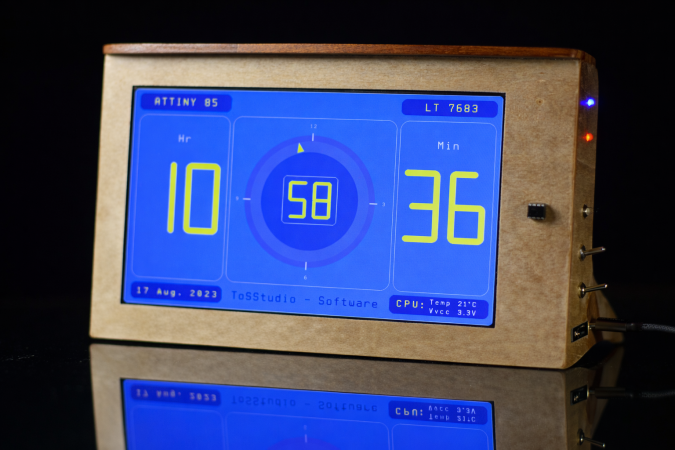
The clock demo on display

Drive 1024×600 Pixels Via I2C With An ATtiny85

If you need to drive a big screen for a project, it’s fair to say your first thought isn’t going to be to use the ATtiny85. With just 512 bytes of RAM and 8 kilobytes of flash memory, the 8-bit micro seems a little cramped to drive, say, a 10″ screen. Yet that’s exactly what [ToSStudio] is doing with TinyTFT_LT7683: 1024 x 600 pixels of TFT goodness, over I2C no less.

With the right TFT controller, this little micro-controller can do magic.

The name kind of gives away the secret: it won’t work on just any TFT display. It’s using properties of the LT7683 display driver, though if you don’t have one of those, the RA8875 is also compatible. Those drivers can take more than just a pixel stream– a good thing, since you’d be hard pressed to get that many pixels streaming from an ATtiny. These are character/graphic display drivers, which means you can get them to draw both characters and graphics on the screen if you speak the lingo.

It’s still not blazing fast; the documentation suggests “static or moderately dynamic UIs” as the suggested use case, and a clock is of the pre-programmed examples. From that, we can surmise that you can get 1 FPS or better with this code. You’re limited both by the simple micro-controller and the bandwidth of the I2C bus, but within those limits this seems like a very powerful technique.

This isn’t the first ATtiny graphics library to blow our minds, but if you really want an impressive graphics demo from the little micro that could, you really need to race the beam.

Thanks to [Thomas Scherer] for the tip!

Motorized Device Helps Swap Out Hard-To-Reach Light Bulbs

High ceilings can make a residence feel open and airy, but they often come with difficult-to-reach light fittings. To better deal with that, [mattwach] built a motorized light bulb changer which makes the job much easier.

Light bulb changers already exist, but they typically need to be used on-axis with the light fitting, which for chandeliers and many other lights, can be difficult. Instead, [mattwach’s] design allows the device to be used at 90-degree angles, and motorizes it for added ease of use.

A 12V gear motor does the work of turning the contraption, and has more than enough torque to get the job done.  A flanged coupling is used to attach the motor to the light bulb changer itself. An ATTiny85 microcontroller is then used to control the motor via an L293D H-bridge driver. A PS2 thumbstick is hooked up for user input, and all the electronics is mounted on a broomstick along with the light bulb end effector mounted at a right angle.

Changing a bulb is then as simple as slipping the end effector over a bulb, and flicking the thumbstick in the direction to unscrew the light. It can then be removed, and then replaced with a fresh bulb, screwed in by pushing the thumbstick in the other direction.

Normally, such a task would be quite a sketchy proposition when done on the top of a tall ladder. Instead, it becomes an easy job done from the safety of an overlooking walkway, completed in less than half an hour when changing a full 15-bulb chandelier.

Incidentally, if you’re swapping out your bulbs, you might be interested in the special royal lights you’re not allowed to buy. Video after the break.

Continue reading “Motorized Device Helps Swap Out Hard-To-Reach Light Bulbs”

You Can Always Use An ATtiny Instead Of A 555

It’s a constant of writing for Hackaday, that whenever a project appears using a 555 timer, someone will say “You could have used a microcontroller to do that!”. It’s something that [Shranav Palakurthi] has approached with the ATTiny555, a project that emulates an entire 555 by making clever use of the humble and ubiquitous microcontroller chip. We’ve all been guilty of it at some time, but now at last the ATTiny85 enthusiasts have conclusive proof that their favourite piece of cheap silicon can prove its mettle.

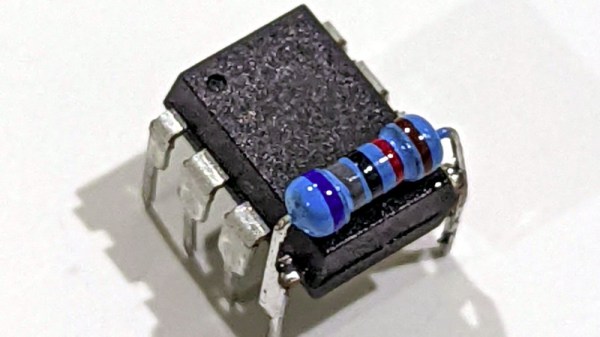
The full details of the ingenious 555 replacement can be found in its GitHub repository, and for those willing to take the plunge it’s as simple as adding a resistor and updating the firmware. It’s not the perfect 555 replacement with its imperfect analogue performance and swapped reset and ground pins, but it does however bring the advantage of a lower supply voltage.

You can see the device in action in the YouTube video below the break, but meanwhile rejoice that finally there’s a way to replace all those unnecessary 555s with your favourite inexpensive 8-pin chip!

While we’re on the subject of the 555, don’t forget we’re running our 555 contest again.

Continue reading “You Can Always Use An ATtiny Instead Of A 555”

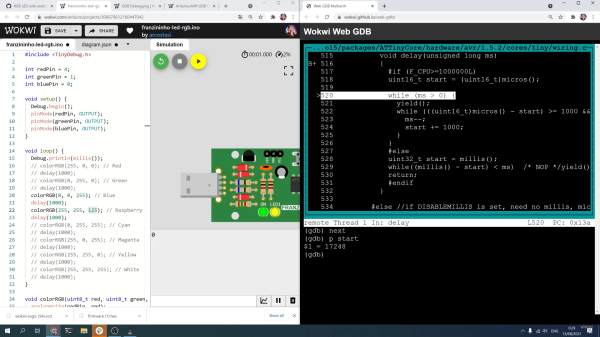
Screenshot of debugging the Wokwi Arduino simulator

Digging Into An ATtiny Simulator Bug With GDB

Being able to track down a bug in a mountain of source code is a skill in its own right, and it’s a hard skill to learn from a book or online tutorial. Besides the trial-by-fire of learning while debugging your own project, the next best thing is to observe someone else’s process. [Uri Shaked] has given us a great opportunity to brush up on our debugging skills, as he demonstrates how to track down and squish a bug in the Wokwi Arduino simulator.

A user was kind enough to report the bug and include the offending Arduino sketch. [Uri]’s first step was to reduce the sketch to the smallest possible program that would still produce the bug.

Once a minimal program had been produced, it was time to check whether the problem was in one of the Arduino libraries or in the Wokwi simulator. [Uri] compiled the sketch, loaded it onto a ATtiny85, and compared the behavior of the simulator and the real thing. It turns out the code ran just fine on a physical ATtiny, so the problem must have been in the Arduino simulator itself.

To track down the bug in the simulator, [Uri] decided to break out the big gun—GDB. What follows is an excellent demonstration of how to use GDB to isolate a problem by examining the source code and using breakpoints and print statements. In the end, [Uri] managed to isolate the problem to a mis-placed bit in the simulation of the timer/counter interrupt flag register.

If you’d like to see more of [Uri]’s debugging prowess, check out his dive into an ATtiny’s write protection and configuration fuses. If you’ve been wowed by the power of GDB and want to learn more, check out this quick tutorial!

Continue reading “Digging Into An ATtiny Simulator Bug With GDB”

Door Mutes Microphone To Prevent Remote Learning Humiliation

In a kind of reverse twist on the doorbell, [TheStaticTurtle] whipped up a system to mute his computer’s microphone whenever someone opens the door to his room. He lives in France, where the government announced a strict lockdown last Friday. Like many university students around the world these days, he is now forced to take online classes. Even though he has his own room, occasionally someone will barge in and announce something, often to [TheStaticTurtle]’s embarrassment.  When his classmates suddenly heard “Do you want some pie?” the other day, it was the last straw.

His first decision was to sense the door opening with a magnet and sensor, which he stuck to the door and frame with hot glue. He then ran a long cable to his desk, where it connected to an ATTiny 85 with a DigiSpark boot-loader. He wrote firmware to simulate special key combinations, which were then registered with his audio routing software Voicemeeter Potato. We presume he isn’t using an external mic, in which case muting might have been easier to accomplish with a hardware switch. All in all, this is a pretty clever and timely hack. Should you be in a similar predicament and want to try this out, he’s published the source code on GitHub.

Continue reading “Door Mutes Microphone To Prevent Remote Learning Humiliation”

Gravity-Defying Water Droplet Fountain Gets An Upgrade

When we last saw [isaac879]’s levitating RGB time fountain, it was made of wood which meant that it would absorb water and didn’t really show off the effect very well. His new version solves this problem with an acrylic case, new PCB and an updated circuit.

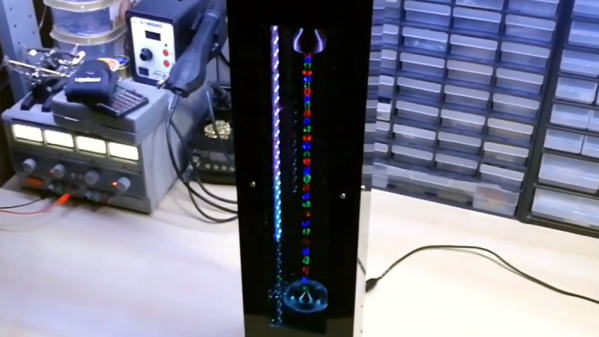
Like the original, this project drops water past strobing RGB LEDs creating an illusion of levitating, undulating colored water droplets. The pump at the top creates the droplets, but the timing has a tendency to drift over time. He thus implemented a PID controller to manage the pump’s drip rate, which was done by having the droplets pass by an infrared diode connected to an ATTiny85. The ’85 used the diode and PWM to control the pump motor speed and communicated to the Arduino over I2C.

The video shown below shows the whole process of designing and building the new time fountain. Everything from circuit and PCB design to 3D printing to assembly is shown along with narration describing what’s going on in case you want to build one yourself. If you do, all the files and components required are listed in the info section of the video.

There’s more that [isaac879] wants to do to improve the time fountain, but V2 looks great. It’s sleeker and smaller than the original and solves some of the design issues of the first. For more inspiration, check out some of the other levitating water fountain projects that have been posted over the years.

Continue reading “Gravity-Defying Water Droplet Fountain Gets An Upgrade”

Simon Game Is A Story Of Rushed Deadlines And Holiday Cheer

Sometimes the Christmas season can feel like a holiday all about spending money to demonstrate your love for others. Many a maker has attempted to subvert these commercialistic overtones by giving handmade presents to friends and loved ones. [APA] is no exception, and has shared their story of producing a simple Simon game during the holidays.

The circuit is nothing wild – an ATtiny85 microcontroller interfaces a handful of buttons and LEDs to handle the basic Simon gameplay. The real value is in [APA]’s retelling of the development process. It’s an accurate recounting that makes us relive some of our own follies of early projects. There’s the confusion between SMD and through hole versions of the same part, forgotten pull up resistors, as well as hours lost trying to figure out why a chip won’t write, only to learn the bootloader hasn’t been burned yet.

In the end, [APA] was able to push through a rush order and deliver the gifts on time, despite the many pitfalls along the way. The final game provided some laughs around the dinner table at Christmas, so we’d say the mission was definitely accomplished.

We’ve seen similar work before, too – like this tiny Simon game on an ATtiny13.