ESP32 Refines Game Boy Bluetooth Adapter

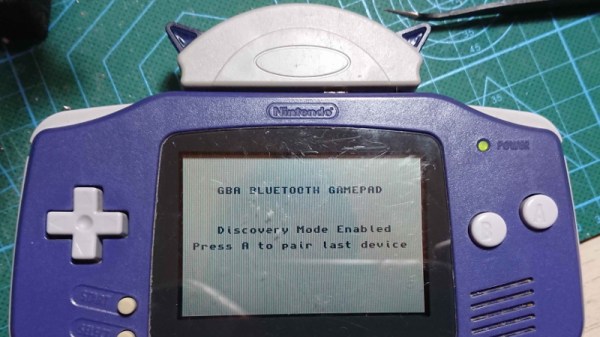
Last year we brought word of a project from [Shyri Villar] that turned a stock Game Boy Advance into a Bluetooth controller by exploiting the system’s “multiboot” capability. The prototype hardware was a bit ungainly, but the concept was certainly promising. We’re now happy to report that the code has been ported over to the ESP32, making the project far more approachable.

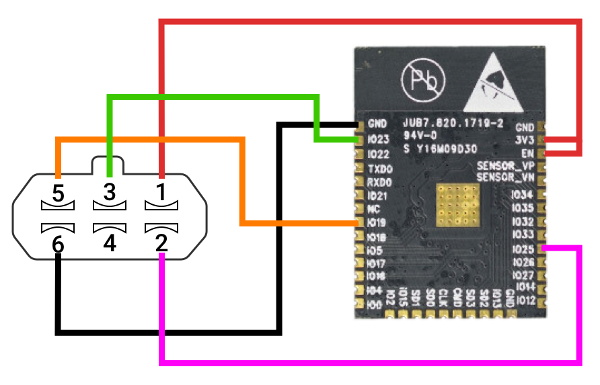
To clarify, the ESP32 is now theĀ only component required for those who want to play along at home. Just five wires connect the microcontroller to the GBA’s Link Cable connector, which is enough to transfer a small ROM over to the system and ferry user input to the Bluetooth hardware. Even if you aren’t interested in using it as a game controller, this project is an excellent example of how you can get your own code running on a completely stock GBA.

While the original version of the hardware was a scrap of perfboard dangling from the handheld’s expansion connector, reducing the part count to one meant [Shyri] was able to pack everything into a tidy enclosure. Specifically, a third party GBA to GameCube link cable. This not only provides a sleek case for the microcontroller that locks onto the handheld with spring loaded tabs, but also includes a male Link Cable connector you can salvage. It looks as though there’s a bit of plastic trimming involved to get the ESP32 to fit, but otherwise its a very clean installation.

The GBA will be 20 years old soon, but that doesn’t mean the hardware and software exploration is over. The original Game Boy is over 30, and people are still giving talks about it.

Using The Steam Controller With LEGO Motors

While Valve’s Steam Controller was ultimately a commercial failure, there’s no denying it’s an interesting piece of hardware. With dual trackpads, a wealth of buttons, and Bluetooth capability, it could be the ideal way to control your next build. Thanks to a recent project by [geggo], now you’ve even got an example you can follow.

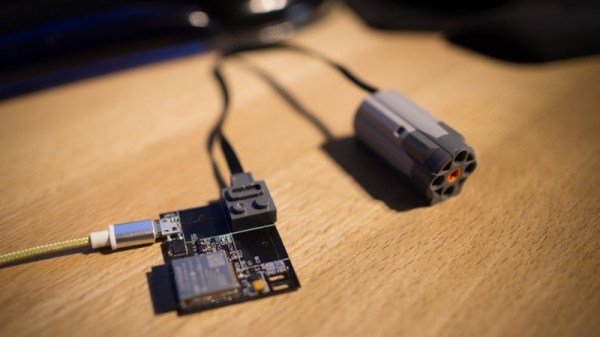
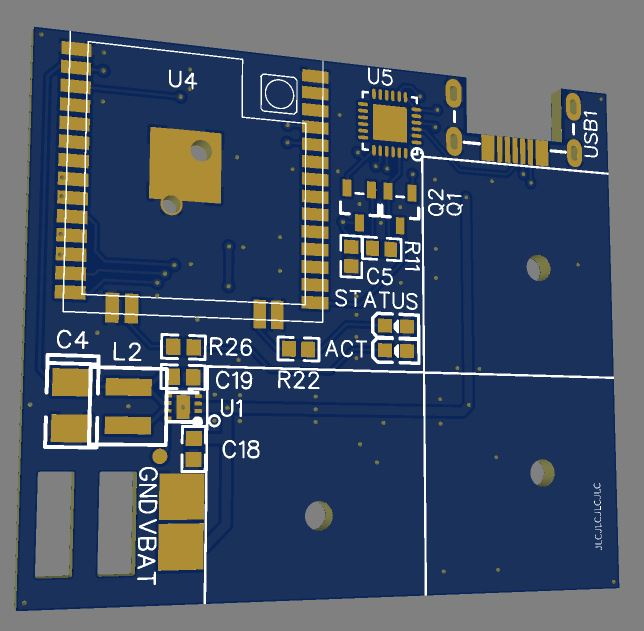
A custom PCB holding an ESP32 and DRV8833 dual H-bridge motor controller is used to interface with standard LEGO motors using their stock block-like connectors. That means the board is a drop-in upgrade for whatever motorized creation you’ve already built.

Since the ESP32 obviously has WiFi in addition to Bluetooth, that also means this little board could be used to control LEGO projects over the local network or even Internet with some changes to the firmware.

Interestingly, while Valve officially enabled Bluetooth on the Steam Controller back in 2018, it sounds like some undocumented poking and reverse engineering was necessary to get it working here. That’s great for those of us who like a good hack, but if you’re more interested in just getting things working, [geggo] has been good enough to release the source code to get you started.

If you’re not interested in Bluetooth but want to get your creation up and moving, we’ve recently covered how one hacker used the ESP8266 to bring his LEGO train to life by integrating it into his smart home.

Continue reading “Using The Steam Controller With LEGO Motors”

Adora-BLE Synth Wails Without Wires

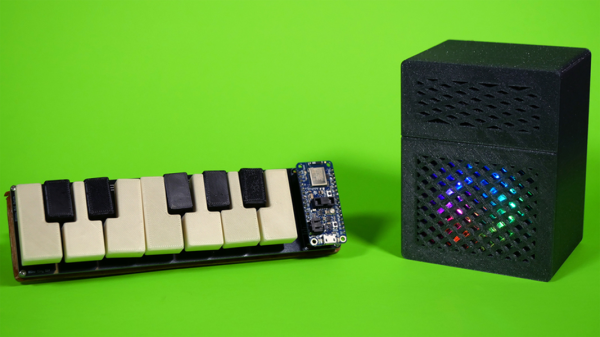
Isn’t this the cutest little synth you ever saw? The matching sparkly half-stack amp really makes it, visually speaking. But the most interesting part? There’s not a wire in sight, ’cause [Blitz City DIY]’s futuristic rig sends the bleep boops over Bluetooth LE.

Hardware-wise, both the synth and the amp are fairly simple. Underneath each of those cute little printed keys is one of those clicky momentaries that usually come with bright button caps in primary colors — the keys themselves just press-fit over the tops. All twelve ebonies and ivories are connected up to an Adafruit Feather, which communicates over Bluetooth LE to a CircuitPlayground Bluefruit (CPB) in the amp. Each time a note is played on the synth, its corresponding color circles comet-like around the CPB’s NeoPixels, which shine through the amp’s speaker grille.

The super interesting part is that all the hard work is happening in the code. Both boards have the same array of colors in rainbow order, and the CPB has an array of tone frequencies that match up one for one with the colors. For every note played, the CPB looks up the color, swirls it, and plays the note. If you want to build one, this project is wide open — [Blitz City DIY] even made a learn guide with all the dirty details. Be sure to check out the demo and extended walk-through after the break.

More in the market for making a computer keyboard? Just grab the nearest ESP32.

Continue reading “Adora-BLE Synth Wails Without Wires”

New Part Day: Ooh, The Things You Can Do With A CLUE

There’s a new development board in town from Adafruit, and it’s called the CLUE. This tiny board can be programmed in Arduino or CircuitPython, and it is absolutely stuffed with sensors and functionality, including Bluetooth. It’s essentially a BBC Micro:bit with more sensors, a screen, and a much beefier processor. Sound interesting? Let’s get out the magnifying glass and take a look, shall we?

(Editor’s note: Adafruit ran out of the first alpha run of the hardware. While we didn’t run into any bugs, the next versions will presumably have even fewer, but will also cost $40 instead of $30. That said, they’re giving out 3,000 of them to attendants of PyCon in April, so you might also get your hands on one that way.)

And Bit:Bot takes the checkered flag! Image via Seeed Studio

First and foremost, there’s the form factor — if that bottom edge looks familiar, that’s because the CLUE is designed to work with micro:bit robot kits and anything else with that edge connector, like the CRICKIT for micro:bit, or the Bit:Bot from Seeed Studios. This is big news for the micro:bit ecosystem, and not just because the CLUE brings tons of sensors and a screen to the scene, although a 1.3″ screen at 240×240 resolution is nothing to sneeze at.

The main brain is a Nordic nRF52840, so you can pair it to your phone and stream your collected data. Or, use it to get two CLUE boards talking to each other. This is a major upgrade from the micro:bit’s nRF51822 — the CLUE is four times faster, has four times the flash memory, and has sixteen times as much RAM. We hope someone can find a way to make them into short-range messaging machines with Q10 keyboards.

Continue reading “New Part Day: Ooh, The Things You Can Do With A CLUE”

Bluetooth Intervalometer Makes Time Lapses Easy

Taking timelapses is a fun pastime of many a photographer. While most modern cameras have some features to pull this off, if you want to get really into it, you’ll want an intervalometer to run the show. Chasing just that, [Zach] decided that rather than buying off-the-shelf, a DIY build was in order.

The build relies on an Arduino Nano to run the show, in combination with the popular HC-05 Bluetooth module. The Bluetooth module allows the device to communicate with a smartphone app which [Zach] created using RoboRemo. This is a platform that makes creating custom USB, WiFI and Bluetooth apps easy for beginners. The app sends instructions to the intervalometer regarding the number of photos to take, and the time to wait between each shot. Then, it triggers the time lapse, and the Arduino triggers the camera by shorting the relevant pins on a TRS plug inserted into the camera.

It’s a straightforward build that most hackers could probably complete with parts from the junk box. Plus, building your own offers the possibility of customising it exactly to your needs. Of course, you can eschew modernity and do things mechanically instead. Video after the break.

Continue reading “Bluetooth Intervalometer Makes Time Lapses Easy”

Emulating A Bluetooth Keyboard With The ESP32

Most people associate the ESP family of microcontrollers with WiFi, which makes sense as they’ve become the solution of choice for getting your project online quickly and easily. But while the WiFi capability might be the star of the show, the ESP32 also comes equipped with Bluetooth; we just don’t see people using it nearly as often. If you’re looking to get started using Bluetooth on the ESP32, then this simple wireless macro keypad from [Brian Lough] would be a great way to get started.

From a hardware standpoint, this project is incredibly straightforward. All you need to do is connect a membrane keypad up to the GPIO pins on the ESP32. Adding in a battery is a nice touch, and you probably would want to put it into a enclosure of some sort, but as a proof of concept it doesn’t get much easier than this. In this case [Brian] is using the TinyPICO board, but your personal ESP32 variant of choice will work just as well.

The rest of the project is all software, which [Brian] walks us through in the video after the break. There’s a preexisting library for Bluetooth Human Interface Device (HID) emulation on the ESP32, but it needs to be manually installed in the Arduino IDE. From there, he demonstrates how you can build up a functioning keyboard, including tricks such as sending multiple virtual keys at once.

In the past we’ve seen the ESP32 used to create a Bluetooth game controller, but the ability to emulate a keyboard obviously offers quite a bit more flexibility. With a practical demonstration of how easy as it is to turn this low-cost microcontroller into a wireless input device, hopefully we’ll start seeing more projects that utilize the capability.

Continue reading “Emulating A Bluetooth Keyboard With The ESP32”

Poking Around The Wide World Of Bluetooth

Bluetooth is a technology with a very interesting history. When it first came around in the late 1990s, it promised to replace the mess of wires that was tucked behind every desk of the day. Unfortunately, the capabilities of early Bluetooth didn’t live up to the hype, and it never quite took off. It wasn’t until the rise of the smartphone more than a decade later that Bluetooth, now several versions more advanced, really started to make sense.

As [Larry Bank] explains in a recent blog post, that means there’s a whole lot to learn if you want to really understand Bluetooth hacking. For example, the Bluetooth versions that were used in the 1990s and 2000s are actually a completely different protocol from that which most modern devices are using. But the original protocol, now referred to as “Classic”, is still supported and in use.

That means to really get your head wrapped around working with Bluetooth, you need to learn about the different versions and all the tools and tricks associated with them. To that end, [Larry] does a great job of breaking down the primary versions of Bluetooth and the sort of tools you might find yourself using. That includes microcontrollers such as the ESP32 or Arduino Nano 33 BLE.

But the post isn’t just theory. [Larry] also goes over a few real-world projects of his that utilize Bluetooth, such as getting a portable printer working with his Arduino, or figuring out how to use those tiny mobile phone game controllers for his own purposes. Even if you don’t have these same devices, there’s a good chance that the methods used and lessons learned will apply to whatever Bluetooth gadgets you’ve got your eye on.

Readers may recall [Larry] from our previous coverage of his exploits, such as his efforts to increase the frame rate of the SSD1306 OLED display or his wireless bootloader for the SMART Response XE. Whenever we see his name pop up in the Tip Line, we know a fascinating hardware deep dive isn’t far behind.