Phone-controlled Light Display Is Simple And Fun

android-phone-light-toy

[Ytai Ben-Tsvi] wrote in to share a little holiday project that he and friend [Al Linke] put together, a dynamic light display that takes its cues from his Android-powered smartphone.

The display fits in a vase that sits in [Ytai’s] family room, and while it wasn’t exactly cheap to build, it sure looks nice. The vase is full of feathery decorative bits which help hide an addressable RGB LED strip. The lights are controlled by an IOIO board which the pair tucked away inside the vase as well.

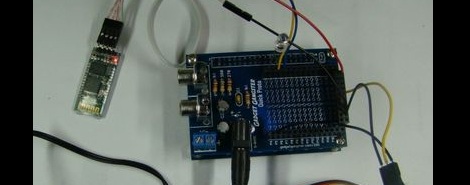
The IOIO board was also fitted with a USB Bluetooth dongle, allowing it to communicate with just about any handset running a relatively recent flavor of the Android OS. When connected, the phone samples its surroundings with the onboard camera, commanding the vase to mix the colors seen by the phone into its twinkling display.

As you can see in the video below it works pretty well when used with solid, brightly colored objects. While just a fun toy in its current form, [Ytai] and [Al] have more than a few ideas on how to expand its usability.

Continue reading “Phone-controlled Light Display Is Simple And Fun”

Dial 1 To Get Siri As Your Operator

Back in the days of yore when hats were fashionable and color TV didn’t exist, there were real life people who would answer the phone if you dialed 0. These operators would provide directory assistance, and connect you to another number (such as KL5-8635). Apple’s Siri is a lot like an olde-timey phone operator, so [davis] decided to put Siri in an old rotary telephone.

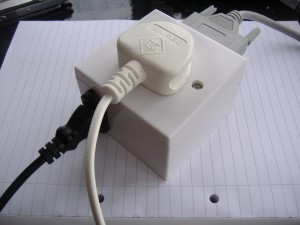
The build started off with a very inexpensive Bluetooth headset and very old rotary phone. The single button on the Bluetooth headset was wired to a contact of the dial – in this case, the number 1. Dialing 1 shorts two contacts in the phone and the Bluetooth headset turns on.

[davis] came up with a very easy build but dialing 1 just isn’t the same as dialing 0. Connecting the Bluetooth button to 0 closes the button for too long. He says ‘0 for operator’ could be implemented with an ATtiny or similar, but we’re wondering if [davis] could make due with a dial-less candlestick phone.

Continue reading “Dial 1 To Get Siri As Your Operator”

Update: Tiny Line-follower And More

This tiny line-following robot is quite impressive. It’s [Ondrej Stanek’s] second take on the design, which he calls PocketBot 2. Just like the earlier version, this robot is small enough to fit in a matchbox, but it’s received several upgrades in this iteration.

The coin cells that ran the previous version have been replaced by a rechargeable Lithium Ion cell. The ATmega8 which controlled the first robot has been swapped out for an ATmega128 running at 32 MHz. You won’t find an IR receiver on this one either, it’s been traded for a Bluetooth module which adds a quantum leap in functionality. For instance, the graph in the upper left of this photograph shows the reflective sensor data readings used to follow the line.

There’s all kinds of great engineering in this design, which is shown off in the video after the break. One of our favorite parts is that the axles are attracted to the center of the robot by one rare-earth magnet. This keeps the rubber tires pressed against the motor spindles rather than use a gearing system.

Continue reading “Update: Tiny Line-follower And More”

Reverse Engineering Bluetooth Using Android And SPOT As An Example

[Travis Goodspeed] wrote in to tell us about his work reverse engineering the Bluetooth communications on this SPOT module. He’s targeted the post as a general guide to sniffing Bluetooth transmissions, but was inspired to use the SPOT as an example after seeing this other SPOT hack. We know he’s a fan of getting things to work with his Nokia N900, and that’s exactly where he ended up with the project.

This module was manufactured to be controlled by an Android phone. But there’s no control app available for the Nokia handset. Since Android uses the open-source Bluez package for the Bluetooth protocol, it’s actually pretty easy to get your hands on the packets. After grabbing a few test sets he shows how he deciphered the packets, then wrote a quick Python script to test out his findings. After working his way through the various commands available (grabbing the SPOT serial number, getting position data from it, etc) [Travis] wrote up a frontend in QT mobility for use on the N900.

This Dongle Makes Any Screen An Android Device

Want that 70″ LCD television in your living room to be an Android device? This little guy can make it happen. With an HDMI port on one end, and a USB plug on the other for power, just plug in FXI Technologies’ Cotton Candy dongle to create a 1080p Android television.

The price isn’t set for the device, but it’s expected to be available at less than $200. Considering what’s inside that’s pretty reasonable. There’s a dual-core 1.2 GHz ARM processor, 1 gig of RAM, 64 gigs of storage, Bluetooth, WiFi, and a microSD card slot. Wow!

So is it hackable? Absolutely. Well, kind of? The company doesn’t intend to bring Cotton Candy to the retail market. Instead, they will sell the device to developers who may do what they wish. From there, said developers have the option to license the technology for their own products. This begs the question, will the development kit come in under $200? Hard to say.

Check out the video after the break to hear an interview with the company’s CEO. It certainly sounds fascinating, and like the Chumby NeTV, we can’t wait to see what comes of this. Continue reading “This Dongle Makes Any Screen An Android Device”

The Rube-Goldberg Of Car Audio

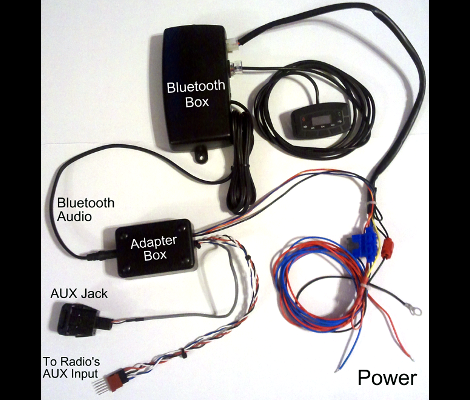
[Anthony Pray] had his car stereo stolen. When thinking about replacing it he realized the he and his wife never used it for anything other than an Auxiliary connection to play songs from their cellphones. So instead of buying a head unit he pulled an unused home audio amplifier out of a dark corner of his house and wired it to the car speakers. Problem solved, except that the under-dash installation meant the only volume control is on the phone playing the audio. He decided to build a wireless audio controller that would let him send commands to the phone without quite as much distraction from the road.

The device you see above is his creation. What a beauty. But seriously, it’s so random and hacked together how can you not love it? And, it works!

The frame is made from plastic coat hangers, and the wheel is an old RC control knob. There’s even a play/pause feature built from the clicking properties of a retractable ball-point pen. A Cypress PSoC board reads the knob and pen positions, then pushes commands via a Bluetooth module in order to control the phone. He recorded a testing video (after the break) which gives you a better look at the functionality of this setup. Continue reading “The Rube-Goldberg Of Car Audio”

Bluetooth For Android Open Accessories

[Ytai], the lead developer for the IOIO breakout board for the Android Open Accessory kit, figured out how to control just about anything from an Android phone wirelessly over Bluetooth.

When [Ytai] first announced the IOIO breakout board for Android devices, one of the commentors on his post said a standard Bluetooth dongle could stand in for the USB cable between the phone and the IOIO. Wireless control of home automation project and robots was just too good of an idea to let go, so [Ytai] dove into this new Bluetooth project.

After getting a cheap Bluetooth dongle from DealExtreme, [Ytai] found btstack, a lightweight Bluetooth stack that was perfect for an embedded environment. Dealing with the USB driver for a no-name Bluetooth adapter didn’t come as easily, but after a few long nights, [Ytai] emerged victorious.

He still has a few more problems to overcome. Namely, supporting environments where more than IOIO board is available. [Ytai] is thinking about adding support for WiFi dongles, something we’d love to see. Check out [Ytai]’s demo of wireless control of a servo after the break.

Continue reading “Bluetooth For Android Open Accessories”