Building A Commodore 64 Laptop

What might a laptop version of the Commodore 64 have looked like if one had been released by the late 1980s? This is the question that [Kevin Noki] tried to recently answer with a custom C64 laptop build.

While technically you could argue that Commodore’s SX-64 could be construed as a ‘portable’ system, its bulky format ensured that it was only portable in the sense that a 1980s CRT-based oscilloscope is also portable. Sadly, this turned out to be the last real attempt by Commodore to make a portable non-PC compatible system, with the ill-fated Commodore LCD project never making it out of development. We can, however, glean from this some design hints of what Commodore’s designers had in mind.

Interestingly, [Kevin] decided to instead use the Macintosh Portable as inspiration, with adaptations to make it look more like a breadbin C64. One could have argued that the C64C’s design would have worked better. Regardless, an enclosure was 3D printed, with parts glued together and metal dowels added for support.

For the guts, a custom keyboard with a new PCB and FDM printed keycaps was used, with a Raspberry Pi Pico as keyboard controller. We would here cue the jokes about how the keyboard controller is more powerful than a C64, but the real brains of this laptop come in the form of a Raspberry Pi 5 SBC for running the Vice C64 emulator, which blows a C64 even further out of the water.

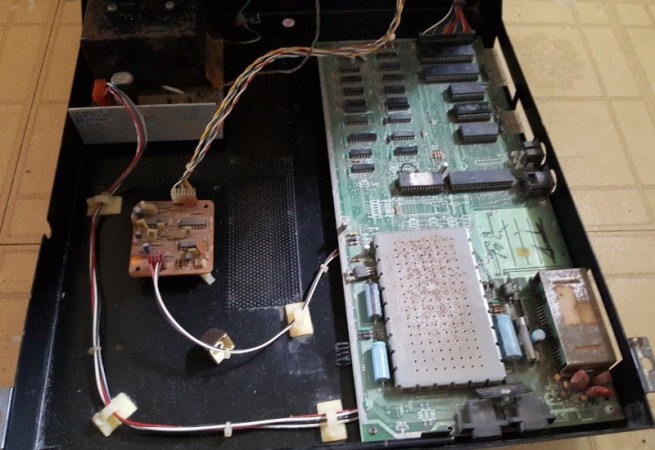
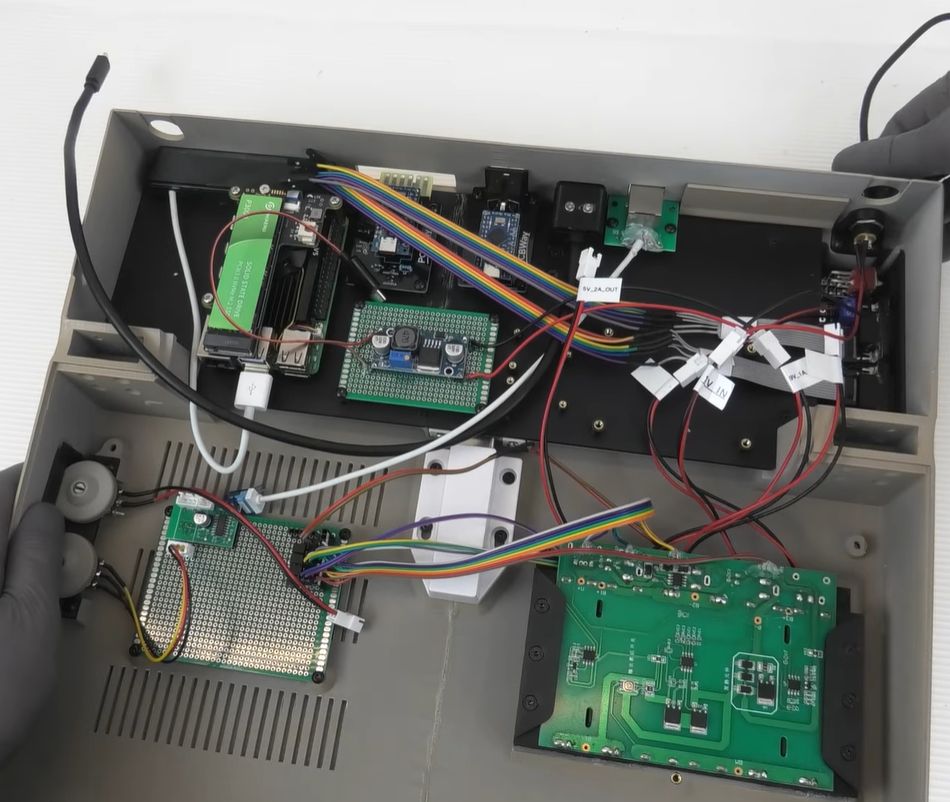
This choice also means there’s no direct compatibility with genuine C64 peripherals, but a workaround involving many adaptors and more MCUs was implemented. Sadly, cartridge compatibility was sacrificed due to these complications. The resulting innards can be glimpsed in the above screenshot to give some idea of what the end result looks like.

Of course, this isn’t the first time a Commodore 64 laptop has been created; [Ben Heck] used a C64C mainboard and an original keyboard back in 2009. This meant direct compatibility with all peripherals, including cartridges. Hopefully, now that Commodore as a company has been revived, it will pick up on ideas like these, as an FPGA-based C64 or C128 laptop would be pretty rad.

Thanks to [fluffy] for the tip.

Continue reading “Building A Commodore 64 Laptop”

Illustrated Kristina with an IBM Model M keyboard floating between her hands.

Keebin’ With Kristina: The One With The C64 Keyboard

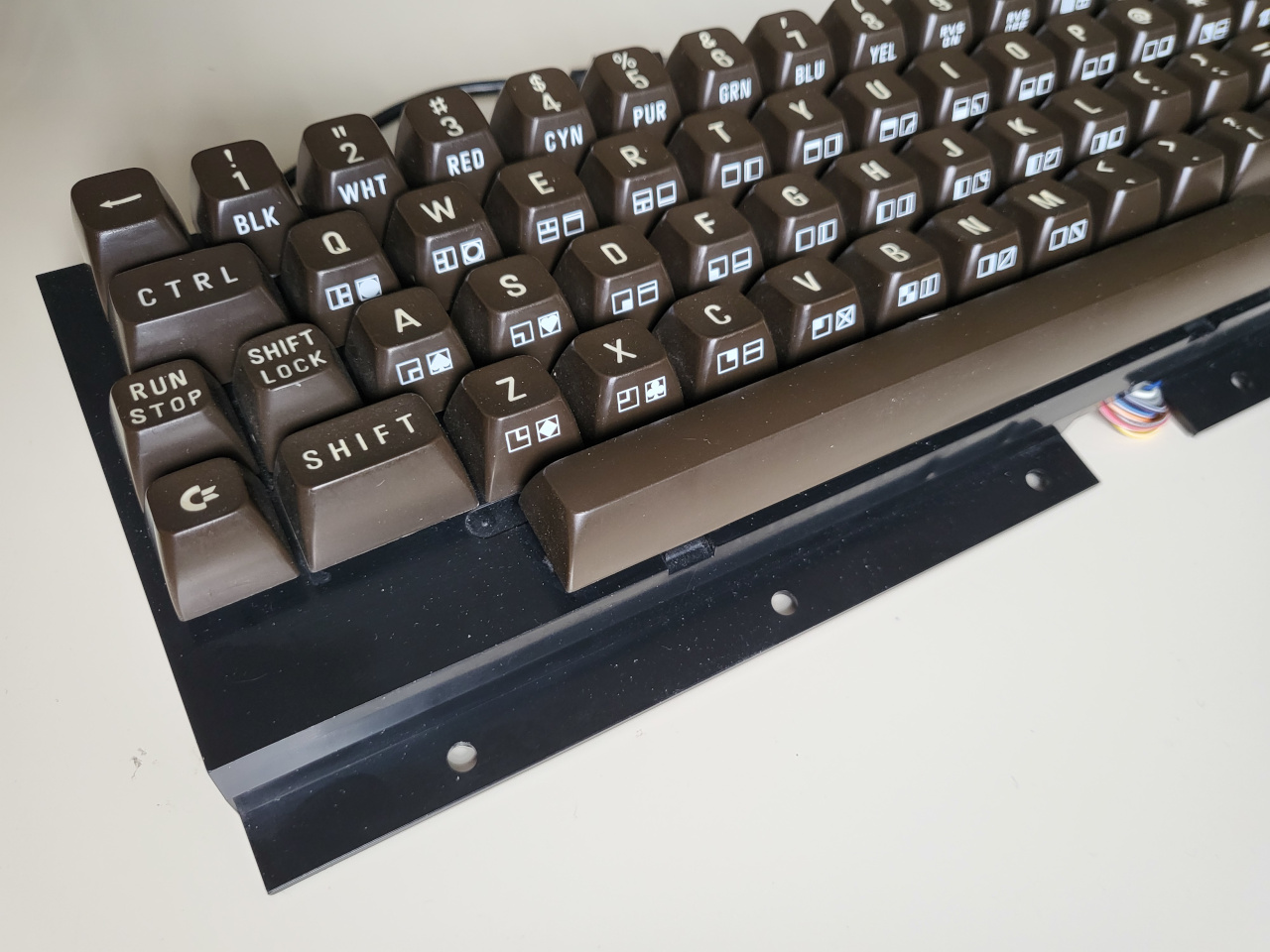
[Jean] wrote into the tips line (the system works!) to let all of us know about his hacked and hand-wired C64 keyboard, a thing of beauty in its chocolate-brown and 9u space bar-havin’ glory.

A C64 keyboard without the surrounding C64.
Image by [Jean] via GitHub
This Arduino Pro Micro-based brain transplant began as a sketch, and [Jean] reports it now has proper code in QMK. But how is a person supposed to use it in 2025, almost 2026, especially as a programmer or just plain serious computer user?

The big news here is that [Jean] added support for missing characters using the left and right Shift keys, and even added mouse controls and Function keys that are accessed on a layer via the Shift Lock key. You can see the key maps over on GitHub.

I’ll admit, [Jean]’s project has got me eyeing that C64 I picked up for $12 at a thrift store which I doubt still works as intended. But don’t worry, I will test it first.

Fortunately, it looks like [Jean] has thought of everything when it comes to reproducing this hack, including the requisite C64-to-Arduino pinout. So, what are you waiting for?

Continue reading “Keebin’ With Kristina: The One With The C64 Keyboard”

Commodore’s Most Popular Computer Gets DOOM-style Shooter

When people talk about the lack of a DOOM being the doom Commodore home computers, they aren’t talking about the C64, which was deep into obsolescence when demon-slaying suddenly became the minimal requirement for all computing devices. That didn’t stop [Kamil Wolnikowski] and [Piotr Kózka] from hacking together Grey a ray-cast first-person shooter for the Commodore 64.

Grey bares more than a passing resemblance to id-software’s most-ported project. It apparently runs at 16 frames per second on a vanilla C64 — no super CPU required. The secret to the speedy game play is the engine’s clever use of the system’s color mapping functionality: updating color maps is faster than redrawing the screen. Yeah, that makes for rather “blockier” graphics than DOOM, but this is running on a Commodore 64, not a 386 with 4 MB of RAM. Allowances must be made. Come to think of it, we don’t recall DOOM running this smooth on the minimum required hardware — check out the demo video below and let us know what you think.

The four-level demo currently available is about 175 kB, which certainly seems within the realms of possibility for disk games using the trusty 1541. Of course nowadays we do have easier ways to get games onto our vintage computers.

If you’re thinking about Commodore’s other home computer, it did eventually get a DOOM-clone. Continue reading “Commodore’s Most Popular Computer Gets DOOM-style Shooter”

A hand holding a One ROM with a Commodore 64 in the background

One ROM: The Latest Incarnation Of The Software Defined ROM

Retrocomputers need ROMs, but they’re just so read only. Enter the latest incarnation of [Piers]’s One ROM to rule them all, now built with a RP2350, because the newest version is 5V capable. This can replace the failing ROMs in your old Commodore gear with this sweet design on a two-layer PCB, using a cheap microcontroller.

[Piers] wanted to use the RP2350 from the beginning but there simply wasn’t space on the board for the 23 level shifters which would have been required. But now that the A4 stepping adds 5 V tolerance [Piers] has been able to reformulate his design.

The C64 in the demo has three different ROMs: the basic ROM, kernel ROM, and character ROM. A single One ROM can emulate all three. The firmware is performance critical, it needs to convert requests on the address pins to results on the data bus just as fast as it can and [Piers] employs a number of tricks to meet these requirements.

The PCB layout for the RP2350 required extensive changes from the larger STM32 in the previous version. Because the RP2350 uses large power and ground pads underneath the IC this area, which was originally used to drop vias to the other side of the board, was no longer available for signal routing. And of course [Piers] is constrained by the size of the board needing to fit in the original form factor used by the C64.

The One ROM code is available over on GitHub, and the accompanying video from [Piers] is an interesting look into the design process and how tradeoffs and compromises and hacks are made in order to meet functional requirements.

Continue reading “One ROM: The Latest Incarnation Of The Software Defined ROM”

Commodore Is Back Selling New C64s, But Should You Buy Them?

It’s hard to argue with nostalgia, but you can toss a bucket of cold facts over it. In the case of the recent rescuing of the Commodore brand from the clutches of relabeling of generic electronics by [Perifractic] of Retro Recipes, we got [The Retro Shack] doing the proverbial bucket dumping in a new video. Basically the question is whether the fresh Commodore 64 offerings by the new-and-improved Commodore are what you really want, or need.

The thing is that over the decades many people have created all the bits that you need to build your own classical C64, or even buy one off-the-shelf, with people like [bwack] having reverse-engineered the various C64 mainboards. These can be populated with drop-in replacements for chips like the SID, VIC-II, CIAs and others that are readily available, along with replica cases and keyboards. If you crave something less bulky and complex, you can run a bare metal C64 emulator like BMC64 on a Raspberry Pi, or just run the VICE emulator on your platform of choice. There’re also options like the full-sized TheC64 and Ultimate 64 Elite II systems that you can buy ready to go.

Basically, there is a whole gamut of ways to get some part of the C64 experience, ranging from emulator-only to a full hardware DIY or pre-assembled format. Each of which come with their own price tag, starting at $0 for running VICE on your existing system. With so much choice we can only hope that the renewed Commodore company will become something more than Yet Another C64 Experience.

Continue reading “Commodore Is Back Selling New C64s, But Should You Buy Them?”

Repairing An Obscure Apple II Clone

The Apple II was made in great numbers, as was the Commodore 64. But the Mimic Spartan? It was a weird Apple II clone that you needed a Commodore 64 to use. [ARC Javmaster] has found one of these obscure machines and has set about bringing it back to life. Check out the video below.

The story of the machine has been told online by one of the developers on the project, one [Brent Marykuca]. Basically, the Mimic Spartan was an Apple II clone that was intended to take advantage of a C64 as a host machine. It came in a beige box with a bunch of edge connectors and cables sticking out, and you were intended to nest it on the back of your C64 so it could hook up to all the ports. Then, you could use your machine as a C64 or an Apple II, or sort of… both… and even exchange data between both machines in some limited ways. There are also a few details of this obscure machine that have been collated by [Mike Naberezny], who is seeking the original disk that shipped with the machine when new.

It’s early days yet for [ARC Javmaster]’s efforts to restore the Mimic Spartan. Thus far, it’s had a clean and basic test. It was able to display a short line of text on a display before ceasing activity. A full boot hasn’t been achieved just yet, but we can’t wait to see where the resurrection efforts go next.

Back in the day, there were all kinds of Frankenstein computer cards that effectively put one kind of computer inside another. These days, you can condense an entire retro machine down to run on a single microcontroller.

Continue reading “Repairing An Obscure Apple II Clone”

Commodore 64 On New FPGA

When it comes to getting retro hardware running again, there are many approaches. On one hand, the easiest path could be to emulate the hardware on something modern, using nothing but software to bring it back to life. On the other, many prefer to restore the original hardware itself and make sure everything is exactly as it was when it was new. A middle way exists, though, thanks to the widespread adoption of FPGAs which allow for programmable hardware emulation and [Jo] has come up with a new implementation of the Commodore 64 by taking this path.

The project is called the VIC64-T9K and is meant as a proof-of-concept that can run the Commodore 64’s VIC-II video chip alongside a 6502 CPU on the inexpensive Tang Nano 9k FPGA. Taking inspiration from the C64_MiSTer project, another FPGA implementation of the C64 based on the DE10-Nano FPGA, it doesn’t implement everything an original Commodore system would have had, but it does provide most of the core hardware needed to run a system. The project supports HDMI video with a custom kernel, and [Jo] has used it to get a few demos running including sprite animations.

Built with a mix of Verilog and VHDL, it was designed as a learning tool for [Jo] to experiment with the retro hardware, and also brings a more affordable FPGA board to the table for Commodore enthusiasts. If you’re in the market for something with more of the original look and feel of the Commodore 64, though, this project uses the original case and keyboard while still using an FPGA recreation for the core of the computer.