How Do PAL And NTSC Really Work?

Many projects on these pages do clever things with video. Whether it’s digital or analogue, it’s certain our community can push a humble microcontroller to the limit of its capability. But sometimes the terminology is a little casually applied, and in particular with video there’s an obvious example. We say “PAL”, or “NTSC” to refer to any composite video signal, and perhaps it’s time to delve beyond that into the colour systems those letters convey.

Know Your Sub-carriers From Your Sync Pulses

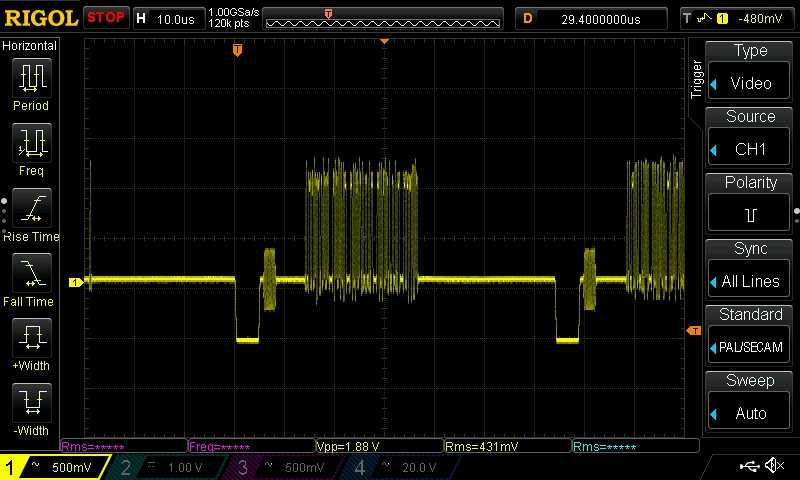
A close-up on a single line of composite video from a Raspberry Pi.

A video system of the type we’re used to is dot-sequential. It splits an image into pixels and transmits them sequentially, pixel by pixel and line by line. This is the same for an analogue video system as it is for many digital bitmap formats. In the case of a fully analogue TV system there is no individual pixel counting, instead the camera scans across each line in a continuous movement to generate an analogue waveform representing the intensity of light. If you add in a synchronisation pulse at the end of each line and another at the end of each frame you have a video signal.

But crucially it’s not a composite video signal, because it contains only luminance information. It’s a black-and-white image. The first broadcast TV systems as for example the British 405 line and American 525 line systems worked in exactly this way, with the addition of a separate carrier for their accompanying sound. Continue reading “How Do PAL And NTSC Really Work?”

Pocket-sized Test Pattern Generator Helps Check Those CRTs

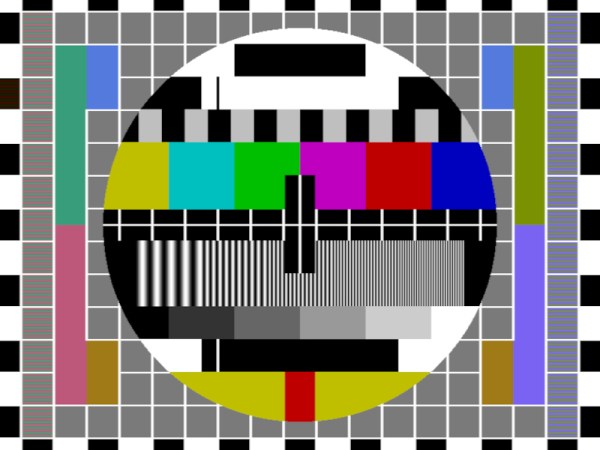
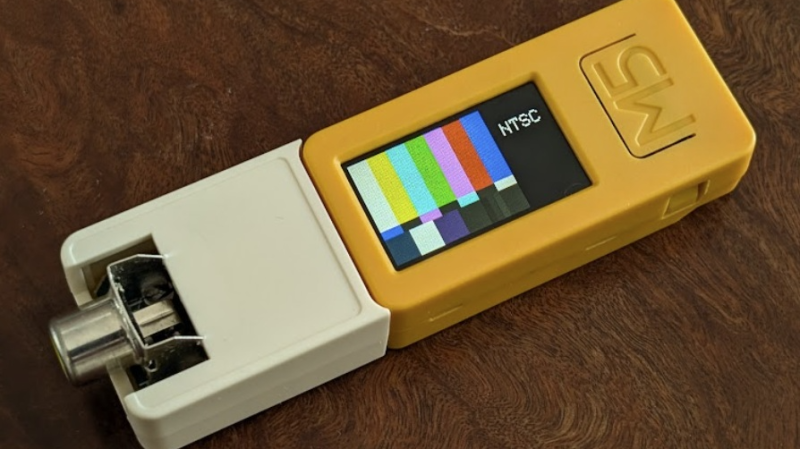
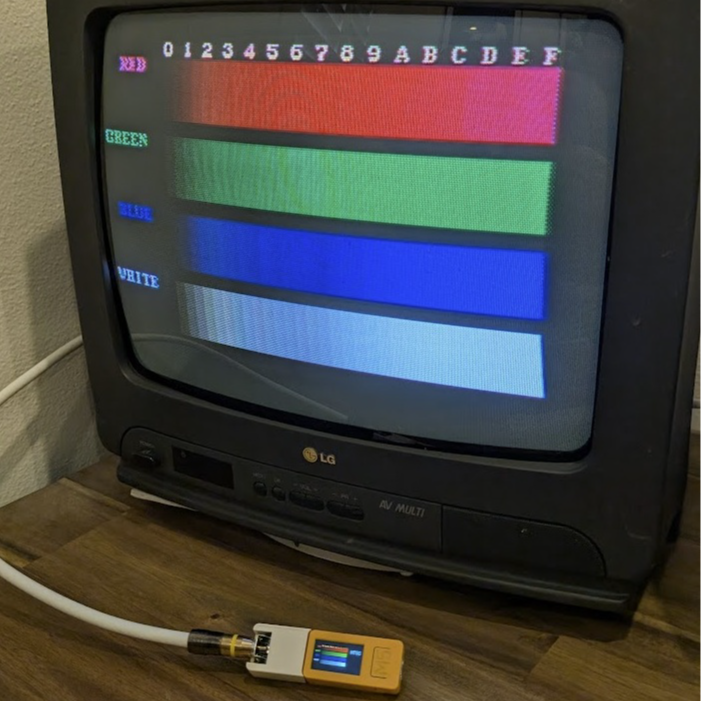
[Nicholas Murray]’s Composite Test Pattern Generator is a beautifully-made, palm-sized tool that uses an ESP32-based development board to output different test patterns in PAL/NTSC. If one is checking out old televisions or CRTs, firing up a test pattern can be a pretty handy way to see if the hardware is healthy or not.

The little white add-on you see attached to the yellow portion is a simple circuit (two resistors and an RCA jack) that allows the microcontroller to output a composite video signal. All one needs to do is power on the device, then press the large button to cycle through test patterns. A small switch on the side toggles between NTSC and PAL video formats. It’s adorable, and makes good use of the enclosures that came with the dev board and proto board.

In a pinch a hacker could use an original Raspberry Pi, because the original Pi notably included a composite video output. That feature made it trivial to output NTSC or PAL video to a compatible display. But [Nicholas]’s device has a number of significant advantages: it’s small, it’s fast, it has its own battery and integrated charger, and the little color screen mirroring the chosen test pattern is a great confirmation feature.

This is a slick little device, and it’s not [Nicholas]’s first test pattern generator. He also created a RP2040-based unit with a VGA connector, the code of which inspired a hacker’s home-grown test pattern generator that was used to service a vintage arcade machine.

Nostalgic Camera Is A Mashup Of Analog Video Gear

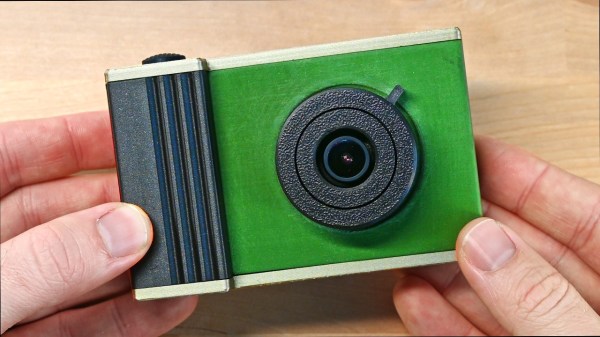
These days, you get a fantastic camera with the purchase of just about any modern smartphone. [Abe] missed some of the charm of earlier, lower-quality digital cameras, though, and wanted to recreate that experience. The way forward was obvious. He built a nostalgic digital video camera from scratch!

[Abe] figured he could build the entire project around analog gear, and then simply find a way to store the video digitally, thus creating the effect he was looking for. To that end, the build is based around a small analog video camera that’s intended for use with FPV drones. It runs on 5 to 20 volts and outputs a simple composite video signal. This makes it easy to display its output on a small LCD screen, originally intended to be used with an automotive reversing camera. These were both paired with a mini video recorder module from RunCam, which can capture composite video and store it on a microSD card in 640 x 480 resolution.

These parts were quickly lashed together, with the camera sending its output to the RunCam video recorder module, which then passed it on to the screen. Everything worked as expected, so [Abe] moved on to implementing an on-screen display using the MAX7456 chip, which is built specifically for this purpose. It overlays text on the video feed to the screen as commanded by an RP2040 microcontroller. Once that was all working, [Abe] just had to provide a battery power supply and wrap everything up in a nice retro-styled case. Then, at the last minute, the separate camera and recorder modules were replaced by a TurboWing module that combined both into one.

The result is a nifty-looking camera that produces grainy, slurry, old-school digital video. If you love 640 x 480 as a resolution, you’ll dig this. It’s got strong 90s camcorder vibes, and that’s a very good thing.

We love a good custom camera around these parts, especially those that offer deliciously high resolution. If you’re building your own, be sure to let us know. Video after the break.

Continue reading “Nostalgic Camera Is A Mashup Of Analog Video Gear”

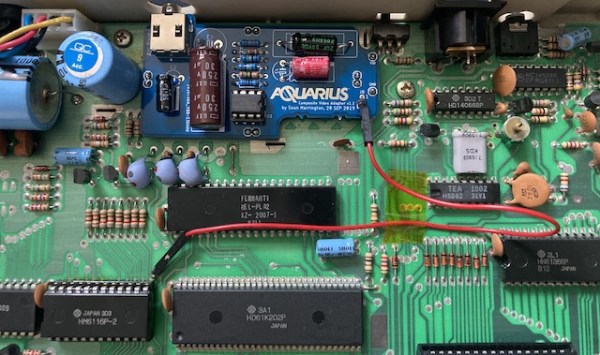
The motherboard of a Mattel Aquarius, with a small daughterboard mounted on top

Adding Composite Video To The Mattel Aquarius

In the home computer market of the 1980s, there were several winners that are still household names four decades later: the Commodore 64, the Apple II and the Sinclair Spectrum, to name a few. But where there are winners, there are bound to be losers as well – the Mattel Aquarius being a good example. A price war between the bigger players, combined with a rather poor hardware design, meant that the Aquarius was discontinued just a few months after its introduction in 1983. However, this makes it exactly the type of obscure machine that [Leaded Solder] likes to tinker with, so he was happy to finally get his hands on a neat specimen listed on eBay. He wrote an interesting blog post detailing his efforts to connect this old beast to a modern TV.

The main issue with the Aquarius is that it only has an RF video output, which results in a rather poor rendition of its already very limited graphics capabilities. Luckily, there is a fix available in the form of a composite A/V adapter that’s an almost plug-and-play upgrade. The only thing you need to do, as [Leaded Solder] illustrates in his blog post, is open up the computer, desolder the RF modulator and solder the A/V adapter in its place. Getting to that point was a bit tricky due to heavy EMI shields that were fixed in place with lots of solder, requiring liberal use of a desoldering iron. Continue reading “Adding Composite Video To The Mattel Aquarius”

System Essentially Contradicting American Methods

Today, acronyms such as PAL and initialisms such as NTSC are used as a lazy shorthand for 625 and 525-line video signals, but back in the days of analogue TV broadcasting they were much more than that, indeed much more than simply colour encoding schemes. They became political statements of technological prowess as nations vied with each other to demonstrate that they could provide their citizens with something essentially home-grown. In France, there was the daddy of all televisual symbols of national pride, as their SECAM system was like nothing else. [Matt’s TV Barn] took a deep dive into video standards to find out about it with an impressive rack of test pattern generation equipment.

At its simplest, a video signal consists of the black-and-while, or luminance, information to make a monochrome picture, along with a set of line and frame sync pulses. It becomes a composite video signal with the addition of a colour subcarrier at a frequency carefully selected to fall between harmonics of the line frequency and modulated in some form with the colour, or chrominance, information. In this instance, PAL is a natural progression from NTSC, having a colour subcarrier that’s amplitude modulated and with some nifty tricks using a delay line to cancel out colour shifting due to phase errors.

SECAM has the same line and frame frequency as PAL, but its colour subcarrier is frequency modulated instead of amplitude modulated. It completely avoids the NTSC and PAL phase errors by not being susceptible to them, at the cost of a more complex decoder in which the previous line’s colour information must be stored in a delay line to complete the decoding process. Any video processing equipment must also, by necessity, be more complex, something that provided the genesis of the SCART audiovisual connector standard as manufacturers opted for RGB interconnects instead. It’s even more unexpected at the transmission end, for unlike PAL or NTSC, the colour subcarrier is never absent, and to make things more French, it inverted the video modulation found in competing standards.

The video below takes us deep into the system and is well worth a watch. Meanwhile, if you fancy a further wallow in Gallic technology, peer inside a Minitel terminal.

Continue reading “System Essentially Contradicting American Methods”

Creating GIFs For The Channels Between Channels

In the United States, analog TV broadcasting officially ended in 2009. While the transition wasn’t without hiccups, we did lose something along the way. For [Emily Velasco], she misses the channels between channels — where an analog TV isn’t quite tuned right and the image is smeared and distorted. A recent bug in one of her projects led to her trying to recreate the experience of the in-between on a CRT.

One of [Emily]’s other projects involved generating composite video signals from an ESP32 microcontroller. While experimenting with adding color to the output signal, the image came out incredibly scrambled. She had made an error in the stride, which smeared the image across the screen. This immediately brought back memories of old analog TV sets. A quick potentiometer allowed her to control the stride error and she wrote some code to break the GIF up into discrete bitmaps for display since the GFX library handles GIFs differently than static images. Next up was vertical hold, which was accomplished by shifting the Y coordinates. With some help from [Roger], there was now a handy GIF library that would draw GIFs line by line with the composite video effects.

She used a Goldbeam portable CRT, soldered the tuning potentiometer to the ESP32, and set up 10 different GIFs to act as “channels” with space in between. It’s a fun and quirky idea, which is exactly the sort of thing [Emily] has been encouraging people to do.

Continue reading “Creating GIFs For The Channels Between Channels”

ESP32 composite library with LVGL demo. (Credit: aquaticus)

Generating Composite Video On ESP32 With LVGL GUI

RCA connector mounted to ESP32 board. (Credit: aquaticus)

Just because a microcontroller doesn’t have a dedicated video peripheral doesn’t mean it cannot output a video signal. This is demonstrated once again, this time on the ESP32 by [aquaticus] with a library that generates PAL/SECAM and NTSC composite signals. As a finishing touch on the hardware side, [aqaticus] added an RCA jack is an optional extra. The composite signal itself is generated on GPIO 25, with the selection from a wide number of PAL and NTSC resolutions.

In addition, LVGL support is integrated: this is an open-source library that provides a cross-platform way to provide graphical UIs for embedded platforms. Using this combination any ESP32 can generate a fully graphical UI on a monochrome or color display to add some extra flair and functionality to an ESP32 project.

Currently, this library does not support color output, but hopefully this will be added in the future. Even so, together with simple VGA output using a DAC, this library provides yet another way to add analog video output to ubiquitous MCUs like the ESP32. Even if these MCUs are not going to be decoding any video formats at a reasonable speed, adding a UI that’s more user-friendly than an HD44780-based display and a few buttons can really elevate the user experience.