Editing Your FPGA Source

[Dave] noted that in a recent poll of FPGA developers, emacs was far and away the most popular VHDL and Verilog editor. There are a few reasons for this – namely, emacs comes with packages for editing your HDL of choice. For those of us not wanting to install (and learn) the emacs operating system, [Dave] got Notepad++ to work with these packages.

Notepad++ already has VHDL and Verilog highlighting along with other advanced text editor features, but [Dave] wanted templates, automated declarations and beautification. To do this, he used the FingerText to store code as snippets and call them up at the wave of a finger.

As [Dave] writes his code, the component declarations constantly need to be updated, and with the help of a Perl script [Dave] can update them with the click of a hotkey. Beautification is a harder nut to crack, as Notepad++ doesn’t even have a VHDL or Verilog beautifier plugin. This was accomplished by installing emacs and running the beautification process as a batch script. Nobody can have it all, but we’re thinking [Dave]’s method of getting away from emacs is pretty neat.

Driving A PSP Screen With An FPGA

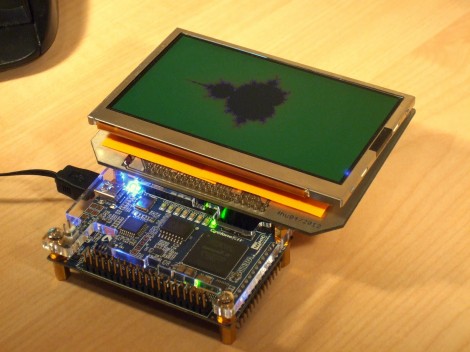
Here’s [FlorianH’s] setup for driving a PlayStation Portable screen with an FPGA. He’s using the DE0-Nano board to do this, and the first order of business was to establish a way to connect the two. He did a great job of etching his own breakout board, which has some traces that are less than 10 mils thick. Soldering the connectors for the screen was a bit of a challenge, and he shared several pictures of the process for your enjoyment.

With everything hooked up he fired it up with just a couple of lines of code to draw a test pattern. From there it was on to building a more intensive driver. [FlorianH] mentioned to us that he’s just starting to learn about FPGAs after having worked extensively with 8-bit microcontrollers. He’s been documenting his work on his site, and finds himself frequently referencing his own material so remember how he did things. Our vicarious enjoyment is an unintended (but welcomed) consequence of that habit.

A Game Of Skill For The North Carolina Maker Faire

The North Carolina Maker Fare was last weekend, and over the course of the festivities  [Dave] was asked for the documentation for the arcade game he built. It’s a neat build, so we’re very glad he chose to share it with us.

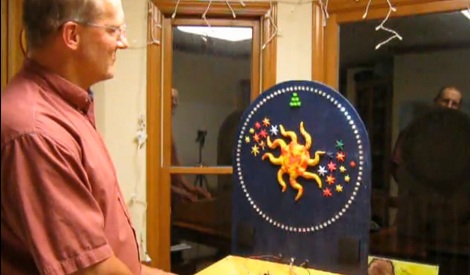
Anyone who has been to an arcade in the last 15 years has seen the game [Dave] was inspired by. The object of the game is to hit a button when the sequentially illuminated lights are in a particular position. [Dave] built his own version out of 90 LEDs and a very tiny FPGA dev board.

The 90 LEDs are controlled by the FPGA using charlieplexing, and are illuminated in sequence when the game starts. A heavy-duty emergency switch button modified into a momentary push button takes a hit whenever the player thinks the LED will land in the ‘jackpot zone.’  If the player wins, a buzzer sounds and much excitement is had by all.

Seeing as how the arcade version of this game is a complete rip off and is impossible to win, we really like [Dave]’s version. You can check out his demo video after the break.

Continue reading “A Game Of Skill For The North Carolina Maker Faire”

MyHDL Python Programming Option For FPGA

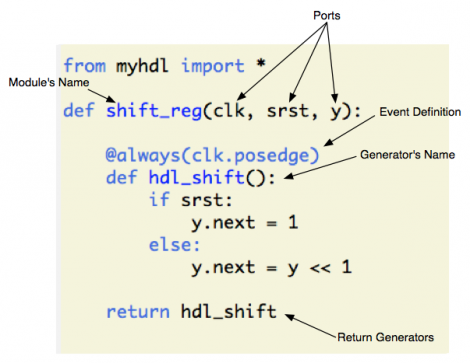
MyHDL is a Python module that brings FPGA programming into the Python environment. [Christopher Felton] tipped us off about a simple tutorial he just finished that gives an overview of how the module is used.

You may remember hearing about PyCPU a couple days ago which can run very simple Python code on a FPGA. There was a healthy discussion in the comments section comparing PyCPU and MyHDL. Although they may seem similar at first, the two are quite different. PyCPU creates a processor on the FPGA chip which can execute a small range of Python code. MyHDL actually implements Hardware Description Language in the Python environment. Once you’re used HDL to model your hardware choices in a Python script, it is converted to VHDL then fed to the toolchain and pushed to the chip like normal.

This is not an absolute beginner’s experience. But if you’re well-versed in Python it makes the jump to HDL a lot easier because you’ll be working with syntax that is already familiar to you.

Programming FPGAs With Python

If you’ve ever wanted to jump into the world of FPGAs but don’t want to learn yet another language, you can now program an FPGA with Python. PyCPU converts very, very simple Python code into either VHDL or Verilog. From this, a hardware description can be uploaded to an FPGA.

The portion of the Python language supported by PyCPU is extremely minimal, with only ints being the only built-in data type supported. Of course ifs and whiles are still included along with all the assignments and operators. A new addition is a way to get digital IO access with Python, and obvious requirement if you’re going to be programming Silicon.

PyCPU surely won’t replace VHDL or Verilog anytime soon, but if you’re looking to get into FPGAs and the ‘telling a chip what to be’ paradigm it offers, it’s certainly a tool worth looking into.

Hats off to [hardsoftlucid] for sending this in. Our wonderful (we mean that, really) noticed a few mistakes when this was first posted. Those mistakes have been corrected.

Putting Every Chiptune Ever In An FPGA

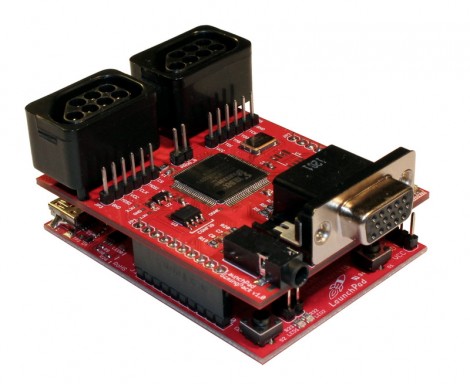
Finally one device combines the power of the Commodore 64 SID, Atari ST YM2149, and Amiga MOD audio into one awesome box. It’s called the RetroCade Synth, and there’s a Kickstarter that is perfect for starting your chiptune composing journey.

[Jack]’s RetroCade synth is connects directly to the Papilio One 500k FPGA. All the classic chiptune ICs can be emulated in this FPGA including the Commodore 64 SID chip, and an Amiga MOD player. Being a follow-up to [Jack]’s previous FPGA YM2149 project, he also threw that chip into the project for good measure. While the RetroCade doesn’t ship with every old chiptune IC – there isn’t support for NES, Atari, GameBoy, or SN76489-based chiptunes yet – that is something [Jack] will add once the Kickstarter is completed.

After the break you can see [Jack] jamming out on his RetroCade project playing a YM2149, SID, and Amiga MOD sounds simultaneously. For $100, it’s comparable to the venerable MIDIbox SID, but also allows anyone to play whatever genre of chiptunes they desire.

Continue reading “Putting Every Chiptune Ever In An FPGA”

Hackaday Links: May 21, 2012

Turning anything into a touch sensor

Makey Makey is a small board with a USB plug and bunch of contact points for alligator clips. Plug the Makey into your computer and attach just about anything to the contacts, and you can make anything into a video game controller, a keyboard, a piano, or pretty much anything you can imagine. If [Sprite_tm] copied it, you know it has to be cool.

RepRaps will finally cost a million dollars

The Pentagon is throwing money at 3D printers. It’s “only” $60 Million the DoD is putting into 3d printer research, but hopefully our most brilliant researchers will help refine some of the ‘unsolved problems’ – like metal and circuit printing – the 3D printer community is facing.

Getting started with FPGAs

[Tim] found a neat little $40 FPGA board aimed right at the hobby hacker. The good news: It’s compatible with Arduino shields, and it’s very cheap. The bad news: it only has 1280 logic cells, so you probably won’t be emulating CPUs on this thing. If anyone has a teardown / project with this board, send it in.

Improving a Bluetooth dongle with a bit of wire

Unsurprisingly, the extremely cheap Bluetooth dongle [Mike] bought on eBay didn’t have great reception or range. No problem, because you can just replace the internal antenna with a piece of wire cut to length. Now bluetooth devices are recognized instantly, and there are no Bluetooth ‘dead spots’ around [Mike]’s computer.

Come to France, make stuff

The Toulouse Hackerspace is having a little shindig this coming weekend (May 25-27) featuring a conference, workshop, concerts and performances. If you’re in the area, drop on by,