
HUD For Real Life Capture-the-flag

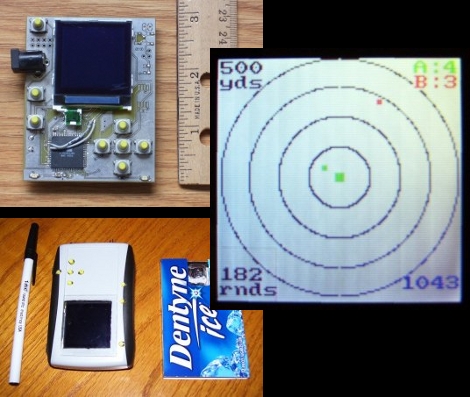
If you’ve played any of the Splinter Cell games you’ll remember the PDA that [Sam Fisher] carried around with him.  What if you could have one of your own when playing capture-the-flag? [Brad] has created the ZephyrEye as an electronic command and communications device for real-life games.

Each player carries around their own unit. The ZephyrEye has a GPS module, Xbee module, LCD screen, and control buttons. This allows a player to setup one of several different games, map out the game field including base locations and flag locations, and monitor a time limit and scoring. Other players can join the game in progress. The best part? The GPS modules report tracking to each handheld and act as radar for your team and the enemy team. We’ve got a couple of demo videos after the break.

Words can’t describe how delighted this would have made us back in the day. We don’t play outside with the other neighborhood kids anymore (insert dirty-old-man joke here) but that might change just because of this device. We may end up joining [Barney Stinson] for some amazingly awesome laser-tag games after all.

[Brad’s] posted hardware information and source code so that you can use to throw together a dozen or so units. We think the next version should incorporate a wearable display.

Continue reading “HUD For Real Life Capture-the-flag”

Hacking The OnStar GPS V2

[Andy] has provided us with his new guide to hacking the OnStar GPS. Previously, we have covered a way to grab the GPS data from an unused OnStar system, however in recent years GM has added much more complex systems, which make it harder than swapping out a serial line. For the new version, [Andy] has figured out GM’s Controller Area Network (CAN), which they call GMLAN. He has also done most of the software snooping and sleuthing, and has mostly solved GMLAN’s method of announcing GPS data. There is sample code available to convert this information into generic latitude and longitude.

Unfortunately for the project, (and very fortunately for [Andy]), he has a child on the way and new job responsibilities, so he is offering up his results to the HaD community to finish up, double check, and provide a good how-to for everyone else. To anyone who decides to pick up this project and run with it, let us know!

Arduino Now Controlling – The Crop Harvest?

[youtube=http://www.youtube.com/watch?v=LDzHwy28kng]

We’ve seen the Arduino board in charge of some pretty unique tasks in the past. Harvesting locally grown soybeans was not one of them.

[Lance] rigged this beast up in order to automate the monotonous task of driving up and down the vast soybean fields of Iowa. The 15 ton farm combine’s hydraulic steering pump is at the mercy of a team of gadgets, including a GPS, Windows 7 PC, and the omnipresent Duemilanove (which acts as the output card, connecting the PC to the pump). So far, it is reported to be doing a great job, straying only about an inch and a half from its desired, GPS-programmed, path. Even if the Arduino decides to go totally berserk and drive the combine off course, speeding around at 5mph makes it pretty avoidable. A supervisor is also in the cabin at all times, looking out for errors. [Lance] eventually hopes to offload all steering-related calculations to the ATmega328P onboard.

Commenters are welcome to share heavier-duty uses for the Arduino (if they exist).

Advanced In Car Computer System

[youtube=http://www.youtube.com/watch?v=xqZj4ArrlhA]

[Jonathan] sent us a pretty in-depth writeup of his car computer system.  This isn’t your typical quasi navigation/media system as you would usually expect with this title. What he has done is made a remotely accessible monitoring computer that can tell him everything from engine data to physical location of the car on a google map.  He can start, stop, lock, and unlock the car as well, as long as the car is within a 3g network. This is pretty impressive and we see tons of uses for this, from analyzing your own data to keeping an eye on those pesky teenagers when they borrow the car.

Urban Defender: Location Aware Game

[youtube http://www.youtube.com/watch?v=zrAFYava258&feature=player_embedded%5D

What do gangs, territories, cities, and glowing blue balls have in common? No, not that one drunken night you can’t seem to remember, rather a new location aware game called Urban Defender.

The concept behind the game is simple. A player hold a ball that knows its current location and can notify you if needed via LEDs and a speaker of changes in its environment. He or she then runs around the city until the ball tells them of an unclaimed or enemy territory. Bounce the ball against a building and that territory is now claimed.

The ball itself is a prototype combination of an Arduino, Accelerometer, vibration motor, LEDs, XBee, batteries, and wire all packed inside of an industrial rubber gym ball. Unfortunately after testing the Urban Defender team found the GPS and a few other components would need to be kept outside of the ball and on the player.

Finally, a project that warrants the use of an Arduino. Anyone up for a game?

AIDA The Dashboard Bot

[youtube=http://www.youtube.com/watch?v=huQLyjwskQo]

In an attempt to create more interaction with our vehicles, researchers have created AIDA. AIDA is basically a car computer and GPS that has some well designed personification. That cute little face will learn your daily habits and schedules and make recommendations to keep you out of traffic. We really like the idea, and the little bit we see of AIDA already has us falling in love, but won’t the placement be a distraction? We already know some people who give their car a name and treat it like a person, we don’t want to imagine what would happen if their car actually had some interactive personality. AIDA’s motion and emotive display are worthy of the crabfu challenge for sure, but do we want AIDA on our dashboard? Yes, most emphatically. She can sit right by the little hula girl.


[via BotJunkie]


Reverse Geocache Puzzle

fig1-6471

[Mikal] wanted to create an awesome electronic wedding gift for his friend who was moving to France. After experimenting with a few things, he settled on creating a puzzle box that would only open in a certain location. Since his friend introduced him to the Arduino, he fittingly used one in the design, along with a serial GPS module and a mini character LCD. The box itself is locked using a servo-controlled chopstick, which could theoretically be snapped if [Mikal] really screwed something up. To save battery life, he used a small Pololu module to provide power that uses only 0.01 microamps in standby, and can be shut off by the Arduino.

The box was designed to be mysterious yet self-explanatory. When the button on the front is pushed, the box comes to life for 3 minutes, displaying the distance away from secret location. Additionally, it warns how many tries are left: the button can only be pushed 50 times before it is sealed “forever”. In order to open the box, you have to be within 2km of the destination. Theoretically, you can narrow down the location to one of 2 points after 2 readings, but a less scientific approach would probably be a lot more fun.

This seems like an amazing gift, and the same concept could be repurposed into hundreds of other devices. For extra fun, he could have placed it at a geocache location.









