IPhone Becomes A Bluetooth Keyboard And Mouse

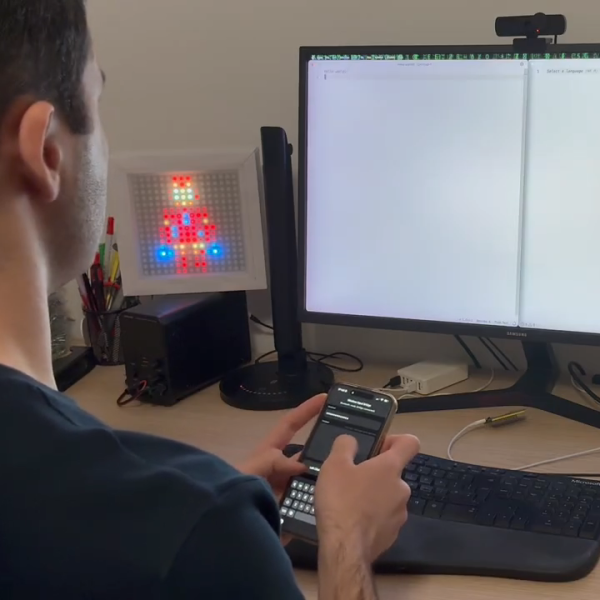
Sometimes you need to use a computer and you don’t have a spare keyboard and mouse on hand. [KoStard] figured an iPhone could serve as a passable replacement interface device. To that end, he built an adapter to let the phone act as a wireless keyboard and mouse on just about any modern machine.

To achieve this, [KoStard] grabbed an ESP32-S3 development board, and programmed it to act as a USB HID device to any machine attached over USB. It then listens out for Bluetooth LE communications from an iPhone equipped with the companion app. The app provides an on-screen keyboard on the iPhone that covers everything including special keys, symbols, and punctuation. You can also take advantage of the iPhone’s quality capacitive touchscreen, which emulates a nicely-responsive  trackpad, with two-finger taps used for right clicking and two-finger drags for scroll. Latency is nice and low courtesy of the direct Bluetooth LE connection.

It’s a nifty build that is particularly useful in oddball situations where you might want a keyboard and mouse. For example, [KoStard] notes it’s a great way to control a Smart TV without having to do ugly slow “typing” on an infrared remote. We’ve seen his work before, too—previously building an adapter to provide Bluetooth capability to any old USB keyboard. Video after the break.

Continue reading “IPhone Becomes A Bluetooth Keyboard And Mouse”
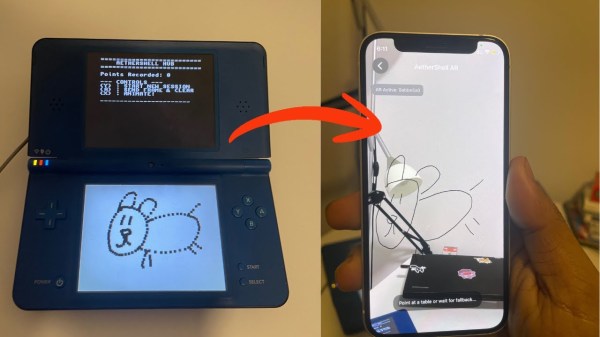
Augmented Reality Project Utilizes The Nintendo DSi

[Bhaskar Das] has been tinkering with one of Nintendo’s more obscure handhelds, the DSi. The old-school console has been given a new job as part of an augmented reality app called AetherShell. 

The concept is straightforward enough. The Nintendo DSi runs a small homebrew app which lets you use the stylus to make simple line drawings on the lower touchscreen. These drawings are then trucked out wirelessly as raw touch data via UDP packets, and fed into a Gemini tool geometric reconstruction script written in Python which transforms them into animation frames. A Gemini tool is used to classify what the drawings are in order for a future sound effects upgrade, too. These are then sent to an iPhone app, which uses ARKit APIs and the phone’s camera to display the animations embedded into the surrounding environment via augmented reality.

One might question the utility of this project, given that the iPhone itself has a touch screen you can draw on, too. It’s a fair question, and one without a real answer, beyond the fact that sometimes it’s really fun to play with an old console and do weird things with it. Plus, there just isn’t enough DSi homebrew out in the world. We love to see more.

Continue reading “Augmented Reality Project Utilizes The Nintendo DSi”

What Happened To Running What You Wanted On Your Own Machine?

When the microcomputer first landed in homes some forty years ago, it came with a simple freedom—you could run whatever software you could get your hands on. Floppy disk from a friend? Pop it in. Shareware demo downloaded from a BBS? Go ahead! Dodgy code you wrote yourself at 2 AM? Absolutely. The computer you bought was yours. It would run whatever you told it to run, and ask no questions.

Today, that freedom is dying. What’s worse, is it’s happening so gradually that most people haven’t noticed we’re already halfway into the coffin.

Continue reading “What Happened To Running What You Wanted On Your Own Machine?”

Broken Phone To Cinema Camera With A Lens Upgrade

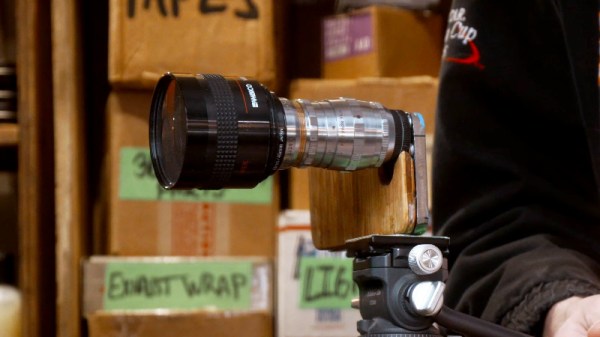
The advent of the mobile phone camera has caused a revolution in film making over the last couple of decades, lowering the barrier to entry significantly, and as the cameras have improved, delivering near-professional-grade quality in some cases. Mobile phone manufacturers hire film makers to promote their new flagship models and the results are very impressive, but there is still a limitation when it comes to the lenses. [Evan Monsma] has broken through that barrier, modifying an iPhone to take C-mount cinema lenses.

It’s likely many of us have one or two broken mobile phones around, and even if they aren’t flagship models they’ll still have surprisingly good camera sensors. This one is an iPhone that’s seen better days, with a severely cracked glass back and a dislodged lens cover on one of its cameras. Removing the back and the lens cover reveals the sensor. The video below the break has a lot of woodwork and filing away of the phone, as he modifies a C-to-CS ring to serve as a C-mount. In reality the flange distance makes it a CS mount so his C-mount lenses need an adapter, but as anyone who’s used a Raspberry Pi camera will tell you, that’s no hardship.

The final camera has a thick plywood back with a tripod mount installed, the other two cameras work with their Apple lenses, and the C-mount gives great results with a cinema lens. We’re concerned that the Super Glue he uses to fix it all together might not hold up to the weight of bigger lenses, but we’re here for this project and we love it.

Continue reading “Broken Phone To Cinema Camera With A Lens Upgrade”

IPhone Air Still Apparently Repairable Despite Its Compact Construction

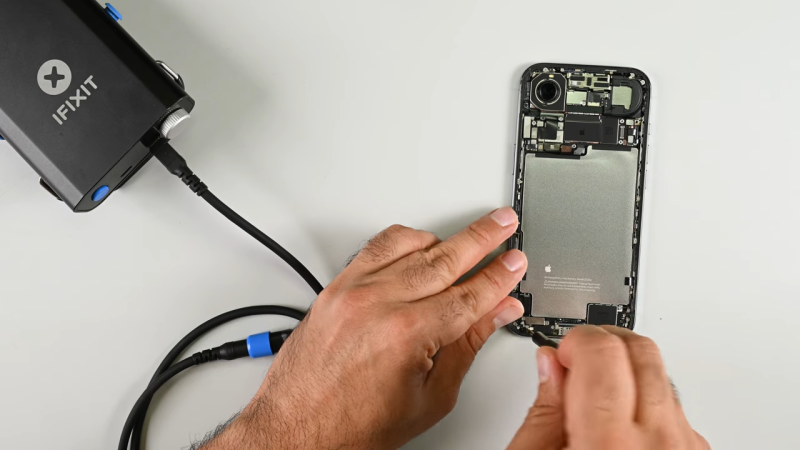
Miniaturization is a trend that comes and goes in the cellular phone space. For a while, our phones were all getting smaller, then they started getting bigger again as screens expanded to show us ever more content and advertising. The iPhone air is going back the other way, with a design that aims to sell based on its slimness. [iFixit] reckons that despite its diminutive dimensions, it should still be quite repairable.

“Thinner usually means flimsier, harder to fix, and more glued-down parts, but the iPhone Air proves otherwise,” states Elizabeth Chamberlain for the repair outlet. Much of this comes down to clever design, that makes repair possible at the same time as ensuring compactness. A big part of this is the way that Apple made the bottom half of the phone pretty much just battery. Most of the actual electronic components are on a logic board up by the camera. Segmenting the phone in this way makes it easier to access commonly-replaced parts like the battery without having to pull a lot of other parts out of the way first.

[iFixit] refers to this as flattening the “disassembly tree”—minimizing the number of components you have to touch to replace what you’re there to fix. In this regard, the thinness of the iPhone Air is actually a boon. The phone is so thin, it wasn’t possible to stack multiple components on top of each other, so everything is easier to get to. The design is also reasonably modular, which should make routine repairs like USB C port swaps relatively straightforward.

Whatever smartphone you’re working on, it often helps to have a disassembly guide to ensure you don’t wreck it when you’re trying to fix something. [iFixit] remains a stellar resource in that regard. Continue reading “IPhone Air Still Apparently Repairable Despite Its Compact Construction”

Animated Widgets On Apple Devices Via A Neat Backdoor

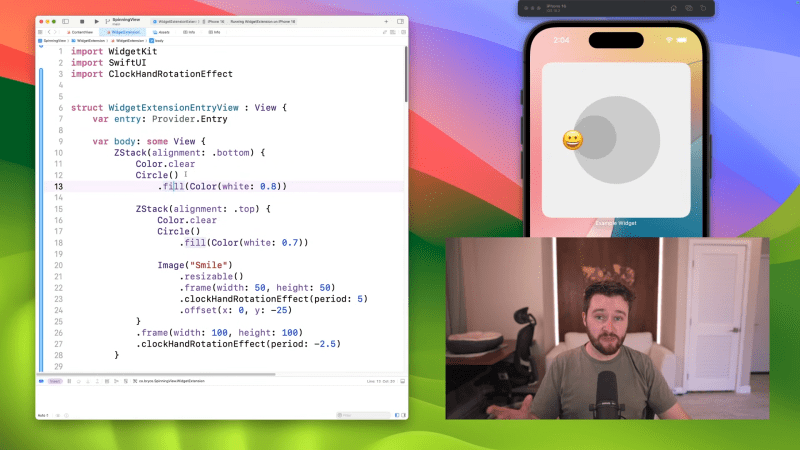
If you’ve ever looked at widgets on your iPhone, you’ve probably noticed they’re largely static, save for a few first-party apps. By and large, third party developers are not supposed to be able to animate them. However, [Bryce Bostwick] found a workaround.

You might be confused as to the idea of animated widgets, but it’s quite simple. For example, think of a clock app with a widget in which the hands always display the current time, or a calendar app with an icon that shows the current date. Apple’s own apps have long been able to do this, but the functionality has mostly been locked out for third parties.

One way to get around this limitation is by using a timer feature baked into the widget functionality. The timer tool is one of the few ways that third-party apps are allowed to do animation. By running a timer with a custom font, you can display various graphical elements instead of numbers counting down to create a hacky animation that updates every second.

However, there are even more advanced techniques that can get you faster, smoother animations. [Bryce] breaks down the private techniques used to rotate the clock hands on Apple’s own widget, and how to use those tools for your own purposes. It takes some sneaky Xcode tricks and a bit of math to make it fully flexible for doing arbitrary animations, but it works surprisingly well.

Will this backdoor last ? Well, Apple is always updating and changing iOS and its associated software, so don’t expect it to work forever.

Continue reading “Animated Widgets On Apple Devices Via A Neat Backdoor”

Emulating IPhone On QEMU

[Georges Gagnerot] has been trying to emulate iOS and run iPhone software in a virtual environment. There were a few choices, and qemu-t8030 had a number of interesting features that you can check out in his post.

The project requires a patched QEMU, and [Georges] did some basic jailbreaking techniques. The real problem, of course, was not having the Apple Silicon GPU. Older versions of iOS let you select software rendering, but that option is gone on newer versions. However, it was possible to patch the phone to still use software rendering. There are still apps that directly use Metal or OpenGL that won’t run, but that’s another problem.

There is a plan to explore forwarding GPU calls to a real device. However, that seems difficult so it will have to wait for now.

Continue reading “Emulating IPhone On QEMU”