ASETNIOP Chorded Typing With A Piano Keyboard

asetniop-chorded-typing-with-a-piano

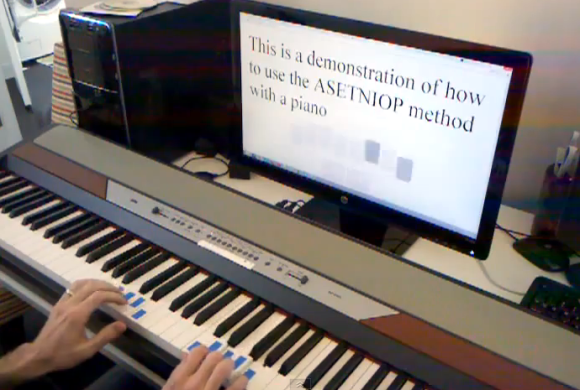
We don’t know if typing your Facebook updates from a piano keyboard counts as practicing or not. But if you want to give it a try here’s how. [Zach] wrote in to our tips line with his latest ASETNIOP hack which uses a MIDI piano keyboard to touch type on a computer.

Last July was when we first heard about ASETNIOP. It’s a chorded typing system which at the time was aimed at, but not limited to, touch screen devices. This version gives a pretty good idea of how the system actually works. Your fingers and thumbs are each assigned a key and they never move away from it. To type more than just the ten letters, combinations of keys are assigned the rest of the alphabet. You can see the piano example of the system after the break. But better yet would be hooking your own MIDI keyboard up to the computer and trying it in a browser.

Continue reading “ASETNIOP Chorded Typing With A Piano Keyboard”

Arduino-controlled MIDI Sequencer

am808vx3-arduino-synth

[Christian] wrote in to tell us about his third-generation Arduino MIDI sequencer (translated) called the AM808 VX3. He had already laid a strong base for the project in his previous versions. But the user interface was still frustrating at times and that’s where this version comes in. it features a nice clean dashboard like interface, but also includes a configurable virtual interface.

The obvious components seen above include the slider and potentiometer band, as well as the repository of buttons mounted below that. But in the center of the board is a touchpad which [Christian] pulled out of an old Laptop. It interfaces as a PS2 device which makes it pretty simple to use in conjunction with the Arduino. But that’s not the only touch-enabled input device. The rectangle to the right of the touch pad is an LCD screen with a touch overlay. As you can see (and hear) in the clip after the break, the touch screen made it possible for him to rework the controls until they became simple and intuitive.

Continue reading “Arduino-controlled MIDI Sequencer”

Building A Velocity Sensitive Keyboard

keys

Cheap toy pianos don’t usually have MIDI, and getting a velocity-sensitive keyboard from something out of the toy aisle at Walmart is nearly out of the question. If you’re willing to tear one of these toy pianos apart and build your own control electronics, though, the sky is the limit, as [JenShen] shows us with his home built velocity sensitive keyboard.

Usually, velocity-sensitive keyboards have two buttons underneath each key. By having a microcontroller measure the time difference between when each button is pressed, it’s possible to sense how fast each key was pressed. [JenShen] took the idea of a velocity-sensitive keyboard in another direction and instead used a force sensitive resistor strip, cut up into many pieces to provide velocity and aftertouch data.

[JenShen]’s keyboard adds these resistive buttons to the button matrix he already made. The result is a very inexpensive velocity sensitive keyboard with aftertouch, an impressive feat for an Arduino and only a few components.

You can check out the keyboard in action after the break.

Continue reading “Building A Velocity Sensitive Keyboard”

Raspberry Pi Plays MIDI Without An Operating System

[youtube=http://www.youtube.com/watch?v=k6TCysv6AzE&w=580]

For all the interesting DSP functions locked away in the Raspberry Pi, it’s still hard to imagine using the Raspberry Pi as an eminently capable software synthesizer, tracker, or sequencer. Running any of the usual Linux digital audio programs means – surprise – running Linux, and the performance penalty associated with that.

It would be much better if all these audio programs could run directly on the Raspberry Pi without an operating system, and [Joe]’s project is right up that alley. He’s playing MIDI files without an operating system, in effect making the Raspberry Pi a very powerful embedded platform.

[Joe]’s build is the first bare metal audio code for the Raspberry Pi. It’s actually an LV2 plugin host that will load audio plugins, read MIDI files, and shoot the resulting audio out over the 1/8″ jack on the Pi.  This work wouldn’t have been possible without a few Raspberry Pi bare metal tutorials put together by [David Welch].

Hopefully this won’t be the last we’ll see of [Joe] and his code; the Raspberry Pi has more than enough horsepower to be an amazing sampler, synth, beat machine, or the next generation of Akai MPC. All we need are a few brave coders to take up coding bare metal on the Raspberry Pi.

Tired Of Playing The MacBook? Play The Raspberry Pi!

pithingy

Hit up any club, party, or get together where musicians are present and you’ll probably find a DJ booth stacked to the gills with faders, various MIDI devices, and a MacBook. However abundant an OS X-based DJ platform is, we haven’t heard hide nor hare of a Raspberry Pi being used as a sequencer, MIDI device, or MaxMSP box.

[James] over at Illuminated Sound put together a great tutorial for making all those cool electronic music devices play nice with a Raspberry Pi. He used a Novation Launchpad, an 8×8 MIDI controller that can act as faders, a keyboard, or even a functional equivalent to the pads on an MPC.

Hardware is nothing without software, so [James] used Puredata and libusb to turn the MIDI data into notes and audio effects.

[James] added a download that includes the Launchpad driver and a Puredata sketch to test everything out. You can see how it all fits together in the video after the break.

Continue reading “Tired Of Playing The MacBook? Play The Raspberry Pi!”

Turning Toy Pianos Into MIDI Keyboards

Building a MIDI device is always a great microcontroller project, and nearly everyone has an old toy keyboard lying around in the back of a closet or in the basement. [JenShen] decided to take one of these toy keyboards and build a MIDI keyboard.

The keyboard [JenShen] used was a simple Casio keyboard with built-in voices. After tearing out the guts of the keyboard, the only thing that remained is the row of push buttons underneath the keys. These buttons were laid out in a row/column matrix, so [JenShen] needed to decode this matrix before sending the result to an Arduino for processing.

A 74HN595 shift register was used to read the 8 rows of buttons underneath the keys, while the rows were tied to different input pins on the ‘duino. This allowed [JenShen] to scan the keyboard matrix with an Arduino and generate MIDI notes and send them to other synths.

In the video after the break, you can check out [JenShen]’s circuit and code that allowed him to turn a toy keyboard into a proper 32-note MIDI keyboard. It’s not velocity sensitive, but he says he’ll show everyone how to accomplish that in a future post.

Continue reading “Turning Toy Pianos Into MIDI Keyboards”

Homebrew Guitar Tuner Also Includes MIDI Out

A few years ago, [Frédéric]’s brother in law wanted a guitar tuner for Christmas. Instead of going out and buying one, [Frédéric] broke out the soldering iron and built one from scratch.

[Frédéric]’s tuner is built around an ATMega168 uC on a Real Bare-Bones Board with an LM386 amplifier. The display is a standard 20×2 LCD character display, and the interface is torn from the pages of stomp box schematics with a very hefty foot switch.

Detecting the frequency of a note played into [Frédéric]’s tuner involves a fair bit of math. To measure the frequency, the Arduino samples the waveform coming from the input jack. This signal is delayed for a fraction of a second and the area underneath the real and delayed waveforms is measured. This delay slides across the original waveform until the area between the real and delayed samples are minimized. At that point, delayed wave form will be exactly one cycle behind the real signal, and the cycles per second can be calculated. It’s called the YIN algorithm, and you can read more about it here.

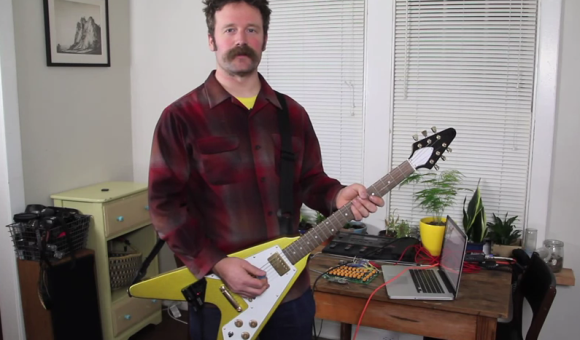
Since [Frédéric] already knew the exact frequency being played into the tuner, he figured it would be trivial to add a small analog audio to MIDI converter. This feature (as shown in the video after the break) turns the sounds from a guitar into MIDI notes. It’s monophonic and probably a little superfluous, but still very cool.

Continue reading “Homebrew Guitar Tuner Also Includes MIDI Out”