N64Boy Advance

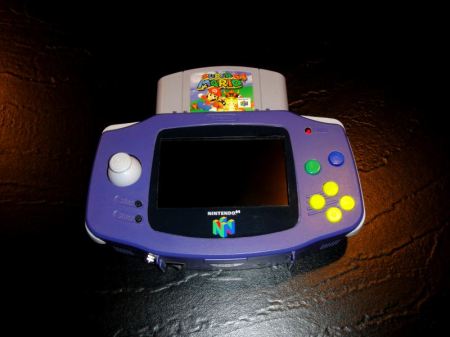
[Hailrazer] found a Game Boy Advance carrying case in his closet and thought he could pull off an N64Boy Advance in a few weekends. Despite the fast build time, [Hailrazer] built something that wouldn’t look out of place sitting on a shelf at a toy store.

This isn’t the first time we have covered an N64 Advance portable gaming system that uses a GBA carrying case, but this hack keeps the original styling of the Game Boy Advance without all the epoxy, bondo and sanding. Inside is a 4.3″ screen, GameCube joystick, N64 expansion pack, and enough Li-ion to get 5-6 hours of play time. The build doesn’t include a D-pad because [Hailrazer] doesn’t use that while playing. It also doesn’t have controller or A/V ports, because he doesn’t, “want to sit around with friends playing N64 on a 4.3″ screen.” A very pragmatic build, indeed.

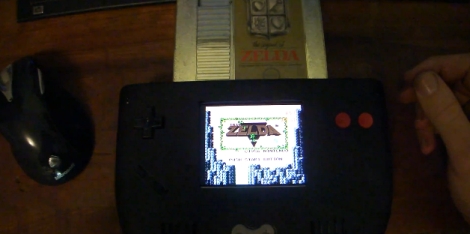
We love seeing people re-purpose odd bits of plastic they have lying around, so we’re wondering when someone with an Original Game Boy Carrying Case will build an NESBoy. Video after the jump.

Continue reading “N64Boy Advance”

Nintendo 3DS Teardown

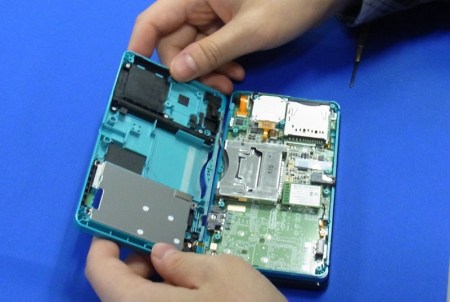
The Nintendo 3DS has been out for a couple days now (in japan) and the folks over at [tech on] were nice enough to do a teardown. Besides all the regular teardown goodies you can also get a good look at the 3DS’ 3D screen with a microscope. Turns out its a parallax barrier display which means that there are slits on top of the LED array to create a 3D effect without the use of special glasses. The rest of the hardware seems pretty standard, running an ARM based processor with some DRAM and NAND flash. Apparently the 3DS didn’t get much of an upgrade (downgrade?) as far as DRM is concerned because there are already examples of the 3DS running pirated games using a R4 card on youtube.

[via engaget]

Continue reading “Nintendo 3DS Teardown”

DrunkenNES Makes A Game Out Of Getting Hammered

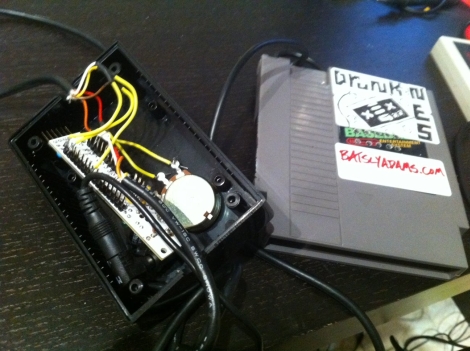
drunkenNES_cart

While handheld breathalyzers are pretty novel to have around while drinking with friends, there’s nothing exciting about a $50 off the shelf unit. If you really want to grab people’s attention, you have to get creative and built something like [Batsly Adams] and his friends did.

One evening, he was casually drinking with some friends and playing around with an electronic alcohol sensor. They quickly put together a NES ROM that would play sounds, changing the pitch depending on how much alcohol the sensor detected. It quickly became apparent to them that a full-fledged breathalyzer video game was in order. In no time, he and his friends had compiled graphics, a soundtrack, and the code to drive their game, DrunkenNES.

To play the game, each player must blow into a gutted NES cartridge that has been fitted with the alcohol sensor. The Nintendo computes the player’s BAC, reporting how intoxicated they are using simple graphics and cheesy animal puns. We don’t know when the code and schematics will be made available, but when they are, you can guarantee we will be building one for “research” purposes to pair with our Power Hour shot glass.

Keep reading to see some in game video of DrunkenNES

[Thanks Adam]

Continue reading “DrunkenNES Makes A Game Out Of Getting Hammered”

NES Game Pad Wireless Light Commander

NES_wireless_light_switch

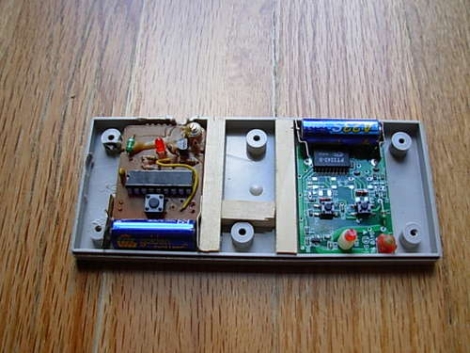
Annoyed that the new lights he bought for his apartment lacked power switches, Instructables user [p.arry.drew] decided to install a pair of wireless light switches. Not content to use the remotes separately, he decided to see if he could cram them both into an old NES controller, making for a nice all-in-one wireless light commander.

He disassembled the light switch remotes, cutting off a bit of the battery contacts to ensure they fit in the game pad. He then pulled apart his NES controller, removing the cord and adding some foam padding to ensure that the buttons fully contacted the wireless switches when pressed. A few bits of wooden dowel were added to keep everything in place, then the controller was reassembled.

His creation makes for a very convenient method of controlling several light switches from once source, plus the packaging is pretty handsome as well. These remote light switching solutions seem to be all the rage lately, so keep them coming!

Read on for a quick video of his remote light switches in action.

Continue reading “NES Game Pad Wireless Light Commander”

N64 Advance Portable Gaming System

n64_advance

Like many people [Kyle] loves the Nintendo 64 and decided he wanted a portable version of his beloved console so he could play games while on the move.  One year, two PSOne screens, and three N64 consoles later, his vision is complete.  A Game Boy Advance travel case was gutted and used to house the console, hence the “N64 Advance” moniker.  Like many others, his project uses a PSOne screen for the display, and a Li-Poly battery pack that provides up to 3.5 hours of playing time.  He made sure to include other members of the Nintendo family in his build by adding a pair DS Lite speakers to the mix.

This build also includes some nice “extras” such as having the N64 RAM expansion pack built-in, headphone and A/V out ports (with a screen kill-switch for TV use), and an external controller port that can be used by either the first or second player. Be sure to check out the video of his build after the jump.

Continue reading “N64 Advance Portable Gaming System”

Diving Deep Into The Game Boy LCD Protocol

[Craig] wanted to make the original Game Boy LCD screen do his bidding so he sniffed out the data protocol that it uses. We were amused when he mentions that there’s an army of people out there looking to build pointless crap as part of a hobby. Guilty. And he goes on to outline why this LCD screen is a great resource for hobbiests.

As you can see in the pinout above, it uses 5V logic, with a 4 MHz data clock. These traits are both very friendly to a wide range if inexpensive microcontrollers. If you know how to address the display it should be very easy to use. Furthermore, the low pin count is thanks the to a 4-shade grayscale screen, limiting the data pins to just two. [Craig] hooked up his Saleae Logic probe to capture communications and walks us through what he discovered. During this process he proved to himself that he had figured out the protocol by exporting captured data from the logic probe and reassembling it into an image on his computer.

Game Boy Printer USB Cable And Software

[Furrtek] hooked up his Game Boy printer for use with a PC (translated). The two-part hack started with a cable to attach the device via USB. A Nokia interface cable was used as a base to translate the USB signals into serial, and an ATtiny45 microcontroller added to talk to the printer. He did a great job of free-forming the circuit alterations and fitting it back into the plastic USB plug housing.The next step was to write some software. Using VB6 he coded an application that loads in an image, scales it to fit, and allows you to adjust the contrast that the thermal printer produces. For testing purposes he’s reusing old receipts. See it in action after the break.

Continue reading “Game Boy Printer USB Cable And Software”