How The 2020s Chip Crisis Led To A Buggy Saleae Analyzer In 2026

For those of us old enough to remember the harrowing days of the early 2020s, alongside another major kerfuffle there was a complete breakdown in global supply chains that led to the 2020-2023 global chip shortage. Unsurprisingly, this pushed many hardware manufacturers into less orthodox approaches, massive BOM changes, and hurried redesigns. One of the results of this era found its way into the hands of the bloke over at the [Playduino] YouTube channel, who was mystified to find two bodge wires in his fancy Saleae logic analyzer.

The reason for popping open the LA was crosstalk between two channels, which was bad enough that it made the unit quite unusable for the intended task. After seeing the cut traces and bodge wires he initially assumed that since he bought it used that the previous owner had modified it, but said person denied having opened it since purchasing it from an official retailer.

This was when he emailed Saleae support to see whether they knew anything. Initially they denied knowing anything about such a modification, but then the CTO emailed back with a long and very detailed confession. As explained in the video, during the aforementioned chip crisis Saleae was forced to rapidly redesign their LAs to use whatever FPGAs and other parts they could still get their hands on.

An initial prototype unit passed their internal tests, so they had a first batch manufactured using PCBs from a different supplier. Despite sending the same Gerber files, the resulting PCBs had ground fill issues that necessitated the observed rework, but due to insufficient testing for crosstalk a total of 406 units made it into the wild.

Sadly he had to return the defective unit for a replacement, making it somewhat hard to let go of such a piece of history. That said, if you want to know whether you’re also one of the lucky remaining 405 LA owners, the CTO provided the affected serial number range: 00200026245 to 00200026675 are affected.

Continue reading “How The 2020s Chip Crisis Led To A Buggy Saleae Analyzer In 2026”

The Saleae logic analyzer software is shown. One PWM channel is active, with values of 0x0001 displayed above the individual waveforms. On the right panel of the app, a trigger mode configuration panel is open for the simple parallel analyzer.

Simple Triggering For Saleae Logic Analyzers

Saleae logic analyzers seem to have it all: good sampling rates, convenient protocol decoding, and plenty of channels – but not a good way to set rising or falling-edge triggering. [James] found this rather inconvenient when debugging embedded devices, and shared a workaround that replicates these simple triggering modes.

Crucially, the logic analyzer’s software has a repeated triggering mode that fires when the protocol decoder detects a preset value. [James] used a clever trick to turn this into a rising-edge trigger: he set up a simple parallel analyzer, and set the signal in question as both the sampled channel and the clock signal. Since he wanted to detect the rising edge, he set the clock mode accordingly. Next, he loaded the simple parallel decoder’s trigger configuration and set it to detect a value of one, the value of a high signal. When he ran the simple parallel trigger, every rising edge of the input signal would trigger the clock to check for a high value on the line, in turn triggering the analyzer.

It’s also possible to set up a falling-edge trigger by selecting the falling-edge clock mode and setting the trigger mode to detect a value of zero. Setting up more complex triggers involving multiple channels is as simple as calculating the hexadecimal value of the desired state and setting the parallel decoder to trigger on that value. For example, if you want to trigger when one input is low and another is high, you can set the decoder to trigger on a value or one or two, depending on which order the inputs come in.

If all this makes you interested in Saleae logic analyzers, we’ve seen them used for everything from floppy disk preservation to signal generation. We’ve even reviewed their earliest model back in 2009.

Continue reading “Simple Triggering For Saleae Logic Analyzers”

Preserving Floppy Disks Via Logic Analyser

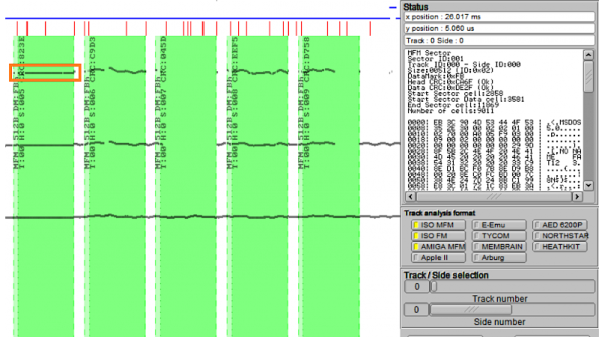
The floppy disk is a technology that is known only to the youth of today as the inspiration for the Save icon. There’s a lot of retro computing history tied up in these fragile platters, thus preservation is key. But how to go about it? [CHZ-Soft] has found an easy way, using a logic analyzer and a healthy dose of Python.

Floppy drives have particularly low-level interfaces, offering up little more than a few signals to indicate the position of the head on the disk, and pulses to indicate changes in magnetic flux. The data is encoded in the pattern of flux changes. This has important implications as far as preservation goes – it’s best to record the flux changes themselves, and create an image of the exact magnetic state of the disk, and then process that later, rather than trying to decode the disk at the time of reading and backing up just the data itself. This gives the best likelihood of decoding the disk and preserving an accurate image of floppy formats as they existed in the real world. It’s also largely platform agnostic – you can record the flux changes, then figure out the format later.

[CHZ-Soft] takes this approach, explaining how to use a Saleae logic analyser and a serial port to control a floppy drive and read out the flux changes on the disk. It’s all controlled automatically through a Python script, which automates the process and stores the results in the Supercard Pro file format, which is supported by a variety of software. This method takes about 14MB to store the magnetic image of a 720KB disk, and can even reveal a fingerprint of the drive used to write the disk, based on factors such as jitter and timing.

It’s an impressive hack that shows that preservation-grade backups of floppy disks can be achieved without spending big money or using specialist hardware. We’ve seen other projects in this space before, too.

Crazy Whirlwind Pre-Hackaday Prize Launch Tour

The Hackaday Prize was about to launch but the date wasn’t public yet. I decided to do a pre-launch tour to visit a few places and to drop in on some of the Hackaday Prize Judges. It started in Chicagoland, looped through San Francisco for a hardware meetup and Hardware Con, then finished with visits to [Ben Krasnow’s] workshop, [Elecia White’s] studio, and the Evil Mad Scientist Laboratories.

The Prize is now running and it’s time for you to enter. Look at some of the awesome hacking going on at the places I visited and then submit your own idea to get your entry started. Join me after the break for all the details of the adventure.

Continue reading “Crazy Whirlwind Pre-Hackaday Prize Launch Tour”

Rewriting WS2812 Driver Libraries For Optimization

ws2812_compared

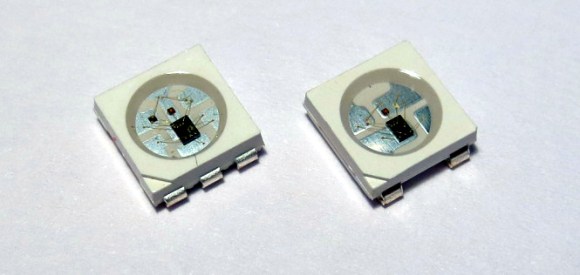
We like [Tim’s] drive for improvement. He wrote a WS2812 driver library that works with AVR and ARM Cortex-M0 microcontrollers, but he wasn’t satisfied with how much of the controller’s resources the library used to simply output the required timing signal for these LED modules. When he set out to build version 2.0, he dug much deeper than just optimizing his own code.

We remember [Tim] from his project reverse engineering a candle flicker LED. This time, he’s done more reverse engineering by comparing the actual timing performance of the WS2812(B) module with its published specs. He learned that although several timing aspects require precision, others can be fudged a little bit. To figure out which ones, [Tim] used an ATtiny85 as a signal-generator and monitored performance results with a Saleae logic analyzer. Of course, to even talk about these advances you need to know something about the timing scheme, so [Tim] provides a quick run-through of the protocol as part of his write-up.

Click the top link to read his findings and how he used them to write the new library, which is stored in his GitHub repository.

Saleae Logic Analyzer Knockoff Hacking

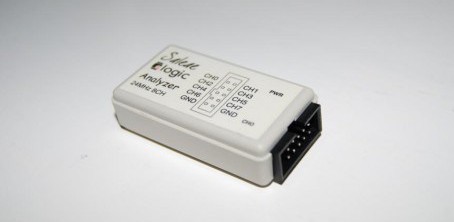
Despite what this module says on the case, it’s certainly not official Saleae Logic Analyzer hardware. [Jack Andrews] picked up this Chinese knockoff on eBay for about $18. When plugged into the computer the Saleae software picks it up as the official hardware. But [Jack] has seen other knockoffs which have a jumper to select between Saleae cloning and USBee cloning so he found a way to switch software with this dongle.

He pulled the board out of the case and discovered a Cypress CY7C68013A microcontroller on a poorly-soldered board (imagine that). This is an 8051-compatible processor that includes USB functionality. There’s also an EEPROM on the bottom of the board which stores the VID/PID pair identifying it as Saleae Logic hardware. The trick to getting this working with the USBee software is to change that pair. [Jack] managed to do this without an external programmer. He uninstalled the Saleae driver and installed a Cypress driver. Then he wrote a bit of code for the CY7C68013A to rewrite the EEPROM and flashed it via the USB connection. Now the dongle enumerates as USBee Logic Analyzer hardware.

Turn A Logic Analyzer Into A Signal Generator Using Only Software

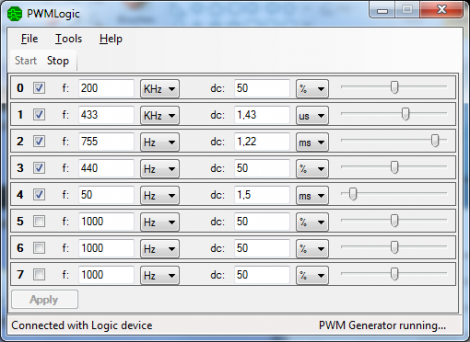
One thing we learned by watching [Alton Brown] on all of those Good Eats episodes is that a multitasker is way better than a unitasker. [Joost] is thinking along the same lines by taking a fantastic tool and adding a useful function to it. His software project turns a USB Saleae Logic Analyzer into a signal generator.

There are already a multitude of reasons to own one of these fantastic tools. But the ability to use it to generate up to 8 channels of PWM signals is a welcome addition. It is capable of producing frequencies from 1Hz up to 1MHz at a sample rate of 4 MHz. It uses the original SDK and doesn’t require any changes to the hardware (we would’ve thought new firmware was necessary, but happily that’s not the case). The one caveat is that right now this only works with Windows machines running the .NET version 3.5 or higher. It looks like an MSI installer package is all that’s available for download so the thoughts of easily porting this to other operating systems have been dashed unless [Joost] decides to share his source code.

Edit 7/12/2016: [Joost]’s webpage is down, but he moved it to Github.