Peripherals Hacks

Custom peripheral projects are among the most rewarding. Especially if you’re like me and you sit at the computer eight hours per day, anything that you can use on a daily basis is super satisfying. This topic of DIY peripherals came up on the podcast while chatting with Kristina, who is no stranger to odd inputs herself.

We were talking about a trackball that had been modified to read twisting gestures, by a clever hijacking of the twin mouse sensors inside. If you do a lot of 3D modeling, you can absolutely get by with just a mouse and shift-ctrl-alt as modifiers, but it’s so much more immediate to use a dedicated 3D input device. (I’ve got an ancient serial Space Mouse just under my left hand as I type this.)

My old favorite, which I haven’t used in ages, is the guts of a 5” hard-drive platter stack that I turned into a scroll wheel. Unfortunately, I don’t have space for it on my desk anymore, but it was just so pleasing to scroll through a document with something that had some real chonky momentum to it.

And it’s easier than ever to make your own. The classic blocky macropad is a great introduction, but as long as you’re doing the design yourself, why not extend it, or at least make it fit your hand? Or take your flights of fancy even further away from the mainstream. Consider the Bluetooth mouse ring, for instance.

Point is, the software side of almost any peripheral device you can imagine is sorted out already, and interfacing with the hardware is equally simple. Peripheral hacks have such a low barrier to entry, but afford so many creative hardware possibilities. And nothing says “Jedi” like building your own lightsaber.
The Quirky Peripherals In Medical PC Setups

Modern hospitals use a lot of computers. Architecturally speaking, they’re pretty typical machines—running the same CPUs and operating systems as any other PCs out there. However, they do tend to have some quirks when it comes to accessories and peripherals, as [tzukima] explores in a recent video.

The video starts by looking at typical power cables used with hospital computers and related equipment. In particular, [tzukima] talks about the common NEMA 5-15P to IEC-320-C13 style cable, which less sophisticated users might refer to as a kettle cord. In hospital-grade form, these cables are often constructed with translucent plug housings, with large cylindrical grips that make them easier to grip.

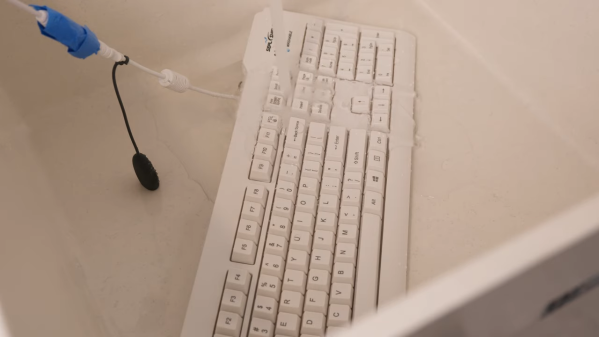
Digging further through business supply catalogs lead [tzukima] to discover further products aimed at hospital and medical users. In particular, there are a wide range of keyboards and mice that are designed for use in these environments. The most typical examples are regular peripherals that have simply been encased in silicone to make them easier to wash and disinfect where hygiene is paramount. Others, like the SealShield keyboard and mouse, use more advanced internally-sealed electronics to achieve their washable nature and IP68 ratings. These are peripherals that you can just throw in a dishwasher if you’re so inclined.

It’s a great look at weird hardware that most of us would never interact with.

Continue reading “The Quirky Peripherals In Medical PC Setups”

Smallest Gaming Mouse Has Crazy Fast Polling Rate And Resolution

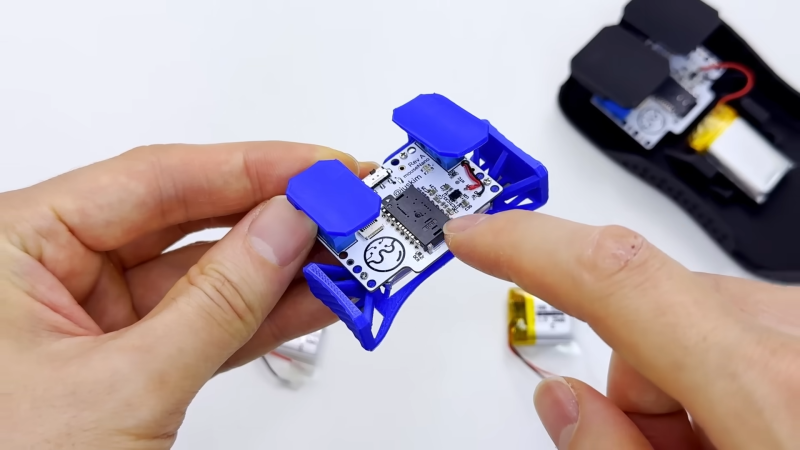
[juskim] wanted to build a tiny mouse, but it couldn’t just be any mouse. It had to be a high-tech gaming mouse that could compete with the best on raw performance. The results are impressive, even if the final build is perhaps less than ideal for pro-level gameplay.

The build riffs on an earlier build from [juskim] that used little more than a PCB and a 3D-printed housing to make a barebones skeleton mouse. However, this one ups the sophistication level. At the heart of the build is the nRF54L15 microcontroller, which is paired with a PAW3395 mouse sensor which is commonly used in high-end gaming mice. It offers resolution up to 26K DPI for accurate tracking, speeds up to 650 ips, and 8 kHz sampling rates. Long story short, if you want fine twitch control, this is the sensor you’re looking for. The sensor and microcontroller are laced together on a custom PCB with a couple of buttons, a battery, and a charging circuit, and installed in a barebones 3D-printed housing to make the final build as small as possible.

The only real thing letting the design down is the mouse’s key feature—the size. There’s very little body to grab on to and it’s hard to imagine being able to play most fast-paced games at a high level with such a tiny device. Nevertheless, the specs are hardcore and capable, even if the enclosure isn’t.

[juskim] loves building tiny peripherals; we’ve featured his fine work before, too. Video after the break.

Continue reading “Smallest Gaming Mouse Has Crazy Fast Polling Rate And Resolution”

Tiny Typing Tutor Tuts At Your Incorrect Shift Usage

There are a wide range of typing tutors out there that will educate you in the glorious skill of touch-typing. Many just focus on the basics, ranking you on accuracy and speed. However, there’s a nifty little online tutor that can help you with one skill specifically—it’s aim is to teach you to use the Shift keys “properly.”

The tutor is the work of [KaarelP2rtel]. The unnamed tool is intended to guide you into instinctively using both the left and right Shift keys as you type. Many typers default to using one or the other. This can lead to fumbles and slowdown when one hand is trying to hit both the Shift key and a letter.

[KaarelP2rtel]’s belief is that the “correct” method is to press the Shift key with the opposite hand to the one typing the letter, and this typing tutor enforces that practice. You must type repeated capitalized words one after the other, and you’ll only progress quickly if you’re hitting the opposite Shift key each time. Unconventional keyboardists fear not—you can convert the tool to work with Dvorak or Colemak layouts if necessary.

Is this a crucial tool for the fast typist? The jury’s out on that one. It’s entirely possible to hit in excess of 120 wpm without this technique for most normal passages of text, using dynamic finger reassignments when hitting Shift with the same hand. Still, the diligent may find it a useful upgrade to their existing typing abilities.

Source code is on GitHub for the curious. Notably, it’s a very small website that weighs in at just a few kilobytes; it would be a rather fitting part of the Small Web, which we’ve explored before!

Building A Mechanical Keyboard As A Learning Project

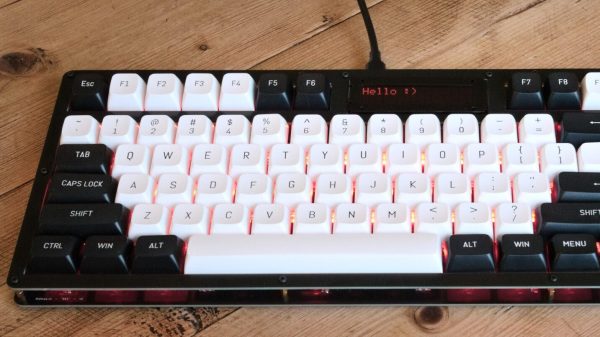
[Thomas Rinsma] wanted to learn about designing PCBs. Thus, he set about a nifty project that would both teach him those lessons and net him something useful in the process. The result was kb1, a mechanical keyboard of his own design!

You might think [Thomas] would have started with a basic, barebones design, but he didn’t shy away from including some neat features. His keyboard has a “tenkeyless” layout, and uses Cherry MX-style switches, as has become the norm in the mechanical keyboard world. It has a 16×2 LCD display for user feedback, a rotary encoder, and it even has an RGB backlight for every key thanks to SK6812 addressable LEDs. Running the show is a Raspberry Pi Pico, equipped with the KMK firmware. The board actually uses twin PCBs as the enclosure, which is a nifty trick.

It’s remarkably fully featured for a first time build.

Mind Control… No, Not Like That

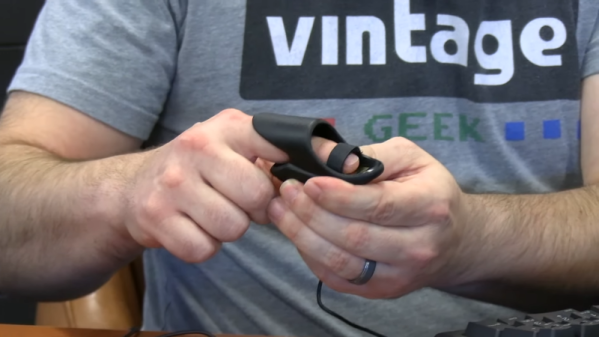
[Vintage Geek] found an interesting device from 1996 called “MindDrive” which claims you can control your computer with your brain. Oddly, though, it doesn’t connect to your head. Instead, it has a little finger sensor that looks like a pulse-ox sensor. Did it work? The video below will show you what it can and can’t do.

The company claims the device is the result of seven years of research. We suspect it is little more than a galvanometer, like a kid’s toy lie detector. There is a gold sensor and a Velcro strap. It is hard to imagine that it was feasible that “thinking left” would cause a change in your finger that the device can interpret.

Continue reading “Mind Control… No, Not Like That”

Why You’ve Never Heard About Nintendo’s U-Force

90’s kids think that the Power Glove was the coolest game peripheral of the epoch. We might have thought so too, until we heard about Don’t Touch: The Story of the U-Force from [The Gaming Historian].

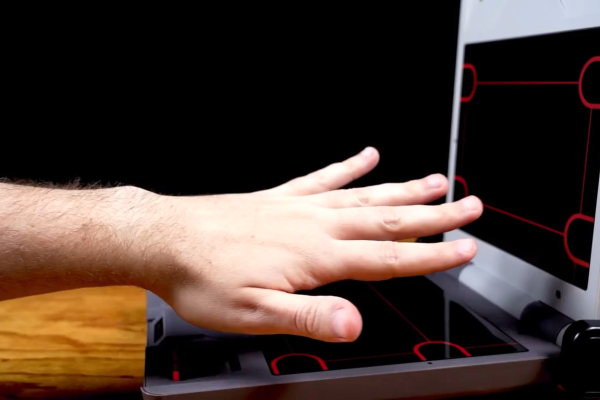
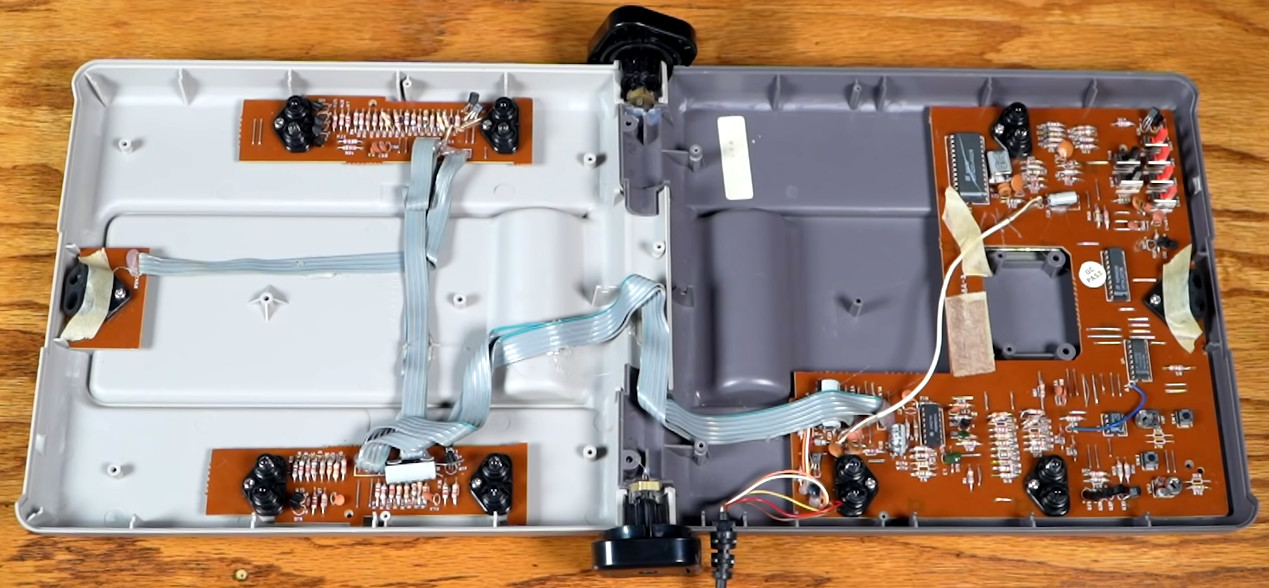
The device itself folded up like a laptop, and on the two surfaces had four IR LED/sensor pairs. All of these combined would localize your fist in space for playing Mike Tyson’s Punch Out, or would work with various other passive controller add-ons like a flight yoke for playing Top Gun. (One of the coolest bits is the flip-out IR reflectors triggered by the buttons in the yoke.)

All-in-all, the video’s take is that a number of factors doomed the U-Force to play second fiddle to the Power Glove. Battling Mattel’s marketing prowess is obvious, but other things like manufacturing problems due to bad hinges and inconsistent IR sensors delayed release and added cost. In the end, though, [Dave Capper], the U-Force’s inventor, puts it down simply to non-convincing gameplay. There were no blockbuster games that used it to its full potential.

At the time, the U-Force utilized more IR LEDs than any other consumer electronic device.

We think there’s interesting hacker potential in a simple interface like this. Perhaps its biggest Achilles heel outside of the lack of a killer application was the fact that it required calibration. We can imagine all sorts of awesome interactions, and we’re not afraid of a little tweaking. Or maybe we would update the sensors to something more modern, like those inexpensive time-of-flight distance units.

Thanks [Karl Koscher] for bringing this documentary to our attention in the comments about the very similarly interesting laser theremin project we featured last year. It’s definitely opened our eyes to an old interaction of the past that would seem no less magical today.

Continue reading “Why You’ve Never Heard About Nintendo’s U-Force”