GE Color Effects Hacking For The Nautically Inclined

ge-color-effects-controller

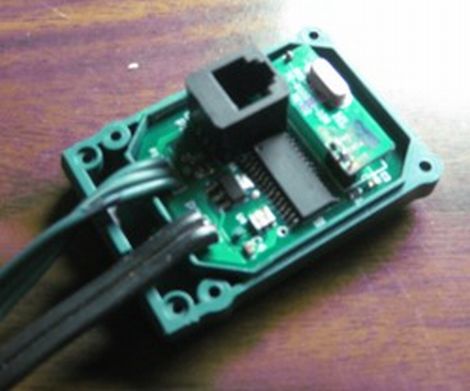
[Jim] wrote in to share some work he did with GE Color Effects LED lights in an effort to create a light display for his boat. He saw our coverage of the Color Effects G-35 hacking efforts by DeepDarc last year, and knew that they would be prefect for the boat. He did some careful scouring of eBay to score 8 strings of lights at bargain basement pricing, then he got down to the business of hacking them.

He originally built a control circuit using a single PIC18F, but just before he started to put everything together, he realized that wiring everything up would be a huge undertaking. Going back to the drawing board, he decided it would be best to replace the lights’ stock board with one of his own. Now, he uses a single master controller board to send messages to his slave “pods”, significantly cutting down the amount of wiring required for the project.

The display looks great as you can see in the video below, though as many do, [Jim] has plenty of improvements in mind for the future.

Continue reading “GE Color Effects Hacking For The Nautically Inclined”

Web-enabled Coffee Maker Over-complicates Your Break Time

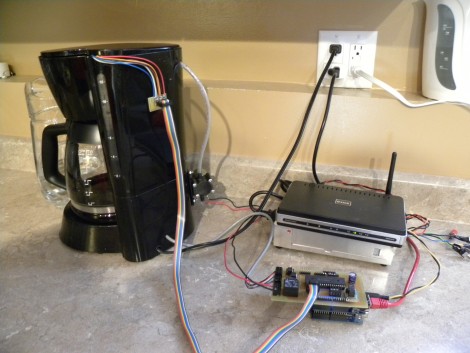
Some think that grinding the beans and filling the coffee maker is part of the coffee-drinking ritual, but [Jamie] isn’t one of them. Instead, he’s been working to make this coffeemaker a web-enabled device. He built it as part of a class project, and has implemented most of what you need to make a cup of Joe automatically.

You can see a small pump attached to the back of the coffee maker. It sucks water from a pitcher (slightly visible to the left of the coffee maker) to fill the reservoir. He experimented with a couple of different water level sensing solutions. His most recent is a PCB with several traces of different length. As those traces are covered by water, a voltage can be read via ADC to establish water level.

He’s using an Arduino and Ethernet shield to add connectivity for the device. The problem is that there aren’t enough ADC pins left on the Arduino to read the water level sensor. Because of this, he added a self-build shield that uses a PIC to do the ADC measurements and push digital data across to the Arduino. A bit complicated, and it doesn’t load the grounds automatically (yet?). But that’s not to say we don’t appreciate complicated coffee hacks.

Lamp Fading And Remote Control For The Lazy

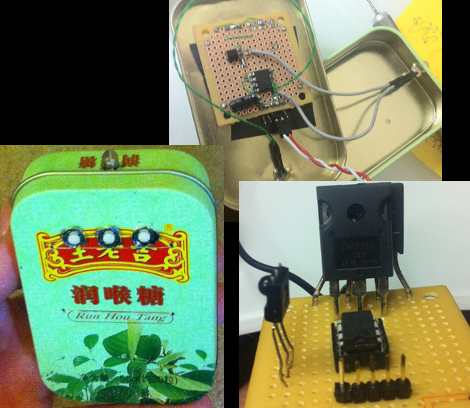
[Dmitry Grinberg] has to walk all the way across his bedroom to switch the lamp on and off. The drudgery of this finally became too much, so he built a remote control and added dimming for good measure. Above you can see the circuitry for the remote and the receiver, as well as the finished remote housed in what he calls a ‘Chinese Altoids tin’.

After the break you’ll find [Dmitry’s] demo video. The remote control is quite responsive, and the dimming has great resolution. That’s thanks to a power N-channel MOSFET which switches the AC with the help of a full wave rectifier. The PIC 12F617 that controls the MOSFET is powered separately, and [Dmitry] mentions that you must use a transformer and not a switch-mode power supply to avoid a fire. We’d like to know more about this, so leave a comment if you are able to explain further.

The remote and receiver communicate via Infrared. The protocol is operating with 38 kHz signals using an easily sourced receiver tuned to that frequency. [Dmitry] shares all the details about the encoding scheme that he uses. Recreating this communications pairing is a great way to test your understanding of this technique. But if you need a refresher, here’s a tutorial to push you in the right direction. Continue reading “Lamp Fading And Remote Control For The Lazy”

Adding RS232 To A Multimeter The Hard Way

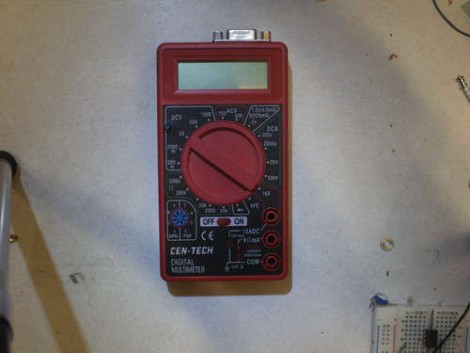
You might want to store information from a multimeter to be graphed over time. This comes with pretty much all of the high-end professional models. But if you buy a super cheap meter you can bet this isn’t an option. [Jazzzzzz] has found a way to pull the data from a $4 meter via RS232. It’s not impossible, but we definitely think he’s doing it the hard way. That’s because he’s not just tapping into a dormant feature. He’s actually adding a microcontroller to sample the data and push it via the RS232 protocol.

On the bright side, this is easier than building a multimeter from scratch. The sampling circuits are still being used, with a PIC 16F688 intercepting the signals as they enter the stock microcontroller. The signal he was after comes into the chip on just one pin, but to get the readings right on the PIC he had to use an OpAmp. That’s only part of the puzzle as he also needed a way to tell what the selector switch was set at. In the end, adding a potentiometer and reading its value let him calculate the position.

[Thanks Karl]

Making An RF Controlled Light Switch Work With IR

ir-rf-light-switch

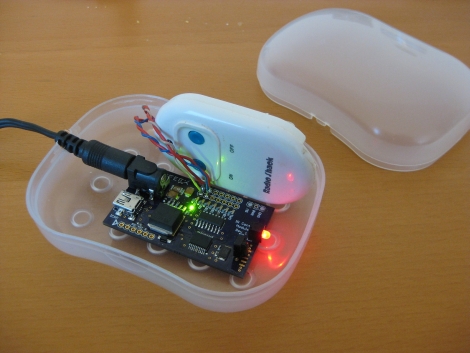
[Gary] had an RF triggered light switch kicking around, and wanted to find a way to control his lights using a home theater remote. The switch, which he bought from RadioShack years ago, came with a simple remote that uses two buttons to toggle the lights on and off. While you might think that switching from RF to IR control would be a step backwards, [Gary] really just wanted to consolidate remotes more than anything else.

He designed a circuit board specifically for interacting with the remote half of his RF controller. It sports a PIC16F628A micro controller, which is tasked with processing IR commands from his home theater remote and triggering the lights when requested.

The code he developed for the project is relatively simple, but very useful all the same. When his board is powered on, it stores the first IR code it receives, then retains it as long as it stays powered on. This lets [Gary] use any button on his remote to turn the lights on and off, without any IR codes permanently defined in software.

As you can see in the video below, the modified switch works just as intended, saving [Gary] from having to walk all the way to the light switch when it’s time to fire up a movie.

Continue reading “Making An RF Controlled Light Switch Work With IR”

Wireless MIDI Piano Glove

Sometimes you just don’t have space for a baby grand. [Abdullah] got around this problem and built a virtual wireless MIDI piano. Unlike it’s inspiration, it’s not bad but we still love it.

[Abdullah] got his hands on some flex sensors and attached them to a glove. These resistive sensors are put through a voltage divider and sent to a microcontroller (a PIC16F778, we believe) and corresponding MIDI notes are chosen. These MIDI notes are sent to a computer and played over a speaker.

Right now, only a single arpeggio is coded into the microcontroller. Depending on which finger is bent shifts this arpeggio up and down the keyboard. That being said, the firmware can be easily modified to recognize standard piano fingering so chords can be played. The only issue is moving the hand up and down the keyboard.

[Abdullah] is planning on making his glove completely wireless with a microcontroller and battery sewn into the glove. Here’s to hoping he’ll keep us posted.

Check out [Abdullah]’s demo after the break.

Continue reading “Wireless MIDI Piano Glove”

Using WebSocket With PIC Microcontrollers

[Blaise Jarrett] has been grinding away to get the WebSocket protocol to play nicely with PIC microcontrollers. Here he’s using the PIC 18F4620 along with a Roving Networks RN-XV WiFi module to get the device on the network. He had started with a smaller processor but ran into some RAM restrictions so keep that in mind when choosing your hardware.

This project was spawned after seeing the mBed feature a few days back which combined that board along with a WebSocket library and HTML5 to pull off some pretty amazing stuff. [Blaise] doesn’t have quite as much polish on the web client yet, but he has recreated the data transfer method and improved on that project by moving to the newer version 13 of WebSockets. The protocol is kind of a moving target as it is still in the process of standardization.

The backend is a server called AutoBahn which is written in python. It comes along with client-side web server examples which gave him a chance to get up and running quickly. From there he got down to work with the WebSocket communications. They’re a set of strings that look very much like HTML headers. He outlines each command and some of the hangups one might run into with implementation. After reading what it takes to get this going it seems less complicated than we thought, but it’s obvious why you’ll need a healthy chunk of RAM to pull it off.