Raspberry Pi Zero, Or Minus One?

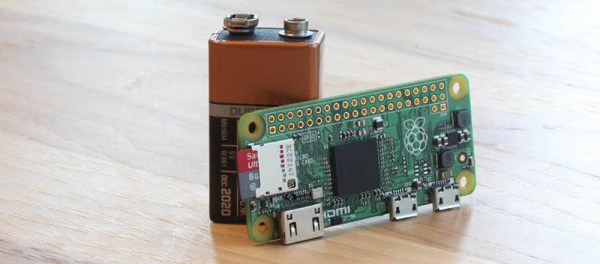
The Wall Street Journal reported that [Eric Schmidt] of Google and now Alphabet Inc, promoted the idea of an inexpensive version of the Raspberry Pi to the Raspberry Pi foundation’s [Eben Upton]. Apparently [Upton] accepted this recommendation despite existing plans to make a more expensive, more powerful version of the Pi. The outcome is the Raspberry Pi Zero that sells, in some places, for $5.00 and was given away for free on the cover of the MagPi magazine.

From the WSJ article:

“He [Schmidt] said it was very hard to compete with cheap. He made a very compelling case. It was a life-changing conversation,” Mr. Upton said, adding that he went back to the lab and scrapped all the engineering plans for more expensive versions of future Pi computers. “The idea was to make a more powerful thing at the same price, and then make a cheaper thing with the same power.”

Plans were scrapped. The more powerful Pi 2 was released at the price point of existing Pis, and now we have the Zero.

Pi’s Purpose

Foundation Mission

The Raspberry Pi Foundation is a registered educational charity in the UK. The purpose of this Foundation according to their About Us page is to, ‘advance the education of adults and children, particularly in the field of computers, computer science, and related subjects.’

Why is the Raspberry Pi Foundation so concerned about computer education? From the 1990s onward, fewer and fewer A Level students in the UK applying to study Computer Science had previous experience as hobbyist programmers. An applicant in the 2000s usually might have only done a little web design.

Why then does the Raspberry Pi Zero exist? [Upton] also told Cnet, “We really hope this is going to get those last few people in the door and involved in computer programming.”

Very good, but how well does the Zero support this goal or address their concerns?

Continue reading “Raspberry Pi Zero, Or Minus One?”

Hackaday Links: November 29, 2015

The Raspberry Pi Zero was announced this week, so you know what that means: someone is going to destroy a Game Boy Micro. If you’re interested in putting the Zero in a tiny handheld of your own design, here are the dimensions, courtesy of [Bert].

[Ahmed] – the kid with the clock – and his family are suing his school district and city for $15 Million. The family is also seeking written apologies from the city’s mayor and police chief.

There are a lot — a lot — of ‘intro to FPGA’ boards out there, and the huge variety is an example of how the ‘educational FPGA’ is a hard nut to crack. Here’s the latest one from a Kickstarter. It uses an ICE40, so an open source toolchain is available, and at only $50, it’s cheap enough to start digging around with LUTs and gates.

Over on Hackaday.io, [Joseph] is building a YAG laser. This laser will require a parabolic mirror with the YAG rod at the focus. There’s an interesting way to make one of these: cut out some acrylic and beat a copper pipe against a form. A little polish and nickel plating and you have a custom mirror for a laser.

You know those machines with wooden gears, tracks, and dozens of ball bearings? Cool, huh? Tiny magnetic balls exist, and the obvious extension to this line of thought is amazing.

[David Windestål] is awesome. Completely and totally awesome. Usually, he’s behind the controls of an RC plane or tricopter, but this time he’s behind a slo-mo camera, an RC heli, and a watermelon. That’s a 550-sized heli with carbon fiber blades spinning at 2500 RPM, shot at 1000 FPS.

How do you label your cables? Apparently, you can use a label printer with heat shrink tubing. Nothing else, even: just put heat shrink through a label maker.

First Raspberry Pi Zero Hack – Piggy-Back WiFi.

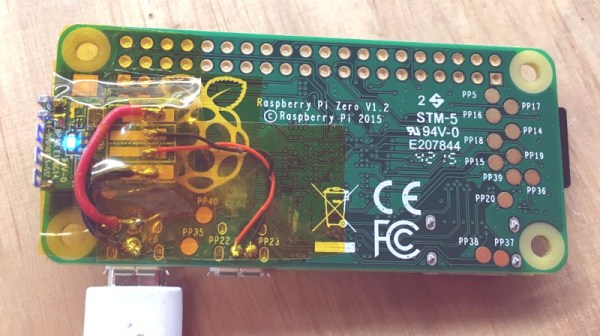
And we have the first Raspberry Pi Zero hack! In less than 72 hours from the official release announcement [Shintaro] attached an Edimax WiFi USB Adapter directly to the USB solder pads on the Pi Zero. He couldn’t bear to disturb the small dimensions of the Pi Zero by using the USB On-the-Go (OTG). The OTG is needed to convert the micro-USB connector on the board to a full USB-A connector.

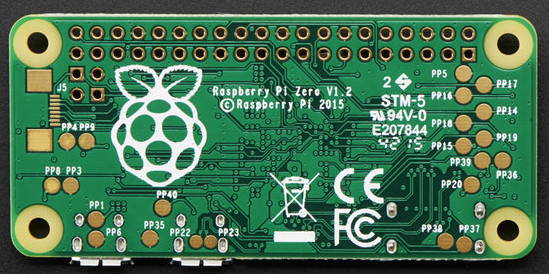
The case was removed from the Edimax and the device and Zero wrapped in Kapton to insulate the exposed solder points. Power was taken from the PP1 and PP6 points on the back of the board. These are the unregulated inputs from the USB power so should be used with caution. Some cheap USB power supplies can put out more that 5 volts when first connected and that might let the smoke out of a device.

raspberry_pi_quarter

The data wires were connected to PP22 and PP23, also on the back, and behind the USB data connector. Since USB is a differential signal these wires were carefully kept of equal length to avoid distorting the signal.

An SD card was created and edited on a Raspberry Pi B 2 to set the WiFi credentials. Inserted into the Zero it booted fine and started up the WiFi network connection.

Congratulations, [Shintaro] for the first Hackaday Raspberry Pi Zero hack. Is that a Hack-a-Zero-Day hack?

The $5 Raspberry Pi Zero

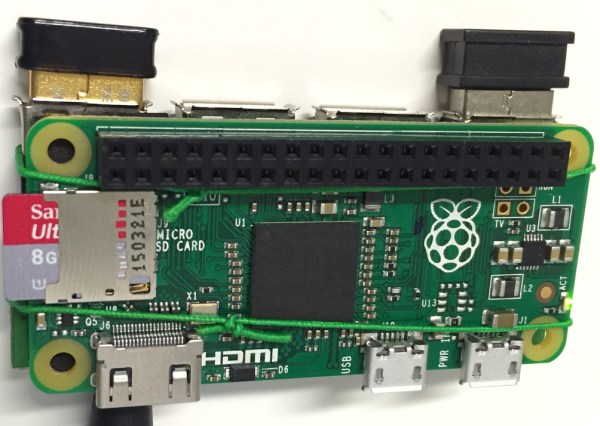
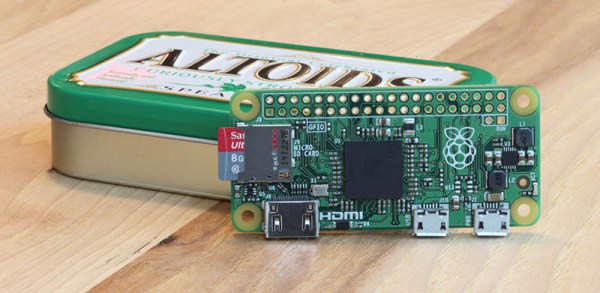
Rumors about a new Raspberry Pi have been circulating around the Internet for the past week or so. Speculation has ranged from an upgraded Model A or compute module to a monster board with Gigabit Ethernet, USB 3.0, SATA and a CPU that isn’t even in production yet. The time is now, and the real news is even more interesting: it’s a $5 Raspberry Pi Zero. It’s the smallest Pi yet, while still keeping the core experience.

Continue reading “The $5 Raspberry Pi Zero”