Investigating The Health Impacts Of UFPs And VOCs From FDM Printers

FDM 3D printing is fairly messy on a molecular scale, with the filament being heated up to temperatures high enough to melt it, which produces ultra-fine particles (UFPs) and volatile organic compounds (VOCs) in addition to the new plastic item on the build plate. Recently [Simon Pow] got somewhat worried about this pollution considering that he spends a considerable amount of time in the same room as FDM printers, sharing air.

While there is a lot of context within the topic, it’s notable that even ‘low risk’ PLA already emits formaldehyde, a group 1 carcinogen. Studies like this 2022 one by [Taehun Kim] et al. on formaldehyde, PM10 and PM2.5 show that common filaments like PLA, ABS and TPU score pretty bad here, even compared to the often maligned resin printing, also in the study. Having good ventilation in a room helps a lot, but it doesn’t reduce the levels to zero.

As noted by [Simon], PETG is much better in the VOC area, while TPU emits siloxanes, some of which are dangerous but most are considered harmless. Once you hit nylon (e.g. PA6), you’re adding caprolactam, which is mildly toxic but mostly just an irritant. Where things get serious is with ABS and ASA, when you add styrene to the mix. This substance is very dangerous, being toxic, mutagenic and possibly carcinogenic, but on the plus side it smells kind of sweet.

Polycarbonate (PC) emits BPA, with its worrying long-term health implications, while carbon fibers in particular can have asbestos-like long-term effects, as we covered previously. Definitely wear PPE while doing things like sanding CF parts and safely dispose of any debris.

Of course, you can do something about this problem, such as having an enclosure around the printer, with HEPA filtration and activated carbon, potentially exhausting into the outside air. The options here are covered in the video, including a BentoBox filter. For [Simon] the biggest improvement – as measured by a whole room sensor – came from a big fan in the window, while the default activated carbon filter in the Bambu Lab printer did effectively nothing.

The problem here is mostly one of long-term exposure, so even basic precautions like filtration and ventilation can already make all the difference. Ideally you’d not have the printer in the same room as where you work, of course, but adding a good filtration setup doesn’t have to be expensive or hard.

Continue reading “Investigating The Health Impacts Of UFPs And VOCs From FDM Printers”

A DIY 3D Printing Filament Dryer

In a recent video [Saša Karanović] revisits the DIY filament dryer that he gave a shot a couple of years ago. Back then he reused an existing filament dryer, adding a custom controller and such to improve its performance.

This technically-not-fully-DIY dryer got some feedback since then, and thus the V2 version is an example of how to better DIY such a dryer, including a custom PCB and a GitHub project for all the details.

Those who just want to dive into the documentation for assembly and the BOM can look at the available documentation. At its core the whole assembly consists of some kind of container like the shown 5L food storage type, along with an SHT30 temperature and humidity sensor and 100 K NTC temperature sensor. These connect to the controller board which then switches on or off the 12 V polyimide resistive heater.

One thing that could be improved here is that the saturated warm air has nowhere to go. This is a common issue with filament dryers and why it’s recommended with even commercial filament dryers like the common Sunlu types to leave them slightly ajar so that the moist air can be replaced with cooler air that can much more readily absorb moisture.

Continue reading “A DIY 3D Printing Filament Dryer”

Electroplating 3D Prints Without Requiring A Big Vat

Electroplating 3D prints is a good way to get a pretty nice coating on even a basic PLA part, but generally you’re expected to dunk the entire part into a big vat with electrolyte after coating it with the requisite conductive paint layer. This is great for small parts, like a ring you’d put on a finger, but gets rather silly when it’s a much larger part, such as the one in [Hendrik]’s recent video. Out of curiosity he tried to see whether rotating the part through a much smaller vat would still get you an even coating, or not.

Perhaps ironically this process required building a custom vat out of acrylic, as well as an entire rig to hold up the part and gently rotate it. This highlights the main disadvantage of this approach, in that unless you’re doing a small production run or otherwise get to re-use the rig a lot it’s a lot of extra effort.

That said, the rotation is controlled by an ESP32 and a stepper motor along with a requisite stepper driver, with the most exotic part being the whole custom PCB and enclosure, all of which can be used repeatedly. With all of that tested and confirmed working, the part to be plated was sanded, sprayed with conductive paint and hooked up to the rotating rig for an overnight run.

Following that the part’s new copper coating was polished before more layers of electroplating were applied to get the desired two different colors from different metals. Along the way no issues were found with this method of rotating electroplating, so if you regularly struggle with oversized parts to electroplate, this would seem to be a viable method.

Continue reading “Electroplating 3D Prints Without Requiring A Big Vat”

How To Make Steel That Breathes

There are plenty of porous materials out there that we’re all readily familiar with. Fabrics and wood are great examples, allowing liquids or gases to pass through to a certain degree—a property which is useful or problematic depending on the application.

Metals, however, are not something we would readily consider to be porous. They are solid, unyielding, and impermeable. However, with the right techniques, it is possible to produce so-called “breathable” steel, which has particularly interesting applications in the molding industry.

Continue reading “How To Make Steel That Breathes”

A Status Screen For Bambu Labs Printers

If you’ve got a Bambu Labs printer, it’s usually pretty straightforward to keep an eye on it via the onboard display or the various apps the company has released. However, if you want a dedicated display somewhere remote from your printer, you might like this build from [Keralots].

The project is based on an ESP32-S3 Super Mini, paired with a 1.54″ TFT display with a 240 x 240 resolution. It’s set up to talk to Bambu Labs printers over MQTT with TLS. It harvests status data and uses it to display a real-time dashboard with critical printer parameters display on arc gauges. There’s also plenty of live stats to pore over, as well as buzzer notifications if you want auditory alerts about what is going on. It’s possible to use with just about any Bambu Labs printer with a Bambu Cloud access token; otherwise, you can tinker with LAN Direct connections on certain models, but you might need to enable Developer Mode depending on your rig.

If you want to monitor your printer’s vital statistics at a glance, this project is a great way to do it. It breaks out the fundamental numbers in a clear and obvious fashion that’s a little easier to parse quickly compared to the interface of the official software. We’ve featured similar builds before, too. If you’re also paranoid about prints and using that to motivate you towards creating useful hardware, don’t hesitate to let us know on the tipsline. 

PreFlight Slicer Brings Added Part Strength Feature, And Many More

Interested in taking some wild new 3D printing features for a test drive? preFlight is a free and open source slicer that brings a host of processing improvements as well as fascinating new features and interesting twists on old ones. There are almost too many to list, so here are a few that caught our eye.

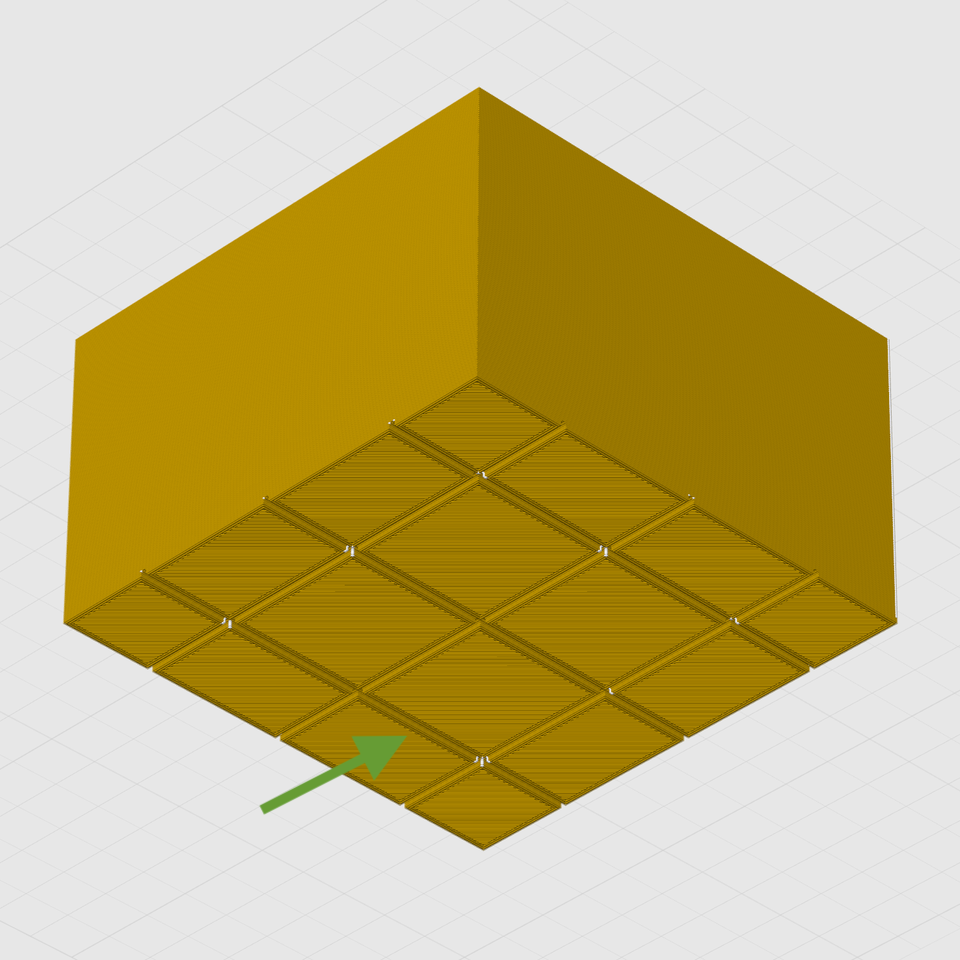
Cross-sectional view of Interlocking Perimeters, which increases Z-strength. Unlike brick layers, layer height stays constant.

Want to mix and match different support types on the same object? No problem. How about use Nip & Tuck seams to better hide where layers start and stop? You can emboss images directly onto print surfaces with a real-time preview and use smart bridging for counter-bored holes. We particularly like the ability to preview a sliced object from the side instead of just by layer. That’s not all, either.

Those features alone are pretty intriguing, but there’s one in particular that is particularly relevant to creating stronger parts. Interlocking Perimeters increases layer bonding to increase object strength. Unlike brick layers, which staggers layers vertically, interlocking perimeters plays with spacing and compression to increase bonding in the Z axis while keeping layer heights constant. This is possible thanks in part to the greater control offered by Athena, the new perimeter generator.

There are plenty more features — like a full Python runtime embedded directly into the slicing pipeline, and a host of export pathways — so check out the GitHub repository for added detail and let us know in the comments if you give it a try.

Using A Nintendo Switch To Speed Up A 3D Printer

3D printers are almost never fast enough. [Cocoanix] had a Prusa MK3S with this very problem. He found it to be disappointingly tedious when completing even simple prints, and sought a way to make it faster. Thus, he grabbed a Nintendo Switch and got to work.

It might sound like an odd choice, and that’s because it is. There’s no special magic inside a Nintendo Switch that makes 3D printers faster – it’s just that the handheld console was a useful platform on which to run Klipper. As [Cocoanix] explains, Klipper is designed to run on faster general-purpose computers compared to the more limited microcontrollers used in some printers. It’s designed to off-load complex motion processing tasks to a faster CPU, while the printer’s onboard microcontrollers are freed up to simply handle the low-level tasks of driving the motors and so on. An older printer equipped with Klipper can often print faster, while implementing techniques like input shaping to further improve speed as well as print quality.

It’s worth noting that you don’t have to use a Nintendo Switch for this. It’s just a good hook for the YouTube video. Typically you’d use a Raspberry Pi or some other computer instead, but the fact it runs on a jailbroken console is amusing nonetheless. It’s also cool to see the results – in this video, [Cocoanix] got the Benchy printing time down from 90 minutes to just 8.

We’ve previously discussed the benefits of Klipper at length.

Continue reading “Using A Nintendo Switch To Speed Up A 3D Printer”