Retro Video Games Sounds…for Your Toilet

super_mario_toilet

After reading about a Super Mario Brothers themed bathroom, [Jonathan] decided that it would be pretty cool to have his toilet play the “warp pipe” sound whenever anyone flushed.

He grabbed a small sound drop key chain on eBay and disassembled it to see how things worked. Once he figured out which solder pads corresponded to the warp pipe sound he added a few wires that, when shorted, trigger the sound effect.

He debated as to how the sound generator should be wired to the toilet, and was pretty reluctant to place the key chain inside the tank due to concerns about sound volume and water damage. He ultimately decided to trigger the sound effects using triboelectric charge, much like those touch lamps from the ’80s. He rigged up a simple circuit that is connected to both the toilet handle as well as the water intake valve on the wall. When someone touches the handle, the small charge that is present in their hand triggers the sound effect as you can see in the video below.

Instead of using a standard project box, he opted to build a small warp tube replica from cardboard and paper, which really brings everything together nicely.

While he says that the circuit is pretty sensitive, triggering at odd times or not at all, we still think it’s awesome.
Continue reading “Retro Video Games Sounds…for Your Toilet”

Converting A Laptop Computer Into A Desktop Machine

[Michael Chen] found himself in possession of a thoroughly broken laptop. The hinges connecting the screen to the body of the computer were shot, and the battery was non-functional. After a bit of thinking he decided that it wouldn’t take much to resurrect the hardware by turning it into a desktop machine.

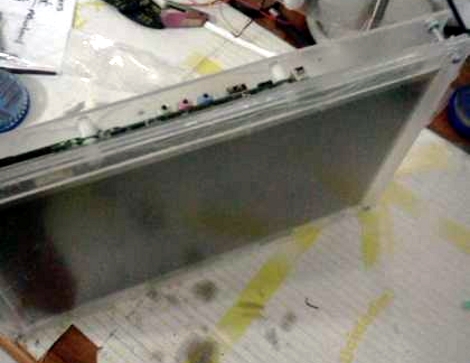
At the core of this hack is the hardware that you must keep for the computer to function. That is, the LCD screen, the motherboard, hard drive, and the AC/DC brick that powers it. [Michael] ditched everything else; the case, keyboard, trackpad, webcam, etc. Next he started building his own enclsure out of acrylic. First he sandwiched the LCD screen between a full sheet of acrylic and a bezel that was one inch wide on each side. Next, another full sheet was used to mount the motherboard and hard drive. You can see how the three sheets are connected by nuts and bolts in the image above. It looks like the only other alteration he made was to relocate the power button to a more convenient spot.

Once a USB keyboard and mouse are added he’s back up and running. We’ve got our eye on an old XP laptop that might end up seeing this conversion to become a dedicated shop computer. We just need to build in some more dust protection.

Beginner Concepts: Designing Transistor Control Circuits

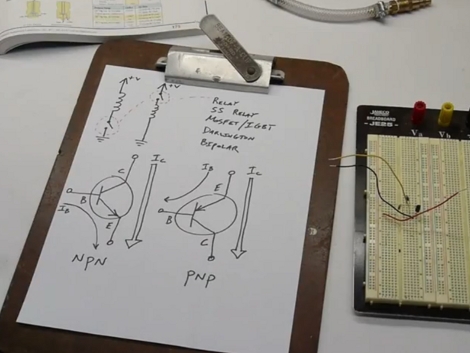
Need to switch something on or off using a microcontroller? Using a transistor is one of the best ways to do this, but how exactly do you design properly for transistor switching? [Ben Krasnow] put together a tutorial in which he does an excellent job of explaining the ins and outs of designing transistor control circuits.

We’ve embedded his twenty-minute video after the break. In it he talks about the use of transistors, the difference between NPN and PNP transistors, and the design specifics you need to know when working with them. We think that beginners will find [Ben’s] demonstration of how to calculates Hfe, which is the base current necessary to fully switch the transistor. If this is gibberish to you, have no fear. [Ben’s] instruction is clear and easily understandable.

The one thing we missed in the video is clarification about base current protection for PNP transistors. [Ben] mentions that there’s no easy circuitry that can be used on the base of a PNP  to regulate flow from the emitter to the base, but he doesn’t elaborate. Otherwise, it’s everything we could have wanted on the topic.

Continue reading “Beginner Concepts: Designing Transistor Control Circuits”

Halloween Props: Trash Can Jack-in-the-box

Last year [Bob] didn’t let the little kids get some candy and continue on their way without giving them quite a fright first. His modified trashcan lures you in and then scares the bejesus out of you.

He calls it Oscar the Trash-bot. The image on the left shows a ghoulish-looking head peeking out of the partially opened lid of the trash can. It has some movement, but is slow and quiet. The small, slow movements catch your eye and seem safe enough. Until you get a bit closer. A range finder triggers when the unsuspecting victim draws near, causing a much bigger, faster, and bloodier beast to pop up and stick out a claw. Check out the two videos after the break. One of them shows the claw mechanism, which is made with the help of a brake cable and shows very realistic and blazingly fast movement. The other is an overview of how the entire setup works.

Continue reading “Halloween Props: Trash Can Jack-in-the-box”

LiveLight Is An Expertly Crafted Ambilight Clone

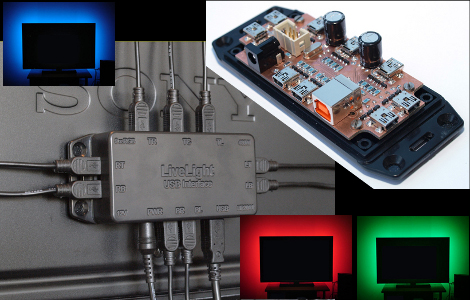
[SunWind] (Edit 2018: who now goes as [nerdaxic]) developed his own version of the Phillips Ambilight system which he is calling LiveLight. We’ve seen more than a few of these hacks, many of them are based around Arduino, and most use LED strip lighting. [Nerdaxic] is using strip lighting as well, but his design is clean and polished quite a bit more than anything else we’ve seen. In our minds this would be welcomed by even the most discriminating of A/V enthusiasts.

He found just the right size of project box and managed to fit everything in on a nicely milled PCB. The enclosure itself has also been milled to allow the mini USB B connectors for each of the nine RGB LED strips. But he didn’t stop there, the top of the enclosure has labels milled into it to help when hooking everything up.

An ATmega32 addresses the LED strips based on data pushed in from a computer. An on-board FTDI chip adds USB connectivity and [nerdaxic] used a hack to rewrite the EEPROM on that chip so that it enumerates with the name “LiveLight USB Interface”. A program called Boblight gathers the data from the currently playing video. You can see the final project in the video embedded after the break.

Continue reading “LiveLight Is An Expertly Crafted Ambilight Clone”

Washing Machine Mechanical Timer Replaced With Microcontroller

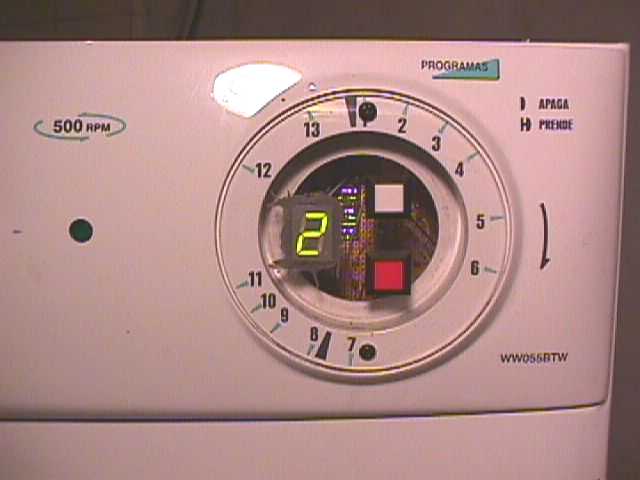
After the electromechanical timer on [Paul Canello’s] washing machine broke for the third time he decided he needed to stop repairing it and find a more permanent fix. He decided to build his own microcontroller-based system for washing his clothes (translated). Caution: The image links on [Paul’s] page seem to be broken and will unleash a never-ending storm of empty pop-up windows if you click on them. We’ve embedded all of the images after the break to save you some hassle.

The controller on a washing machine is nothing more than a mechanical alarm clock. It starts the cycle, then moves through various modes based on the passage of time. [Paul] started his hack by observing how long the delay between cycles was meant to be, and recording which parts of the machine were switched on and off at each stage.

It turns out that when the mechanical knob is turned, it reroutes how water flows through the detergent chamber. Since that knob won’t be in the new system [Paul] came up with a way for the microcontroller to handle this by using a servo motor. The rest of the control involves relays to control the motor, and solenoid valves for the water. There are also pressure switches that give feedback for the level of the water in the machine. A PIC 16F872 serves as the new controller, with the help of a 7 segment display, a buzzer, and a pair of buttons as the user interface.

This is an older project, but after reading about the Arduino controlled dishwasher [Ramiro] sent us a link. Thanks! Continue reading “Washing Machine Mechanical Timer Replaced With Microcontroller”

Faking High-speed Video Photography Of Repetitive Events

[Destin] has been doing some high-speed and high-resolution video photography using a standard DSLR. He accomplishes this using a bit of ingenuity to capture images of repetitive events at slightly different points in time.

The banner image above shows a bullet travelling through a set of matchsticks. [Destin] uses the sound of the gun firing to trigger the flash that captures the image. A piezeo transducer picks up the sound, triggering a precision pulse generator. That pulse generator then triggers the flash, adding a delay based on the settings. In this way, [Destin] can capture video by firing a bullet for each frame, but adjusting the delay period of the pulse generator to capture the image when the bullet is in a slightly different place from the previous frame. It’s an old technique, but after some post-processing it produces a high-quality output without sinking thousands of dollars into an actual high-speed camera. Check out the video we’ve embedded after the break.

We like this guy’s style. We saw him strapping a camera onto a chicken back in December and we hope to see a lot more from him in the future.

Continue reading “Faking High-speed Video Photography Of Repetitive Events”