A Big Transformer, Because It’s Cool!

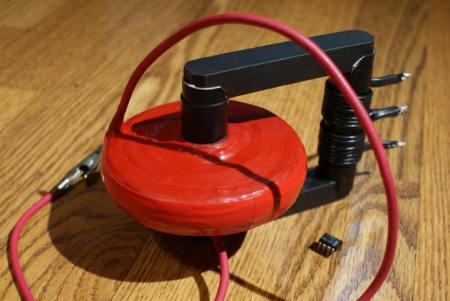
[Grenadier] Had some spare wire, electrical tape, and a giant ferrite core laying about and decided to create a massive and pretty snappy looking disk shaped flyback transformer. Dubbed the Fryback, he claims that it will “revitalise your health and bring wondrous wealth and prosperity to your family”.

He chose a disk shaped transformer because they look cooler, fair enough.. (oh and they reduced inter-winding capacitance and the voltage difference between layers). The construction is fairly simple, but time consuming. Grenadier goes through the important steps on his website, but be prepared for 25 hours of winding wire if you decide to make your own.

Running at 48V the Fryback can output 8kV at a very high current, producing some nice thick 30cm long sparks. Check out the video after the break to see the Fryback in action.
Continue reading “A Big Transformer, Because It’s Cool!”

How To Make A Hand Drill Out Of A Pencil Sharpener

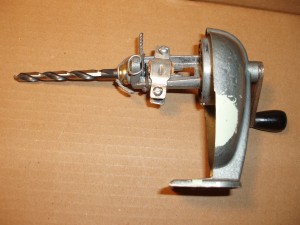
Necessity is the mother of invention, or so they say. [Jason] was in such a situation where he needed to install some safety railing at his grandmother’s house. He didn’t have the necessary tools available, like a drill, so he fashioned one himself out of a pencil sharpener and some fittings and wire that he was able to find.

Although crude, and probably not what one would choose to use if an actual drill was available, this “drill-pencil-sharpener” actually does a pretty decent job of cutting through plywood as seen in the video after the break. Continue reading “How To Make A Hand Drill Out Of A Pencil Sharpener”

Vocera B1000A Teardown

vocera_teardown

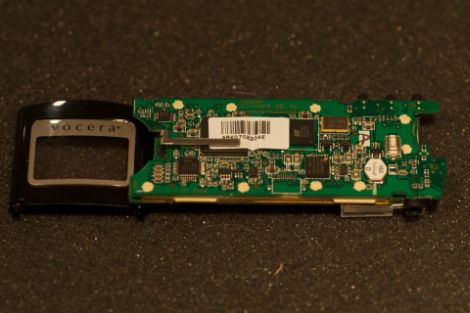
[Gray] over at Geek Chique had a bit of an eBay mishap and was suddenly the proud owner of 16 Vocera B1000A badges. If you are not familiar, these badges are small, lightweight communications devices similar to the famous Star Trek communicator, which allow users to talk to other individuals via VOIP. He was working on getting the remaining badges up and running by reimplementing the server software, and figured that since one of the badges he purchased was not working, he might as well take it apart.

It took him awhile to get the well-made badges apart, requiring a rotary tool and some elbow grease to get the job done. Inside, he found that the device was split into two circuit boards, one being the “WiFi” board, and the other the “CPU” board. The WiFi board uses a Prism WiFi chipset, which was incredibly common at the time of construction. The CPU board sports small SRAM and flash chips as you would expect, with a Texas Instruments 5490A DSP running the show.

While it remains to be seen if tearing the device down helps [Gray] to get things up and running again, it never hurts to take a closer look to see what you are working with.

Putting The Flex Back Into The RDS 80 Soldering Station

ersa_soldering_iron_fix

[Markus] was looking to upgrade his soldering station, and having had good luck with Ersa in the past, opted to purchase one of their new stations, the RDS 80.

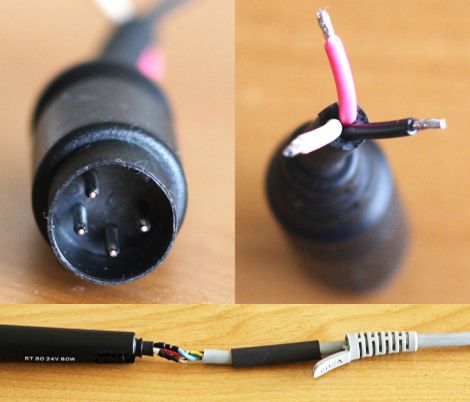
Once he got the iron home however, he was very disappointed to see that while his previous Ersa model used a silicone cable to connect the iron to the base station, his new iron used a stiff, non heat-resistant PVC cable instead. He found plenty of people complaining about the same issue online, but no one seemed to have a fix, so he set off to figure it out for himself.

He thought that he could disassemble the iron and change the wiring out once it was apart, but it seemed that there was no way of doing so without destroying it. Instead he chopped the wire off at the end of the soldering iron, replacing it with a new silicone cable. He did the same thing at the base station end, since he was forced to reuse the proprietary 4-pin plug Ersa decided to use there.

His modifications worked out nicely, and he is now happily soldering away.

If you happen to have one of these soldering stations, be sure to swing by his site to get a closer look at how he swapped out the cable.

Programming Robots Like You Would Train A Pet

[Jim] has been working with a team from various Universities to develop an intuitive way to guide and train assistance robots. They focused on one particular technique, training a robot to follow on a leash in the same way you would a pet dog (PDF).

He was inspired to send in a link to his research after reading about the Kinect-powered shopping card robot. He figures that that project is similar to his own, but his does have several added benefits. The first being that if a robot is on a leash, everyone knows who that bot is following or assisting. But there is the added benefit of the user needing no training whatsoever. That’s because the act of walking a dog on a leash is commonplace in developed societies; you may not have ever owned a dog, but you’ve seen others walking them on leashes numerous times and could do so yourself without any training.

The leash connects to a sensor-filled turret in the center of the robot’s body. The bot can sense when, and in which direction the user is pulling the leash. There’s also an emergency kill switch on the handle for added functionality. Take a look at some of the test video after the break to see how quickly humans can adapt to this type of user interface.

Continue reading “Programming Robots Like You Would Train A Pet”

Canon A70 CCD Replacement/repair

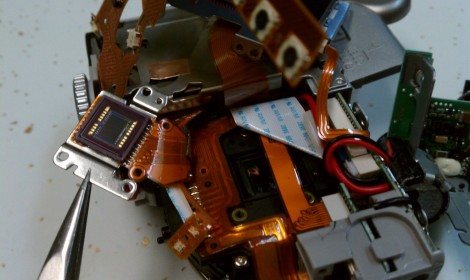
Looking for an underwater camera setup, [Imsolidstate] picked up a Canon A70 and a Canon water-tight housing on eBay for around $45. Unfortunately the camera arrived with a non-functioning CCD. Another trip to the online auction site landed him a replacement CCD which he set about installing.

We have this exact model of camera with a cracked LCD display. Being that we like to hack around on things we’ve pulled it apart in order to replace the screen and believe us, there’s no extra room inside that thing. The video after the break shows the teardown, and you can see what a pain it is to get the unit apart. That process in only eclipsed in difficulty by the reassembly itself.

In the end it wasn’t a problem with the CCD itself, but with the connector on the PCB that received the flat cable. It wasn’t holding the contacts tight, but [Imsolidstate] fixed that with a strategically placed piece of foam.

Continue reading “Canon A70 CCD Replacement/repair”

Shop Lighting: Weighing Cost And Efficiency

[Ben Krasnow] wanted to upgrade his shop lighting but before he made any decisions he decided to educate himself about the options that are out there. Luck for us, he shares the facts about different lighting in terms of cost and efficiency.

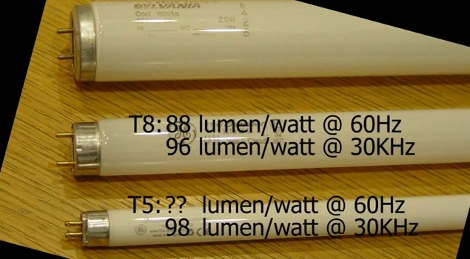
His old setup uses fluorescent light fixtures with T12 bulbs. These are rather bulky and inefficient bulbs. Many folks, ourselves included, would think of LED as a logical replacement. [Ben] started by looking into the various high-intensity LED modules that are available. He grabbed a catalog and started doing a couple of different calculations to compare Lumens/dollar for the upfront cost, and Lumens/Watt for the operational costs. Hands down, newer fluorescent bulbs come in cheaper on both counts and provide a wider spectrum of light.

The next decision was between purchasing the newer T5 bulbs which are rated at very high efficiencies, or to go with T8 bulbs which are better than the T12 standard but can use the same fixtures. After doing some digging he found that T5 is not much more efficient than T8, but they use an electronic ballast to boost efficiency. He ended up replacing his old magnetic ballasts with electronic ones to get high T8 efficiency at a cost that was lower than buying new T5 fixtures.

See [Ben’s] own recount of this process in the clip after the break.

Continue reading “Shop Lighting: Weighing Cost And Efficiency”