Chipcon CC1110/CC1111 Serial Bootloader

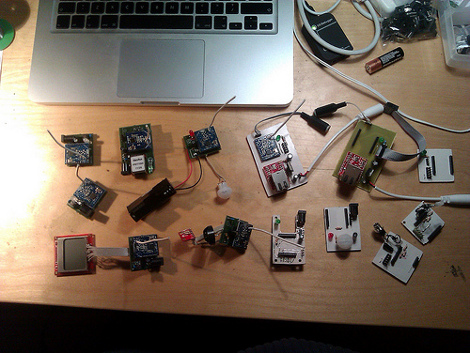
[Joby Taffey] just rolled out a serial bootloader for the Chipcon CC1110/CC1111 processors. The project is called CCTL and aims to make prototyping with the Girltech IM-ME a bit less tedious. Up until now firmware for the device had to be pushed in with a GoodFET or TI proprietary programmer which was quite slow. But this bootloader makes it possible to push your code via the chip’s serial port at 115200 baud. But the pretty pink pager isn’t the only device using these chips and to prove it [Joby] send this picture of all the electronics he has on hand running this architecture.

Once the 1KB CCTL bootloader has been flashed to the chip, a serial port or USB to Serial converter can be used as a programmer. [Joby] warns that the Chipcon processors are not 5V tolerant so you need to either use a 3V serial converter or add a level converter into the mix.

CCTL provides the features you’d expect from a bootloader. It uses the chip’s watchdog timer to guard against failure due to broken code. And there is an upgrade mode available at power up. Instruction for use are included in the Github repo linked at the top.

A Capacitive Discharge Welder/cutter For All Your Lightweight Needs

microspot-welder

[Radu Motisan] wrote in to share a cool project he has been working on lately, a pulsed microspot welder/cutter.

The device is capable of spot welding thin metals such as foils and battery tabs by sending a pair of high current pulses between the two electrodes whenever [Radu] presses the trigger button. The cutting portion of his device uses the same general mechanism, though it requires a far greater number of pulses to get the work done.

The welding/cutting process is controlled by an ATMega16, which is also tasked with taking input from the user and displaying information on the LCD panel. The microcontroller creates quick (in the ten to several hundred microsecond range) pulses for both welding and cutting, with the latter obviously requiring a long series of pulses.

[Radu] started out using a relatively small capacitor array to power the device, but has recently upgraded to a 1.6 Farad car audio capacitor, which works (and looks) much better than before. His blog seems to update every few days with more pictures and details about his welding station, so be sure to check back often for updates.

Be sure to stick around to see a short video of [Radu] adding metal tabs to batteries and tearing down an aluminum can with his cutter.

Continue reading “A Capacitive Discharge Welder/cutter For All Your Lightweight Needs”

Wireless Solar Water Heater Controller Ensures Hot Water Every Time

water-heater-controller

[Peter Sobey] had a solar hot water heater installed in his home, which worked great until he relocated his kitchen to a neighboring room. Now a good bit further from the tank, the hot water reaching his sink was tepid at best due to the increased distance and temperature limiting mixer valve in the new heater.

He installed a salvaged solar panel and water tank solely for use in his kitchen, but as the panel was located above the tank, he had to find a way to actively monitor and control the water temperature. His pump and valve system was originally driven with an off the shelf PICAXE-based controller, but he eventually got the urge to add a wireless display and control panel to the mix.

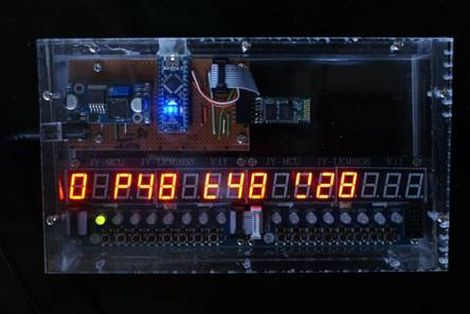
A pair of Arduino Nanos run the show now, one of which resides in the pump controller box, while the other is used in the temperature display box in his kitchen. He uses a set of Bluetooth modules to link the Arduinos together, relaying temperature data and allowing him to send the pump controller manual commands if needed.

He says the system works a treat, and he’s much happier with his homebrew controller than the one he used originally.

Installing Military Hardware In A Home Flight Simulator

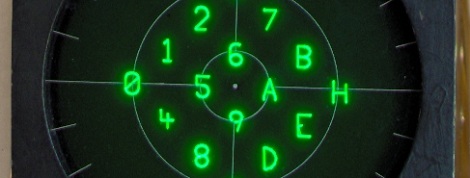
The cockpit of an F-16 Fighting Falcon features a small 3-inch display that monitors and tracks hostile aircraft and missiles, friendlies, and the current target. This Radar Warning Receiver is vitally important to pilots in combat, so [Mike] decided to add one to his homebuilt F-16 simulator that runs Falcon 4.0.

The RWR displays threats as symbols that are usually generated by tens of thousands of dollars worth of military hardware. [Mike] figured a $7 PIC microcontroller would work just as well and set about designing vector graphics that would fit on a single chip.

[Mike] had the graphics displaying correctly on an oscilloscope, but that’s a far cry from the from the surplus RWR display he picked up. Although the display is a simple CRT, the original designers of the radar warning receiver thought it necessary to put the deflection amplifiers in another part of the airplane. After building a pair of 30 Watt amplifiers, [Mike] could finally display more than a single dot on the display.

After all was said and done, [Mike] has a wonderful radar warning display that fits into his F-16 cockpit perfectly. While it’s not quite a 737 in a garage, we’ve got to respect someone who takes surplus avionics and makes them work. Check out [Mike]’s display in action after the break.

Continue reading “Installing Military Hardware In A Home Flight Simulator”

Going Old School With An 8051

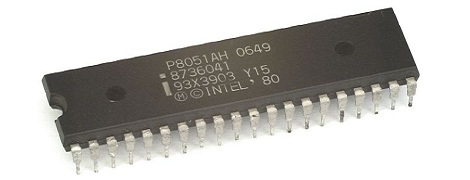
A while back, [Matt] bought a few 8051 MCUs and tucked them away for a future project. He just found these fabulous little chips in a component drawer and decided it was time to figure these guys out. Eventually, [Matt] stumbled across this awesome resource for 8051 programming.

The 8051 featured a still reasonably respectable 4k of ROM and 128 bytes of RAM – not too dissimilar from an ATtiny of today until you realize this 30-year-old chip has 32 IO pins. This microcontroller, along with its bigger brother the 8052, served as the de facto microcontroller standard for 20 years. You’ve no doubt taken a ride in a car that used one, and was even put to use doing low-level grunt work in early PCs.

[Matt] says he couldn’t find a Hackaday project featuring this 30-year-old microcontroller (not true, here’s one of those tilty mazes and an electronic toll booth), but even we have to admit we don’t feature much outside of the usual AVRs and PICs. Even though it’s 32 years old, the 8051 family still has some tricks up its sleeve like playing audio CDs. If you’ve got an 8051 project lying around, send it in on the tip line and we’ll probably throw it up.

PushingBox Alerts You Of Your Cat’s Roaming Habits

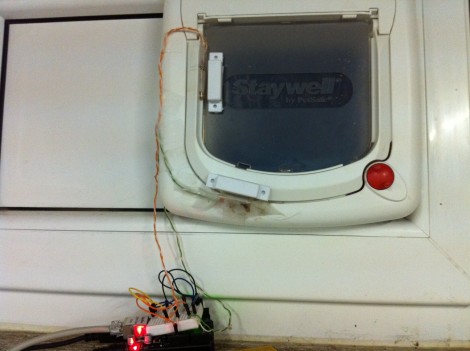
Dogs may be man’s best friend, but cats are certainly a hacker’s best muse. They provide so many ‘reasons’ for projects, like this cat door which [Clement] augmented to monitor the comings and goings of his feline friend (translated). He’s using a web service we hadn’t heard of before called PushingBox to send notifications like Tweets and Emails from the Arduino monitoring that door.

The two white rectangles attached to the cat door in the image above are magnets commonly used for entry door monitoring. Using a pair of them along with reed switches lets the system differentiate between an incoming or outgoing cat. The Arduino is web-connected and running the PushingBox API to manage the notification messages. See a demo of the system in the clip after the break.

This would be a nice addition to the cat door we saw [Dino] build. Of course, if you really want to go all out with the cat hacks the next project should be a GPS tracking collar. Continue reading “PushingBox Alerts You Of Your Cat’s Roaming Habits”

Old Radio + Old Phone = Android Media Station

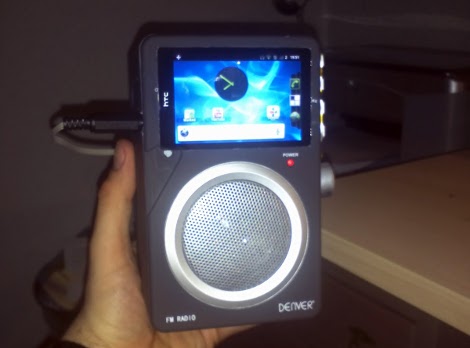
[Bjørn] combined some aging electronics he had around the house to create this Android media center. The enclosure is an FM-radio, but since he only listens to online media it wasn’t of much use to him. After sizing it up he realized it was a perfect candidate to receive his old HTC Hero Android phone.

The upper portion of the stock radio used to host controls for tuning the FM dial, adjusting volume, and switching the unit on and off. He cracked open the case, ditching the radio receiver and patching in to the amplifier. The volume knob was moved to the right side of the case, and a hole cut to receive the phone. Audio is pulled from the phone with the jack sticking out the left side. We’d love to see a future improvement using a right-angle jack (kind of like this charging hack) or patched directly into the phone’s circuit board. This way everything would fit inside the box.

Now he can listen to Internet radio, or stream some video like in the clip after the break.

Continue reading “Old Radio + Old Phone = Android Media Station”