Finally, A TV For Portrait Videos

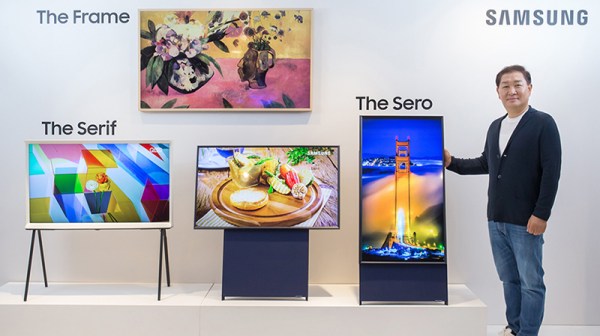
Vertical video is bad, or so we’re told, and you shouldn’t shoot a video with your phone in a vertical position. Why? Because all monitors are wider than they are tall. This conventional wisdom is being challenged by none other than Samsung. There is now a vertical TV (Korean, Google Translate link) , engineered specifically videos shot on mobile phones.

“Samsung Electronics analyzed the characteristics of the Millennial generation, which is familiar with mobile content, and presented a new concept TV ‘The Sero’ (loosely translated as ‘The Vertical’), which is based on the vertical screen, unlike the conventional TV,” so goes the press release.

Features of The Sero TV include synchronization between the screen and a mobile device, and mirroring functions based on NFC. This display is no slouch in the audio department, either: it features a 4.1 channel, 60-watt high-end speaker. A built-in microphone and support for Samsung’s Bixby voice assistant means artificial intelligence can easily control various functions of the display.

The Sero will be released in Korea at the end of May, with a reported price tag of 18,900,000 South Korean Won. A quick Google search tells us that converts to an implausible-sounding $16,295 USD, but it’s not as if you were going to buy one anyway.

Nevertheless, there actually is a market for ‘vertical’ or portrait displays; thanks to the ever-widening of aspect ratios by LCD manufacturers, it makes sense to edit documents with a vertically-oriented monitor. You can fit more code on the screen if you just rotate your monitor. Apple was one of the first companies to realize this with the release of the Macintosh Portrait Display in 1989, providing a wondrous 640×870 grayscale resolution display for desktop publishing. Of course, the Radius full page display was released a few years earlier and the Xerox Alto had a vertically oriented screen. But wait a minute, can’t you just rotate your monitor and save $16k?

KiCad Gets Banana For Scale

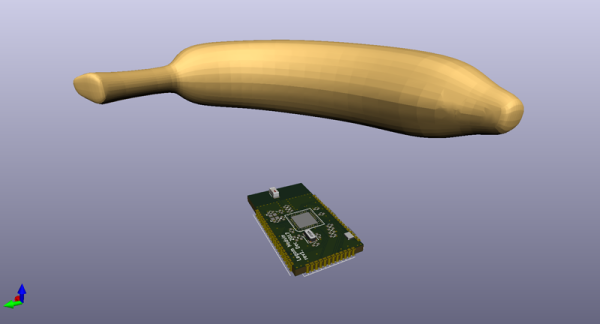
Over the years we’ve seen KiCad grow from a niche, somewhat incomplete, but Open Source PCB design suite to a full-featured extravaganza of schematics and board layouts. We’ve plumbed the depths of keys and kais and queues and quays, and KiCad just had its first conference last weekend. While we wait for the rest of the talks to be published, there’s a special treat for KiCad users everywhere. Here’s a banana for scale.

Have you ever worried your PCB was too big? Confused if you’re working in inches or millimeters? Do you just want to know the scale of your PCB? Just add this footprint to your KiCad project, and you’ll have a banana on your board view. This is immediate visual feedback, giving you all the information you need to continue on with your design. There’s a 2D view and a 3D view. It’s something no electrical engineer should be without. All of this can be yours for the low, low, cost of free because KiCad is Open Source.

If you’re wondering what official features are in the works for the EDA suite, the first two talks from the con delve into that. project leader Wayne Stambaugh’s talk covers features new to version 5.1 and plans for 6.0. There was also a developers panel that provides insight on what goes into a large project like this one.

Twenty Five Years Since The End Of Commodore

This week marks the twenty-five year anniversary of the demise of Commodore International. This weekend, pour one out for our lost homies.

Commodore began life as a corporate entity in 1954 headed by Jack Tramiel. Tramiel, a Holocaust survivor, moved to New York after the war where he became a taxi driver. This job led him to create a typewriter repair shop in Bronx. Wanting a ‘military-style’ name for his business, and the names ‘Admiral’ and ‘General’ already taken, and ‘Lieutenant’ simply being a bad name, Tramiel chose the rank of Commodore.

Later, a deal was inked with a Czechoslovakian typewriter manufacture to assemble typewriters for the North American market, and Commodore Business Machines was born. Of course, no one cares about this pre-history of Commodore, for the same reason that very few people care about a company that makes filing cabinets. On the electronics side of the business, Commodore made digital calculators. In 1975, Commodore bought MOS, Inc., manufacturers of those calculator chips. This purchase of MOS brought Chuck Peddle to Commodore as the Head of Engineering. The calculators turned into computers, and the Commodore we know and love was born.

Continue reading “Twenty Five Years Since The End Of Commodore”

The Vintage Computer Festival East Is Happening This Weekend

This weekend is the premier vintage computer meetup on the East Coast. It’s VCF East, and it’s all going down this weekend, Friday to Sunday afternoon, in Wall, New Jersey.

2019 is a fantastic year for computer history, being the 50th anniversary of Unix, and the 40th anniversary of Atari. For that, there will be exhibits of dozens of systems running some sort of *nix, including systems from Apple, AT&T, DEC, IBM, NeXT, SGI, and Sun. For the Atari extravaganza, you’re getting the full line of Atari 8-bitters, some STs, and a Falcon 030. There will be other exhibits about POTS, so bring a landline phone, a progress update on a 1/10th scale, pulse-level simulator of the ENIAC, and someone will assuredly have Super Mario Brothers for the C64 running.

Keynotes reflect this great year of computer history with a keynote by the one and only Ken Thompson, co-inventor of Unix. On Sunday, there’s a talk with Joe Decuir, engineer who helped develop the Atari VCS and Atari 800. There’s also a Homebrew Computing Discussion Panel.

As always, there will be a flea market, an understated highlight of any Vintage Computer Festival. It’s like a museum you can buy. One time there was an LCD for an Apple IIc. Too rich for my blood, but technically the first Apple laptop.

As with all VCF East events, it’s held at the InfoAge Science & History Center the site of the Camp Evans Signal Corps R&D lab during World War II. It’s basically the site of what would become DARPA. You’ve also got the Silverball pinball museum just up the road in Asbury Park. There’s plenty to do and see on the Jersey Shore this weekend, and it’s not even Labor Day.

The Stratolaunch Is Flying, But Can It Do Cargo?

The world’s largest aircraft is flying. Stratolaunch took to the skies in test flights leading up to its main mission to take rockets up to 20,000 feet on the first stage of their flight to space. But the Stratolaunch is a remarkable aircraft, a one-of-a-kind, and unlike anything ever built before. It can lift a massive 250 tons into the air, and it can bring it back down again.

By most measures that matter, the Stratolaunch is the largest aircraft ever flown. It has the largest wingspan of any aircraft, and it has the largest cargo capacity of any aircraft. In an industry that is grasping at interesting and novel approaches to spaceflight like rockoons and a small satellite launcher from a company whose CTO is still a junior in college, the Stratolaunch makes unexpected sense; this is a launch platform above the clouds, that can deliver a rocket to orbit, on time.

But the Stratolaunch is much more than that. This is an aircraft whose simple existence deserves respect. And, like others of its kind, the Antonov AN-225, the Spruce Goose, there is only one. Even if it never launches a rocket, the Stratolaunch will live on by the simple nature of its unique capabilities. But what are those capabilities? Is it possible for the Stratolaunch to serve as a cargo plane? The answer is more interesting than you think.

Continue reading “The Stratolaunch Is Flying, But Can It Do Cargo?”

A Physical Knob For Browser Tabs

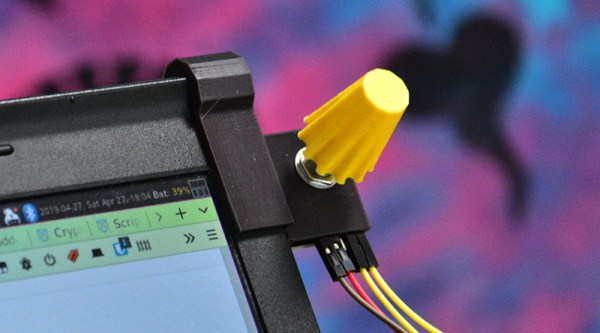
If you’re like most of us, you have about twenty browser tabs open right now. What if there were a way to move through those tabs with a physical interface? That’s what [Zoe] did, and it’s happening with the best laptop ever made.

The hardware for this build is simply an Arduino and a rotary encoder, no problem there. The firmware on the Arduino simply reads the encoder and sends a bit or two of data over the serial port. This build gets interesting when you connect it to a Firefox extension that allows you to get data from a USB or serial port, and there’s a nice API to access tabs. Put all of this together, and you have a knob that will scroll through all your open tabs.

This build gets really good when you consider there’s also a 3D printed mount, meant to attach to a Thinkpad X220, the greatest laptop ever made. At the flick of a knob, you can scroll through all your tabs. It’s handy if you’re reading three or four or five documents simultaneously, or if you’re just editing video and trying to go through your notes at the same time. A great invention, and we’re waiting for this to become a standard device on keyboards and mice. Check out the video below.

Continue reading “A Physical Knob For Browser Tabs”

Fritzing Is Back, And This Time It’s Written In JavaScript!

Fritzing has been stuck in the mud for just over a year now. There were no updates for many months, and members of the community wondered what was going on. Now, things might be turning around: Fritzing is being rebooted by community members, and there’s a roadmap of upcoming features.

The biggest takeaway from the GitHub discussion is that there simply aren’t enough developers for Fritzing. Fritzing is written in C++ and Qt, and there simply aren’t enough skilled devs to work on it. Future versions of Fritzing will be written in JavaScript.

Other developments in store for Fritzing include clearing out the number of open issues, making a new alpha, generally clean up the entire codebase, and prepare for a release. To that end, there’s also the Freetzing community to rebase the entire project with an emphasis on modularity.

Yes, Fritzing died a terrible death due to legal and funding issues. That still doesn’t mean Fritzing isn’t a valuable tool, though. With these new developments, and entirely new generation of hardware makers can dip their toes into the world of hardware development the easy way, and an entirely new generation of Open Source developers can work on making Fritzing the best tool it can be. There’s never been a better time to get started in Fritzing.