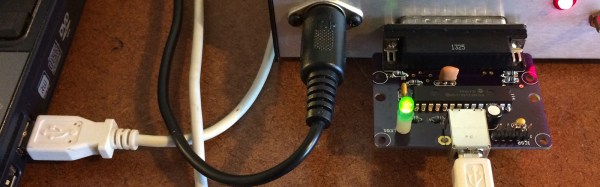
If you’re looking for a small, benchtop CNC machine for PCBs and light milling the ubiquitous Sherline CNC machine is a good choice. There’s a problem with it, though: normally, the Sherline CNC controller runs off the parallel port. While some of us still have a Windows 98 battlestation sitting around, [David] doesn’t. Instead, he built a USB dongle and wrote the software to turn this mini CNC into something usable with a modern computer.
First up, the hardware. The core of this build is the rt-stepper dongle based around the PIC18F2455 microcontroller. With a bare minimum of parts, this chip converts USB into a parallel port for real-time control. It’s fast — at least as fast as the parallel port in the ancient laptops we have sitting around and plugs right into the CNC controller box for the Sherline.
The software is where this really shines. the application used to control this dongle is a hack of the EMC/LinuxCNC project written in nice, portable Python. This application generates the step pulses, but the timing is maintained by the dongle; no real-time kernel needed.
There are a lot of choices out there for a desktop CNC machine made for routing copper clad board, wood, brass, and aluminum. The Othermill is great, and Inventables X-Carve and Carvey are more than up for the task. Still, for something small and relatively cheap, the Sherline is well-regarded, and with this little dongle you can actually use it with a modern computer. Check out the demo video below.
Surface mount diodes are simple enough — all you need to do is make sure you have the anode and cathode in the right order when you place them on the pad when you solder them. These SMD diodes come in industry-standard packages, but do you think there’s an industry-standard way of marking the cathode? Nope, not by a long shot. To solve the problem of figuring out which way the electrons go through his LEDs, [Jesus] built a simple pair of LED tweezers.
The purpose of these tweezers is to figure out which way is up on a LED. To do this, [Jesus] picked up a pair of multimeter and power supply compatible SMD test clips that are sufficiently tweezy. These tweezers come with red and black wires coming out the back, but cutting those leads off, peeling back the insulation and adding a CR2032 battery holder and 220Ω resistor turns these tweezers from a probe into an electrified poker.
To figure out what the arcane symbols on the bottom of an SMD diode mean, all [Jesus] has to do is touch each side of the pair of tweezers to one of the contacts on a LED. If it lights up, it’s that way around. If it doesn’t light up, the battery is dead, or the diode is backwards. It’s a great project, especially since these SMD test clip tweezer things can be had from the usual online retailers for just a few bucks. We would recommend a switch and marking which tweeze is ground, though.
Betteridge’s Law of Headlines states, “Any headline that ends in a question mark can be answered by the word no.” This law remains unassailable. However, recent claims have called into question a black box hidden deep inside every Intel chipset produced in the last decade.
Yesterday, on the Semiaccurate blog, [Charlie Demerjian] announced a remote exploit for the Intel Management Engine (ME). This exploit covers every Intel platform with Active Management Technology (AMT) shipped since 2008. This is a small percentage of all systems running Intel chipsets, and even then the remote exploit will only work if AMT is enabled. [Demerjian] also announced the existence of a local exploit.
Intel’s ME and AMT Explained
Beginning in 2005, Intel began including Active Management Technology in Ethernet controllers. This system is effectively a firewall and a tool used for provisioning laptops and desktops in a corporate environment. In 2008, a new coprocessor — the Management Engine — was added. This management engine is a processor connected to every peripheral in a system. The ME has complete access to all of a computer’s memory, network connections, and every peripheral connected to a computer. The ME runs when the computer is hibernating and can intercept TCP/IP traffic. Management Engine can be used to boot a computer over a network, install a new OS, and can disable a PC if it fails to check into a server at some predetermined interval. From a security standpoint, if you own the Management Engine, you own the computer and all data contained within.
The Management Engine and Active Management Technolgy has become a focus of security researchers. The researcher who finds an exploit allowing an attacker access to the ME will become the greatest researcher of the decade. When this exploit is discovered, a billion dollars in Intel stock will evaporate. Fortunately, or unfortunately, depending on how you look at it, the Managment Engine is a closely guarded secret, it’s based on a strange architecture, and the on-chip ROM for the ME is a black box. Nothing short of corporate espionage or looking at the pattern of bits in the silicon will tell you anything. Intel’s Management Engine and Active Management Technolgy is secure through obscurity, yes, but so far it’s been secure for a decade while being a target for the best researchers on the planet.
Semiaccurate’s Claim
In yesterday’s blog post, [Demerjian] reported the existence of two exploits. The first is a remotely exploitable security hole in the ME firmware. This exploit affects every Intel chipset made in the last ten years with Active Management Technology on board and enabled. It is important to note this remote exploit only affects a small percentage of total systems.
The second exploit reported by the Semiaccurate blog is a local exploit that does not require AMT to be active but does require Intel’s Local Manageability Service (LMS) to be running. This is simply another way that physical access equals root access. From the few details [Demerjian] shared, the local exploit affects a decade’s worth of Intel chipsets, but not remotely. This is simply another evil maid scenario.
Should You Worry?
This hacker is unable to exploit Intel’s ME, even though he’s using a three-hole balaclava.
The biggest network security threat today is a remote code execution exploit for Intel’s Management Engine. Every computer with an Intel chipset produced in the last decade would be vulnerable to this exploit, and RCE would give an attacker full control over every aspect of a system. If you want a metaphor, we are dinosaurs and an Intel ME exploit is an asteroid hurtling towards the Yucatán peninsula.
However, [Demerjian] gives no details of the exploit (rightly so), and Intel has released an advisory stating, “This vulnerability does not exist on Intel-based consumer PCs.” According to Intel, this exploit will only affect Intel systems that ship with AMT, and have AMT enabled. The local exploit only works if a system is running Intel’s LMS.
This exploit — no matter what it may be, as there is no proof of concept yet — only works if you’re using Intel’s Management Engine and Active Management Technology as intended. That is, if an IT guru can reinstall Windows on your laptop remotely, this exploit applies to you. If you’ve never heard of this capability, you’re probably fine.
Still, with an exploit of such magnitude, it’s wise to check for patches for your system. If your system does not have Active Management Technology, you’re fine. If your system does have AMT, but you’ve never turned it on, you’re fine. If you’re not running LMT, you’re fine. Intel’s ME can be neutralized if you’re using a sufficiently old chipset. This isn’t the end of the world, but it does give security experts panning Intel’s technology for the last few years the opportunity to say, ‘told ‘ya so’.
SCSI devices were found in hundreds of different models of computers from the 80s, from SUN boxes to cute little Macs. These hard drives and CDROMs are slowly dying, and with that goes an entire generation of technology down the drain. Currently, the best method of preserving these computers with SCSI drives is the SCSI2SD device designed by [Michael McMaster]. While this device does exactly what it says it’ll do — turn an SD card into a drive on a SCSI chain — it’s fairly expensive at $70.
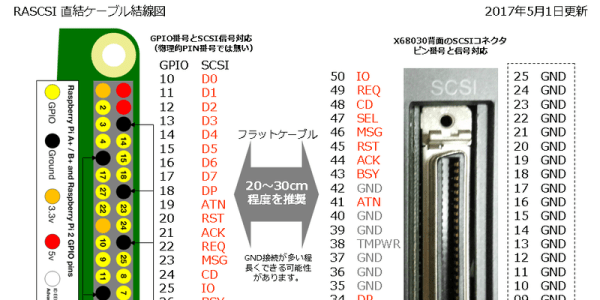
As far as the hardware goes, this is a pretty simple build. The 40-pin GPIO connector on the Pi is attached to the 50-pin SCSI connector through a few 74LS641 transceivers with a few resistor packs for pullups and pulldowns. The software allows for virtual disk devices – either a hard drive, magneto-optical drive, or a CDROM – to be presented from the Raspberry Pi. There’s also the option of putting Ethernet on the SCSI chain, a helpful addition since Ethernet to SCSI conversion devices are usually rare and expensive.
Officially, [GIMONS] built this SCSI hard drive emulator for the x68000 computer, developed by Sharp in the late 80s. While these are popular machines for retrocomputing aficionados in Japan, they’re exceptionally rare elsewhere — although [Dave Jones] got his mitts on one for a teardown. SCSI was extraordinarily popular for computers from the 70s through the 90s, though, and since SCSI was a standard this build should work with all of them.
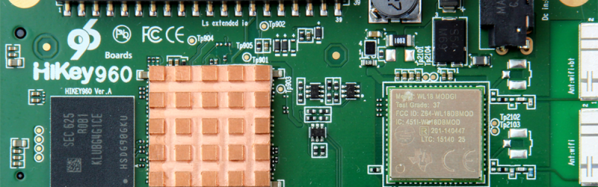
The HiKey 960, built in collaboration with 96Boards, gives the user 4 ARM Cortex-A73 cores clocked at 2.4GHz, 4 ARM Cortex-A53 cores clocked at 1.8 GHz, a Mali GPU (ugh), 32GB of Flash storage, 3GB of LPDDR4, HDMI 1.2, WiFi, Bluetooth, USB 3.0 type A, PCIe on an M.2 connector, and a familiar 40-pin GPIO connector whose configuration is not published yet but is one we can make a very educated guess about. This is a powerful ARM-based single-board computer that’s the same size as a credit card.
This single board computer draws more power than a Raspberry Pi (but less than 24 W with a 12V supply), but that’s what you get when you need a powerful ARM chip. Interestingly, the HiKey 960 places all the connectors on one side of the board. This is a feature very often overlooked in ARM-based single board computers; all the ports on your desktop are on the back, and it only makes sense to constrain the cables and dongles to one side of a Nintendo-shaped 3D printed enclosure.
This is not the first ARM-based single board computer that markets itself as a more powerful Pi. The Pine64 was supposed to be significantly more powerful, handle 4K HDMI, and bring Android to the desktop. The first versions of the Pine64 really, really sucked. However, most of the kinks have been worked out and the folks behind the Pine64 are now shipping a somewhat reasonable low-end Chromebookesque laptop for $89. This is a laptop for under a Benjamin, whereas the HiKey 960 will sell for $239. That’s the same price as an Intel NUC or other mini PC running an x86 CPU. Of course, the HiKey 960 will have higher performance compared to the latest Pi, or other Pi Killer such as the Asus Tinker board, but there must be a point of diminishing returns. Either way, we look forward to getting our hands on one of these powerful single board computers.
This last week was SEFF, a week of electric-powered remote-controlled aircraft above 1700 feet of Bermuda grass in the middle of Georgia. [Damon Atwood] has been bringing his 16-foot-wingspan Emmaselle to SEFF for a few years now, and this year we’re getting a great video of the flight. This is, or was at one time, the 3rd largest electric RC on the planet. It’s flying on 11S, and is absolutely beautiful in the air.
Speaking of electric RC meetups, Flite Fest West is going on right now. Flite Fest East will be July 13th through the 16th. Here’s the link to the relevant YouTube channel.
One of the very inexpensive 3D printers announced at CES by Monoprice is now on sale. It’s the improved $200 Cartesian, not the $150 delta. As I saw at CES last January, this is a slight improvement over the already fantastic V1 version of this printer. Improvements include an all metal hot end (an E3D clone) and working WiFi on the main board. Still waiting on the $150 delta printer? The only thing I can tell you is that it’s coming out soon.
StippleGen is an application from Evil Mad Scientists Labs to create stippled drawings. Stippling is dots, but not halftone. [HEXceramic] is using StippleGen to create laser cut molds for making ceramic tiles. The results look awesome, and I can’t wait to see one of these fired.
Hackaday has been voted, ‘The Hacker News of Hardware‘ by the Hacker News community. I would have included this in the links post last week, but feared that would be seen as manipulating the upvote system on Hacker News. This is great, but of course you already know Hackaday is seen as a reputable source of hardware and embedded news!
As a rule, Hackaday is nonpartisan and not political at all. In fact, two of my headlines have been shot down so far this year for using the word ‘trump’ as a verb. You’re welcome. This project is too cool, so we’re going to bend a few rules. This is a Trump gummi. It’s the rarest gummi of them all. It was carved by gummi artisans who work exclusively in the medium of gummi.
[Michael Welling] designed the PocketBone Mini in KiCad. It’s built around the Octavo Systems OSD3358, and is really, really tiny while designed to be as capable as a full size BeagleBone. He’s doing an interest check to gauge the community’s interest in this tiny, tiny single board computer.
The Internet of Things, as originally envisioned in papers dating to the early to mid-90s, is a magical concept. Wearable devices would report your location, health stats, and physiological information to a private server. Cameras in your shower would tell your doctor if that mole is getting bigger. Your car would monitor the life of your cabin air filter and buy a new one when the time arrived. Nanobots would become programmable matter, morphing into chairs, houses, and kitchen utensils. A ubiquity of computing would serve humans as an unseen hive mind. It was paradise, delivered by ever smaller computers, sensors, and advanced robotics.
The future didn’t turn out like we planned. While the scientists and engineers responsible for asking how they could make an Internet-connected toaster oven, no one was around to ask why anyone would want that. At least we got a 3Com Audrey out of this deal.
Fast forward to today and we learn [Christopher Hiller] just put his toilet on the Internet. Why is he doing this? Even he doesn’t know, but it does make for a great ‘logs from a toilet’ pun.
The hardware for this device is a Digistump Oak, a neat little Arduino-compatible WiFi-enabled development board. The Digistump Oak is able to publish to the Particle Cloud, and with just five lines of code, [Chris] is able to publish a flush to the Internet. The sensor for this build is a cheap plastic float switch. There are only three components in this build, and one of them is a 4k7 resistor.
Right now, there are a few issues with the build. It’s battery-powered, but that’s only because [Chris]’ toilet isn’t close enough to a wall outlet. There’s a bit of moisture in a bathroom, and clingfilm solves the problem for now, but some silly cone carne would solve that problem the right way. [Chris] also has two toilets, so he’ll need to build another one.