There’s A Mew Underneath The Truck Next To The SS Anne

Before we dig into this, I need to spend a paragraph or two conveying the knowledge of a twelve-year-old in 1996. Of course, most Hackaday readers were twelve at least once, but we’re just going to do this anyway. The payoff? This is an arbitrary-code-execution virus for Pokemon, and maybe the most amazing Game Boy hack of all time.

In the first generation of Pokemon games, there is a spectacularly rare Pokemon. Mew, the 151st Pokemon, could learn every move in the game. It was a psychic type, which was overpowered in the first gen. You could not acquire a Mew except by taking your Game Boy to a special event (or to Toys R Us that one time). If someone on the playground had a Mew, they really only had a GameShark.

There was a mythos surrounding Mew. Legend said if you went to the SS Anne and used Strength to move a truck sprite that appeared nowhere else in the game, a Mew would appear. Due to the storyline of the game, you didn’t have the ability to get to this truck the first time you passed it. However, if you started a new game – thus losing all your progress and your entire roster of Pokemon – you could test this theory out. Don’t worry, you can just trade me all your good Pokemon. I’ll give them back once you have a Mew. Screw you, Dylan. Screw you.

Now the Mew truck trick is real. You can do it on a copy of Red or Blue on an original Game Boy. If this hack existed in 1998, kids would have lost their god damned minds.

The basis for this hack comes from [MrCheeze], who created a ‘virus’ of sorts for the first generation of Pokemon games. Basically, given the ability to manually edit a save file, it is possible to replicate this save file over a Game Link cable. The result is a glitchy mess, but each Pokemon game has the same save file when it’s done.

Combine this virus with arbitrary code execution, and you have something remarkable. [MrCheeze] created a save file that allows you to move the truck next to the SS Anne. When the truck is moved, a Mew appears. It’s exactly what everyone was talking about over the sound of their sister’s Backstreet Boys marathon.

The new ‘Mew Truck virus’ is not as glitchy as the first attempt at a self-replicating save file. In fact, except for the music glitching for a few seconds, nothing appears abnormal about this Pokemon virus. It’s only when the Mew truck trick is attempted does something seem weird, and it’s only weird because we know it shouldn’t happen. Combine the self-replicating nature of this virus, and you have something that would have drawn the attention of Big N. This is a masterpiece of Pokemon-based arbitrary code execution and a hack that may never be equaled.

You can check out the video below.

Continue reading “There’s A Mew Underneath The Truck Next To The SS Anne”
The Custom Clicky Shortcut Keypad

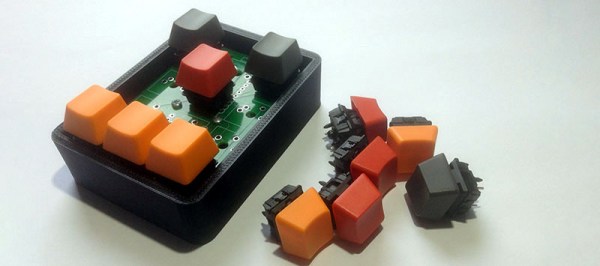
You’re not cool unless you have a mechanical keyboard. Case in point: if you were to somehow acquire an identical keyboard to the one I used to type this, it would set you back at least seven hundred dollars. Yes, it’s mechanical (Topre), and yes, I’m cooler than you. Of course, you can’t be as cool as me, but you can build your own mechanical keyboard. [Robin] is, I presume, a pretty cool dude so he built his own keyboard. It’s the amazing shortcut keyboard, and it can be programmed graphically.

The idea for this keyboard came when [Robin] was studying as an engineer. We assume this is code for wearing out the Escape key on AutoCAD, but many other software packages have the same problem. The solution to [Robin]’s problem was a shortcut keypad, a 3 by 4 matrix of Cherry switches that could be programmed for any task.

The design of this keyboard started out as an Adafruit Trellis matrix keypad. This was combined with some software written in Processing that assigned macros to each button. This was a sufficient solution, but the switches in the Adafruit trellis look squishy. These are not the right switches for someone who craves a soft snap under every fingertip. It’s not the keyboard of someone who desires the subtle thickness of laser etched PBT keycaps. The Adafruit keypad doesn’t have the graceful lines of a fully sculpted set of keycaps. Oh my god, it’s doubleshot.

[Robin]’s completed keyboard has gone through a few revisions, but in the end, he settled on PCB-mounted switches and a very clever 3D printed standoff system to hold an Arduino Pro Micro in place. The enclosure, too, is 3D printed, and the end result is a completely custom keyboard that’s perfect for mashing key combos.

You can check out a video of this keyboard in action below.

Continue reading “The Custom Clicky Shortcut Keypad”

PiSound, The Audio Card For The Raspberry Pi

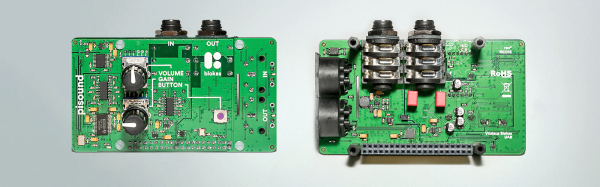
Kids today are being loud with their ‘drum machines’ and ‘EDM’. Throw some Raspberry Pis at them, and there’s a need for a low-latency sound card with MIDI and all the other accouterments of the modern, Skrillex-haired rocker. That’s where PiSound comes in.

Of course, the Pi already comes with audio out, but that’s not enough if you want to do some real audio processing. You need audio in as well, and while you’re messing around with that, adding some high-quality opamps, ADCs, DACs, and some MIDI would be a good idea. This is what the PiSound is all about.

[Pranciskus], the guy who has been working on the PiSound for a while now, developed this multitool for audio on a tiny Linux system. One of the killer features on the PiSound is ‘The Button’, a simple tact switch that runs a script if the button is pressed, another script if the button is held down, and two more if the button is pressed two or three times. This is actually a pretty nifty UI, and we wouldn’t mind seeing this on a few more Pi accessories.

If you’d like to see some example projects using the PiSound, there example MIDI controllers, networked audio players, and some goofing around with LV2 plugins over here.

The BeagleBone Blue – Perfect For Robots

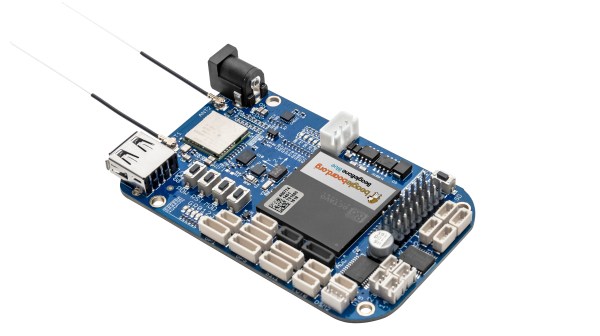
There’s a new BeagleBone on the block, and it’s Blue. The BeagleBone Blue is built for robots, and it’s available right now.

If a cerulean BeagleBone sounds familiar, you’re not wrong. About a year ago, the BeagleBone Blue was introduced in partnership with UCSD. This board was meant for robotics, and had the peripherals to match. Support for battery charging was included, as well as motor drivers, sensor inputs, and wireless. If you want to put Linux on a moving thingy, there are worse choices.

The newly introduced BeagleBone Blue is more or less the same. A 9-axis IMU, barometer, motor driver, quad encoder sensor, servo driver, and a balancing LiPo charger are all included. The difference in this revision is the processor. That big square of epoxy in the middle of the board is the Octavo Systems OSD3358, better known as a BeagleBone on a chip. This is the first actual product we’ve seen using this neat chip, but assuredly not the last – a few people are working on stuffing this chip onto a board that fits in mini Altoids tins.

Friday Hack Chat: ASIC Design

Join [Matt Martin], ASIC designer at Keysight, for this week’s Hack Chat.

Every week, we find a few interesting people making the things that make the things that make all the things, sit them down in front of a computer, and get them to spill the beans on how modern manufacturing and technology actually happens. This is the Hack Chat, and it’s happening this Friday, March 17, at noon PDT (20:00 UTC).

[Matt] has been working at Agilent / Keysight since 2007 as an ASIC designer. The work starts with code that is synthesized into logic gates. After that, [Matt] takes those gates and puts them into silicon. He’s worked with processes from 0.13um to 28nm. Turning code into silicon is still a dark art around here, and if you’ve ever wanted to know how all of this works, this is your chance to find out.

Here’s How To Take Part:

join-hack-chatOur Hack Chats are live community events on the Hackaday.io Hack Chat group messaging.

Log into Hackaday.io, visit that page, and look for the ‘Join this Project’ Button. Once you’re part of the project, the button will change to ‘Team Messaging’, which takes you directly to the Hack Chat.

You don’t have to wait until Friday; join whenever you want and you can see what the community is talking about.

Upcoming Hack Chats

We’ve got a lot on the table when it comes to our Hack Chats. On March 24th, we’re going to argue the merits of tube amplifiers in audio applications. In April, we have [Samy Kamkar], hacker extraordinaire, to talk reverse engineering.

Because I’ve never had the opportunity to do so, and because these Hack Chat announcement posts never get many comments anyway, I’m going to throw this one out there. What would it take to build out a silicon fabrication plant based on technology from 1972? I’m talking about a 10-micrometer process here, something that might be able to clone a 6502. Technology is on our side — a laser printer is cheaper than a few square feet of rubylith — and quartz tube heaters and wire bonding machines can be found on the surplus market. Is it possible to build a silicon fab in your garage without going broke? Leave your thoughts in the comments, and then bring them with you to the Hack Chat this Friday.

Hands-On Nvidia Jetson TX2: Fast Processing For Embedded Devices

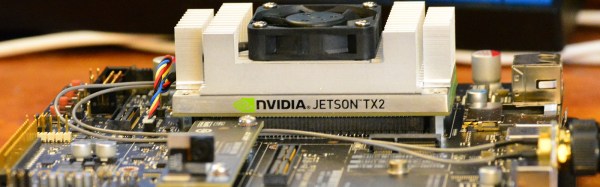
The review embargo is finally over and we can share what we found in the Nvidia Jetson TX2. It’s fast. It’s very fast. While the intended use for the TX2 may be a bit niche for someone building one-off prototypes, there’s a lot of promise here for some very interesting applications.

Last week, Nvidia announced the Jetson TX2, a high-performance single board computer designed to be the brains of self-driving cars, selfie-snapping drones, Alexa-like bots for the privacy-minded, and other applications that require a lot of processing on a significant power budget.

This is the follow-up to the Nvidia Jetson TX1. Since the release of the TX1, Nvidia has made some great strides. Now we have Pascal GPUs, and there’s never been a better time to buy a graphics card. Deep learning is a hot topic that every new CS grad wants to get into, and that means racks filled with GPUs and CUDA cores. The Jetson TX1 and TX2 are Nvidia’s strike at embedded deep learningor devices that need a lot of processing power without sucking batteries dry.

Continue reading “Hands-On Nvidia Jetson TX2: Fast Processing For Embedded Devices”

The Altair Shield

From PDPs to Connection Machines, the Hackaday crowd are big fans of blinkenlights. While this project isn’t an old CPU, RAM, ROM, and an S-100 bus wrapped up in a fancy enclosure, it is a great recreation of the Altair 8800, the historic kit computer that supposedly launched the microcomputer revolution.

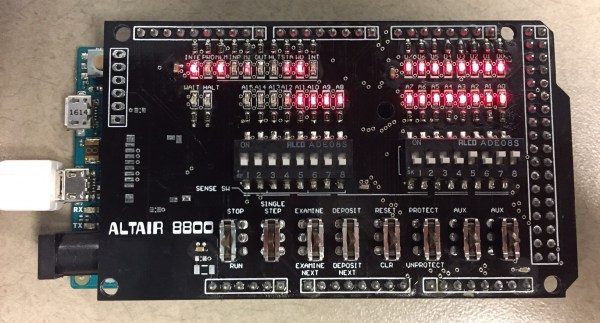
[Justin] says his project is just another Altair 8800 clone, but this one is cut down to the size of an Arduino shield. This is in stark contrast to other Altair recreations, whether they are modern PCs stuffed in an old case, modern replicas, or a board that has the same functionality using chunky toggle switches.

On board [Justin]’s pocket-sized Altair are a few LEDs, some DIP switches, and an octet of spring-loaded dual throw switches that wouldn’t look out of place in a 40-year old computer.

This shield targets the Arduino Due rather than the Mega, but only because the Due performs better running an Altair simulation. Everything is there, and a serial terminal is available ready to run BASIC or any other ancient OS.