A Pet Robot, Just Like Boston Dynamics Makes

Every few months or so, a new video from Boston Dynamics will make the rounds on the Internet. This is their advertising, because unless the military starts buying mechanical mules, Boston Dynamics is going to be out of business pretty soon. You’ll see robots being kicked down the stairs, robots walking through doors, and robots acting like dogs. If a hundred or so highly skilled and highly educated roboticists, technologists, and other experts can put together a walking dog robot in a decade, obviously one person can cut through the cruft and build one in a basement. That’s what [Misha] is doing. It’s the Dizzy Wolf, a robotic wolf, or dog, or cat, we don’t actually know because there’s no fur (or head) yet. But it is interesting.

The key component for any quadruped robot is a high-torque, low-noise servo motor. This isn’t a regular ‘ol brushless motor, and for this application nine gram servos go in the trash. This means custom made motors, or DizzyMotors. You’re looking at a big brushless motor with a planetary gearset, all squished into something that could actually fit into the joint of a robotic wolf’s leg.

There’s a driver for these motors, strangely not called the DizzyDriver, that turns a BLDC into a direct drive servo motor. It is effectively a smart servo, that will move to a specific rotation, receive commands over RS-485, and write back the angular position. It also applies constant torque. Of course, there is a video of the DizzyMotor and servo driver below.

Building a robotic dog that will walk around the house is one of the hardest engineering challenges out there. You’ve got fairly crazy kinematics, you’ll need to think about the strength of the frame, control systems, and eventually how to fit everything in a compact design. This project is hitting all the marks, and we can’t wait to see the Dizzy Wolf do a backflip or chase a ball.

Continue reading “A Pet Robot, Just Like Boston Dynamics Makes”
Teardown Of A 50 Year Old Modem

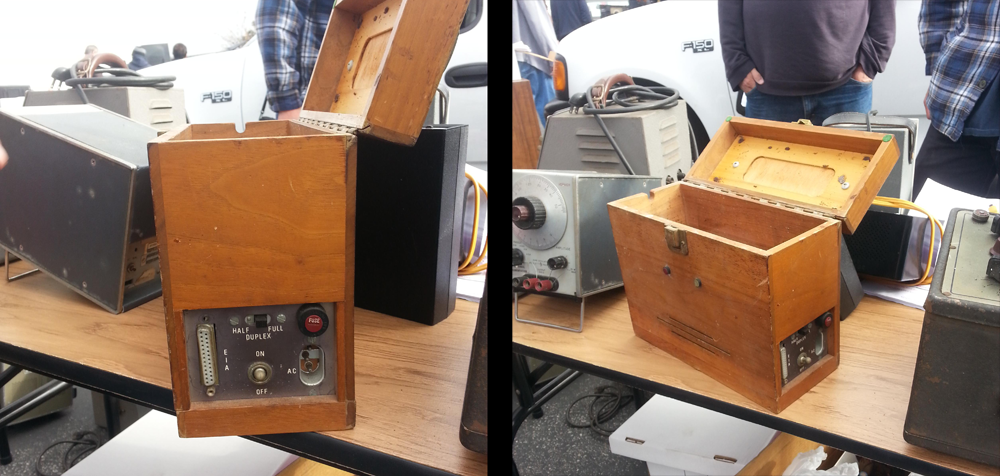
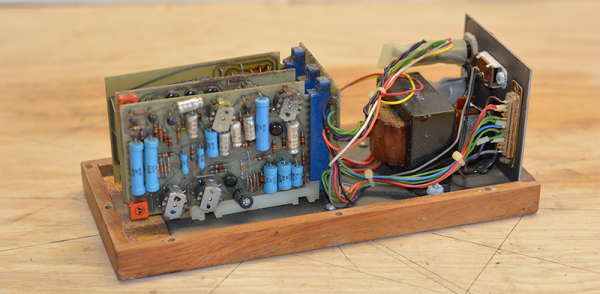
A few years ago, I was out at the W6TRW swap meet at the parking lot of Northrop Grumman in Redondo Beach, California. Tucked away between TVs shaped like polar bears and an infinite variety of cell phone chargers and wall warts was a small wooden box. There was a latch, a wooden handle, and on the side a DB-25 port. There was a switch for half duplex and full duplex. I knew what this was. This was a modem. A wooden modem. Specifically, a Livermore Data Systems acoustically coupled modem from 1965 or thereabouts.

The Livermore Data Systems Modem, where I found it. It cost me $20

The probability of knowing what an acoustically coupled modem looks like is inversely proportional to knowing what Fortnite is, so for anyone reading this who has no idea what I’m talking about, I’ll spell it out. Before there was WiFi and Ethernet and cable modems and fiber everywhere, you connected to the Internet and BBSes via phone lines. A modem turns digital data, in this case a serial connection, into analog data or sound. Oh yeah, we had phone lines, too. The phone lines and the phones in your house were owned by AT&T. Yes, you rented a phone from the phone company.

90s kids might remember plugging in a US Robotics modem into your computer, then plugging an RJ-11 jack into the modem. When this wooden modem was built, that would have been illegal. Starting with the communications act of 1934, it was illegal to attach anything to the phone in your house. This changed in 1956 with Hush-A-Phone Corp v. United States, which ruled you could mechanically attach something to a phone’s headset. (In Hush-A-Phone’s case, it was a small box that fit over a candlestick phone to give you more privacy.)

The right to attach something to AT&T’s equipment changed again in 1968 with Carterphone decision that allowed anyone to connect something electronically to AT&T’s network. This opened the door for plugging an RJ-11 phone jack directly into your computer, but it wasn’t until 1978 that the tariffs, specifications, and certifications were worked out. The acoustically coupled modem was the solution to sending data through the phone lines from 1956 until 1978. It was a hack of the legal system.

This leaves an ancient modem like the one sitting on my desk in an odd position in history. It was designed, marketed and sold before the Carterphone decision, and thus could not connect directly to AT&T’s network. It was engineered before many of the integrated chips we take for granted were rendered in silicon. The first version of this modem was introduced only a year or so after the Bell 103 modem, the first commercially available modem, and is an excellent example of what can be done with thirteen or so transistors. It’s time for the teardown, so let’s dig in.

Continue reading “Teardown Of A 50 Year Old Modem”

A Keyboard For Your Thumb

Here’s an interesting problem that no one has cracked. There are no small keyboards that are completely configurable. Yes, you have some Blackberry keyboards connected to an Arduino, but you’re stuck with the key layout. You could get one of those Xbox controller chat pads, but again, you’re stuck with the keyboard layout they gave you. No, the right solution to building small and cheap keyboards is to make your own, and [David Boucher] has the best one yet.

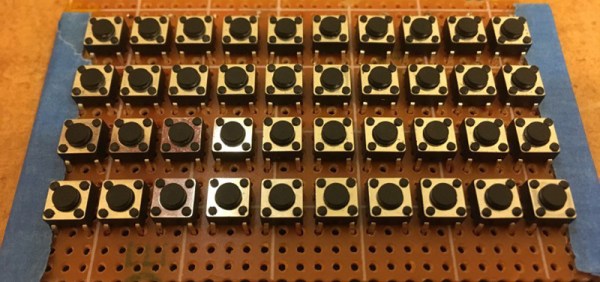
The Thumb Keyboard uses standard through-hole 4mm tact switches on a 10×4 grid, wired up in a row/column matrix. Yes, this is a mechanical keyboard, which is important: no one wants those terrible rubber dome keyswitches, and you need only look at the RGB gaming keyboard market for evidence of that. These tact switches fit into a standard perfboard, allowing anyone to build this at home with a soldering iron. After wiring up the keyboard and connecting it to an Arduino, [David] had a working keyboard.

There’s a lot going on with this build, not the least of which is the custom, 3D printed bezel for those tiny, tiny tact switches. This is a much simpler solution than building an entirely new PCB, which we’ve seen before. Since this is a 3D printed bezel, it’s easy to put labels or whatnot above the keys, or potentially print buttons. It’s great work, and one of the best small keyboards we could imagine.

Can You Live Without The WS2812?

As near as we can tell, the popular WS2812 individually addressable RGB LED was released to the world sometime around the last half of 2013. This wasn’t long ago, or maybe it was an eternity; the ESP8266, the WiFi microcontroller we all know and love was only released a year or so later. If you call these things “Neopixels”, there’s a good reason: Adafruit introduced the WS28212 to the maker community, with no small effort expended on software support, and branding.

The WS2812 is produced by WorldSemi, who made a name for themselves earlier with LED driver solutions, especially the WS2811, an SOIC chip that would turn a common anode RGB LED into one that’s serially controllable. When they stuffed the brains from the WS2811 into a small package with a few LEDs, they created what is probably the most common programmable LED lighting solution available today.

A lot has changed in the six years that the WS2812 has been on the market. The computer modding scene hasn’t heard the words ‘cold cathode’ in years. Christmas lights are much cooler, and anyone who wants to add blinky to their bling has an easy way to do that.

But in the years since the WS2812 came on the market, there are a lot of follow-up products that do the same thing better. You now have serially addressable LEDs that won’t bring down the rest of the string when they fail. You have RGBW LEDs. There are LEDs with a wider color gamut and more. This is a look at the current state of serially addressable RGB LEDs, and what the future might have in store.

Continue reading “Can You Live Without The WS2812?”

WiFi Your Door Lock With An ESP

The Internet of Things is upon us, and with that comes a deluge of smart cameras, smart home monitors, and smart home locks. There actually aren’t many smarts in these smart conveniences, and you can easily build your own. That’s what [MakerMan] did with some off-the-shelf parts and just a little bit of code. Now he can open his door with WiFi, and it’s a nice clean build.

The build process began by first removing the existing barrel bolt on the door. This was replaced by a deadbolt that also had some really neat solenoids inside for remote activation. This was mounted to the door in a way that the door could lock, with a minimal amount of damage from some skillful hacksaw work. The only thing left to do after this was add some electronics and brains to the lock.

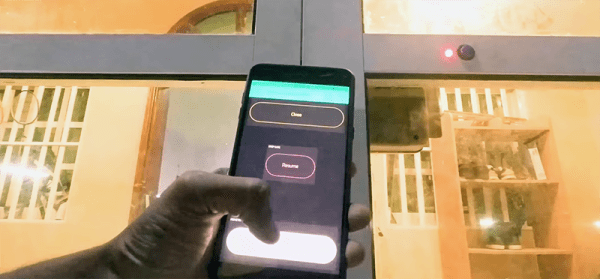
For this, [MakerMan] added a button and LED to the outside of the door. Some of these wires were fed into the lock mechanism, with a few more run over to a project enclosure mounted next to a power outlet. The project enclosure holds an ESP-8266, power regulator, and relay board, and the ESP is running code that instantiates a web server that will unlock the door with a few clicks on a web page.

Sure, it’s probably not the most secure lock on the planet, and the 5V linear regulator is held on to the relay board with hot glue, but this is an exceptionally well-documented project, and all the code is available in an archive.

Continue reading “WiFi Your Door Lock With An ESP”

Hackaday Links Column Banner

Hackaday Links: March 24, 2019

It has come to my attention that a few of you don’t know about Crystalfontz, an online store where you can find displays of all types, from USB LCD displays to I2C OLEDs, to ePaper displays. Thanks to [arthurptj] for that tip. Yes, Crystalfontz is cool, but have you ever heard of Panelook? Oh boy are there some displays at Panelook. Here’s a 1024 by 768 resolution display that’s less than half an inch across.

The comments section of Hackaday has been pretty tame as of late, so here’s why Apple is the king of design. It’s a question of fillets. There are a few ways to add a fillet to the corner of an icon or a MacBook. The first is to draw two perpendicular lines, then add a fixed radius corner. The Apple way is to make everything a squircle. The ‘squircle’ way of design is that there are no sudden jumps in curvature, and yes, you can do this in Fusion360 or any other design tool. This is also one of those things you can’t unsee once you know about it, like the arrow in the FedEx logo.

The ESP8266 simply appeared one day, and it changed everything. The ESP32, likewise, also just arrived on the Internet one day, and right now it’s the best solution for a microcontroller, with WiFi, that also does things really fast. Someone over at Espressif is dropping hints of a new microcontroller, with a possible release on April 1st (the same date that Apple released their competitor to the Raspberry Pi). Is it RISC-V? Is it 5V tolerant? Who knows! (Editor’s note: it’s not RISC-V. Though they’re saying that’s in the pipeline.)

The Verge got their hands on an original iPhone engineering validation unit. It’s a breakout board for an iPhone.

San Dimas High School Football Rules

There’s a screwdriver in your toolbox that has a cast clear handle, a blue ferrule surrounding the shaft, and red and white lettering on the side. Go check, it’s there. It’s a Craftsman screwdriver. It’s an iconic piece of design that’s so ubiquitous that it’s unnoticeable. It’s just what a screwdriver is. It’s a prototypical screwdriver. Thanks to the rise of resin and turning craftsmanship, there’s now a gigantic version of this screwdriver.

[The 8-Bit Guy] posted the following message on his Facebook on March 19th: “Just FYI – somebody hacked and totally erased my website. So, it’s going to be down for a while.” At the time of this writing, everything looks okay, which brings up the larger question of why Facebook is still a thing. We’re on a gradient of coolness here, and the sooner you delete your Facebook, the cooler you are. I, for example, deleted my Facebook during the Bush administration, and we all know how cool I am. I’ll never get to the singularity of coolness of kids who never had a Facebook in the first place, but the point remains: delete your Facebook old man.

[SirEdmar] wants to bring Fusion 360 to Linux users. Autodesk wants the same, and they tried a web-based version of Fusion 360, but… it’s a web version of Fusion 360. Right now the best solution is Wine, and thanks to [SirEdamr] 360 works in Wine.

Bing translate does Klingon! How well does it work? Not bad, it could use some work, mostly with non-standard vocabulary:

Here’s The First Person To Put A Pi In The Raspberry Pi Keyboard

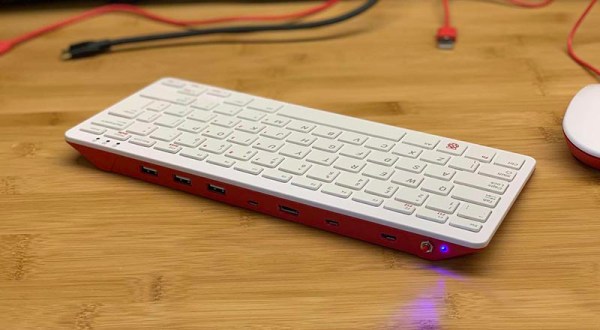
Last week, the Raspberry Pi foundation released the first official Raspberry Pi-branded keyboard and mouse. As a keyboard, it’s probably pretty great; it’s clad in a raspberry and white color scheme, the meta key is the Pi logo, there are function keys. Sure, the Ctrl and Caps Lock keys are in their usual, modern, incorrect positions (each day we stray further from God’s light) but there’s also a built-in USB hub. Everything balances out, I guess.

The Pi keyboard started shipping this week, and it took two days for someone to put a Pi zero inside. Here’s how you do it, and here’s how you turn a Pi keyboard into a home computer, like a speccy or C64.

The parts required for this build include the official Pi keyboard, a Pi Zero W, an Adafruit Powerboost, which is basically the circuitry inside a USB power bank, and a LiPo battery. The project starts by disassembling the keyboard with a spudger, screwdriver, or other small wedge-type tool, disconnecting the keyboard’s ribbon cables, and carefully shaving down the injection molded webbing that adds strength to the keyboard’s enclosure. The project is wrapped up by drilling holes for a power LED, a button to turn the Pi on and off, and the holes for the USB and HDMI ports.

One shortcoming of this build is the use of a male-to-male USB cable to connect the keyboard half of the circuitry to the Pi. This can be worked around by simply soldering a few pieces of magnet wire from the USB port on the Pi to the USB input on the USB hub. But hey, doing it this way gives the Official Pi keyboard a convenient carrying handle, and when one of the ports breaks you’ll be able to do it the right way the second time. Great work.