Human Asteroids Makes You A Vector Triangle Ship

asteroids

In 1979, [Nolan Bushnell] released Asteroids to the world. Now, he’s playing the game again, only this time with the help of a laser projector and a Kinect that turns anyone sitting on a stool – in this case [Nolan] himself – into everyone’s favorite vector spaceship. It’s a project for Steam Carnival, a project by [Brent Bushnell] and [Eric Gradman] that hopes to bring a modern electronic carnival to your town.

The reimagined Asteroids game was created with a laser projector to display the asteroids and ship on a floor. A Kinect tracks the user sitting and rolling on a stool while a smart phone is the triangular spaceship’s ‘fire’ button. The game is played in a 150 square foot arena, and is able to put anyone behind the cockpit of an asteroid mining triangle.

[Brent] and [Eric] hope to bring their steam carnival to LA and San Francisco next spring, but if they exceed their funding goals, they might be convinced to bring their show east of the Mississippi. We’d love to try it out by hiding behind the score like the original Asteroids and wasting several hours.

Continue reading “Human Asteroids Makes You A Vector Triangle Ship”

Programming A Through-hole ARM Microcontroller

NXP

The age of ARM microcontrollers for the electronics hobbyist is upon us, and luckily there are a few breadboard-friendly microcontrollers available in a DIP package. One of these chips is NXP’s LPC810M021FN8 – a tiny little 8-pin DIP with 4 kB of Flash, 1 kB of SRAM, and has a clock fast enough for some really cool stuff. [Joao] needed a way to program one of these microcontrollers and came up with an easy method using only a USB/UART adapter.

The key to this build is the fact the LPC810 doesn’t need any additional components to operate; the internal oscillator means the chip will run at 30 MHz with only a power and ground attached. To program the chip, [Joao] attached the Tx and Rx lines of the chip to a USB/UART adapter (at 3.3 V, of course), and uploaded some code with Flashmagic.

We’ve seen these DIP-sized ARM chips before, but [Joao]’s method of using off-the-shelf tools to write a blinking LED program means it’s a piece of cake to start working with these very cool and very powerful microcontrollers.

Charlotte, The Hexapod With 3D Vision

spider

Charlotte’s chassis comes from as a kit, but the stock electronics are based on an Arduino – not something for a robot that needs to run computer vision apps. [Kevin] ended up using a Raspi for the controller and gave Charlotte eyes with an Asus XTION. Edit: or a PrimeSense sensor These sensors are structured light depth cameras just like the kinect, only about smaller, lighter, and have a better color output.

Hardware is only one half of the equation, so [Kevin] tossed the Arduino-based stock electronics and replaced them with a Raspberry Pi. This allowed him to hone his C++ skills and add one very cool peripheral – the XTION depth camera.

To the surprise of many, we’re sure, [Kevin] is running OpenNI on his Raspberry Pi, allowing Charlotte to take readings from her depth camera and keep from colliding into any objects. The Raspberry Pi is overclocked, of course, and the CPU usage is hovering around 90%, but if you’re looking for a project that uses a depth sensor with a Pi, there you go.

Continue reading “Charlotte, The Hexapod With 3D Vision”

Programming Microcontrollers With A Raspi

rasduino

The advent of the Arduino brought the world of microcontrollers to hobbyists, students, and artist the world over. Right now we’re in the midst of a new expansion in hobbyist electronics with the Raspberry Pi, but we can’t expect everyone to stay in the comfortable, complex, and power-hungry world of Linux forever, can we? Eventually all those tinkerers will want to program a microcontroller, and if they already have a Raspberry Pi, why not use that?

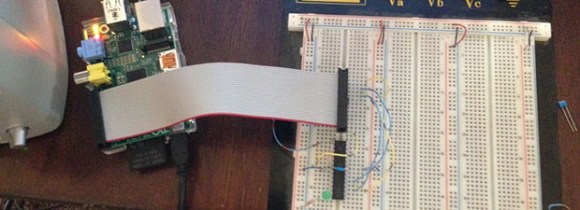
[Kevin] wanted to turn his Raspi into an AVR development workstation, without using any external programmers. He decided to use the Raspi’s SPI port to talk to an AVR microcontroller and was able to make the electrical connections with just a few bits of wire an a handful of resistors.

For the software, [Kevin] added support for SPI to avrdude, available on his git. Theoretically, this should work with any AVR microcontroller with the most popular ATMegas and ATtinys we’ve come to love. It doesn’t support the very weird chips that use TPI programming, but it’s still extremely useful.

One Man’s Adventures In Custom Keyboard Development

BlueCube-flat

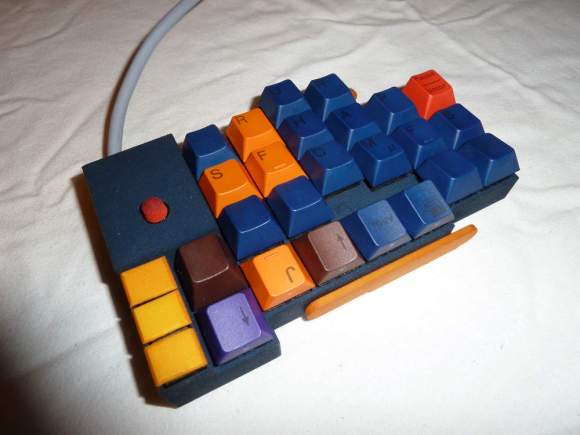
As a software developer, [suka] spends a lot of time every day in front of a keyboard. He had been trying out different keyboard layouts far less common than even the moderetly obscure Dvorak layout, and after some time decided a custom ergonomic keyboard was what he wanted. His progress of designing his own custom ergonomic keyboard is a fascinating read, made even cooler by the fact these are real, professional-quality keyboards with mechanical switches and custom enclosures.

After starting off with a few USB numpads, [suka] dove in to the world of Cherry switches by crafting his own wing-style keyboard. [suka] works for one of the larger manufacturers of laser-sintering machines, so he was able to create the enclosures for his keybaord – as well as the key caps – fairly easily. The technology behind laser sintering allowed [suka] to create some strange bowl and trough-shaped keyboards before settling on his daily driver, seen above.

The Blue Cube, as [suka] calls it, includes an integrated stand, an integrated IBM trackpoint mouse, and is powered by a Teensy microcontroller. [suka]’s keyboards might not be heafty enough for melee combat like the venerable IBM Model M, but it’s exactly what [suka] wants, and that’s just fine by us.

An Overkill Network Adapter For Retrocomputers

amiga

If you want to get an old Apple, Commodore 64, Amiga, or any other retrocomputer up on the Internet, this is for you. [Stian] had an Amiga 500 lying around and wanted to put it on a network. The A500 isn’t expandable, so he needed to look at some sort of adapter to put it on a network. The solution came to him in the form of a Raspberry Pi, a null modem cable, and a few bits of software.

To connect his Amiga to his network, [Stian] made a small serial converter board for his Raspi that breaks out the Tx and Rx pins on the Pi to a 9-pin serial port. With the physical connection to the Pi made, the only thing left to do was to get some software for the Amiga, namely AmiTCP and PPP. It’s not exactly a fast network connection, but this build allows [Stian] to connect to WiFi networks with ancient hardware.

One interesting aspect of [Stian]’s build is the fact it’s completely transferable to other retrocomputers – everything from old S-100 bus computers to classic macs, apples, and pretty much anything else with a serial port that supports PPP. Even with the expense of a Raspberry Pi, it’s much cheaper than absurdly expensive second-hand SCSI to Ethernet controllers and other tomfoolery.

Shocking Your Brain And Making Yourself Smarter

tds

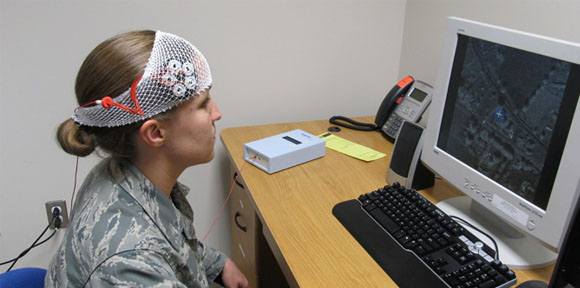
Transcranial Direct Current Stimulation – or tDCS – is the technique of applying electrodes to the skull and running a small but perceptible current through them. It’s not much current – usually on the order of 1 or 2 mA, but the effect of either increasing or decreasing neural activity has led to some interesting studies. [Theo] over on Instructables wrote a tutorial for making his own tDCS suppy that will supply 2 mA to electrodes placed on the skull for everyone to experiment with.

The basic idea behind tDCS is to put the positive electrode over the part of the brain to be excited or the negative electrode over the part of the brain to be inhibited. This is a well-studied technique that can be used to improve mathematical ability. It’s not electroshock therapy (although that is a valid treatment for depression and schizophrenia) in that a seizure is induced; tDCS just applies a small current to specific areas of the brain to excite or inhibit function.

[Theo]’s device is a simple circuit made of a transistor, resistors, and a few diodes to provide about 2 mA to a pair of electrical contacts. With this circuit and a few gel electrode pads for your head, you too can experiment with direct current stimulation of your brain.

Of course we need to warn you about putting electricity into your head. In any event, here’s a quadcopter / stun gun mashup we made. Don’t do that, either. You might get a takedown request.