Becoming Intelligent Designers And Saving The RepRap

While Hack a Day’s modus operandi is serving up hacks from around the Internet, sometimes we feel the need to exercise a bit of editorial freedom. A thousand words is a bit awkward for the front page, so feel free to skip the break and head straight to the full text of this article.

It’s no secret myself and my fellow writers for Hack a Day are impressed with the concept of a personal 3D printer. We’ve seen many, many, builds over the years where a 3D printer is a vital tool or the build itself.

Personally, I love the idea of having a 3D printer. I’ve built a Prusa Mendel over the past few months – Sanguinololu electronics, [Josef Prusa]’s PCB heated bed, and a very nice Budaschnozzle 1.0 from the awesome people at LulzBot. I’ve even made some really cool bits of plastic with it, including the GEB cube from the inside cover of Gödel, Escher, Bach (a very tricky object to realize in a physical form, but not a bad attempt for the third thing I’ve ever printed, including calibration cubes). Right now I’m working on the wheel design for a rocker-bogie suspension system I hope to finish by early August when the next Mars rover lands. My Prusa is a wonderful tool; it’s not a garage filled with a mill, lathe, and woodworking tools, but it’s a start. I think of it as the Shopsmith of the 21st century.

Lately I’ve become more aware of the problems the RepRap and 3D printer community will have to deal with in the very near future, and the possible solution that led me to write this little rant.

Continue reading “Becoming Intelligent Designers And Saving The RepRap”
Using The Nook As A Keyboard

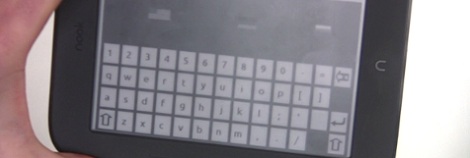
[Andrew] has been pining for an Optimus Maximus – a keyboard with a small LCD screen in each key – for years. Like a lot of people, he love the idea of a completely configurable keyboard, but balked at the two thousand dollar price tag. Although it doesn’t have full color OLED screens behind each key, [Andrew]’s nook simple touch can be used as a keyboard just the same.

After rooting his new nook, [Andrew] had a very nice tablet computer, and the only Android device with an e-ink screen. Although[Andrew] never wrote an Android app before, he wanted to do a proof of concept build to see if a nook keyboard would actually work. The “keyboard app” is actually just a webpage hosted on his home server. When he presses a virtual key, JavaScript sends an ASCII value back to the server where it is decoded and sent to xte.

[Andrew] says his build works, but not very well. Opera mini doesn’t like the homebrew server he set up, and Cyrillic characters are a no go. Still, it works, and looks like an awesome application for an e-ink tablet with a proper Android app. Demo after the break.

Continue reading “Using The Nook As A Keyboard”

Storing Sketches In The Cloud

There’s a fine line between solving problems that don’t exist and solving problems that no one recognizes until a solution is found. The former shows up with housewares peddled on late-night infomercials, while the latter is summed up by [Henry Ford], “If I asked people what they wanted, they would have said faster horses.” [Dave]’s method of storing microcontroller code in the cloud definitely falls into the ‘useful’ category.

[Dave] first realized the problem when he was digging around the IDEO Toy Lab and came across an orphan project, a Barbie credit card swiper. [Dave] had no idea if the firmware for this project was saved on the server, or even if the current version was available. One solution to this problem could be burning a copy of the source onto the Flash or EEPROM on the board.

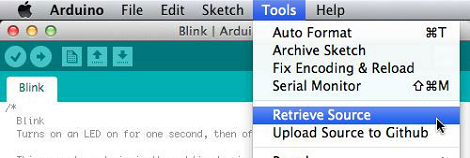
There’s a problem with this idea, though: storing the source in an Arduino’s memory takes space. Thinking laterally, [Dave] realized that editing source happens on a computer, computers are connected to the Internet, so why not keep the source “in the cloud?”

[Dave]’s solution is to host the source on GitHub, and tie every piece of code to a board’s unique USB serial number. This gives every Arduno a unique ID, allows for version control, and libraries of multiple files.

This very clever addition to the Arduino IDE is up on GitHub, ready to be added to any Arduino installation. Why the Arduino IDE doesn’t already have this feature is beyond us, but that’s what you get when you want a faster horse.

Solar Charging A Buddha Machine

While having ambient music playing in the background can lead to a more relaxed state of mind, we can’t imagine the annoyance of having to replace the batteries constantly. Thankfully, [Phil] added solar charging to his Buddha Machine so he won’t have to worry about batteries anymore.

If you’re not familiar, the Buddha Machine is a small plastic box that loops nine tracks of ambient music inspired the Buddhist temples of south-east Asia. There’s not much to these little boxes; they’re just a plastic box with a speaker, on/off knob and an EEPROM loaded up with samples of music.

A year or so ago, the people behind the Buddha Machine posted a prototype of a solar-powered meditative noise box that was unfortunately never made. Thankfully, [Phil Stearns] stepped in posted a guide on how to convert a AA-powered Buddha Machine to solar power.

The modification is incredibly simple: after replacing the disposable AA batteries with NiMH rechargeable, two wires are swapped connecting the battery compartment with the main PCB and the box is sealed up again. Now, whenever one of [Phil]’s solar panels is connected to the power jack the batteries begin charging. [Phil] says he can get two days worth of runtime with a full 8-hour charge, so he shouldn’t need any batteries for his Buddha Machine anytime soon.

Bringing A 19th Century Stock Ticker Into The 21st Century

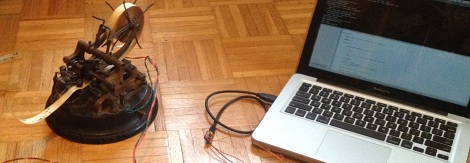
[Ames]’s father has had an old stock ticker sitting on a shelf for some time. He may have become quite listless over his spring break, because he decided connect a century-old stock ticker to his laptop.

When stock tickers were in use, they were all connected to a stock ticker circuit that would broadcast stock prices as a sequence of pulses. For each of these pulses, the letter wheel would advance by one character and finally print the letter with a great ca-thunk. Because stock tickers are incredibly simple devices – just a few solenoids and a couple of gears – [Ames] knew it would be relatively easy to connect one to his laptop.

[Ames]’ tool of choice for moving electrons back and forth in a wire is an Arduino, with none handy he needed to rig up something with the tools available on hand. [Ames] took a USB FTDI serial port connected the flow control lines to his ticker. A pair of MOSFETS and a tiny Python script advances the letter wheel and prints on the paper tape, a success by any measure.

After the break, you can see [Ames]’ stock ticker going about its antique machinations for the first time in possibly a hundred years. Not bad for a something put together over spring break.

Continue reading “Bringing A 19th Century Stock Ticker Into The 21st Century”

Poking Machine

We may be showing our age here, but we have no idea what a ‘poke’ on Facebook actually means. Whether it’s the passive-aggressive manifestations of online stalkers or an extension of  the ‘like’ button, all we know is [Jasper] and [Bartholomäus] built a machine that translates virtual pokes into our analog world.

The “Poking Machine” as [Jasper] and [Bart] call it, syncs to your phone over a Bluetooth connection. The build is incredibly simple: just an ATtiny running Arduino for ATtiny, a Bluetooth controller (possibly this one from Sparkfun), and a servo. When the Facebook app on [Jasper] and [Bart]’s phone receives notification of a ‘poke’, the servo is powered and gently taps the wearer on the arm.

One thing we really like about this project is the case made of several layers of laser-cut acrylic bolted together. This case offers a very clean look even if it is a bit ungainly. We suppose the guys could have used a simple vibration/pager motor for this build, but it wouldn’t exactly be a poking machine at that point. Check out the build video after the break.

Continue reading “Poking Machine”

Nanoscale 3D Printing

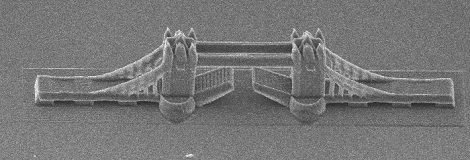
This 3D-printed model of the Tower Bridge is only 200 micrometers long. To put that into perspective, the distance between the towers is the width of a human hair. This model is the product of research at the additive manufacturing department of the Vienna University of Technology

The models were fabricated much like normal stereolithography – a laser shines onto a vat of light-sensitive resin. The resin hardens when exposed to light, and the model is built up layer by layer. These nanoscale models were made using a process called “two-photon lithography,” something we’re not going to pretend we understand completely but here’s a nice paper that provides a good overview. Needless to say, the precision these prints exhibit are nearly ludicrous. The researchers claim a precision of ±1µm, a respectable amount of precision for very high-tech machining applications.

The researches posted a video of the fabrication of a nanoscale F1 race car filmed in real-time. Check that out after the break.

Continue reading “Nanoscale 3D Printing”