Maximite Harkens Back To The Days Of BASIC

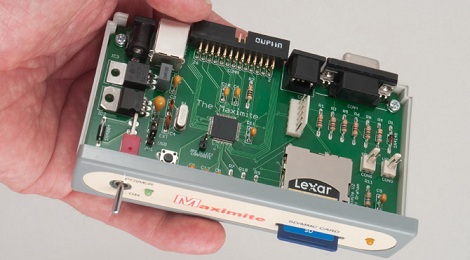
Any self-identified geek that spent some time in the 80s will tell you how they used to type out programs into their ‘microcomputer’ with BASIC. It was a simpler time when a computer’s raison d’etre was simply being a BASIC interpreter. These days are long past us now; you can’t simply turn on a computer and have it load a BASIC prompt anymore. This is where [Geoff]’s Maximite single board computer comes in. It’s a tiny little box that whose only purpose is to play around with BASIC.

[Geoff]’s used a PIC32MX microcontroller with 128k of RAM for the CPU of his Maximite. Unlike an Apple ][ or TRS-80, the Maximite version of BASIC can do floating point arithmetic out of the box. To connect to the outside world, the Maximite has VGA or composite out to display the BASIC interepreter. A PS/2 keyboard port provides the input, and a USB port and SD card can be used to load and save programs from a PC.

The Maximite includes a 20-pin breakout for whatever IO you can imagine. This is duplicated on [Geoff]’s mini Maximite that is designed to be the retro throwback of an Arduino. We though those were called BASIC stamps, but if it gets kids programming, we’ll let it slide.

3D Printed Helicopter Blades

If you’re like us, you’ve been infatuated with the small RC helicopter you picked up on Amazon up until the point where it careened off a wall and broke its blades. Now that you’re wondering about what to do with that small pile of plastic, metal, and electronics, why not print some helicopter blades on your 3D printer?

[Taylor] printed these blades on his Utilimaker, but we don’t see why they couldn’t be printed on a Makerbot or other RepRap. The first set of printed blades worked on the top rotor, but they were too heavy when all four blades were replace. The parts were edited in netfabb using a 0.08mm layer height and now they’re working perfectly. As far as free tools go, Slic3r is the new hotness for .STL to Gcode conversion and now that [Taylor] put the files up on Thingiverse, anyone can print a set of spare blades.

Check out [Taylor] comparing his printed blades to the stock ones that came with his awesome heli after the break.

Continue reading “3D Printed Helicopter Blades”

PVC Magnetometer To Measure Magnetic Storms

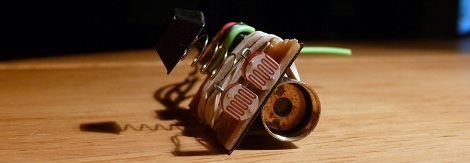
In the hopes of getting a heads up on when the aurora borealis will be visible from his back yard, [Alex] built a magnetometer to measure disruptions in Earth’s magnetic field. The build is extremely simple, too. It’s amazing what you can build with a few components and a trip to the dollar store.

The design or [Alex]’s project is called a torsion magnetometers. In this setup, two mirrors are affixed to a permanent magnet connected to a string. A laser is shone onto the mirror and is reflected back to an array of sensors. In [Alex]’s case he used a simple laser pointer and a pair of photoresistors encased in a PVC tube.

[Alex] has been running his magnetometer in his back yard for over a month now and has the data to prove it. Luckily for [Alex], those graphs he has been generating may get a little more interesting. A coronal mass ejection is coming our way and is expected to hit today around 22:30 UTC. We’ll go outside to look for an aurora, but we’re sure [Alex] will be glued to his laptop tonight.

Check out the CGI visualization of [Alex]’s magnetometer after the break

Continue reading “PVC Magnetometer To Measure Magnetic Storms”

Overlaying Video On Encrypted HDMI Connections

[bunnie] is up to his old tricks again. He successfully implemented a man-in-the-middle attack on HDCP-secured connections to overlay video in any HDMI video stream. There’s a bonus, too: his hack doesn’t use the HDCP master-key. It doesn’t violate the DMCA at all.

HDCP is the awful encryption scheme that goes into HDMI-compatable devices. Before HDCP, injecting video overlays or even chroma keying was a valid interpretation of fair use. [bunnie] thinks that HDMI devices should have the same restrictions analog devices have, so he decided to funnel his own video into his TV.

The build uses the NeTV, a handy and cheap FPGA board with an HDMI input and output. [bunnie] got the FPGA to snoop the HDMI bus and decide if a pixel needs to be changed or not. This isn’t much different from what researchers in Germany did a few months ago, but unlike the academic security researchers, [bunnie] gives you a shopping list of what to buy.

As an example of his work, [bunnie] implemented something like a ‘tweet ticker’ on HDCP-encrypted video. There’s very little the NeTV setup can’t do from chroma keying, filters, or simply dumping the HDMI stream to a hard disk. Check out the slides from [bunnie]’s talk to get better idea of what he did.

[PAPPP] found a video of the talk in question. Check that out after the break.

Continue reading “Overlaying Video On Encrypted HDMI Connections”

FLORA: A Better Arduino LilyPad

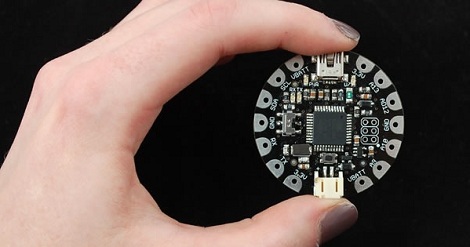
[Ladyada] has been working on FLORA, her wearable electronics platform, for a few months now. Even though it has just been announced the specs look much better than the previous queen of the hill, the Arduino LilyPad.

Going down the spec sheet for both the FLORA and the LilyPad, we see that FLORA has twice as much flash and SRAM as the LilyPad. The LilyPad has more options for I/O, but [Ladyada]’s FLORA has the benefit of not using an ISP header for programming; FLORA is completely USB-compatable. FLORA is also about a quarter-inch in diameter smaller than the LilyPad, something to take into account when you’re going for a wearable project.

On top of Bluetooth, GPS, accelerometer, compass and other modules planned for FLORA ( it doesn’t look like they’re available yet, though), FLORA has USB HID support so it can operate as a USB keyboard, mouse, MIDI device, or connect to a cell phone. If you’ve ever wanted a keytar cardigan, this is the board for you.

Check out [Ladyada]’s video demo of a LED-equipped fabric after the break.

Continue reading “FLORA: A Better Arduino LilyPad”

Computing With The Command Line

Here’s something we thought we would never see: computing with just pipes, /dev/zero, and /dev/null.

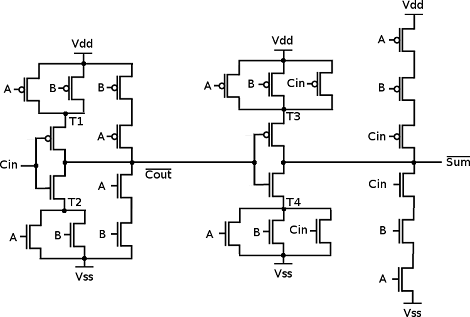
As a thought experiment, [Linus] imagined a null byte represented an electron. /dev/zero would have an infinite supply of electrons and /dev/null would make a wonderful positive power supply. With a very short program (named mosfet.c), [Linus] can use Linux pipes to control the flow of electrons between /zero and /null. [Linus] used mosfet.c with a very short shell script to create a NAND gate. From there all bets were off. He ended up creating a D flip-flop4-bit adder and a counter.

From a bit of cursory research, Linux has a maximum pipe capacity of 1,048,576 bytes and the maximum number of PIDs is 4,194,304 (correct us if we’re wrong). [Linus]  can theoretically build some of the classic CPUs of the 70s and 80s with his pipe logic. An Intel 486 is just out of reach, though. If you give someone a NAND or a NOR they’ll eventually build a computer; we thought we’d never see this, though.

Tubular POV Display

[Ryan]’s cylinder POV display is an amazing piece of work. Right now it’s impressive sitting on his workbench, but we’re sure it would be astonishing hanging above the middle of a dance floor. There are 64 RGB LEDs on this display and they’re certainly bright enough to liven up any space.

Power is provided through a slip ring. The ground is connected to the shaft of the motor [Ryan] picked up at an auto parts store. It’s an efficient way to do things, but the display can only be controlled by whatever image is stored in the ATMega1284’s flash memory. [Ryan] admits this isn’t an ideal setup so he’s working on a ZigBee or Bluetooth connection.

We’ve seen some amazing spinny POV cylinders, but [Ryan]’s build looks amazingly professional. All the board files, schematics and code are uploaded, as well as an image converter for BMPs and PNGs. Check out the demo after the break.
Continue reading “Tubular POV Display”