2023 Halloween Hackfest: Candy Basket Sees You Coming

On Halloween, some people can’t or don’t want to open the door for various reasons. Maybe they have a cat that likes to escape every chance it gets, or maybe their favorite TV show is on during prime trick-or-treating time. Whatever the case, we think it’s perfectly acceptable to leave a bowl of candy outside the door, especially if there are electronics involved.

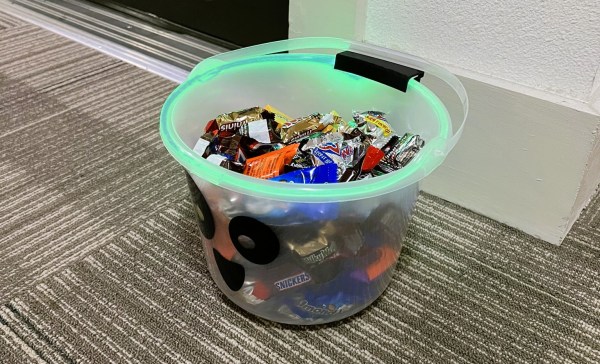
In this case, the bowl detects trick-or-treaters and candy eaters using an LD2410 60 GHz radar sensor and an RP2040. A light pipe shows orange when a person is detected, and switches over to green as they come closer, as if to say you may have candy now.

Nothing happens after that, but now that we think about it, it would be cool to add an MP3 decoder and a speaker to play a little witch cackle or something once they’ve had a chance to stick their hand in the bucket.

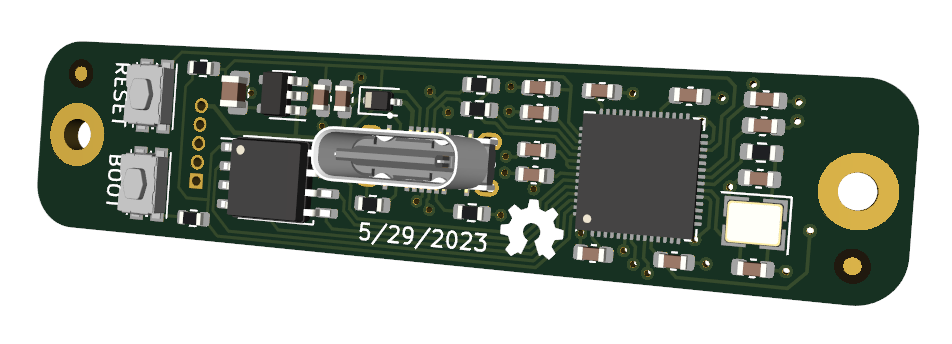
[Mike Kushnerik] actually designed the PCB a few months ago for non-Halloween purposes: some home automation projects. But then they were trying to think of something for Halloween, and this delightful light-up bucket came to mind. In addition to the RP2040 chip, there’s a 128 MB flash chip, a WS2812 LED, and a header for communicating with the radar sensor over UART. Be sure to check out the brief demo video after the break.

If you’d like to stand outside and give out candy, at least send it down a light-up slide or something.

Continue reading “2023 Halloween Hackfest: Candy Basket Sees You Coming”

This 3D Printable Soldering Air Filter Really Sucks

If you solder (and we know you do), you absolutely need ventilation, even for that lead-free stuff. Fortunately, [tinyboatproductions] has gotten into air quality lately and is here to help you with their snappy 3D printed air-filtering design.

At the heart of this build is a 120 mm notoriously-quiet Noctua fan coupled with a carbon filter. It does what you’d think — position the fan the right way and it sucks the air through the filter, which catches all those nasty particles.

The only problem is that the Noctua uses PWM, so there’s no governing it with a just potentiometer. To get around this, [tinyboatproductions] introduced an Arduino Nano and a buck converter, both of which were admittedly a bit overkill. Now the speed can be controlled with a pot.

Once control of the fan was sorted, [tinyboatproductions] decide to add an OLED display to show the fan speed and power condition, which is a nice touch. Be sure to check out the build video after the break.

If this doesn’t have quite enough features for you, here’s one that’s battery powered.

Continue reading “This 3D Printable Soldering Air Filter Really Sucks”

Crabapplepad Folding Keyboard Is Actually Pretty Sweet

[Sergei Silnov] was quite attached to the Microsoft Natural Ergonomic 4000 keyboard, an updated version of their Natural keyboard that brought so many into the split fold. But once [Sergei] started writing notes in coffee shops, it was time for something portable.

The trouble with many portable keyboards, especially folding ones, is that they’re not often comfortable to type on. However, the Crabapplepad, a sleek, elegant offering, looks as though it begs to differ.

[Sergei] truly thought of everything and packed it into this 2cm thick wonder. There’s a little kickstand to hold your phone, or you can just throw an Apple trackpad between the halves and it magnetically attaches. Inside there’s a Seeed Studio XIAO nRF52840, and the switches are the extremely thin and hard-to-find Kailh PG1425 X, a sweet-looking scissor switch.

The only problem with X-switches is that there is only one type of keycap for them at the moment, and there aren’t any homing bums for F and J. To get around this, [Sergei] designed some 3D-printed frames to go around the keycaps and make them more distinct. Yes, this beauty it is open source, so go forth and be comfortable in absolute style. Don’t forget to check out the demo after the break.

To be honest, there once was a pretty good folding keyboard — the Palm Portable. Don’t worry; someone made a Bluetooth adapter for them.

Continue reading “Crabapplepad Folding Keyboard Is Actually Pretty Sweet”

2023 Halloween Hackfest: Musical Jack-o-Lanterns Harmonize For Halloween

Halloween is many things to many people. For some, it’s a chance to dress up and let loose. For others, it’s a chance to give everyone in the neighborhood a jump scare. For [Aaron], it’s the perfect time to put on a show in the yard with some musical, light-up jack-o-lanterns.

[Aaron] came across some deeply-discounted light-up jack-o-lanterns a few years ago. They all had one of those Try Me buttons that’s powered by a couple of coin cells and uses a temporary two-wire connection to the PCB, and [Aaron] figured he could remotely control them using this port of sorts.

Now the guts are made of addressable RGB LEDs that are connected through the battery compartment via weatherproofed pigtails.

On the control side, he has a Raspberry Pi 3, an amplifier, and a couple of power supplies all housed in a weatherproof box. Since it’s not possible to multiplex both the lights and the audio on a Pi 3, he added a USB sound card into the mix.

Be sure to check out the awesome demo video after the break, followed by a pumpkin conversion video.

If you’re more into scaring people, carve up an animated evil-eye pumpkin.

Continue reading “2023 Halloween Hackfest: Musical Jack-o-Lanterns Harmonize For Halloween”

You’ve Got Mail: It All Depends On ZIP Code

Previously on You’ve Got Mail, we looked at a few services that were designed to speed up the mail at various points along the way. But these improvements were all taking place on the USPS’ side of the the fence. Was there anything the customer could be doing to help out?

A post card from my collection.

As it turns out, yes. And it was almost too late. Whereas you could once address a letter or postcard simply to “Fred Minke, Somerset, Wis.” and it would reach him, the volume of mail was getting completely out of hand with the rise of computers, automated billing, and advertising. Something was needed to improve routing and speed up delivery.

We all know enough about ZIP codes to use them, but where did they come from? How many types are out there? What do they even mean? Let’s find out.

Continue reading “You’ve Got Mail: It All Depends On ZIP Code”

A Buzzing, Flashing Phone Ringer For The Elderly

For a lonely person, elderly or otherwise, the sound of a ringing phone can be music to the ears, unless of course it’s another spam call. But what good is a phone when you can’t hear it well enough to answer?

[Giovanni Aggiustatutto] was tasked with building an additional ringer for a set of cordless landline phones belonging to an elderly friend. Rather than try to intercept the signal, [Giovanni] chose to simply mic up the phone base that’s connected to the phone port on the router and send a signal over Wi-Fi to a second box which has a loud piezo buzzer and a handful of LEDs.

At the heart of this build is a pair of ESP8266 Wemos D1 minis and an Arduino sound sensor module inside a pair of really nice-looking 3D printed boxen that may or may not have been inspired by an IKEA air quality sensor. On the receiving side, a green LED indicates the system is working, and the red LEDs flash as soon as a call comes in.

All the code, schematics, and STL files are available for this build, and between the Instructable and the build video after the break, you should have no trouble replicating it for the hard-of-hearing in your life.

Continue reading “A Buzzing, Flashing Phone Ringer For The Elderly”

Dial Up A Tune On The Jukephone

What do you do when you find a nice corded phone with giant buttons out in the wild? You could pay $80/month for a landline, use a VOIP or Bluetooth solution instead, or do something a million times cooler and turn it into a jukebox.

Now when the receiver is lifted, [Turi] hears music instead of a dial tone or a voice on the other end. But playback isn’t limited to the handset — there’s a headphone jack around back.

To listen to a track, he can either dial one in directly, or call up a random track using one of the smaller buttons below. A handy directory organizes the tunes by the hundreds, putting children’s tracks between 1-99 and the intriguing category “hits” between 900-999.

The phone’s new guts are commanded by a Raspberry Pi Pico, which is a great choice for handling the key matrix plus the rest of the buttons. As you may have guessed, there’s an DF Player Mini mp3 player that reads the tracks from an SD card. Everything is powered by a rechargeable 18650 battery.

Jukephone is open source, and you’ll find more pictures on [Turi]’s blog post. Be sure to check out the very brief build and demo video after the break.

Continue reading “Dial Up A Tune On The Jukephone”