2023 Cyberdeck Challenge: Crosberry Pi Loves Lo-Fi Hip Hop

As far as we can tell, the only real selling point that any portable record player offered was, well, its portability. To be clear, the sound is never that great. But perhaps a selling point for this crowd is that they usually come in hinged cases with handles, and you know what that means — cyberdeck that thing!

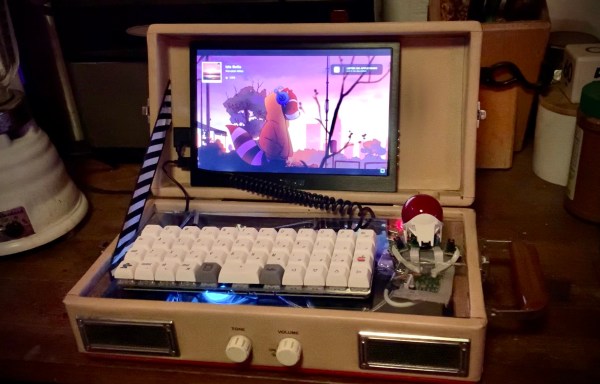
[Mx. Jack Nelson] started gutting this Crosley CR40 record player to make a Raspberry Pi housing, but it quickly turned into a cyberdeck project with the addition of a 10.1″ portable monitor, a Planck ortholinear keyboard, and a gutted trackball mouse.

We love that [Mx. Jack Nelson] made use of the Crosley’s original speakers — this was the wife’s idea! — as well as the volume and tone knobs. But our favorite part has to be the clear acrylic top that both protects the electronics and provides a platform for the keyboard and mouse buttons. Be sure to check out the demo video after the break.

Continue reading “2023 Cyberdeck Challenge: Crosberry Pi Loves Lo-Fi Hip Hop”

You’ve Got Mail: Sorting And The USPS

Snail mail. You may not think much of it these days, but the mail doesn’t stop and it never has. Every type of mail from postcards and letters to large envelopes and packages of all sizes moves every single day all over the US, even though it isn’t typically delivered on Sundays. Dealing with the ever-increasing volume of physical mail has called for the invention and evolution of automatic mail sorting machines that are used by both postal facilities and businesses alike.

While mail sorting machines have grown and matured over the years, the human element of the task remains intact. As long as people type addresses, write them by hand, and/or print them in handwriting fonts by the hundreds, there will need to be humans on hand to verify at least a few of them that are really hard to read.

There are roughly a dozen different types of mail sorting machines in 2023. In this series, we’re going to take a look at most of them, along with many other aspects of the United States Postal Service and its history.

Continue reading “You’ve Got Mail: Sorting And The USPS”

Hackaday Podcast 225: Leafy Meats, Wind To Heat, And A Machine That’s Neat

This week, Editor-in-Chief Elliot Williams and Kristina Panos don’t have a whole lot in the way of news, but we do know this: the Green Hacks Challenge of the 2023 Hackaday Prize ends precisely at 7AM PDT on July 4th. Show us what you can do in the realm of hacking for the planet, be it solar-based, wind-powered, recycled-trash-powered — you get the idea.

Kristina is now completely down for the count on What’s That Sound, although this week, she was sort of in the neighborhood. But no matter, because we know several of you will nail it. Then it’s on to the hacks, where we have quite a bit to say this week when it comes to cars.

From there we take a look at a really fun gumball run, ponder the uses of leafy meats, and fawn over an Amiga-inspired build. Finally we talk PCB earring art, hacking the IKEA Kvart, and discuss the potential uses for wind-to-heat power.

Check out the links below if you want to follow along, and as always, tell us what you think about this episode in  the comments!

Download and savor at your leisure.

Continue reading “Hackaday Podcast 225: Leafy Meats, Wind To Heat, And A Machine That’s Neat”

Illustrated Kristina with an IBM Model M keyboard floating between her hands.

Keebin’ With Kristina: The One With The Mouse-cropad

Okay, so you built a macropad or even a keyboard. What now? Well, most people use some kind of mouse to go along with it, but no one uses a mouse like this creation by [Joe_Scotto].

This is the mouse no one asked for, and yet I think it’s pretty awesome for something that’s supposed to be a joke. Maybe it’s in the great execution, I don’t know. I will ignore the suggestion that MX Browns are part of the joke, however. *cries in OG tactility*

Essentially, this is a macropad that uses QMK mouse keys to emulate a mouse. The build itself couldn’t be more straightforward — it’s six MX browns wired up to six pins on a Pico, and they all share a common ground. Keep the joke going by commissioning one from [Joe] or building it yourself.

Via [r/cyberdeck]

News: Microsoft Discontinues Natural Keyboard

Image via Wikipedia

It’s often people’s first ergonomic keyboard — some variation of Microsoft’s Natural keyboard, that 90s split that took up so much real estate on the desk with it’s built-in wrist rest.

I’ll admit that despite using one for years at the office, I went back to whatever clicky rectangles I could get from the IT department. Then came the pain, and I got a Logitech Wave. Then came the surgery, and the Kinesis Advantage.

Well, now it seems that after 30 years and several ergonomic models, Microsoft are exiting the keyboard game. While I don’t personally understand why when there are so many fans, [Jeff Atwood] believes it’s because keyboards are exploding in popularity and tons of people are building their own. While that may be true, there are legions of normies trying to stave off carpal and cubital tunnel syndrome and have absolutely no interest in building anything, much less a keyboard. So, get these things while they’re hot, I guess.

Continue reading “Keebin’ With Kristina: The One With The Mouse-cropad”

Hackaday Podcast 218: Open Source AI, The Rescue Of Salyut 7, The Homework Machine

This week, Editor-in-Chief Elliot Williams and Kristina Panos have much in the way of Hackaday news — the Op Amp Challenge is about halfway over, and there are roughly three weeks left in the Assistive Tech challenge of the 2023 Hackaday Prize. Show us what you’ve got on the analog front, and then see what you can do to help people with disabilities to live better lives!

Kristina is still striking out on What’s That Sound, which this week honestly sounded much more horrendous and mechanical than the thing it actually is. Then it’s on to the hacks, beginning with the we-told-you-so that even Google believes that open source AI will out-compete both Google’s own AI and the questionably-named OpenAI.

From there we take a look at a light-up breadboard, listen to some magnetite music, and look inside a pair of smart sunglasses. Finally, we talk cars, beginning with the bleeding edge of driver-less. Then we go back in time to discuss in-vehicle record players of the late 1950s.

Check out the links below if you want to follow along, and as always, tell us what you think about this episode in  the comments!

Download and savor at your leisure.

Continue reading “Hackaday Podcast 218: Open Source AI, The Rescue Of Salyut 7, The Homework Machine”

Easter’s Over, But You Can Still Dye Keycaps

While it’s true that keycap colorways abound these days, one can’t always find exactly what one is looking for. And once found, the set is often either prohibitively expensive, or it doesn’t come in the desired layout, or both. So, why not color your own keycaps?

That’s exactly what [amphiboi] did, while standing on the shoulders of [CrowningKnight]’s imgur post on the subject. Essentially, you use Rit dye and PBT keycaps for best results. Rit has a comprehensive guide to mixing their dyes to achieve pretty much whatever colors you want. Once that’s all squared away, it’s time to gather your cooking supplies.

Starting with a pot you don’t care about and four cups of boiling water. Add about a teaspoon of dish soap, which helps the dye settle evenly across the keycaps. Then you just add the dye(s) and stir with an expendable spoon, then add your keycaps. 5-10 minutes later, depending on your desired outcome, the ‘caps are ready to be rinsed, dried, and pushed on to your switches.

Satisfied with the color of your keycaps, but wish they had cool legends? Check out this waterslide decal tutorial.

Barcodes Enter The Matrix In 2027

Beep. We’ve come a long way since June 26, 1974 when the first bar code was scanned at a grocery store in Troy, Ohio. That legendary pack of Juicy Fruit proved that even the smallest of items could now carry numbers associated with inventory and price.

By now, we’re all too familiar with this sound as self-checkouts have become the norm. Whereas you yourself could at one time literally check out during the transaction, you must now be on your toes and play find the bar code on every item.

What does the consumer gain from the bar code today? Practically nothing, except the chance to purchase, and potentially return, the item without too much hassle. Well, the non-profit outfit that runs the bar code world — GS1 US — wants to change all that. By 2027, they are confident that all 1D bar codes will be replaced with 2D bar codes similar to QR codes. Why?

Continue reading “Barcodes Enter The Matrix In 2027”