The Ommatid Is An Awesome “Thing”

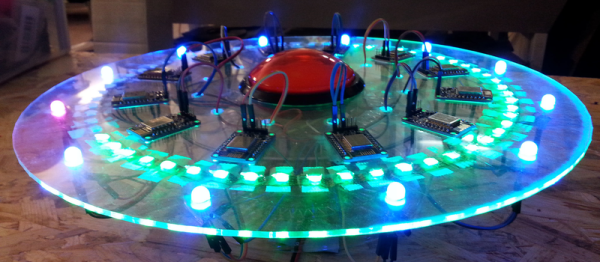
[Jonathan Foote] made a really cool device: the Ommatid spherical display and controller. Part woodworking craft project, part art, and part tremendous hack, the Ommatid is something that we don’t really have a name for. But you can watch it in action, running demo code, in a video below the break.

The sphere design started out with a “20-sided regular polyhedron” with which D&D players should be familiar, and then divided each triangular face into four more triangles. An 80-sided die? Almost. One triangle’s worth was sacrificed for the part that mounts to the base.

Each facet contains an RGB LED and an IR sensor so that it can tell when a hand is nearby. All of this input and output is run through a Raspberry Pi, so both the sensing and display interactions are easily modified. [Jonathan] runs us through the electronics, programming, and interactivity in a separate Instructable. We really like [Jonathan]’s idea of turning this device into an OSC controller / display.

Continue reading “The Ommatid Is An Awesome “Thing””

The First Radio Sets: A Spark Gap And A Coherer

[Ashish] let us know about his experiments in recreating the earliest type of radio set: a spark-gap transmitter and iron-filings coherer. He goes through the historical development of the kit in great detail, so we’re just going to skip that part. Go read it yourself!

Instead, we’re going to tease you with the coolest part of the rig: the coherer. In [Ashish]’s build, it’s a piece of tubing with some iron filings between two bolts. When a sufficiently strong EM wave hits the filings, they stick together and bridge the gap between the bolts, allowing electricity to flow and light up an LED, for instance. You can see this in [Ashish]’s video below the break, along with kmore discussion of that coherer.

Continue reading “The First Radio Sets: A Spark Gap And A Coherer”

Laser-cut Cardboard Planetary Gearset Is Pretty, But Useless

[Shane] made a project that speaks directly to our heart — combining laser cutting, cardboard, and gears. How could it be any better? Well, it could do anything. But that’s quibbling. It’s fun enough just to watch the laser-cut cardboard planetary gears turn. (Video after the break.)

It was made on a laser cutter using the gear extensions for generating gears in Inkscape, everybody’s favorite free SVG editor.

In his writeup, [Shane] touches on all of the relevant details: all of the gear pitches need to be the same, and the number of teeth in the sun gear (in the center) needs to equal the number of teeth in the ring (outside) divided by the number of planets (orbiting, in the middle). So far so good.

Continue reading “Laser-cut Cardboard Planetary Gearset Is Pretty, But Useless”

Tiny Arcade, Based On Arduino

Who can resist video games when they’re packed up in tiny, tiny little arcade machines? [Ken]’s hoping that you cannot, because he’s making a cute, miniature Arduino-based arcade game platform on Kickstarter. (Obligatory Kickstarter promo video below the break.)

The arcades are based on [Ken]’s TinyCircuits Arduino platform — a surprisingly broad range of Arduino modules that click together using small snap connectors in place of pin headers. The system is cool enough in its own right, and it appears to be entirely open source. Housing these bits in a cute arcade box and providing working game code to go along with it invites hacking.

There’s something about tiny video cabinets. We’ve seen people cram a Game Boy Advance into a tiny arcade cabinet and re-house commercial video game keyfobs into arcade boxes. Of course, there’s the Rasbperry Pi. From [Sprite_TM]’s cute little MAME cabinet to this exquisite build with commercially 3D-printed parts, it’s a tremendously appealing project.

But now, if you’re too lazy to build your own from scratch, and you’ve got $60 burning a hole in your pocket, you can get your own tiny arcade — and tiny Arduino kit — for mere money. A lot of people have already gone that route as they passed the $25k funding goal early yesterday. Congrats [Ken]!

Continue reading “Tiny Arcade, Based On Arduino”

Water-Saving Agricultural System Wins Best Product

The 2015 Hackaday Prize included something new: a prize for the Best Product. The winner took home $100k in funding, a six-month residency at the Supplyframe Design Lab in Pasadena, and help turning a budding product into a full-grown success. And the winner is…

Vinduino

vinduino-shot0007 Water is a crucial element for farming: the plants need enough, but not too much. Water is also an increasingly precious resource all over the world. In California, five times as much water is used in agriculture as is used by residential consumers. A 25% reduction in agricultural use, for instance, would entirely offset all urban water use. With this in mind, a number of California farmers are trying to voluntarily reduce their water consumption. But how?

One important development is targeted irrigation. Getting precisely the right amount of water to each plant can reduce the fraction lost to evaporation or runoff. It’s a small thing, but it’s a very big deal.

Cue Vinduino, a long-running project of “gentleman farmer” and hacker [Reinier van der Lee]. As a system, Vinduino aims to make it easy and relatively inexpensive to measure the amount of water in the soil at different depths, to log this information, and to eventually tailor the farm’s water usage to the plants and their environment. We were able to catch up with [Reinier] at the Hackaday SuperConference the day after results were announced. He shared his story of developing Vinduino and recounts how he felt when it was named Best Product:

The product that won Best Product is simple, but very well executed. It’s a hand-held soil moisture sensor reader that couples with a DIY soil probe design to create a versatile and inexpensive system. All of the 2015 Best Product Finalists were exceptional. Vinduino’s attention to detail, room for expansion, and the potential to help the world pushed this project over the top.

Continue reading “Water-Saving Agricultural System Wins Best Product”

Pea-Whistle Steganography

Do you see the patterns everywhere around you? No? Look closer. Still no? Look again. OK, maybe there’s nothing there.

[Oona Räisänen] hears signals and then takes them apart. And even when there’s nothing there, she’s thinking “what if they were?” Case in point: could one hypothetically transmit coded information in the trilling of a referee’s whistle at the start of a soccer match?

acme-spektriTo you, the rapid pitch changes made by the little ball that’s inside a ref’s whistle sounds like “trilling” or “warbling” or something. To [Oona], it sounds like frequency-shift key (FSK) modulation. Could you make a non-random trilling, then, that would sound like a normal whistle?

Her perl script says yes. It takes the data you want to send, encodes it up as 100 baud FSK, smoothes it out, adds some noise and additional harmonics, and wraps it up in an audio file. There’s even a couple of sync bytes at the front, and then a byte for packet size. Standard pea-whistle protocol (PWP), naturally. If you listen really closely to the samples, you can tell which contains data, but it’s a really good match. Cool!

[Oona] has graced our pages before, naturally. From this beautiful infographic tracing out a dial-up modem handshake to her work reversing her local bus stop information signs or decoding this strange sound emitted by a news helicopter, She’s full of curiosity and good ideas — a hacker’s hacker. Her talk on the bus stop work is inspirational.. She’s one of our secret heroes!

VOCore Tutorial Gets You Started With Tiny Router

[Vadim] wrote up this short but sweet tutorial on getting started with the Vocore (tiny) OpenWRT-router-on-a-stamp. If you need more computing power than you can get with an ESP8266, and you want an open-source Linux-plus-Wifi solution in a square inch of board space, the Vocore looks pretty sweet.

We covered the Vocore a while ago. It has 28 GPIOs, all accessible from system calls in OpenWRT. It becomes much more computer-like if you add a dock that breaks out the USB and Ethernet functionality, but that also doubles the price.

IMG_5299_tnGetting started with a no-frills Linux box (chip?) can be intimidating. So it’s a good thing that [Vadim] details a first setup of the Vocore over WiFi and SSH, and then takes you through a button-and-LED style ‘Hello World’ application that makes simple use of the GPIOs.

He says he’s going to interface it eventually with a TI CC110 sub-gig radio unit, but that’s going to involve writing some drivers and will take him some time. We’d love to see how to connect peripherals, so we’re waiting with bated breath.

[Vadim] also helpfully included an un-bricking script for the Vocore, which restores the default firmware and gets you out of whatever hole you’ve managed to dig yourself into. Basically, you connect to the device over a USB-Serial adapter, run his script, and you should be set.

Any of you out there using a Vocore? Or other OpenWRT routers? Give [Vadim]’s tutorial a glance and let us know what you think.