Linux, Running On Not A Lot

There are many possible answers to the question of what the lowest-powered hardware on which Linux could run might be, but it’s usually a pre-requisite for a Linux-capable platform to have a memory management unit, or MMU. That’s not the whole story though, because there are microcontroller-focused variants of the kernel which don’t require an MMU, including one for the Xtensa cores found on many Espressif chips. It’s this that [Naveen] is using to produce a computer which may not be the Linux computer with the lowest processor power, but could be the one consuming the least electrical power.

The result is definitely not a Linux powerhouse, but with its Arduino-sourced ESP32 board stacked on an UNO and I2C keyboard and display, it’s an extremely lightweight device. The question remains, though, is it more than a curiosity, and to what can it do? The chief advantage it has over its competitors such as the Raspberry Pi Zero comes in low power consumption, but can its cut-down Linux offer as much as a full-fat version? We are guessing that some commenters below will know the answer.

If you’re curious about the Xtensa version of Linux, it can be found here,

A Time-Lapse Film, Not A Time-Lapse Video

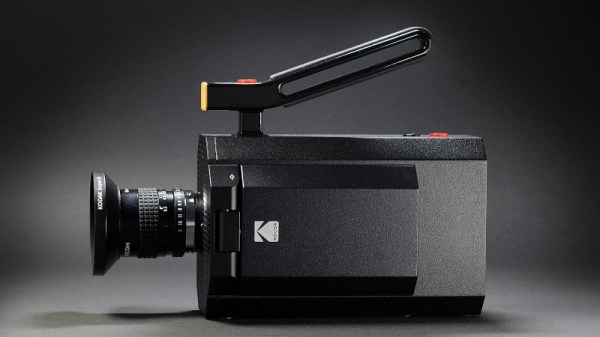
We’re used to time-lapse photography being merely a feature of our smartphone camera app, but of course it has its origins in film. A movie camera would be triggered frame by frame at fixed intervals, with the result being the timelapse. A dead art, you might wonder, were it not for [Kevin Santo Cappuccio], who is capturing his work in timelapse on 16mm film, with a vintage Bolex camera.

For those of us with a penchant for film the camera alone makes it worth a second look, but the actuation mechanism is at the heart of the project. It uses a slightly unusual but nevertheless strangely ubiquitous actuator, in the form of a car door central locking actuator. This in turn is triggered by an Arduino Nano, and he has the ultimate dream of using a 16mm film timelapse as part of a fully-16mm submission video for the Hackaday prize.

We think it’s a pity that more film-based projects don’t end up on these pages, so we’re very pleased indeed to see this one. If you’re curious about the other side of the 16mm system, well we’ve introduced you to the inner workings of a projector before, too.

A Quarter Century Of The IMac

Growing older as an engineer turns out to be a succession of moments in which technologies and devices which you somehow still imagine to be cool or exciting, reveal themselves in fact to be obsolete, indeed, old. Such a moment comes today, with the25th anniversary of the most iconic of 1990s computers, Apple’s iMac. The translucent all-in-one machine was and remains more than simply yet another shiny Mac, it’s probably the single most influential home computer ever. A bold statement to be sure, but take a look at the computer you’re reading this on, indeed at all your electronic devices here in 2023, before you dismiss it.

Any colour you want, as long as it's beige
Any colour you want, as long as it’s beige. Leon Brooks, Public domain.

Computers in the 1990s were beige and boring. Breathtakingly so, a festival of the generic. If you had a PC it came in the same beige box as every single other PC, the only thing breaking the monotony being one of those LED 7-segment fake-MHz displays. Apple computers took the beige and ran with it, their PowerMac range being merely a smoother-fronted version of all those beige-box PCs. This was the period following the departure of Steve Jobs during which the company famously lost its way, and the Bondi blue Jonny Ive-designed iMac was the signature product of his triumphant return.

That’s enough pretending to have drunk the Apple Kool-Aid for one article, so  why are we marking this anniversary? The answer lies not in the iMac’s hardware, though its 233MHz PowerPC G3 and ATI graphics driving a 15″ CRT were no slouch for the day, nor even in its forsaking of all their previous proprietary interfaces for USB. Instead it’s the design influence of this machine, as it ushered in a new era of technological devices whose ethos lay around how they might be used rather than in simply showering the interface with features. At the time the iMac spawned a brief fashion for translucent blue in everything from peripherals to steam irons, but in the quarter century since your devices have changed immeasurably in its wake. We still don’t like that weird round mouse though.

Header image: Rama, CC BY-SA 4.0.

A Digital Camera For The 1984 Market

Digital cameras are a ubiquitous consumer and professional product here in 2023, and because of the wide availability of parts it’s relatively straightforward to construct one for yourself. Four decades ago though, film was king, but that hasn’t stopped [Georg Lukas] from building a digital camera for the 1984 market. The hardware is definitely from recent years, the extremely affordable ESP32-cam board that many of us will have worked with already. Meanwhile the 1984 part lies in the recording format, it makes EGA 16-colour low-res pictures and stores them in the archaic TGA file format.

A low-res camera is fun, but there are two other angles on this which are definitely worth some time. The first is that his description and code are worth a read for anyone with an interest in programming an ESP32 camera, while the second invites us to consider whether such a camera could have been made using parts available in 1984. We remember camera peripherals for 8-bit microcomputers which were a C-mount lens positioned over a decapped RAM chip, and thus we can’t help wondering whether an RGB split to three of those sensors could have been constructed. Whether a 6502 or a Z80 with 64k of memory could have processed the three images into one is another matter, but at least if any of you want to try there’s a handy 1984 computer still popping up on eBay.

Black Graphics On Your TV, For A Greener World?

Can you really save energy by carefully choosing the colors displayed on a TV screen? Under some conditions, yes. Or at least that’s the conclusion of a team at the BBC that looked at reducing the energy consumption impact of their output by using what they call Lower Carbon Graphics. In short, they’re trying to ensure that OLED displays or those with reactive backlights use less energy when displaying BBC graphics, simply by using more black.

It turns out that a lot of British households play radio stations on their TVs, and the BBC sends a static image to each screen in this mode. As part of a redesign across the organisation, the BBC removed the bright background colours from these images and replaced it with black, with a remarkable reduction in power consumption, at least on OLED and FALD screens. (On normally backlit screens, 89% of British TVs, this does nothing.)

If you look hard at their numbers, though, listening to radio on the TV is horrendously inefficient; can you imagine a radio that consumes 100 W?  If the BBC really wants to help reduce media-related energy consumption, maybe they should stop broadcasting radio programming on the TV entirely.

Anyway, as we move toward a larger fraction of OLED screens, on TVs and monitors alike, it’s fun to think that darker images use up to 40% less power. Who knew that Hackaday was so environmentally friendly? Black is the new green!

Header: RIA Novosti archive/ Igor Vinogradov, CC-BY-SA 3.0.

This 3D Scanner Uses A Sensor You Might Not Know About

The huge diversity of sensors and other hardware which our community now has access to seems comprehensive, but there remain many parts which have made little impact due to cost or scarcity. It’s one of these which [Enginoor] has taken for the sensor in a 3D scanner, an industrial laser displacement sensor.

This sensor measures distance, but it’s not one of the time-of-flight sensors we’re familiar with. Instead it’s similar to a photographic rangefinder, relying on the parallax angle as seen from a sensor a distance apart from the laser. They are extremely expensive due to their high-precision construction, but happily they can be found at a more affordable level second-hand from decommissioned machinery.

In this case the sensor is mounted on an X-Y gantry, and scans the part making individual point measurements. The sensor is interfaced to a Teensy, which in turn spits the data back to a PC for processing. By their own admission it’s not the most practical of builds, but for us that’s not the point. We hope that bringing these parts to the attention of our community might see them used in other ways.

We’ve featured huge numbers of 3D scanners over the years, including a look at how not to make one.

Update Your Chinese Radio Without The Pain

The new hotness in cheap radios this year has been the Quansheng UV-K5, a Chinese handheld transceiver with significant RF abilities and easy modding. The amateur radio community have seized upon it with glee and already reverse-engineered much of the firmware, but flashing the thing has always required a minor effort. Now thanks to the work of [whosmatt], it can be flashed with little more than a web browser and a serial cable.

This feat was made possible through the magic of WebSerial, a handy feature that allows web applications to talk to connected hardware. We’ve seen it in action a few times in the world of badges, and as browser support for it has improved it’s now available through browsers on all the major platforms.

The web app allows tweaking of the Quansheng settings and will, no doubt, be capable of uploading that when fully open-source firmware is available. It should be of great interest well beyond the world of Chinese radios, though, because we’re guessing there are a lot of projects that could benefit from such a ubiquitous interface tool.

If you’d like to know more, WebSerial is something we’ve looked at in the past.

Header image: [Concretedog]