The Zero Terminal 3: A Pop-Out Keyboard Linux Computer In Your Pocket

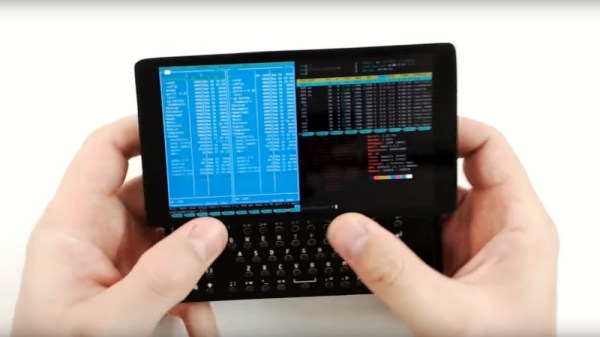
The mobile phone revolution has delivered us attractively packaged and convenient computing in our pockets, but without the easy hackability we like in our community. Meanwhile the advent of single board computers has given us affordable super-powerful hardware that can run a very capable GNU/Linux operating system and fulfill all our hackable computing needs. Combine the two though? Plenty have tried, few have succeeded in making something as slick as the former with the open power of the latter. Fine if you like your portable devices to have a cyberdeck vibe, but maybe not something you’d take into the boardrooom. Never fear though, for [N-O-D-E] have the solution, in version 3 of the Zero Terminal. It’s the ultimate in Raspberry Pi based handheld computing, and it resembles a slightly chunky mobile phone.

At its heart is a Waveshare OLED 5.5″ touch screen, on the back owhich is mounted a PCB that carries a USB hub and power circuitry. A Pi Zero is mounted directly to this, and a cleverly designed HDMI adapter board interfaces it to the display. The power board is a generic one, the one designed for the PCB proved difficult to hand solder. There’s a very smartly designed case to give it that mobile phone feel, and on the back are a set of sockets with all the relevant Pi connections. This opens the possibility of some exciting add-ons, the first of which is a sliding keyboard similar to those on early Android phones. The ‘board is based on a [Bobricius] design, though sadly isn’t quite working yet.

As you can see in the video below the break, this is about as slick a mobile Pi as it’s possible to get. [N-O-D-E], we want one. Just take our money!

Continue reading “The Zero Terminal 3: A Pop-Out Keyboard Linux Computer In Your Pocket”

Animal Crossing IRL With Nova Lights To Mark The Passage Of Time

We feature a lot of clocks here at Hackaday, but it’s not often that one comes along and makes us stop in our tracks and reconsider the fundamental question: just what is a clock? [Charlyn] has managed it though, with her Nova Light clock, which doesn’t so much measure the passing of time, but mark it.

The clock itself is a set of origami pieces in the shape of the Nova lights and a star fragment from the popular Animal Crossing New Horizons game, and each has a multicolour LED underneath. The star fragment pulses, while the two Nova lights imperceptibly slowly change colour, one over the course of the day and the other over the course of the week. Except for Fridays, when in celebration of the end of the work week they pulsate with different colours. Under the hood is an Adafruit Feather with a real-time clock module, and since all the code is there for your enjoyment you can have a go at making your own. Below the break is a video showing the clock in action.

[Charlyn] is no stranger to these pages, in fact we’ve featured her exquisite use of origami before. It’s probably her rideable rocking horse that’s the most memorable among her projects though.

Continue reading “Animal Crossing IRL With Nova Lights To Mark The Passage Of Time”

Print With Plasma!

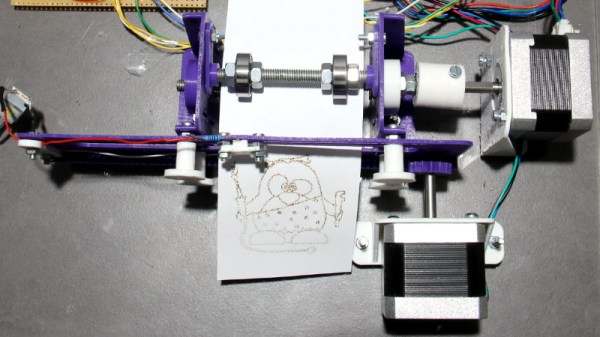
Over the years there have been a variety of methods for a computer to commit its thoughts to paper. Be it a daisy wheel, a dot matrix, a laser, or an inkjet, we’ve all cursed at a recalcitrant printer. There’s another type of printer that maybe we don’t think of quite as often but is workhorse in a million cash registers and parking ticket machines: the thermal printer. These mechanisms can be readily found as surplus items and have made their way into more than one project here over the years. [HomoFaciens] has taken thermal printing a step further by building a plasma printer from scratch that makes use of the thermal paper.

A thermal printer does its job as its name suggests, by burning the image into the paper. It may not deliver the best quality print, but scores on not needing ink ribbons, cartridges, or toner. This DIY version uses an off-the-shelf battery-powered plasma lighter to do the job, mounted on a 3D printed XY printer mechanism driven by two stepper motors. Behind the scenes is an Arduino Uno, which receives its instructions via USB from a command-line program on a Linux box. It’s admitted that this is hardly the pinnacle of printing technology, but it does at least make for a fascinating project. You can see it in action in the video below the break.

This isn’t [HomoFaciens]’ first printer, we’re instantly reminded of this ink drop printer from a few years ago.

Continue reading “Print With Plasma!”

Wood-Fired Hot Tub For The End Of The World

It’s one of the idyls of our age, to imagine oneself lounging in a hot tub watching a golden sunset, glass of wine in hand and the love of your life at your side. Along the way though it’s one that’s become diverted from the original, instead of a Scandinavian style wood fired tub in the forest we’re more likely to be thinking of an electric whirlpool spa made from fibreglass, as much a status symbol as a leisure item. It’s refreshing then to see [sirClogg]’s home made hot tub, a simple wooden tub with associated wood stove to heat its water. We can’t wait to step in!

The tub is simplicity itself, being made from softwood planks held together under tension by some steel cables. He admits though that he made a mistake using green wood, as it has now contracted leaving the tub with some gaps. But it’s a simple enough build that he can contemplate dismantling and rebuilding it to correct for that oversight.

Heat meanwhile is provided by a pipe that circulates water from the bottom of the tub through a heat exchanger coil inside a brick-built wood stove adjacent to the tub. The fabrication of the heat exchanger is detailed in the video below, we enjoyed seeing the copper piping filled with salt to ensure it doesn’t collapse when being bent around a five-gallon bucket. It doesn’t get much simpler than this, and the reward of a hot tub must be a sweet one indeed.

For hot tub enthusiast hackers, it’s always worth remembering that the excellent Danish hacker camp BornHack has a hot tub as part of its wellness area.

Continue reading “Wood-Fired Hot Tub For The End Of The World”

Why Buy The Newer Model, When You Can Just Replicate Its User Interface?

Every now and then, along comes an awesome hack from years past that we missed at the time. We kick ourselves for somehow missing such amazing work, and since it’s that good, we share it with you with apologies. Such is the case with [Andrei Anatska]’s faithful replication of the Pioneer CDJ-2000 user interface as an upgrade to the earlier CDJ-1000 DJ controller, a piece of work of such quality that you could almost mistake it for being a commercial product.

At its heart is the STM32F746G Discovery board, which for some reason it pleases us greatly in this context that he refers to as the Disco board. If you’re hazy on the details of the various STM dev boards, this is the all-singing all-dancing one with the fancy colour LCD display. Out comes the VFD on the CDJ-1000 and a set of wires are soldered to its main board, then the Disco board is hooked up with the project firmware installed. The piece de rĂ©sistance is the case, for which he eschews 3D-printing and instead cuts out from black plastic. Full instructions can be found in this PDF, so should you happen to have a CDJ-1000 that’s seen better days, you can join in the fun. See it in action in the video below.

DJ controllers may be run-of-the-mill today, but to those of us whose DJing days were in the era of a pair of Technics SL1200s and a stack of vinyl to the sound of early ’90s house music they are still nothing short of miraculous. We’ve featured plenty of hacks involving them here but they don’t always involve professional kit. Even a game controller can be pressed into service.

Continue reading “Why Buy The Newer Model, When You Can Just Replicate Its User Interface?”

An Amiga Sampler 30 Years Later

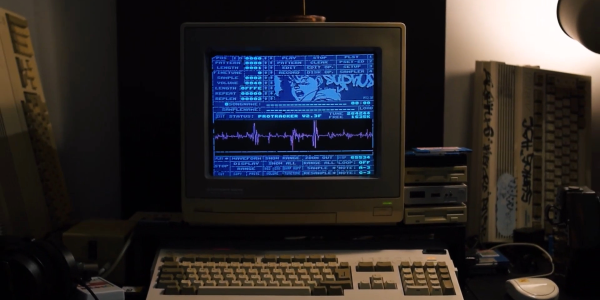
There was a magic moment for a few years around the end of the 1980s, when home computers were better than professional ones. That’s a mighty grand pronouncement, but it refers to the crop of 16-bit home computers that genuinely were far better than nearly all PCs at the time for multimedia tasks. You could plug a sampler cartridge into your Amiga and be in the dance charts in no time, something which sparked a boom in electronic music creativity. As retrocomputing interest has soared so have the prices of old hardware, and for those still making Amiga music that cart can now be outrageously expensive. it’s something [echolevel] has addressed, with an open-source recreation of an Amiga sampler.

As anyone who peered inside one back int he day will tell you, an Amiga sampler was a very simple device consisting of a commonly-available 8-bit A to D converter, a CMOS switch for right and left samples, and maybe an op-amp preamplifier. This is exactly what he’s produced, save fpr the CMOS switch as he points out that Amiga musicians use mono samples anyway. At its heart is an ADC0820 half-flash ADC chip, and the whole thing is realised on a very retro-looking through-hole PCB.

For a Hackaday scribe with a Technosound Turbo still sitting in a box somewhere it’s a real trip down memory lane. It was a moment of magic to for the first time be able to edit and manipulate audio on a computer, and we’re glad to see that something of those days still lives on. See it in action in the video below the break.

Continue reading “An Amiga Sampler 30 Years Later”

Lightning Analysis With Your SDR

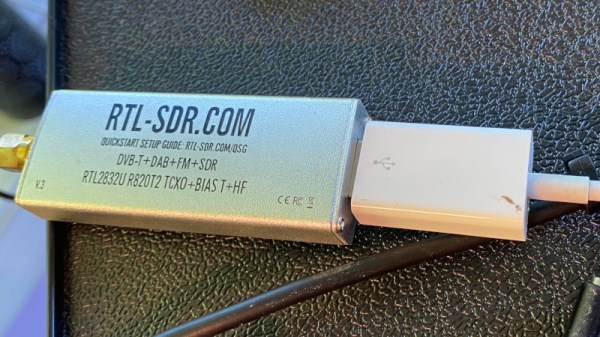
Perhaps it’s just one of those things adults dream up to entertain their children, but were you ever told to count slowly the time between seeing a lightning flash and hearing the rumble of thunder? The idea was that the count would tell you how far away the storm was, but from a grown-up perspective the calibration accuracy of a child saying “one… two…three…” in miles seems highly suspect. It’s a valid technique though, and it can be used to monitor thunderstorms by the radio emissions created through the electrical discharge. It’s an area the SAGE project has been working in, and they’ve posted some details including a fascinating run-down of the software techniques , on how lightning can be detected with an RTL-SDR.

A lightning strike produces a characteristic wideband burst that shows up in the time domain as a maximum point that can easily be detected but could also be confused with radio interference from another source. Thus after identifying maxima they zoom in and perform a Fourier transform to spot the wideband burst. It’s all done in Python, and the pleasant surprise is how straightforward to understand it all is.

SAGE are working on a distributed sensor network, so we hope this work might one day give us real-time open lightning data. The FFT approach should ensure that it won’t be fooled by false positives as a traditional detector might be.

Via RTL-SDR.com.