Fail Of The Week: Oil Expeller And Hasty PCB Layout

fotw-oil-extractor-hasty-pcb-layout

This Fail of the Week is a twofer. On the left we have an attempt to heat the output of an oil expeller. After a bountiful crop of sunflower seeds [Mark] picked up the oil expeller to make is own cooking oil. He tried to use the soldering gun as a heat source but after just a couple of minutes of on-time it melted the soldering iron’s plastic case. He’s looking for an alternate heat source but we wonder why he can’t just ditch the plastic and bolt this to a heat sink?

To the right is the product of hasty PCB layout. [Andrew] needed a USB to GPIO converter to use with his Android stick. He had built several of these before, etching the PCBs himself. But now he didn’t have the time to do his own etching and figured he could lay out a revision of the board and have it fabbed. Turns out this isn’t the time saver he had hoped. Problems with the location of silk screen labels aren’t a huge deal, but the ‘V’ in the board where his USB connector is located blocked any cable he tried to plug in. A bit of cutting solved that but he also had to deal with spring terminals whose leads wouldn’t fit the diameter of holes drilled in the board. We always print out the Gerbers and compare the footprints to our parts before submitting to the fab house. But we’re not sure we would have caught the USB cable clearance issue doing it that way. What checklists do you use before submitting your own boards?


2013-09-05-Hackaday-Fail-tips-tileFail of the Week is a Hackaday column which runs every Wednesday. Help keep the fun rolling by writing about your past failures and sending us a link to the story — or sending in links to fail write ups you find in your Internet travels.
WS2811 SPI Driver Using One Transistor And Passives

ws2811-spi-driver

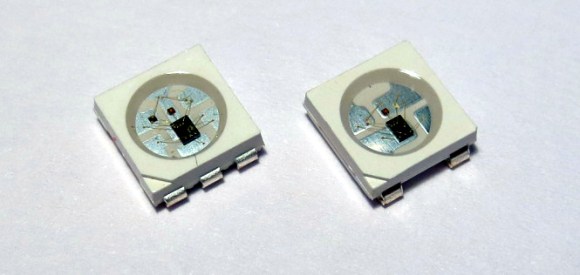
We love the WS28xx projects because even if we never plan to use them, the signal timing is like the most addictive puzzle game ever. For instance, check out this WS2811A driver which uses hardware SPI to generate the signals.

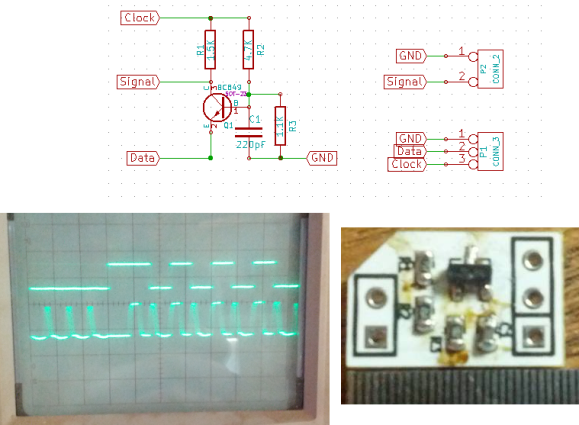
The WS28xx offerings place a microcontroller inside an RGB LED, allowing them to be individually addressed in very long chains or large matrices (still a chain but different layout). But the timing scheme used to address them doesn’t play well with traditionally available microcontroller peripherals. [Brett] had been intrigued by some of the attempts to bend hardware SPI to the will of the WS2811 — notably [Cunning_Fellow’s] work featured in this post. He took it a great step forward by simplifying the driver to just one transistor, three resistors, and a capacitor.

Click through the link above for his step-by-step description of how the circuit works (it’s not worth re-explaining here as he does a very concise job himself). The oscilloscope above shows the SPI signal on top and the resulting timing signal below. You will notice the edges aren’t very clean, which requires the first pixel to be very close to the driver or risk further degradation. But, since the WS28xx drivers feature a repeater which cleans up signals like this, it’s smooth sailing after the first pixel.


Kitchen Computer Hides In Pantry Door

hidden-kitchen-pantry-computer

You might look at the images above and think “oh neat” and then go about your business. But you’d be missing a great motorized hidden computer build. We simply must insist that you click on that link and look at all that went into it. Do it. DO. IT.

Still here? Okay, we’ll give you the gist and then you won’t be able to help yourself. First off, [Designforhire] built that door completely from scratch using skills that your average hacker wields. At first glance you’d think it was a retrofit or done with serious woodworking tools (quality table saw, router table, etc.). This actually started with a simple frame out of 2″x3″ pine studs. This is faced with Masonite which was affixed with glue and brads. From there the upper half was outfitted with a dry-erase panel, and trim pieces were added.

Now the hack really starts to get interesting. The opening for the monitor and the keyboard are both motorized. An old cordless drill (borked handle and dead battery) was cannibalized for its motor which is run using the two black switches just above the left corner of the monitor. When closed, a dry-erase calendar covers the monitor and a blank panel keeps the keyboard secret. The computer itself is actually in the basement, with cables running down the hinged side of the door and through a hole in the jamb.

We didn’t see a video showing off the build, but you can satisfy that craving by looking back at the Kitchen HAL installation from a few years back.

Retrotechtacular: Bakelite Plastics

retrotechtacular-bakelite-plastics

[ColdTurkey] sent in a really great video for this week’s Retrotechtacular. It’s a half-hour promo reel about Bakelite Plastic. There is so much to enjoy about this film, but we’ve been overlooking it because the first six minutes or so consist of an uncomfortably fake interview between a “Chemist” and “Reporter”. They are standing so close to each other that it’s violating our personal space. But endure or skip ahead and the rest of the video is gold.

Bakelite is an early plastic, and putting yourself in the time period it’s very easy to see the miracle of these materials. The dentures being molded above are made out of phenol formaldehyde resin (to us that sounds like something you don’t stick in your mouth but what do we know?). The plastic pellets take on the shape of the mold when heated — we don’t know if this where the name comes from or if it’s a variation on the name of the chemist who discovered the material: [Dr. Leo Baekeland]. This was the first synthetic plastic, and came at just the right time as it was heavily adopted for use in the electronics and the automotive industry. Both of which were forging new ground at the time.

Continue reading “Retrotechtacular: Bakelite Plastics”

Rewriting WS2812 Driver Libraries For Optimization

ws2812_compared

We like [Tim’s] drive for improvement. He wrote a WS2812 driver library that works with AVR and ARM Cortex-M0 microcontrollers, but he wasn’t satisfied with how much of the controller’s resources the library used to simply output the required timing signal for these LED modules. When he set out to build version 2.0, he dug much deeper than just optimizing his own code.

We remember [Tim] from his project reverse engineering a candle flicker LED. This time, he’s done more reverse engineering by comparing the actual timing performance of the WS2812(B) module with its published specs. He learned that although several timing aspects require precision, others can be fudged a little bit. To figure out which ones, [Tim] used an ATtiny85 as a signal-generator and monitored performance results with a Saleae logic analyzer. Of course, to even talk about these advances you need to know something about the timing scheme, so [Tim] provides a quick run-through of the protocol as part of his write-up.

Click the top link to read his findings and how he used them to write the new library, which is stored in his GitHub repository.

Oscilloscope Repair Projects Still Probing For Success

lecroy-9450-oscilloscope-repair[Luke] isn’t able to declare total victory yet. His LeCroy 9450 oscilloscope repair project has seen some success, though. The glitchy screen seen above is just one of the problems it had, but has now been fixed. When [Luke] got his hands on it, this was one of three screen states: the other two being normal operation or completely dead. Replacing the screen connector was all it took, so he moved on to the second part.

This one is much less trivial. Only one of the two channels works—which might be the point at which many would abandon the repair—but it’s still a fine single-channel scope. [Luke] continued to trouble-shoot by disassembling the bottom of the case and breaking out the device’s schematics. He traced the circuit and found one module that is suspect (and is looking for help finding a replacement). Unfortunately, the problems don’t end there. Another unknown problem is causing erroneous signals on the displayed waveforms. It’s an odd issue but it really feels like he’s close to solving this one!

Hackaday Terms Of Use (aka: The Lawyers Are Coming!)

they-laywers-are-coming

Hackaday has posted Terms of Use and Privacy Policy documents which you should read. These can also be accessed through the Policies Page which is linked in the footer. We’ve edited this post to take up less room since it will be sticky for a few days. Original text and updates after the jump.

Continue reading “Hackaday Terms Of Use (aka: The Lawyers Are Coming!)”