Assigning New Packages To Eagle PCB Components

adafruit-eagle-component-creation-tut

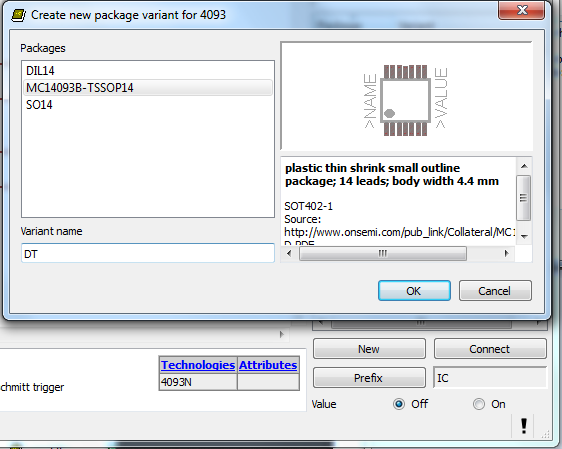
If you’ve spent any time at all laying out your own circuit boards we’re sure you’ve run into the issue of not having the right component or package available in the standard libraries. If it’s a common part, chances are the symbol definition will be there.  But perhaps the footprint you want to use is missing? Here’s an easy to follow tutorial which demonstrates how to assign new packages to existing Eagle PCB components. It even shows the basics of how to tweak the footprint to fit your needs (like making SMD footprints easier to hand solder).

This will not teach you how to make your own custom symbols, or how to build packages from scratch. But it will let you locate the package you want to use from a different component, then copy it to your own library for use with different parts. And the techniques shown make this a quick and relatively painless process.

We certainly don’t want to start another comment quagmire like the recent PIC v. AVR discussion. But we’ve used both Kicad and Eagle rather extensively and feel that neither one has really mastered part/footprint creation in a user-friendly way. We like Kicad’s total separation of footprints from components, and it’s myriad of parameters which can be used to tweak the layout. But if you use the same components frequently, Eagle’s standard of linking parts and footprints does end up saving a lot of time. What do you think?
Printed Vacuum Pump Muffler Quiets The Lab

printed-vacuum-pump-muffler

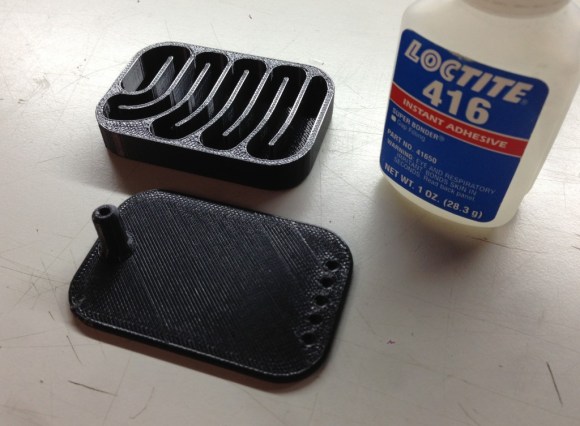
[Joel] made a brilliant improvement to his shop. If you think about it, most folks would hear a loud vacuum pump and either tolerate it or put in some ear plugs. But [Joel] heard a loud vacuum pump and thought: hey, I can fix that! His solution was to design and print his own muffler.

He did a bit of research on the topic and found that design complexity runs the gamut based on the application. For instance, you don’t want to affect the airflow of a vehicle’s exhaust too much or you will take a horsepower (and efficiency) hit for it. In this case the vacuum pump making all the noise has a relatively low airflow so that is not a concern. What he ended up doing is designing a baffle that will help cushion the vibrations in the airy by piping it through a maze of channels. The end result drops from about 92 dB to 82 dB. That might not seem like much, but decibel measurements aren’t linear so it ends up having a great effect. Hear for yourself in the video after the break.

Continue reading “Printed Vacuum Pump Muffler Quiets The Lab”

Second Grade Science Project: A Steam Engine

2nd-grade-steam-engine

If you’re looking for a way to let the kids get hand-ons with science this is a perfect example of how to do it. [Erich] wanted to help out with his 7-year-old’s science project. They decided to build a working model of a steam engine but couldn’t find online instructions appropriate for the age group. So the two of them not only pulled off the build, but then they wrote a guide for others to follow. The thing about it is, you really have to understand a concept to teach it to someone else. So we think the write-up is equally important to having actually done the experiment.

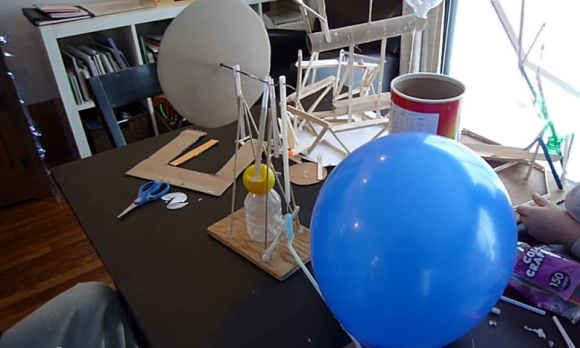
Steam can scald you if you’re not careful. But you don’t really need steam to explore the concepts of a steam engine. The main reason to use steam is that it’s a fairly rudimentary way to build pressure which can be converted to motion. For this demonstration the blue balloon provides that pressure. It’s feeding a reservoir that connects to the valve built out of straws. A plastic piston inside pushes against the crank shaft, spinning the cardboard wheel on the left. When the piston travels past the valve opening it releases the air pressure until the machine makes a revolution and is in place for the next push. This is well demonstrated in the clip after the break.

Continue reading “Second Grade Science Project: A Steam Engine”

CuteUino: Only Use The Parts Of The Arduino That You Need For Each Project

CuteUino

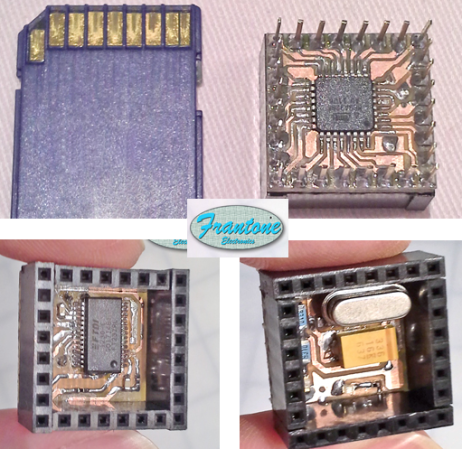
[Fran’s] been working on her own version of the Arduino. She calls it CuteUino for obvious reasons. The size of the thing is pretty remarkable, fitting within the outline of an SD card. But that doesn’t mean you won’t get the power that you’re used to with the device. She’s broken it up into several modules so you can choose only the components that you need for the project.

The main board is shown on the right, both top and bottom. It sports the ATmega328p (it’s hard to believe we could make out the label on the chip package in the clip after the break) in a TQFP-32 package soldered to the underside of what she calls the Brain Module. You can also see the extra long pins which stick through from the female pin headers mounted on the top side of the board. Inside of these pin headers you’ll find the clock crystal, status LEDs, and a capacitor. The other module is an FTDI board used to connect the AVR chip to a USB port.

You’ll definitely want to check out her prototyping post for this project. She uses a very interesting technique of combining two single-sided boards to make a 3-layer PCB. The side that was not copper clad is fitted with copper foil by hand to act as a ground plane for the vias. Neat!

Continue reading “CuteUino: Only Use The Parts Of The Arduino That You Need For Each Project”

Retrotechtacular: Flying Foot-soldiers Are Coming For You (sixty Years Ago)

Hiller_VZ-1_Pawnee_(2)

Pictured above is a remarkable piece of experimental technology from the 1950’s that never ended up going anywhere. The Hiller VZ-1 Pawnee is a single-rider vehicle that was supposed to provide a tactical advantage to US forces. The Office of Naval research spent a couple of years developing the aircraft, wich uses two rotors mounted inside the base of the platform. They spin opposite each other — which removes the need for a tail rotor like you’d find on a helicopter –to lift the platform a short distance off the ground. Although six of them were made only two survive. But the good news is you can go and see them at museums on the East or West coast of the US.

Now that the serious business is behind us, let’s talk about the video clip after the break. The narrative style is a gem of the newsreel era. We can’t tell what is going on with the accent, but we’re totally convinced that at least one general meeting per year at your local hackerspace should require all presenters to use their best impression of this talented gentleman’s voice.

Continue reading “Retrotechtacular: Flying Foot-soldiers Are Coming For You (sixty Years Ago)”

Bakery Automation Mixes Single Cookies

bakery_automation

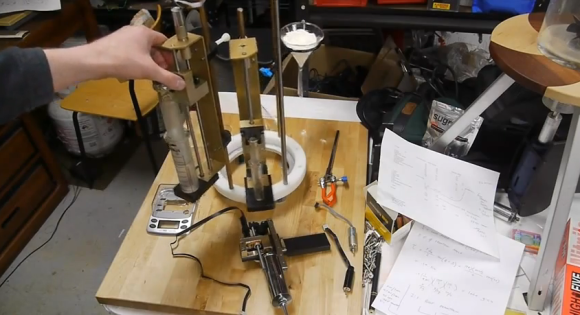
[Ben Krasnow’s] latest project is a delicious one. In the image above he’s showing off the beginnings of his cookie dispenser. No, it’s not another take on a way to eat Oreo cookies. It actually comes much earlier in the production chain. His device is akin to a 3D printer for baked goods in that it will be able to automatically combine raw ingredients to form production runs as small as a single serving of cookie dough.

When we first heard about it we wondered why you would want to bake just one cookie? But of course that’s not the purpose at all. The machine will allow you to bake a full sheet of cookies, but provides the option of making each one of them with a different recipe. As with all baking, combining ingredients in the proper proportions is paramount. In the post linked at the top he’s working on a butter dispenser. But in an earlier post he hacked an electronic scale to help weigh other ingredients. You can watch both video clips after the break.

Imaging a dozen cookies with slightly different amounts of flour in them. A few test sheets and he should be able to dial in the very best recipes.

Continue reading “Bakery Automation Mixes Single Cookies”

Hackerspace Intro: Make Lehigh Valley

make-lehigh-valley

The video tour of Make Lehigh Valley in Pennsylvania involves mostly a show-and-tell about the raw materials just waiting to find their way into members’ projects. The tour starts off outside the warehouse that house the hackerspace as well as an associated business incubator called Hive 4A. It then moves inside to give us a look at what they’ve got going on.

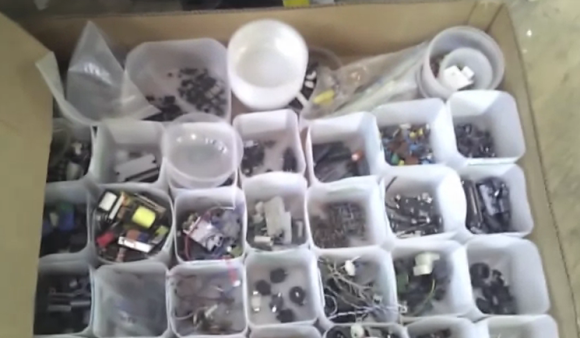
We love the space. There are really two kinds of buildings we see used in these tours. One type are commercial retail spaces, like HeatSync Labs or Workshop 88. They’re clean, well-lit, and in the public view. This is the other kind, behind closed doors and full or floor-space. The building features a really awesome wide-plank wooden floor. It plays host to a smattering of different equipment and a multitude of boxes, jars, troughs, and jugs full of all kinds of stuff. It looks like they’re beginning to get the parts organization under control. Old milk jugs serve as a first round of sorting. There’s also a nice little small parts rack built from plastic tea bottles and small cubby holes made of cardboard. See it all in the clip after the break.

Continue reading “Hackerspace Intro: Make Lehigh Valley”