Hacking Game Port Peripherals To Work With Modern PCs

gameport_hack

[Atiti] has a bad habit of hanging on to old things. Some people call this sort of behavior “hoarding”, but around here we understand his affliction. It turns out that in his collection of old computer peripherals, he located a Thrustmaster Formula 1 racing wheel he used back in the day. Analog racing wheels can cost a pretty penny nowadays, depending on what you buy, so he decided to see if he could hack this outdated controller to work with his new PC.

You see, the problem with this wheel is that it utilized a “game port” connecter to interface with the computer. If you don’t remember the game port, go dig up an old PCI sound card and take a look on the back. That 15-pin connector? That’s a game port. Microsoft discontinued support for the game port once Vista was released, so [Atti] had to figure out how in the world he would get it to work on his new PC.

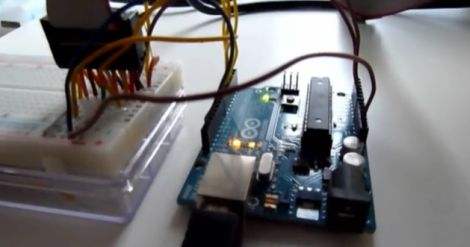
His solution was an Arduino, which is used to read the analog signals output by the wheel. Those signals are processed and sent to a parallel port joystick emulator, enabling him to use the wheel with any game supporting a standard joystick.

Obviously he could have just gone out to the store and bought a USB wheel, but where’s the fun in that?

Stay tuned for a video demo of his refreshed wheel in action.

Continue reading “Hacking Game Port Peripherals To Work With Modern PCs”
Robotic Berimbau Plays Itself

berimbau

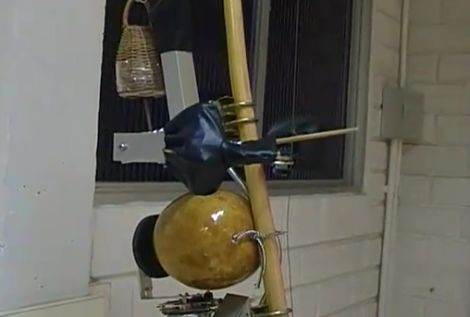
If you have ever seen capoeira, you have undoubtedly heard the music of a berimbau. If you are not familiar, Capoeira is a Brazilian art form that melds martial arts, acrobatics, and music. This graceful fighting form is often accompanied by the sounds of a berimbau, a single-stringed musical instrument comprised of a gourd, a wooden bow, and a steel string.

[Ivan Monsão] and [Paulo Libonati] have constructed what is considered to be the first robotic berimbau in existence, capable of playing music without any human interaction. The robot strikes the berimbau’s metal string, mechanically muting the gourd when appropriate, and even shakes the caxixi (a rattle) in time with the music.

The builder claims that the berimbau learns songs by “listening” and repeating rather than having songs pre-programmed into the system. We can’t see any evidence of that functionality from the video, though we’d love to see the learning process in action.

While we try to find our VHS copy of “Only the Strong”, be sure to take a look at the following video of the berimbau playing itself.

[Thanks, Camilo]

Continue reading “Robotic Berimbau Plays Itself”

Simple DTMF Decoder Pulls Numbers From YouTube Videos

dtmf_decoder

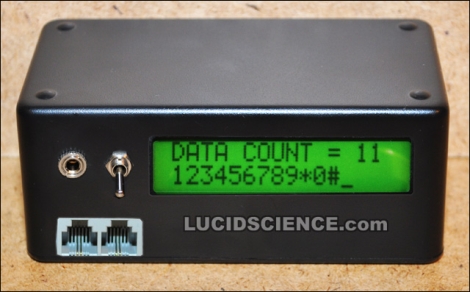
While many of us have banished land line telephones from our houses, there are still quite a few people who utilize POTS lines today. These analog phone systems use Dual Tone Multi Frequency (DTMF) signals in order to audibly represent all of the keys on a telephone keypad and place calls. [Brad] over at LucidScience decided that it would be useful to have a DTMF decoder on hand, and got busy building one.

His DTMF decoder box uses a CM8870 DTMF decoder chip, which you might assume is all you need to get the job done. This chip performs its duties very well, outputting a 4-bit binary code for each button press it registers, but that doesn’t do a whole lot of good without being able to represent those codes in a meaningful fashion. He first built a breadboard decoder circuit that would light 1 of 16 LEDs depending on the detected button press. This was well and good, but he decided that an Arduino-driven LCD display would work far better.

When he was finished, he had a compact decoder box with an LCD display, which accepts input from either an RJ-11 cable or an audio jack. He says that the audio jack is particularly useful for decoding tones from computer audio, such as YouTube clips. [Brad] praises the CM8870 chip, stating that it can pull phone numbers from pretty much any audio or phone signal you throw at it, regardless of quality. We think it would make a great basis for a telephone-based security system, if that was something that appealed to you.

Be sure to stick around to see his DTMF decoder circuit in action.

Continue reading “Simple DTMF Decoder Pulls Numbers From YouTube Videos”

Awesome Portable N64 Keeps Your Games In Hand, Out Of Sight

n64_portable

[David] recently wrote us to share the portable Nintendo 64 he constructed with the help of the friendly people over at the ModdedbyBacteria forums. We are no strangers to N64 portables, as you may have noticed, but this one was just too good to pass up.

Sheathed in a metallic blue case, this console is an instant standout among the other portable N64 mods we have seen. As you would expect, he trimmed down an N64 console board and some various controller bits in order to fit them into the case, finishing it off with a 5″ PSOne display panel. A small fan protrudes out of the back side of the device, which seemed out of place at first. However, it not only keeps the console cool, but it can serve as a bit of a “kickstand” as well, if the console is placed on a flat surface. [David] also added a dongle for the bottom of the console, which allows him to use an external N64 controller if he so desires.

To be honest, one of our favorite features is that the game cartridges do not stick up from the back of the case when inserted. He included just enough room to allow the game to be completely hidden while playing.  Nice job!

Continue reading to see a video build log and demonstration of his portable N64.

Continue reading “Awesome Portable N64 Keeps Your Games In Hand, Out Of Sight”

Bluetooth Bot Constructed From Thrift Store Rejects

bluetooth_bot

[John] wrote in to share his latest creation, an Arduino-controlled Bluetooth robot. You might remember him from one of his previous hacks, the Lawnbot 400. This time around, he has decided to scale things down a bit and focus his hacking on small R/C toys.

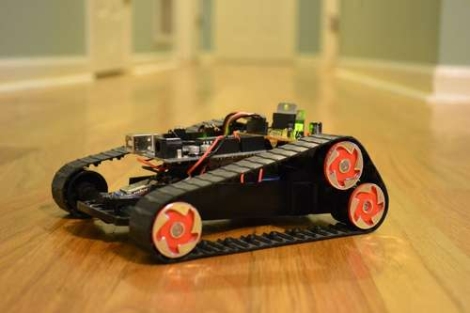
His Bluetooth bot was constructed using a cheap R/C tank he scored at a thrift store for about $1.50. He removed all of the bot’s parts, aside from the frame, the battery compartment, and the motors that drive the treads. He added in an Arduino, which he paired with an Ardumoto shield from SparkFun. The motor shield costs about $25, but he does have schematics available so that you can roll your own if you so desire.

A Bluetooth Mate was added to the car, which allows serial communication with any other Bluetooth device. Once everything was wired up, he paired the robot with his computer and got down to driving it by simply pressing keys on his keyboard.

It looks like a fun little toy to have around, and it seems fairly easy to construct. Check out the videos below of his robot in action, and be sure to check out his code/schematics if you are interested in building your own.

Continue reading “Bluetooth Bot Constructed From Thrift Store Rejects”

DIY Camera Stabilizer Keeps Your Video Shake Free On The Cheap

diy_camera_stabilizer

Commercial vest-based camera stabilizer systems are quite expensive, sometimes bearing price tags in the $700-$800 dollar range. Photographer [Miguel Vicente] has a pretty well-stocked workshop and decided there was no way he would shell out that much cash for a rig, so he simply built his own.

“Simply” is a bit of a misstatement, to be honest. The system looks relatively complex, judging by the build videos embedded below. Constructed of steel tubing, custom-built springs, and a really snazzy vest, the rig is adjustable in almost every direction. He has tested its capacity up to 2.5 Kg (roughly 5.5 pounds), though he says it’s pretty unruly to manage at that weight. [Miguel] says that 1.5 Kg (3.3 pounds) is a far more reasonable limit, and that the stabilizer works quite well at or below that weight.

While it looks pretty good to us, he says that there are plans to improve the design even further. One particular point that he wants to address is the ability for the stabilizer to accept asymmetric camera setups, i.e. cameras with attached lighting and microphones.

Stick around to see a short “highlight” film of the build process, as well as a video featuring a more thorough documentation of the stabilizer’s construction.

Interested in more DIY camera equipment?  Check out this overhead camera dolly and this DIY gimbal mount we featured a short while back.

[via Make]

Continue reading “DIY Camera Stabilizer Keeps Your Video Shake Free On The Cheap”

R/C Car Controlled By An IPad Or Kinect

ipad_kinect_rc_control

R/C cars can be tons of fun, but sometimes the fun runs out after awhile. [Gaurav] got bored of steering around his R/C car with its remote, so he built an interface that lets him control the car using two different motion-detecting devices.

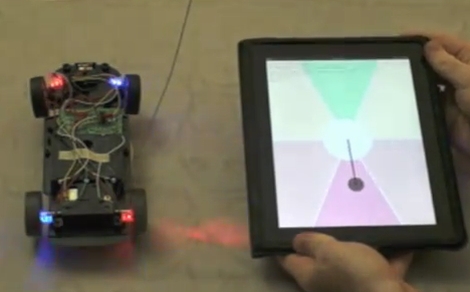
He built an HTML5 application for his iPad, which allows him to steer the car around. As you can see in the video below, the application utilizes the iPad’s tilt sensor to activate the car’s motors and steering depending on where on the screen he has moved the guide marker.

The second steering method he devised uses his Kinect sensor to track his movements. His hand gestures are mapped to a set of virtual spaces similar to those which the iPad uses. By moving his hands through these areas, the Arduino triggers the car’s remote just as it does with the iPad.

The actual remote control interface is achieved by wiring the car’s remote to an Arduino via a handful of opto-isolators. The Arduino is also connected to his computer via the serial port, where it waits for commands to be sent. In the case of the iPad, a Python server waits for commands to be issued from the HTML5 application. The Kinect’s interface is slightly different, with a C# application monitoring his movements and sending the commands directly to the serial port.

Check out the video below to see the car in action, and swing by his site if you are interested in grabbing some source code and giving it a try yourself.

Continue reading “R/C Car Controlled By An IPad Or Kinect”