Reverse Engineering The Playstation Move

playstation_move

[Kenn] is working on building a quadrocopter from the ground up for a university project. Currently, his main focus is building an Inertial Measurement Unit, or rather re-purposing a PS3 Move controller as the IMU for his copter. He previously considered using a Wiimote Motion Plus, but the Move has a three-axis magnetometer, which the Wii controller does not.

The ultimate goal for this portion of his project is building custom firmware to run on the Move’s STM32-Cortex microcontroller, allowing him to obtain data from each of the controller’s sensors. Through the course of his research, he has thoroughly documented each sensor on his site, and dumped a full working firmware image from the Cortex chip as well. Recently, he was even able to run arbitrary code on the controller itself, which is a huge step forward.

[Kenn’s] project is coming along very nicely, and will undoubtedly be a great resource to others as he continues to dig through the inner workings of the Move. Be sure to swing by his site if you are looking for information, or if you have something to contribute.
Bristlebot Mod Never Rubs You The Wrong Way

controllable_bristlebot

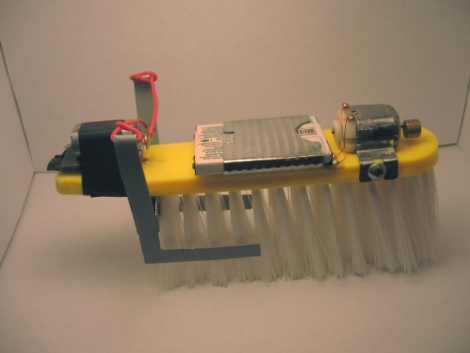
[Underling] sent in his bristlebot project that aims to put a new spin on controlling bristlebot movement. We have seen several attempts at bristlebot directional control in the past, but none of these methods really fit what he wanted to do. His goal was to use a single brush rather than two, and be able to aim the bot in any direction at will.

He tried several different designs, but settled on what you see in the picture above. The large brush head is fitted with a vibrating motor on the front as well as a cell phone battery near the midsection.  These pieces are placed in the center plane of the brush as to not influence the direction of movement.  A separate servo-like motor is placed on the back of the brush, and each side of the motor’s arm is attached to a paddle that extends down the sides of the brush. When the motor is activated, one paddle is pressed in towards the bristles, while the other paddle is pulled away. This causes an immediate shift in direction, and should provide for a relatively tight turn radius. It should be noted that he also took the time to remove bristles from the center of the brush where the steering paddles are located in order to improve turning performance.

Unfortunately [Underling] does not currently have a video camera with which to show off his work, but we hope to see some action footage in the near future.

Sleek Numitron Clock Tells The Time And Temperature

numitron_clock

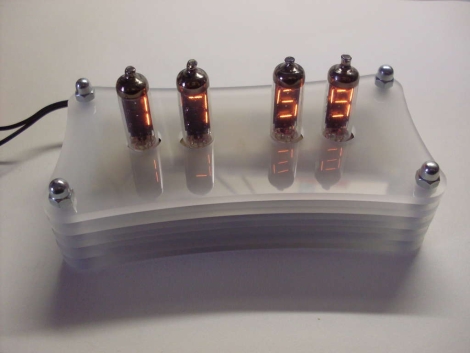
Instructables user [janw] is a big fan of nixie clocks, but he had never built one before. He decided he would rather start small and build a clock using numitron tubes first, before moving to nixies. He preferred the simpler tubes due to their much lower voltage requirements and the fact that he would not have to use any specialized power supply for his project.

His clock serves double-duty, functioning as a thermometer as well. Timekeeping is regulated with a DS12307, and temperature is monitored using a DS18B20 single wire sensor – both of which are pretty common in these sorts of projects. Both are wired to an Atmega48 MCU which serves as the brain of the clock.

The numitrons were mounted in a handsome 5-layer milled acrylate stand with a pair of buttons mounted on the bottom which allow him to set the time. It really is a spectacular looking timepiece, and a great first effort on [janw’s] part.

Be sure to stick around to see a video of the clock in action.

Continue reading “Sleek Numitron Clock Tells The Time And Temperature”

USB Dongle Hack Tethers DSLR Cameras At A Fraction Of The Price

wireless_usb_grip

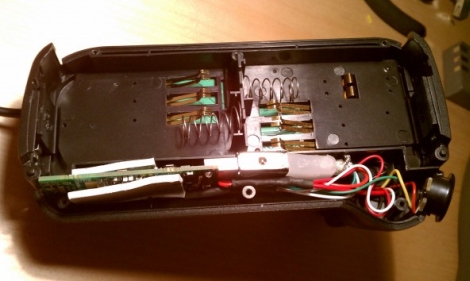
[Neal] wanted to tether his DSLR to his computer, but he wasn’t about to fork out the $1,000 Nikon was asking for their wireless adapter. Instead, he opted to construct his own solution using two separate camera accessories which cost him less than $200 when finished.

The two components he purchased were a wireless USB transmitter/receiver pair and an external battery grip. The battery grip allows him to use a pair of batteries to power his camera, while providing just enough space to wedge in the USB transmitter. He stripped the casing off the transmitter and connected it to a mini USB plug that he wired into the battery grip. He then added a small voltage regulator to step down the Nikon battery voltage from 7.2v to the 5v required by the USB transmitter.

The battery grip and transmitter were then hooked directly into his camera using the weatherproof plug built into the grip. Once he powered on his camera, it was connected to the PC immediately.

It’s amazing how the simplest hacks can save incredible amounts of money.  Nice job!

Be sure to check out the video embedded below to see the wireless adapter in action.

Continue reading “USB Dongle Hack Tethers DSLR Cameras At A Fraction Of The Price”

Personal Soundboard Recounts Years Of Clever One-liners

personal_soundboard

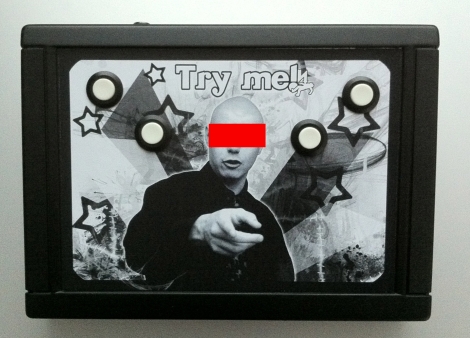
[Antibore’s] friend was just wrapping up his Ph.D. Degree and he wanted to build him something special to commemorate the accomplishment. After thinking about it awhile, he realized that his friend was quite gregarious and known to make off-the-wall comments at parties and such. A ton of these one-liners were documented on video over a span of 10 years, so [Antibore] got the idea to make his friend a soundboard featuring his own witticisms.

He found a breakout board capable of playing back OGG files and got to work loading it up with his friend’s random sayings. The board was connected to a small amplifier and speaker, then everything was installed into a black plastic case. Four arcade-style buttons were mounted on the front of the case, along with a picture of his friend. Up to 16 different sayings can be played, depending on which combination of buttons are being held at a particular time.

It’s sounds like a really cool project, and certainly makes for a one of a kind gift. Currently there is no video or audio of the box in action, but here’s hoping we’ll see some soon.

Passcode Protected Laser Tripwire Alarm System

laser_tripwire

Sometimes security doesn’t need to be overly complex to be effective. Instructables user [1234itouch] recently built a simple laser tripwire alarm that can be mounted virtually anywhere, complete with a keypad for disarming the device.

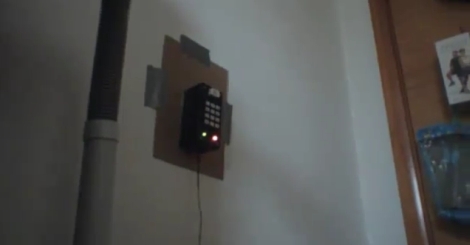
He mounted a photo cell in a project box, along with an Arduino and a 12-button key pad. A laser pointer is aimed at the photo cell from across a gap, which results in a steady voltage being read by the Arduino. When the laser beam is broken, a drop in voltage is detected, and the alarm sounds until you enter the proper pre-configured passcode. Entering the passcode triggers a 15 second grace period during which the the alarm cannot be tripped again.

It might not be built with triple-thick steel doors and thermo-sensors, but it’s a simple device for simple needs. In its current form it could be pretty useful, and with a little reworking, there are a wide range of things it could be used for.

Continue reading to see a demo video of the tripwire alarm, and be sure to check out these other tripwire-based security systems.

Continue reading “Passcode Protected Laser Tripwire Alarm System”

Lol Shield Theatre Brings Online Video To The Pixelated Screen

lol_shield_theatre

[FallDeaf] bought a Lol Shield, and after making all sorts of blinky displays, he thought to himself, “What in the world can I use this thing for?”

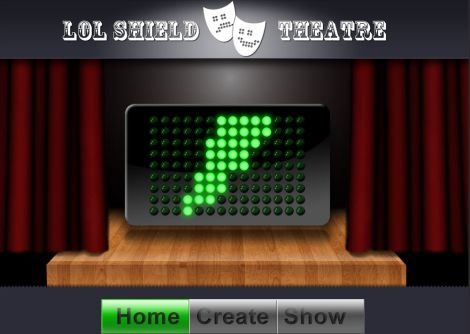
In a really slick fusion of hardware, software, and the power of the Internet, he has created what he calls, “Lol Shield Theatre”.

The idea goes something like this:

You visit his site, and create your own “movie” by drawing on his virtual Lol Shield. Add as many frames as you would like, set the frame rate, then submit your creation. From there, you can download an Arduino sketch that contains your entire animation so you can play it on your own Lol Shield. You can also visit his Lol Shield gallery, where you have the ability to watch, download, and vote on movie submissions from other visitors.

He has also provided the source code to drive your Lol Shield, as well as created an API through which you can stream the various animation feeds from his Lol Shield gallery directly to your Arduino via a USB cable.

Be sure to check out the video demo we have embedded below, and show off your pixel cinematography skills over in the theatre.

Continue reading “Lol Shield Theatre Brings Online Video To The Pixelated Screen”