Model Rocketry From The Rocket’s Point Of View

model_rocketry_video

When someone writes in and says, “Hey, I strapped a camera to a rocket and took videos of it launching!” it’s really hard for us to not get suckered in. Try as we might, we just couldn’t resist taking a look at the videos [Vlad] recorded of his model rocketry “exploration”.

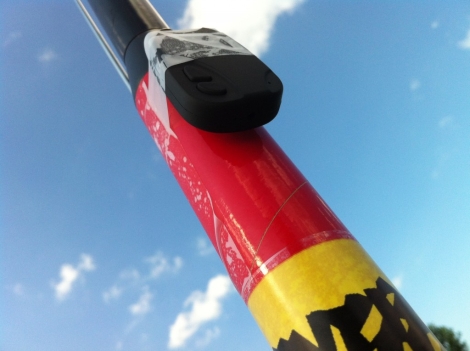
Inspired by our 4th of July post featuring POV videos of bottle rocket launches, he bought himself an 808 keychain camera and decided to try his hand at some high flying video. He strapped the camera to his 46” Estes rocket with a few pieces of scotch tape in an effort to keep weight down, and set off to his launch pad.

He used a Estes C6-5 engine for each launch, which he estimates took the rocket up to a height of 300 feet rather than the typical 500 feet, due to the added weight. While not particularly useful, the video is still awfully fun to watch, and perhaps it will inspire others to mount cameras on even larger, more powerful rockets.

We can only hope.

Continue reading to check out the videos [Vlad] shot, but be warned, the descent is vertigo-inducing.

Continue reading “Model Rocketry From The Rocket’s Point Of View”
Visualizing PCB Revisions Using A Gerber Viewer

gerber_schematic_highlighting

We all know that Eagle has its share of shortcomings. Instructables user [westfw] was particularly annoyed by the fact that while Eagle keeps copies of up to 10 revisions of your board, it cannot open those files without resorting to manually renaming each one. Even more frustrating to him is the fact that you can’t use Eagle to view two files simultaneously in order to compare layouts. This made hunting down changes quite tedious, so he started looking for a better way to do things.

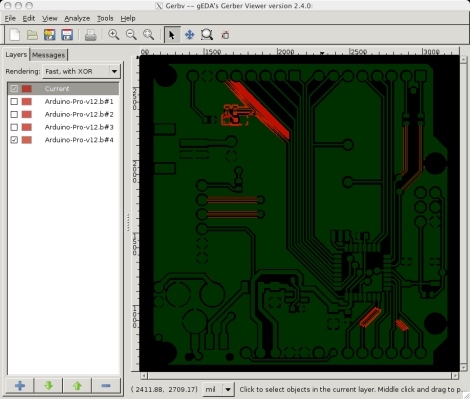
While using his favorite open-source gerber viewer gerbv, he noticed that the application let him load multiple copies of the same layer, XORing the PCBs’ colors together. Realizing that with some clever color selection, he could use gerbv to automatically highlight layout differences, he set off to automate the process.

The resulting script works on any flavor of *nix, and should play nice in Windows under cygwin as well. The script reads through Eagle backup files, renaming them and tweaking the colors so that when XORed, they show up as bright red areas in gerbv. It’s a simple yet handy tool to have on hand if you happen to do a lot of PCB design.

Incredibly Fast 3D Printing With The Ultimaker

ultimaker_3d_printer

There’s a new 3d printer on the block, and hot damn is it fast!

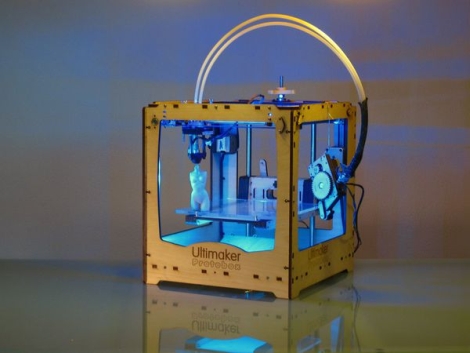
Hailing from the Netherlands, the Ultimaker 3D Printer has finally hit US shores, and aims to give the MakerBot a run for its money. The Ultimaker was designed by Utrecht Fab Lab manager [Siert Wijnia] along with two frequent lab patrons, [Erik DeBruijn and Martijn Elserman]. The trio were big fans of the MakerBot, but they wanted to make a better 3D printer.

And make a better printer, they did.

The Ultimaker can print using Either ABS or PLA plastic just like the MakerBot, but it is several magnitudes faster than its predecessor. While the MakerBot utilizes a moving build platform, the Ultimaker has a print head that can move along three axes. The moving print head, along with offset motors which are mounted on the printer’s frame allow the Ultimaker to build taller object than the MakerBot, at higher speeds.

That’s not to say that the MakerBot is bad in any way – rather, the presence of a new kid on the block shows how the evolution and progression of open source design benefits us all.

Keep reading to see a video of the Ultimaker in action, you won’t regret it!

Continue reading “Incredibly Fast 3D Printing With The Ultimaker”

Tiny External System Monitor Makes It Easy To Keep Tabs On Your PC

tiny_pc_resource_monitor

Instructables user [Jan] likes to keep close tabs on his computer’s memory usage, but wanted something more interesting to look at than the standard resource manager. He preferred to have an external display available that would show his computer’s status with a quick glance, and thus this system monitor was born.

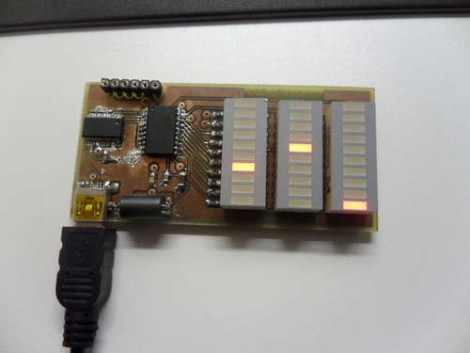
His status panel contains a trio of constantly updated LED bars that show his computer’s CPU usage, available physical memory, and virtual memory consumption. With a small footprint being a priority, [Jan] kept the indicator’s size down by using SMD components and by including an on-board UART to USB converter to go along with his ATTiny microcontroller.

He uses a Python script to gather usage information from his computer, feeding it to his display over USB. The system works pretty well as you can see in the video below, though the virtual memory indicator doesn’t seem to get a ton of action – perhaps it could be used to indicate hard drive activity instead.

If you are looking to build something similar, [Jan] has made all of his code and schematics available for anyone’s use.

Continue reading “Tiny External System Monitor Makes It Easy To Keep Tabs On Your PC”

Google ADK Clones Pack A Few Extra Features, Hopefully Far Cheaper Than The Original

adk_board_clone

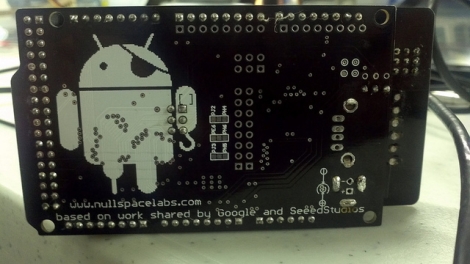
[charliex] from Null Space Labs wrote in to share a project that he and the rest of the gang have been working on over the last few weeks. The team has been remixing and building clones of the Google ADK demo board we saw earlier this year, in hopes of getting a huge batch prepped before Defcon 19.

Their version makes subtle changes to the original, such as extra header rows for Mega AVRs, higher quality RGB LEDs, and a nifty pirate-Android logo. They also added the ability for the board to send and receive IR signals allowing it to be used as a TV-B-Gone, as well as in more fruitful pursuits. The Arduino board used with the ADK has only undergone minor revisions, most of which were layout related.

[charliex] hasn’t mentioned a price for their improved ADK boards, but we’re guessing they will be substantially cheaper than the official Google version. In the meantime, check out their site for a boatload of pictures and videos of these boards undergoing various stages of construction.

WASP UAV Gets Some New Toys, Now Intercepts Your Phone Calls Too

wasp_drone

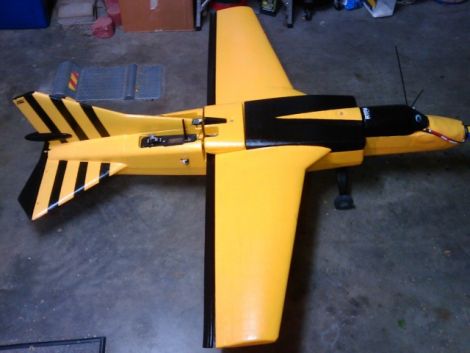
If you had the pleasure of attending last year’s DEFCON conference, you are no doubt familiar with [Mike Tassey] and [Richard Perkins]. There, the pair showed off a work in progress DIY aerial drone named WASP. Short for Wireless Aerial Surveillance Platform, WASP was impressive when we brought it to your attention last year, but the duo has spent some time completing their project, adding a few extra features in the process.

The drone still packs the same pico-ITX computer which now runs Backtrack5, and utilizes a 340 million word dictionary for cracking WiFi networks (pardon the pun) on the fly. While updated pen testing tools are well and good, the most impressive update is that the drone can now act as a standalone GSM tower. This allows the pair to trick nearby phones into routing calls through WASP before being relayed to their carrier’s network.

Once WASP is launched, the plane flies autonomously along a preset route, sniffing, hacking, cracking and gathering data until [Tassey and Perkins] summon it back to Earth. The drone is as impressive as it is scary, and we can’t wait to hear what the pair has to say about it this time around.

Continue reading to watch a video demo of WASP taking to the skies and doing its thing.

[via PopSci]

[Thanks, DainBramage1991]

Continue reading “WASP UAV Gets Some New Toys, Now Intercepts Your Phone Calls Too”

Making The Case For In-circuit Debugging Tools

in_circuit_debugging_of_pic_microcontrollers

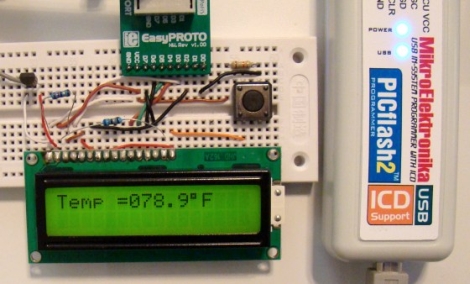
If you are in the market for a PIC microcontroller programmer, you may want to consider a model with an In-Circuit Debugger (ICD). [Rajendra] put together a great tutorial on using an ICD when debugging PIC firmware, which makes a pretty convincing argument for owning one.

In his tutorial, he happens to be using a MikroElektronika PICflash2, but he says that there are plenty of other ICDs out there if you are not keen on this particular model. The PICflash2 not only acts as an ICD, but as the name suggests it works as an ICSP as well.

[Rajendra] walks us through a short debugging session using some simple code that reads data from an LM34DZ temperature sensor, displaying the results on an LCD screen. While he isn’t actually hunting for bugs, he does show how easy it is to step through the PIC’s code one statement at a time, evaluating variables and registers along the way.

[Rajendra] does point out that using an ICD does occupy a few I/O pins while running, limiting your resources just a bit. We think that being able to debug code as it runs is pretty reasonable tradeoff if you don’t necessarily need each and every pin available for use.