Man Spends 30 Years Helping Disabled Gamers

xbox_sip_puff

Using our hands to manipulate game controllers is something most of us take for granted. However for quadriplegics, whose arms and legs are completely paralyzed, gaming becomes a nearly impossible task. One man has spent the last 30 years of his life trying to help quadriplegics once again “pick up” the controller and enjoy a few rounds of their favorite video games.

Retired aerospace engineer [Ken Yankelevitz] has been using his skills to create game controllers that can be easily used by disabled gamers, offering them for sale at cost. Starting with Atari joysticks in 1981, he has been perfecting his craft over the years, creating some 800 mouth-operated game controllers. As the systems and their controllers became more complex, so did [Ken’s] designs. His new Xbox and Playstation controllers use all manner of components, including sip-puff tubes and lip-activated buttons in order to allow users to access every single controller function.

Even as he approaches his 70th birthday, he is busy making controllers, though at a slower pace than he has in the past. He has said that he will continue making them for as long as he can, but at some point he will have to close up shop. This has disabled gamers worried that they may no longer have someone to turn to for custom controllers, though we hope someone steps in to fill the gap whenever that day comes.

Be sure to check out his site to take a look at his designs, what he has done for the disabled community is amazing.

Adjustable Voltage And Polarity Tester

polarity_tester

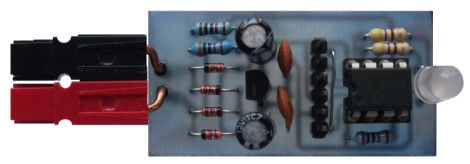
Instructables user [Rudolf] wrote in to share a handy little tool he created with ham radio operators in mind. Now and again, he found himself connecting to an unknown power supply, and rather than blow out all his expensive radio gear, he decided to put together a simple polarity and voltage tester that can be easily carried out in the field.

The tester features a pair of powerpole connectors, which are used quite often for connecting HAM gear. A PIC12F675 runs the show, acting as an adjustable comparator for detecting voltage levels. By default, his probe glows amber when the supply voltage is below 11.5V, turning green when the supply is between 11.5V and 15V. When the detected voltage is too high, the built-in LED glows a bright red. When the polarity is reversed, the LED flashes red regardless of the supply voltage.

All of these trigger levels can be set in the PIC’s code, which [Rudolf] is kind enough to include on his page, along with schematics for making your own.

Bikinis Of The Future!

bikini_duo

It’s always interesting to see what happens when hacking meets clothing – check out this pair of bikinis, for instance.

This first item, called the N12 bikini (mildly NSFW), comes from Continuum Fashion and is composed entirely from Nylon 12, hence the name. Shapeways uses 3D Selective Laser Sintering (SLS) to create the tiny circles that make up this piece of swimwear. The suit is held together by tiny stretchy strings made of the same nylon, and the bikini can be printed to order. It seems like an interesting idea, but we wonder how it would hold up against some big waves or a game of beach volleyball.

The second item is a bit more functional. Designer [Andrew Schneider] has put together a bikini that can solve all of your energy needs while sitting by the pool. His solar bikini is covered with hand-sewn flexible solar cells that work together to produce up to 5v, available via a USB connection. He claims that you are free to go swimming in the suit, so long as you dry out the USB port before using it again. For all the guys out there crying foul, don’t worry – he’s got a suit for you too. He’ll be putting together a men’s suit in the near future that powers a 1.5 amp Peltier cooler to keep your beer cold – we just don’t want to know where the hot side of the Peltier goes…

Puppy POV: Four-legged Persistence Of Vision Display

puppy_pov

We see lots of persistence of vision projects around here, but we can’t recall any that involve a POV display facilitated by a living, breathing animal (humans aside, if you want to picky). [Michael] has a Miniature Pinscher that just loves to run and run…and run…in circles. Since she generally runs very fast and in large curves, he thought she would make a great POV device.

He has a small fleece “jacket” for his dog, and on it, he mounted a Lilypad Arduino, the associated power supply, and five bright white LEDs. Naturally, conductive thread was used to wire up the circuit, and after a bit of trial and error, things came together nicely.

With the vest complete, [Michael] unleashed his dog at the park, letting her run to her heart’s content. All the while, her vest was writing out [Cory Doctorow’s] “Makers” while he snapped some pictures.

We can’t think of a more appropriate text to write with LEDs in the night, but in the spirit of the book, we were hoping to see a circuit diagram or the project’s code posted. If he shares it, perhaps we could convince [Cory Doctorow] to run about the park in a vest, writing out [Michael’s] code in bright white LEDs!

Reverse Engineering Wireless Weather Stations

lacrosse_wireless_temp_sensor

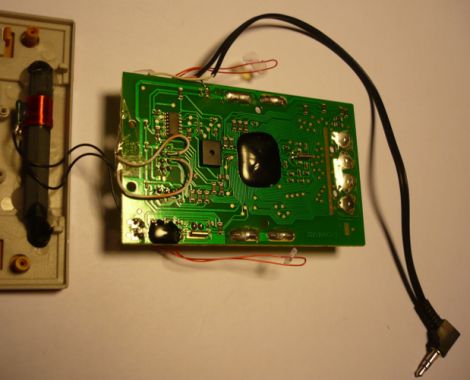
[Fred] got a La Crosse wireless weather station as a gift and thought the LCD display was great, but he was dismayed that there was no means of extracting the temperature data for use on a computer. He thought that the modular design of the system would make it great for use in his home automation project if he could only get his hands on the data.

He tore into the base station and started looking around for easy places to get at the data he was looking for. He thought about tapping into the bus that controls the LCD in hopes of finding an easy to decode signal, but the weather station used a proprietary chip with an integrated LCD controller, making it all but impossible. Instead, he started sniffing the data coming across the wireless link, and while he didn’t quite yet know what he was seeing, it was a start.

He sniffed the signals using Audacity, and eventually found that the base station received 40-bit data bursts from each sensor. He dug further, and with the help of some data he found online, he was able to decode the data packets. The last hurdle he ran into was figuring out how the system’s CRC encoding worked. It took a bit of work but he eventually got it, and can now record data packets knowing that the data has come over the air intact.

So far, it looks like his temperature monitoring system is working quite well, though he has several improvements planned for the near future. If you have a similar unit and are interested in extending its capabilities, [Fred] has posted plenty of code on his site.

Flashing Arduinos With A Zipit

zipit_arduino_flashing

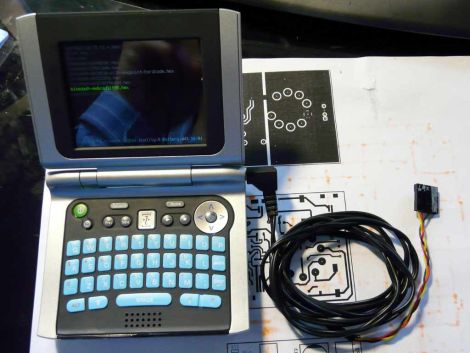
[Giacomo] finds that every once in awhile, he needs to flash a sketch to an Arduino while on the go. While he doesn’t always carry his laptop with him, he almost certainly has his Zipit Z2 on hand. He prefers to use the Zipit because it’s tiny, it uses Debian, has built-in WiFi, and can run for about 5 hours before requiring a recharge. The only shortcoming is that the device lacks a serial port.

Following instructions we featured last year he added a serial port to his device, then built a small converter cable that allows him to connect it to virtually any Arduino. He says it only takes a moment to get avrdude up and running on the Zipit via apt-get, and once that’s done, he is in business. He wrote a short script that saves him from entering the flash command over and over, so the process couldn’t be simpler.

He does mention that since the Zipit does not have a DTR line, Arduino resetting must be done manually. For the convenience of flashing sketches from the palm of our hand, we can deal with that.

Check out the video below for a quick demonstration of his setup.

Continue reading “Flashing Arduinos With A Zipit”

How Canonical Automates Linux Package Compilation

pandaboard

What do you do when it’s time to port the most popular Linux distribution to a completely different architecture? Canonical employee [David Mandalla] works on their ARM development team and recently shared the answer to that question with his fellow Dallas Makerspace members.

Canonical needed a way to compile about 20,000+ packages for the ARM platform, however they did not want to cross-compile, which is quite time consuming. Instead, they opted to build a native solution that could handle the load while ensuring that all packages were compiled securely. To tackle this immense task, [David] and his team constructed a 4U server that runs 20 fully-independent ARM development platforms simultaneously.

The server is composed of 21 PandaBoards, small OMAP development boards featuring a dual-core ARM cortex processor with just about all the connectivity options you could possibly ask for. One board operates as the server head, keeping track of the other 20 modules. When someone requests server time to build a package, the main board checks for unused server, triggering a relay to reboot it before the server is automatically reimaged. Once the pristine, secure environment is ready to go, it’s handed off to the customer who requested it.

If you’re interested in learning more about the build process, [David] has put together a blog with additional details.

[Thanks Leland]