Crosshair Aiming System For Your Laser Cutter

diy_laser_crosshairs

[Rich] was having quite a bit of fun with his newly-acquired laser cutter, but was not impressed by the stock aiming laser that came with it. The problem with the built-in laser is that it did not actually follow the cutting laser’s path – instead, it has to be calibrated for a fixed focal length. This becomes problematic when engraving and cutting since they require different focal lengths, so it becomes a guessing game as to where the cutting laser will actually end up in respect to the aiming laser.

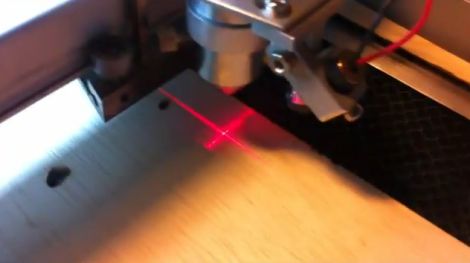
An additional optic module that solves this problem can be had for about $300, but after sinking $2500 into the laser setup, [Rich] was not inclined to purchase one. Instead, he bought a pair of cheap laser levels online and scavenged the line lens from one module, which was mounted on the laser cutter’s existing aiming laser. The second module was epoxied to the top of the cutting head, to create a set of cross hairs on the work surface.

As you can see in the video below, the hack works quite well, and the lasers are accurate at a variety of different focal lengths.

Continue reading “Crosshair Aiming System For Your Laser Cutter”
Fixing Motorized Window Shutter Battery Problems

rolling_shutter_battery_fix

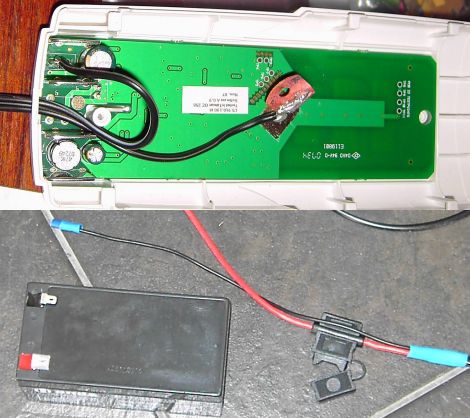
Living in a brushfire-prone area, [Erich] had a set of roller shutters installed to protect his home. Mains power can be spotty in emergencies, so the shutters are powered by NiMH batteries which are housed inside the shutters’ remote control units. After encountering a good handful of dead batteries, he decided it was time to search around for a better means of powering the shutters rather than pay another $80 AUD for batteries that he knew would fail in short order.

After disassembling the shutters and the remotes, he found a litany of problems. The remotes are ATMega-based, so he assumed the programming was robust, but he found that the charging algorithm was quite poorly implemented. The batteries were allowed to get extremely hot while charging, a result of the fact that charging was done for a set period of time rather than monitoring battery voltage. Additionally, the shutter motors required a 4 amp instantaneous current when activated, something that seemed to contribute to the quick draining of the 1500 mAH battery packs.

To remedy his issues, he upgraded to a much larger sealed lead acid battery pack, which he mounted in a wall cavity. The remotes were tweaked to add a modular power plug, enabling him to easily connect and disconnect the remotes as needed. Not only did he save a ton of money on constantly replacing batteries, he’s got a nice 12v power supply in the wall that he can tap into at will.

Forearm-mounted GPS Uses LEDs To Light The Way Home

arm_mounted_gps

While some people can rely solely on memory and landmarks to find their way home, others need a bit more help. Consider Instructables user [_macke_] for instance.

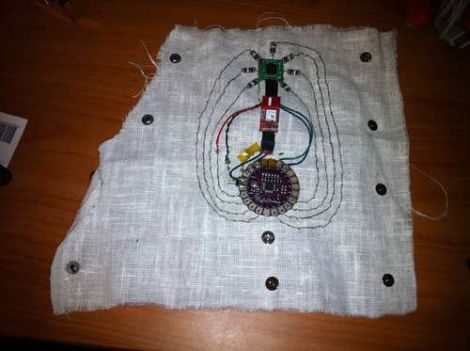
Like other screenless GPS navigation devices we have seen, his “Find Home Detector” uses a GPS module to obtain his location, guiding the way home via a set of alternate indicators. In this case, he uses LEDs which are laid out like a compass rose. When [_macke_] is aimed toward his destination, the LED nearest to his fingertips lights up, letting him know he is on the right path. As he turns away from home, the other LEDs light, indicating the direction in which he should turn.

His forearm-mounted GPS navigator uses a LilyPad Arduino to control the system, much like others we have seen. It is connected to a GPS sensor and a compass module that work in concert to guide him home. The compass is responsible obtaining his heading information, and while it might look as if the LEDs that surround the module are pointing North, they are in fact indicating the heading of his destination instead.

It’s a cool little creation, and we can imagine it would be quite helpful if you happen to be walking home after a long night of drinking.

Be sure to check out the video below for a quick demonstration.

Continue reading “Forearm-mounted GPS Uses LEDs To Light The Way Home”

Spherical Military Drone Coming To A Sky Near You

spherical_drone

We’re always fascinated by flying drones around here, and this latest creation by Japan’s Ministry of Defense is no exception. The spherical drone, which looks far simpler than this drone we saw several months back, looks pretty benign at first glance. Once it starts moving however, you can see just how slick it is.

Reports say that it can hit a top speed of 40 mph, but it seems that the fun is relatively short-lived, as the drone runs out of juice after about 8 minutes. While it is flying, the drone appears to be incredibly agile and fairly easy to control. The built-in camera isn’t top end, but it looks more than sufficient for general surveillance use.

While we love quadrocopters and all of the cool acrobatics they pull off, there’s something awesome about a drone that can hit the ground at speed, roll, and take off again without incurring any serious damage.

Anyone care to start work on a civilian prototype with a longer battery life?

Pick And Place At Home

diy_pick_and_place

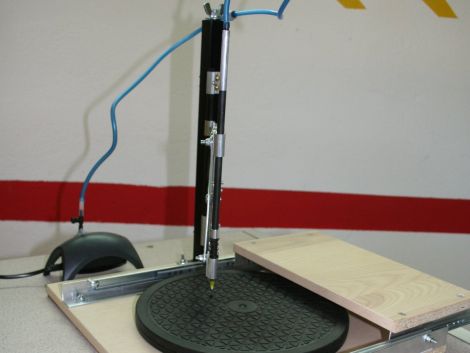
[Erv’] wrote in to share a manual pick and place he recently constructed. He builds a lot of circuits using SMD parts, and after looking at commercial pick and place systems, he decided it would be far cheaper to build his own. Using some components he had sitting around the house, along with a few store-bought pieces, he put the pick and place together for about $50, which is pretty cheap when you think about it.

The base is made from wood he had left over from another project, which has a sliding rail and a movable arm rest built into it. A rotating TV stand is used to hold workpieces, allowing PCBs to be repositioned at will while parts are being laid out. A square furniture leg is used as a support arm, holding the pick and place vacuum pen in place at the end of a small accordion hinge. As in most DIY pick and place installations, a small aquarium pump has been used to provide the suction needed to pick up SMD parts.

It’s a great build with plenty of useful features, and comes in far cheaper than any commercial system you’ll find out there.

Ubuntu Laika – An Android Phone Pen Testing Platform

laika_screenshot

Once [Ruan] over at AndroidClone heard that Android devices were capable of running a full Linux environment, he started contemplating all of the things he might be able to do with a full Linux OS in his pocket.

He decided that a portable penetration testing platform would be great to have on hand, so he got busy installing Ubuntu 10.10 on his Lenovo LePhone. Once he had it up and running, he stripped out all of the unnecessary fluff and added some common tools such as Wireshark, Nmap, and Kismet, among others. He says it easily runs side by side with Android, allowing you to switch between the Ubuntu install and your standard Android applications with ease.

While this all started out as a proof of concept, he has continued to refine the project, releasing several new versions along the way. If you are interested in giving it a try, he has installation instructions available in the AndroidClone forums.

[thanks Stephen]

Tablet-controlled Disco Droid

disco_droid_adk_control

We have seen a few neat Google ADK projects pop up since its announcement a few weeks back, and this one is already on the list of our favorites.

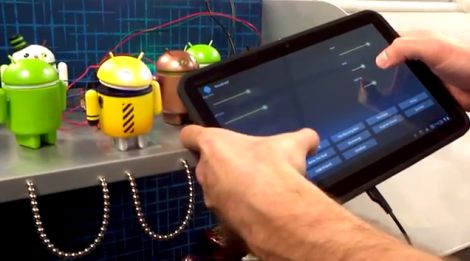
YouTube user [chrisjrelliot] has put together a great hack demonstrating the ADK’s power and how easy it can be to control devices in real time with an Android-powered device.

He hacked apart an Android figure (naturally) and fitted it with some LED eyes as well as four servos. The servos are used to rotate the head, body, and arms of his Disco Droid, all of which can be controlled via his Android-powered tablet. As you can see in the video below, he is able to control the Droid’s actions in real time with a few simple swipes of his finger. One thing we did notice is that his tablet is not connected to anything via wires, so we are assuming that there’s a Bluetooth module hidden away somewhere in the mix.

While the video is a bit short on details, [Chris] promises that source code and build plans will be published in short order.

[youtube=http://www.youtube.com/watch?v=jwvkJVUECrg&w=470]