SolidWorks Certification… With FreeCAD?

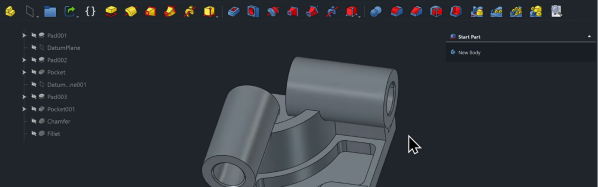
There are various CAD challenges out there that come with bragging rights. Some, like the Certified Solid Works Professional Exam (CWSP) might actually look good on a resume. [Deltahedra] is apparently not too interested in padding his resume, nor does he have much interest in SolidWorks, and so decided to conquer the CWSP with FreeCAD in the name of open source — and to show us all how he did it. 

Because these CAD exams are meant to show your chops with the program, the resulting video makes an awesome FreeCAD tutorial. Spoiler alert: he’s able to model the part, though it takes him about 15 minutes. After modeling the part, the CWSP exam needs you to find the mass of the part, which [Deltahedra] does with the FCInfo macro — which, of course, he shows us how to install and use. The second and third questions are similar: change some variables (it is a parametric modeling software, after all) and find the new mass. In a second exercise, he needs to modify the model according to a new drawing. Modifying existing models can sometimes be more difficult than creating them, but [Deltahedra] and FreeCAD pass with flying colors once again.

If you’re at all curious about what FreeCAD can do, this video is a really impressive demonstration of FreeCAD’s part modeling workbench. We’ve had a few FreeCAD guides of our on on Hackaday, like this one on reverse engineering STLs and this one on best practices in the software, but if you’d asked us before the release of v1.0 we’d never have guessed you could use it for a SolidWorks exam in 2025. So while there are kudos due to [Deltahedra], the real accolades belong to the hardworking team behind FreeCAD that has brought it this far. Bravo!
Continue reading “SolidWorks Certification… With FreeCAD?”

MCE Blaster Translates TTL For Modern(ish) Monitors

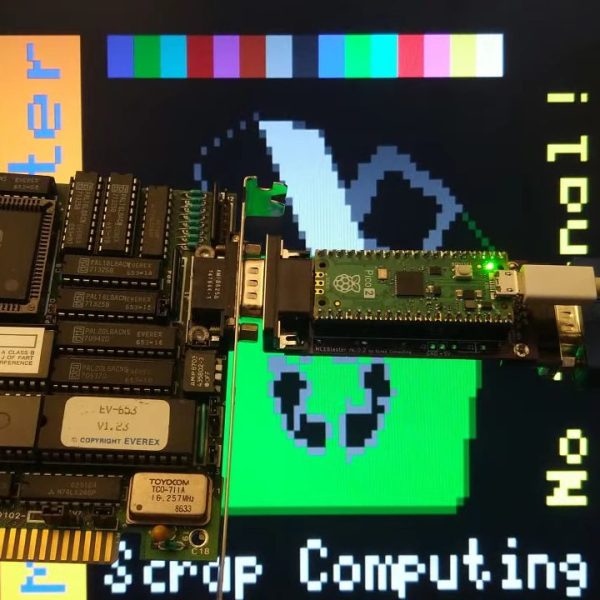
VGA isn’t much used anymore, but it’s not hard to get a hold of monitors with that input. How about the older standards like EGA, CGA, or MDA? Well, it’s good luck on eBay or at the recycling yard to get a period-appropriate monitor, but the bulky, fragile CRTs seem to have been less likely to survive than computers that drove them. That’s what [Scrap Computer]’s MCE Blaster is for: it sits betwixt the retrocomputer’s TTL output and the VGA input of a (more) modern monitor, be it CRT or LCD.

Continue reading “MCE Blaster Translates TTL For Modern(ish) Monitors”

Is This The Last PCB You’ll Ever Buy?

Breadboards are great, but as the world moves more and more to having SMD as a standard, prototyping straight PCBs is becoming more common. If you’re mailing off to China for your PCBs, it’s shockingly quick for what it is, but a one-week turnaround is not “rapid prototyping”. [Stephen Hawes] has been on a quest on his YouTube channel for the ideal rapid-prototyping PCB solution, and he thinks he’s finally got it.

Now, if you’re only doing single-layer PCBs, this is a solved problem. You can mechanically mill, or laser cut, or chemically etch your way to PCB perfection, far faster than the Chinese fabs can get you a part. If you want a double-sided board, however, vias are both a pain in the keister to do yourself, and a rate-limiting step.

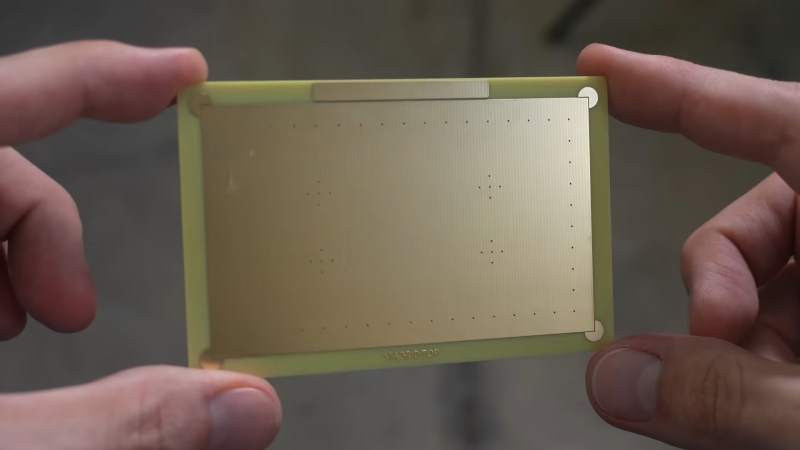
[Stephen Hawes] hit on the idea of buying a bulk set of PCBs from the usual vendors. The boards will be simple copper pours with vias in a grid with just a bit of etching. PCB Vendors are good at that, after all, and it’s not going to cost much more than raw copper. [Stephen] then uses the template of this “viagrid” board to lay out the circuit he’s prototyping, and it’s off to the races. Continue reading “Is This The Last PCB You’ll Ever Buy?”

Volumetric Display Takes A Straight Forward (and Backward) Approach

There’s something delightfully sci-fi about any kind of volumetric display. Sure, you know it’s not really a hologram, and Princess Leia isn’t about to pop out and tell you you’re her only hope, but nothing says “this is the future” like an image floating before you in 3D. [Matthew Lim] has put together an interesting one, using persistence-of-vision and linear motion.

The basic concept is so simple we’re kind of surprised we don’t see it more often. Usually, POV displays use rotary motion: on a fan, a globe, a disk, or even a drone, we’ve seen all sorts of spinning LEDs tricking the brain into thinking there’s an image to be seen. [Matthew’s] is apparently the kind of guy who sticks to the straight-and-narrow, on the other hand, because his POV display uses linear motion.

An ESP32-equipped LED matrix module is bounced up by an ordinary N20 motor that’s equipped with an encoder and driven by a DRV8388. Using an encoder and the motor driver makes sure that the pixels on the LED matrix are synced perfectly to the up-and-down motion, allowing for volumetric effects. This seems like a great technique, since it eliminates the need for slip rings you might have with rotary POV displays. It does of course introduce its own challenges, given that inertia is a thing, but I think we can agree the result speaks for itself.

One interesting design choice is that the display is moved by a simple rack-and-pinion, requiring the motor to reverse 16 times per second. We wonder if a crank wouldn’t be easier on the hardware. Software too, since [matthew] has to calibrate for backlash in the gear train. In any case, the stroke length of 20 mm creates a cubical display since the matrix is itself 20 mm x 20 mm. (That’s just over 3/4″, or about twice the with of a french fry.) In that 20 mm, he can fit eight layers, so not a great resolution on the Z-axis but enough for us to call it “volumetric” for sure. A faster stroke is possible, but it both reduces the height of the display and increases wear on the components, which are mostly 3D printed, after all.

It’s certainly an interesting technique, and the speechless (all subtitles) video is worth watching– at least the first 10 seconds so you can see this thing in action.

Thanks to [carl] for the tip. If a cool project persists in your vision, do please let us know. Continue reading “Volumetric Display Takes A Straight Forward (and Backward) Approach”

The most exciting search engine 68k can handle.

There’s Nothing Boring About Web Search On Retro Amigas

Do you have a classic Amiga computer? Do you want to search the web with iBrowse, but keep running into all that pesky modern HTML5 and HTTPS? In that case, [Nihirash] created BoingSearch.com just for you!

BoingSearch was explicitly inspired by [ActionRetro]’s FrogFind search portal, and works similarly in practice. From an end-user perspective, they’re quite similar: both serve as search engines and strip down the websites listed by the search to pure HTML so old browsers can handle it.

Boing search in its natural habitat, iBrowse on Amiga.

The biggest difference we can see betwixt the two is that FrogFind will link to images while BoingSearch either loads them inline or strips them out entirely, depending on the browser you test with and how the page was formatted to begin with. (Ironically, modern Firefox doesn’t get images from BoingSearch’s page simplifier.) BoingSearch also gives you the option of searching with DuckDuckGo or Google via the SerpAPI, though note that poor [Nihirash] is paying out-of-pocket for google searches.

BoingSearch is explicitly aimed at the iBrowse browser for late-stage Amigas, but should work equally well with any modern browser. Apparently this project only exists because FrogFind went down for a week, and without the distraction of retrocomptuer websurfing, [Nihirash] was able to bash out his own version from scratch in Rust. If you want to self-host or see how they did it, [Nihirash] put the code on GitHub under a donationware license.

If you’re scratching your head why on earth people are still going on about Amiga in 2025, here’s one take on it.

Graph showing accuracy vs model

Why You Shouldn’t Trade Walter Cronkite For An LLM

Has anyone noticed that news stories have gotten shorter and pithier over the past few decades, sometimes seeming like summaries of what you used to peruse? In spite of that, huge numbers of people are relying on large language model (LLM) “AI” tools to get their news in the form of summaries. According to a study by the BBC and European Broadcasting Union, 47% of people find news summaries helpful. Over a third of Britons say they trust LLM summaries, and they probably ought not to, according to the beeb and co.

It’s a problem we’ve discussed before: as OpenAI researchers themselves admit, hallucinations are unavoidable. This more recent BBC-led study took a microscope to LLM summaries in particular, to find out how often and how badly they were tainted by hallucination.

Not all of those errors were considered a big deal, but in 20% of cases (on average) there were “major issues”–though that’s more-or-less independent of which model was being used. If there’s good news here, it’s that those numbers are better than they were when the beeb last performed this exercise earlier in the year. The whole report is worth reading if you’re a toaster-lover interested in the state of the art. (Especially if you want to see if this human-produced summary works better than an LLM-derived one.) If you’re a luddite, by contrast, you can rest easy that your instincts not to trust clanks remains reasonable… for now.

Either way, for the moment, it might be best to restrict the LLM to game dialog, and leave the news to totally-trustworthy humans who never err.

10 Cent Microcontroller Makes Tracker Music

We are absurdly spoiled these days by our microcontrollers. Take the CH32V00X family– they’ve been immortalized by meme as “the ten cent micro” but with a clock speed of 48MHz and 32-bit registers to work with, they’re astoundingly capable machines even by the standards of home computers of yore. That’s what motivated [Tim] to see if he could use one to play MOD files, with only minimal extra parts– and quite specifically no DAC.

Well, that’s part of what motivated him. The other part was seeing Hackaday feature someone use a CH32V003 making chiptune-like beeps. [Tim] apparently saw that post as a gauntlet thrown down, and he picked it up with an even smaller chip: the CH32V002, which he proceeded to turn into a MOD player. For those of you who slept through 80s and early 90s (or for those precocious infants reading this who hadn’t then yet been born), MOD files are an  electronic music format, pioneered on the Amiga home computers. Like MIDI, the file specifies when to play specific voices rather than encoding the sound directly. Unlike MIDI, MOD files are self-contained, with the samples/voices used being stored inside the file. The original version targeted four-channel sound, and that’s what [Tim] is using here.

As you can see from the demo video, it sounds great. He pulled it off by using the chip’s built-in PWM timer. Since the timer’s duty cycle is determined by a variable that can be changed by DMA, the CPU doesn’t end up with very much to do here. In the worst case, with everything in flash memory instead of SRAM, the CPU is only taxed at 24%, so there’s plenty of power to say, add graphics for a proper demo. Using the existing MODPlay Library, [Tim]’s player fits into 4kB of memory, leaving a perfectly-usable 12kB for the MOD file. As far as external components needed, it’s just an RC filter to get rid of PWM noise.

[Tim] has put his code up on GitHub for anyone interested, and has perhaps inadvertently cast down another gauntlet for anyone who wants to use these little RISC V microprocessors for musical tasks. If you can do better, please do, let us know.

Continue reading “10 Cent Microcontroller Makes Tracker Music”