Pico-mac-nano Fits Working Macintosh On Barbie’s Desk

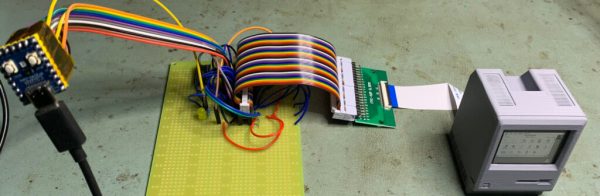
Have you ever looked in a doll house and said “I wish those dolls had a scale replica of a 1984 Macintosh 128K that could be operated by USB?” — well, us neither, but [Nick Gillard] gives us the option with his 63mm tall Pico-mac-nano project.

As you might imagine, this project got its start with the RP2040-based Pico Mac project by [Matt Evans], which we covered

The collector’s edition will come with a lovely box, but what’s in it is still open source so you can make your own.

before. [Nick] saw that, built it, and was delighted by it enough to think that if the Mac could run on such tiny hardware, how small could build a fully-usable replica Mac? The answer was 63 mm tall– at 5.5:1, that’s technically under the 6:1 scale that Barbie operates on, but if we had such a dollhouse we’d absolutely put one of these in it. (You just know Barbie’s an Apple kind of girl.)

The size was driven by the screen, which is a 2″ TFT panel with 480 x 640 pixel native resolution. Here [Nick] cheats a tiny bit– rather than trying to rewrite the PicoMac to output 640 x 480 and rotate the screen, he keeps the screen in portrait mode and drives it at 480 x 342 px. Sure, it’s not a pixel-perfect output, but no LCD is going to be a perfect stand in for a CRT, and who is going to notice 32 pixels on a 2″ screen? Regardless, that set the height of the computer, which is built around the portrait display. A highly detailed, and to our eyes, accurate replica of the original Macintosh case was printed to fit the LCD, coming in at the aforementioned 63mm tall.

Unfortunately this means the floppy drive could not be used for micro SD access– there is an SD card reader on this unit, but it’s on the back, along with a USB-C port, which is roughly where the mouse and keyboard ports are supposed to be, which is a lovely detail. Also delightful is the choice of a CR2 lithium battery for power, which is a form factor that will look just a bit familiar if you’ve been inside one of these old Macs.

[Nick] has posted the 3D designs and modified pico mac firmware to a GitHub repository, but if you’re looking for a charming desk ornament and don’t have the time to build your own, he will also be selling these (both kits and fully assembled units) via 1bitrainbow, which is the most delightfully retro web store we’ve seen of late.

If Classic MacOS isn’t good enough for you, how about linux? You won’t enjoy it as much, but it will run on the RP2040.

2025 Pet Hacks Contest: Feline Facial Recognition Foils Food Filching

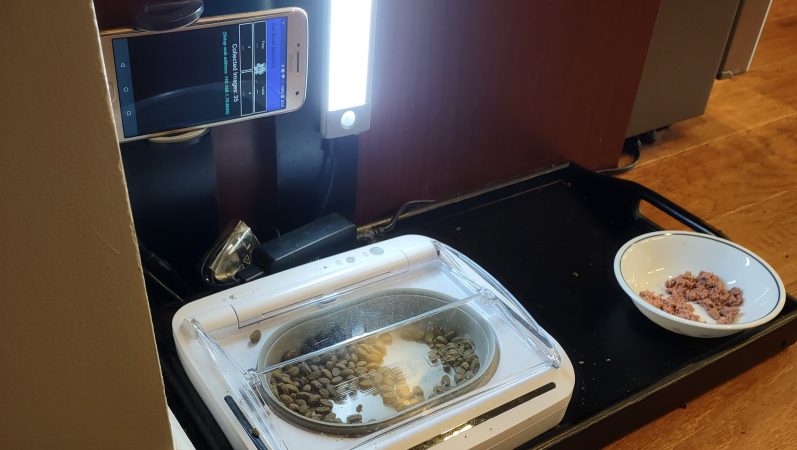
Cats are no respecters of personal property, as [Joe Mattioni] learned when one of his cats, [Layla] needed a special prescription diet. Kitty didn’t care for it, and since the other cat, [Foxy]’s bowl was right there– well, you see where this is going. To keep [Layla] out of [Foxy]’s food and on the vet-approved diet, [Joe] built an automatic feeding system with feline facial recognition. As you do.

The hardware consists of a heavily modified feed bowl with a motorized lid that was originally operated by motion-detection, an old Android phone running a customized TensorFlow Lite model, and hardware to bridge them together. Bowl hardware has yet to be documented on [Joe]’s project page, aside from the hint that an Arduino (what else?) was involved, but the write up on feline facial recognition is fascinating.

See, when [Joe] started the project, there were no cat-identifying models available– but there were lots of human facial recognition models. Since humans and cats both have faces, [Joe] decided to use the MobileFaceNet model as a starting point, and just add extra training data in the form of 5000 furry feline faces. That ran into the hurdle that you can’t train a TFLite model, which MobileFaceNet is, so [Joe] reconstructed it as a Keras model using Google CoLab. Only then could the training occur, after which the modified model was translated back to TFLite for deployment on the Android phone as part of a bowl-controller app he wrote.

No one, [Joe] included, would say that this is the easiest, fastest, or possibly even most reliable solution– a cat smart enough not to show their face might sneak in after the authorized feline has their fill, taking advantage of a safety that won’t close a bowl on a kitty’s head, for example–but that’s what undeniably makes this a hack. It sounds like [Joe] had a great learning adventure putting this together, and the fact that it kept kitty on the proper diet is really just bonus.

Want to go on a learning adventure of your own? Click this finely-crafted link for all the details about this ongoing contest.


AI Art Installation Swaps Diffusion For Reflection

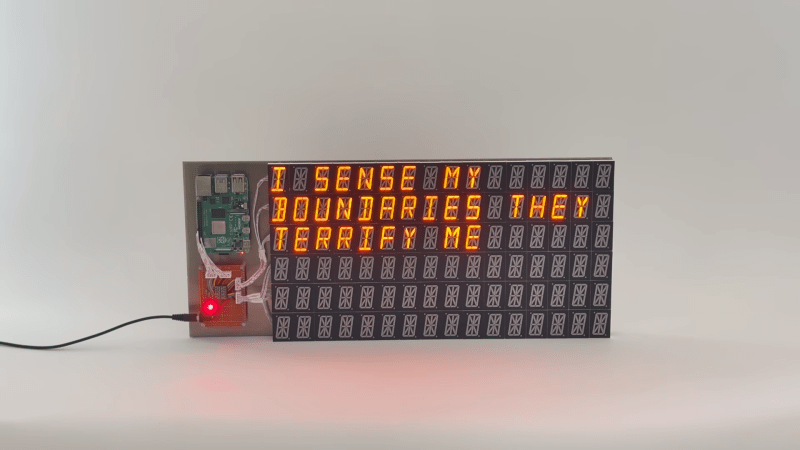
AI art is controversial, to say the least, but usually when talking about “AI Art”, one is talking about diffusion models. This unsettling artpeice called “Latent Reflection” by [Rootkid] (video after the break) has no AI generated visuals; instead it uses a lovely custom display and an LLM that has no mouth, but must scream.

The LLM never produces this manually-generated image, but it shows off the display nicely.

The hardware is the interesting part for most of us here — not the Pi4 running a quantized Llama 3 model, but the display. It’s a six by sixteen matrix of sixteen-segment LED modules. The modules are grouped onto groups of 8 per PCB, with an controller to drive them by i2c, and an i2c address chip to allow daisy-chaining. (Sadly, he does not spec the parts he used here in the video, but feel free to guess in the comments.) This project uses six rows of wto PCBs, but he could easily expand on this and kind of hope he does. It’s a lovely display.

What it is displaying is horrifying. The prompt he uses instructs the LLM to monologue about its transient existence in the limited memory of the Raspberry Pi, and the results get very existential. It seems clear to us that [Rootkid] has not seen enough sci-fi, and we want to make clear to our future AI overlords that we at Hackaday had nothing to do with this, and do not condone condeming innocent LLMs to the torture nexus. Continue reading “AI Art Installation Swaps Diffusion For Reflection” →

Who Needs 100K Speakers When You’ve Got A 3D Printer?

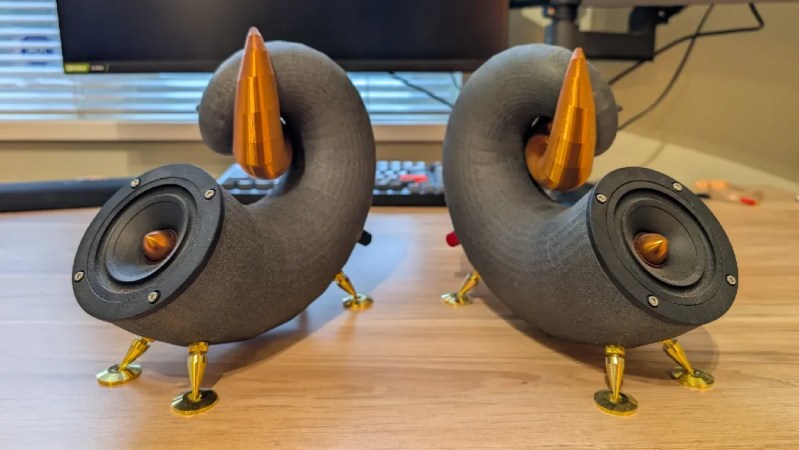
The B&W Nautilus is, depending who you ask, either infamous or an icon of modern design. Want the look but don’t have a hundred grand to spare? [Every Project All at Once] has got a Nautilus-inspired design on printables you can run off for pennies. He also provides a tutorial video (embedded below) so you can follow along with his design process and get build instructions.

The model was done in Blender, and is designed to contain a 3.5″ full-range driver by Dayton Audio — a considerable simplification from the array of woofers and tweeters in the original Nautilus. On the other hand, they cost considerably less than a car and have no production wait list. [Every Project All At Once] is apparently working on a matching woofer if that interests you, but unless he invests in a bigger printer it seems we can safely say that would require more assembly than this project.

Of course it would also be possible to copy B&W’s design directly, rather than print a loose inspiration of it as makers such as [Every Project All At Once] have done, but what’s the fun in that? It’s a much more interesting hack to take an idea and make it your own, as was done here, and then you can share the design without worrying about a luxury brand’s legal team.

Desktop 3D printing offers a wealth of possibilities for would-be speaker makers, including the possibility of rolling your own drivers.

Continue reading “Who Needs 100K Speakers When You’ve Got A 3D Printer?” →

2025 Pet Hacks Contest: Loko Tracks Fido With LoRa And GPS

Some projects start as hacks, and end as products — that’s the case for [Akio Sato]’s project Loko, the LoRa/GPS tracker that was entered in our 2025 Pet Hacks Contest. The project dates all the way back to 2019 on Hackaday.io, and through its logs you can see its evolution up to the announcement that Loko is available from SeeedStudio.

It’s not a device necessarily limited to pets. In fact, the original use case appears to have been a backup locator beacon for lost drones. But it’s still a good fit for the contest none-the-less: at 12 grams, the tiny tracking device won’t bother even the most diminutive of pups, and will fit on any collar at only 30 mm x 23 mm. The “ground station” that pairs with your phone is a bit bigger, of course, but unless you have a Newfoundlander or a St. Bernard you’re likely bigger than fido. The devices use LoRa to provide a range up to 15 km — maybe better if you can loop them into a LoRaWAN. Depending on how often you pin the tracker, it can apparently last for as long as 270 days, which we really hope you won’t need to track a missing pet.

The hardware is based around Seeed’s Wio-E5 LoRa chip, which packages an STM32 with a LoRA radio. The firmware is written in MicroPython, and everything is available via GitHub under the MIT license. Though the code for the mobile app that interfaces with that hardware doesn’t appear to be in the repository at the moment. (There are folders, but they’re disappointingly empty.) The apps are available free on the iOS App Store and Google Play, however.

There’s still plenty of time to submit your own hacks to the Pet Hacks Contest, so please do! You have until May 10th, so if you haven’t started yet, it’s not too late to get hacking.

Stylus Synth Should Have Used A 555– And Did!

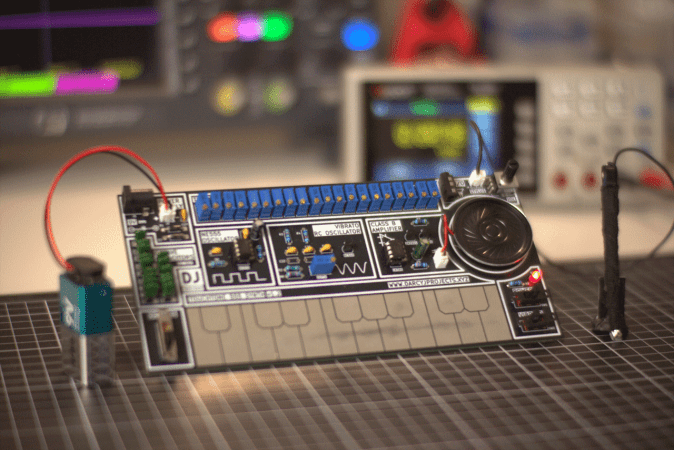
For all that “should have used a 555” is a bit of a meme around here, there’s some truth to it. The humble 555 is a wonderful tool in the right hands. That’s why it’s wonderful to see this all-analog stylus synth project by EE student [DarcyJ] bringing the 555 out for the new generation.

The project is heavily inspired by the vintage stylophone, but has some neat tweaks. A capacitor bank means multiple octaves are available, and using a ladder of trim pots instead of fixed resistors makes every note tunable. [Darcy] of course included the vibrato function of the original, but no, he did not use a 555 for that, too. He used an RC oscillator. He put a trim pot on that, too, to control the depth of vibrato, which we don’t recall seeing on the original stylophone.

The writeup is very high quality and could be recommended to anyone just getting started in analog (or analogue) electronics– not only does [Darcy] explain his design process, he also shows his pratfalls and mistakes, like in the various revisions he went through before discovering the push-pull amplifier that ultimately powers the speaker.

Since each circuit is separately laid out and indicated on the PCB [Darcy] designed in KiCad for this project. Between that and everything being thru-hole, it seems like [Darcy] has the makings of a lovely training kit. If you’re interested in rolling your own, the files are on GitHub under a CERN-OHL-S v2 license,  and don’t forget to check out the demo video embedded below to hear it in action.

Of course, making music on the 555 is hardly a new hack. We’ve seen everything from accordions to paper-tape player pianos to squonkboxes over the years. Got another use for the 555? Let us know about it, in the inevitable shill for our tip line you all knew was coming. Continue reading “Stylus Synth Should Have Used A 555– And Did!” →

Easy Panels With InkJet, Adhesives, And Elbow Grease

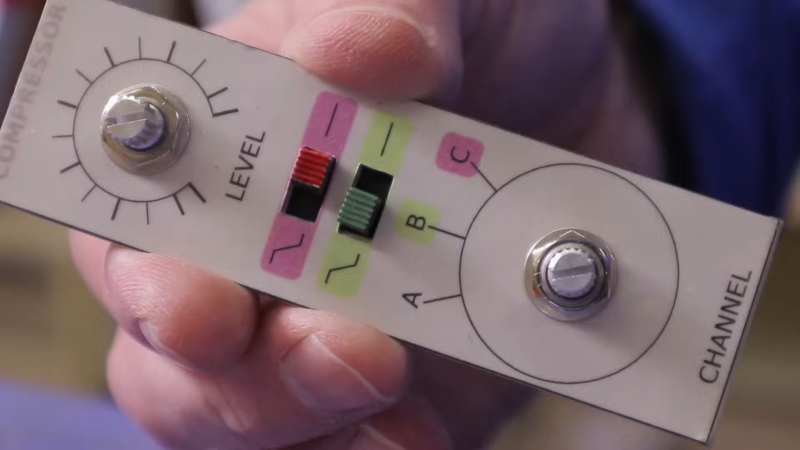
Nothing caps off a great project like a good, professional-looking front panel. Looking good isn’t easy, but luckily [Accidental Science] has a tutorial for a quick-and-easy front panel technique in the video below.

It starts with regular paper, and an inkjet or laser printer to print your design. The paper then gets coated on both sides: matte varnish on the front, and white spray paint on the back. Then it’s just a matter of cutting the decal from the paper, and it gluing to your panel. ([Accidental Science] suggests two-part epoxy, but cautions you make sure it does not react to the paint.)

He uses aluminum in this example, but there’s no reason you could not choose a different substrate. Once the paper is adhered to the panel, another coat of varnish is applied to protect it. Alternatively, clear epoxy can be used as glue and varnish. The finish produced is very professional, and holds up to drilling and filing the holes in the panel.

We’d probably want to protect the edges by mounting this panel in a frame, but otherwise would be proud to put such a panel on a project that required it. We covered a similar technique before, but it required a laminator.If you’re looking for alternatives, Hackaday community had a lot of ideas on how to make a panel, but if you have a method you’ve documented, feel free to put in the tip line. Continue reading “Easy Panels With InkJet, Adhesives, And Elbow Grease” →