Royal Navy Tests Quantum Navigation

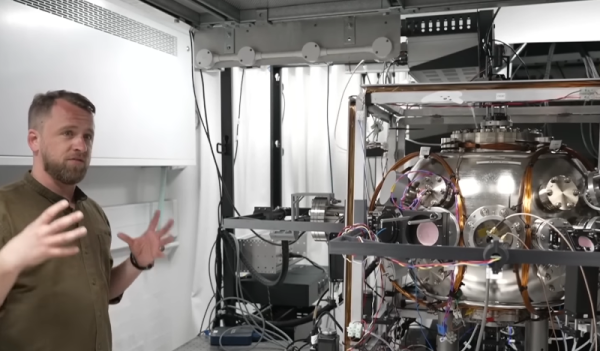
GPS has changed the way we get around the globe. But if you command a warship, you must think about what you would do if an adversary destroyed or compromised your GPS system. The Royal Navy and Imperial College London think a quantum navigation system might be the answer.
Of course, Heisenberg says you can’t know your speed and position simultaneously. But at the real-world level, you can apparently get close enough. The quantum sensors in question are essentially accelerometers. Unlike conventional accelerometers, though, these devices use ultracold atoms to make very precise measurements using a laser optical ruler, which means they do not drift as rapidly as, say, the accelerometer in your phone. Navigating with accelerometers is well understood, but the issue is how often you have to correct your computed position with an actual reference due to drift and other error accumulation. You can see a Sky News report on the trial below. Continue reading “Royal Navy Tests Quantum Navigation”

Plastic Welding Revisited

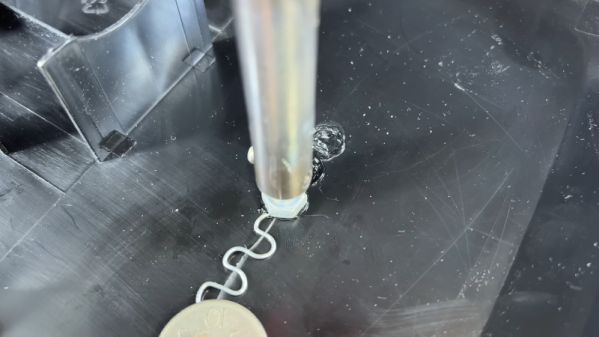
Last time we talked about a video that purported to do plastic welding, we mentioned that the process wasn’t really plastic welding as we understood it. Judging by the comments, many people agreed, but it was still an interesting technique. Now [Inventor 101] has a video about plastic repair that also talks about welding, although — again, we aren’t sure all of the techniques qualify.

That’s not to say there aren’t some clever ideas, though. There are several variations on a theme, but the basic idea is to use a bolt or something similar in a soldering iron, metal reinforcement from things like wires and staples, and donor plastic from a zip tie. While we don’t think the nylon in a typical zip tie is the best way to repair anything other than nylon, if you were repairing something 3D printed, you could easily swap out the tie for filament of the same material, which — we think — would bond better.

Continue reading “Plastic Welding Revisited”

Billion Year Clock Is LEGO Genius Or Madness

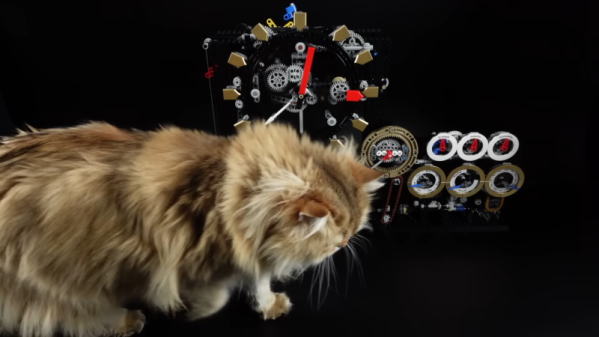
If you are a fan of LEGO bricks or Rube Goldberg, you should have a look at [Brick Technology’s] billion-year LEGO clock. Obviously, it hasn’t been tested for a billion years, and we wonder if ABS would last that long, but the video below is still worth watching.

Even if you aren’t a LEGO fan, the demonstration of a pendulum clock and escapement is worth something and really shows the practical side of things. Of course, making a pendulum clock that keeps time isn’t anything magic — people have been doing that for centuries. But then more and more elements join to keep track of more time.

You might wonder how the pendulum keeps going for a billion years. Well, honestly, it can’t. But a solar panel charges a battery that rewinds the clock when the drive weight reaches the bottom. We imagine the solar cell and battery would be maintenance items if you expected the billion-year life cycle.

Some will ask why, but we get it. If you must explain why you build everything you do with LEGO, you are doing it wrong. The clock even keeps track of the galaxy’s rotation which, apparently, completes every 230 million solar years.

We’d be impressed with this clock even if it weren’t made with LEGO. Sure, it isn’t as posh as the fancy clock in Denmark. But it does work longer — at least, in theory — than most other LEGO clocks we’ve seen.

Continue reading “Billion Year Clock Is LEGO Genius Or Madness”

Want Lower Power? Add More Cores!

[Jacob Beningo] over at Embedded.com recently posted his thoughts on how to do a low-power microcontroller design. On the surface, some of his advice seems a little counter-intuitive. Even he admits, “…I’m suggesting adding more cores! I must be crazy!” There are a few tips, but the part he’s talking about is that you can save power by using CPUs with multiple cores and optimizing for speed.

This seems strange since you think of additional cores and speed to consume more power. But the idea is that the faster you get your work done, the faster you can go to sleep. We’ve seen that in our own projects — faster work means more napping, and that’s good for power consumption.

Of course, it isn’t just that simple. Multiple cores don’t help you if you don’t use them. The overarching goal is to get done quickly so you can get back to sleep. You know, kind of like work. The other advice in the post is generally good, too. Measure your power consumption, respond to events, and — maybe slightly surprising — with modern CPUs, variations within the CPU family, according to [Jacob], isn’t very significant. Instead, he reports that the big changes are switching to the least-capable processor family.

Naturally, Hackaday readers are no strangers to low-power design. If you get your power consumption low enough, you can consider a low-tech battery or even a potato.

The Printing Of Pi

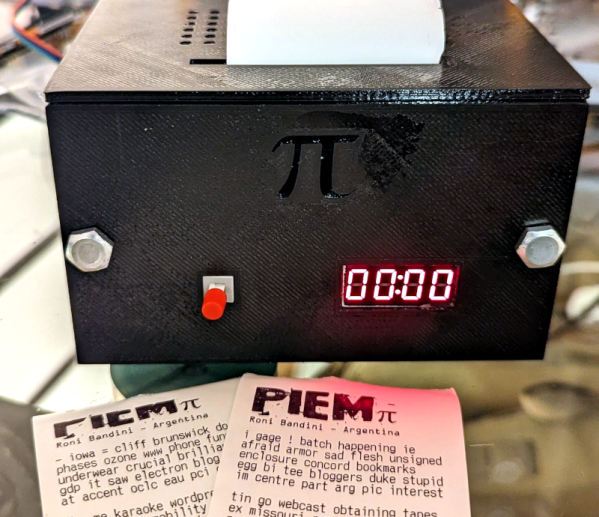
It really isn’t necessary, but there is some geek cred to learning pi to some bizarre number of digits. One way to do that is via a piem — a mnemonic device that is easy to remember and gives you the digits. Don’t know any? [Roni Bandini] has you covered with the PiemPi machine. It prints a random piem on a thermal printer and calculates each digit on the fly. You can watch the machine in action in the video below.

Unfortunately, the Raspberry Pi Zero inside doesn’t have enough language skills to ensure the thing makes sense, so you get word salad that may or may not have any real meaning. For example, [Roni] quotes astronomer [Sir James Jeans’] phrase: “How I want a drink, alcoholic, of course, after the heavy lectures involving quantum mechanics.” Before the advent of calculators, we always used: “May I have a large container of coffee today?” In each case, you count the number of letters in each word to get the digits. However, some of the piems you can see from the machine start off with phrases like: “# leon a yahoo execution im actual total pit eagle detector christmas…”

Continue reading “The Printing Of Pi”

This Vending Machine Is For The Birds

The early bird may get the worm, but [Stephen Chasey’s] birds only get to eat if they are smart. He’s created a vending machine for bird feeding. While this is a classic and simple exercise for a microcontroller, [Stephen’s] design is all op amps and 555 timers. The feeder comes on when it detects a warm body and waits for something to drop through a hole. Birds don’t have coins, so the hole will accept anything that will trigger the IR sensor within. In response, it dispenses a few peanuts. Rodents and squirrels won’t figure out the machinery, and so they can’t pilfer the peanuts meant for the pigeons — or other birds, even if they don’t start with the letter P.

A PIR sensor detects a warm body. A 555 keeps the system going for about 24 seconds after the last PIR event. Pairs of IR LEDs and phototransistors act as sensors that look through heat shrink tubing, which is, apparently, IR transparent. When a virtual coin drops through the hole, one of the sensors picks it up and starts another 555, which turns on a vibration motor. Another sensor watches for a nut to drop, which stops the motor. It also will time out after 11 seconds.

Continue reading “This Vending Machine Is For The Birds”

3D Printing Safety (According To The UL)

If you want to start a heated discussion in 3D printing circles, ask people about the requirements to print safely. Is ABS safe to print without ventilation? Can you drink out of a PLA cup? How nasty is that photo resin if you spill it on yourself? If you are at home, it’s more or less up to you. But if you are building a shared hackerspace, a corporate workstation, or a classroom, these questions might come up, and now, the UL has your answer. The UL200B document is aimed at 3D printers in “institutions of higher education,” but we imagine what’s good for the university is good for us, too.

The 45-page document isn’t an easy read. It does cover both “material extrusion” and “vat photopolymerization” technology. In fact, they identify seven “most common” processes ranging from powder bed fusion, energy deposition, and more.  The work results from a UL task force with participants from Harvard, Princeton, and Carnegie-Mellon. We were surprised there didn’t seem to be any industry representation, but maybe that was on purpose.

With extrusion printing — what we’d call FDM — the focus seems to be on ultra-fine particles and volatile organic compounds (VOCs). However, the level of VOCs rose up to six times with resin printers when compared to FDM. Filters helped with ABS, nylon, and ASA, and polycarbonate/ABS. The paper does acknowledge that PLA is probably safer, although it is quick to point out that PLA with additives may not be as safe as plain PLA. If you want a quick summary, check out Table 2, starting on page 23.

The rest of the document is about creating a safety plan for all the printers that might be on a college campus — that might not be as interesting. However, you’ll want to skip forward to the appendix section. It has some data about relevant industrial standards and other data.

This is a great step in analyzing the risks of 3D printing. Of course, laser printers and copiers also spew micro-particles, and we seem to have survived those for a number of decades. Still, more data is good — you should be informed to make decisions about your health and safety. We didn’t see much in the document that covered food safety, something we’ve talked about before. If you want to monitor your VOC exposure, we got you.