Transparent LCD Makes Everything Look Futuristic

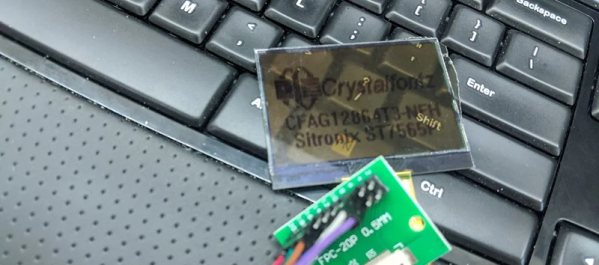
According to [Kelsey], transparent displays are guaranteed to make “everything feel like the future.” Unfortunately they’re hard to find, and the ones typically available are OLED and can’t make solid black colors. But as luck would have it, it’s possible to repurpose a common LCD to be sort of transparent.

A LCD uses nematic crystals that can polarize light, with the amount of polarization changing based on the electric field applied to the crystal. Light enters the front of the panel through a polarizing film, passes through the display, and then bounces off a reflective back coating. The display itself usually polarizes light in a way that matches the front polarizer. That means if you do nothing you get reflected light. However, if a part of the LCD gets an electric field, it will repolarize in such a way as to block the reflected light making the display look black in that area.

[Kelsey’s] trick is to peel off the reflector and replace it with polarizing film taken from another display. The new polarizer needs to be bigger than the display for one reason: you need to match the polarizing angle of the front film with the new back film. That means if the new film is exactly the right size, it won’t be able to rotate without leaving gaps. By starting with a larger piece, you’ll be able to rotate for maximum transparency before you stick it on.

We’ve seen some homemade transparent numeric displays. The transparent wood, though, has usually left something to be desired.
Amp Volt Ohm Meter Model 8 Mark III From The 1960s

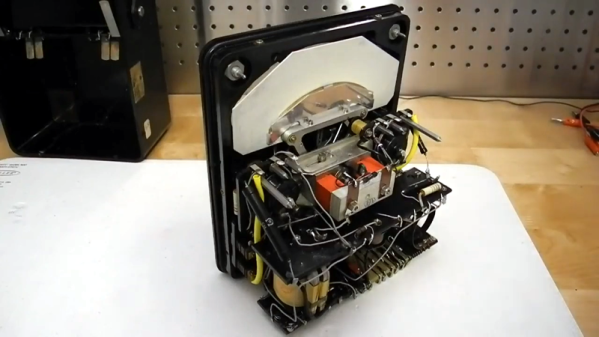
There’s hardly any piece of test equipment more fundamental than a volt ohm meter. Today you’re likely to have a digital one, but for most of history, these devices had real needle meters. The AVOmeter Model 8 Mark III that [Jeff Tranter] shows off had an odd banana-shaped meter. Maybe that goes with the banana plugs. You can get a closer view of this vintage piece of equipment in the video after the break.

Even the outside description of the meter is interesting. There were several unique features. For example, if the meter goes full scale a little button pops out and disconnects the probes to protect the meter. Another unusual control reversed the polarity of the leads so you didn’t have to swap them manually.

Some of the other features will be familiar to anyone who has used a good analog meter. For example, the meter movement has a mirror under the needle. This is used to make sure you are looking straight down on the needle when making readings. If you can see the reflection of the needle, then you are off to one side and will not read the precise value you are interested in.

If you only want to see the insides, [Jeff] teases you until around the six minute mark. There are no active devices and this meter is old enough to not use a printed circuit board. The AC ranges work with a transformer and germanium diodes. The rest of the circuit is mostly a bunch of resistors.

The point to point wiring always makes us wonder who built this thing sixty years ago. You can only wonder what they would think if they knew we were looking at their handiwork in the year 2020.

We see a lot of meter clocks, but it would be a shame to tear this unique meter apart for its movement. Perhaps someone should make a clock that outputs a voltage to a terminal so you could read it with your favorite meter. This instrument was probably pretty precise for its day, but we doubt it can match a modern 6.5 digit digital instrument.

Continue reading “Amp Volt Ohm Meter Model 8 Mark III From The 1960s” →

GitHub Goes GUI-less

Git is a handy tool that many of us are using for more than just software development. Having a cloud-based upstream repository is also surprisingly useful, but until now using GitHub — the most common upstream server — meant firing up a web browser, at least for certain tasks. Now GitHub is releasing a beta version of command-line tools made to manipulate your GitHub repos.

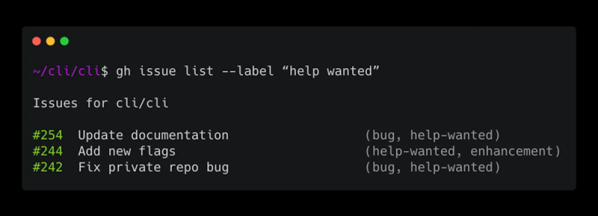
The tools are early release so they mostly focus on issues and pull requests. Of course, git itself will do the normal things like clone and checkout — you’ve always been able to do that on the command line. The example given in the announcement blog post lists all issues with a help wanted label:

gh issue list --label "help wanted"

We noticed that asking to view the issue, while done on the command line, will still open a browser. The tools are still a little early, so this is an excellent time to let the developers know what you’d like or otherwise influence the project.

We were a little surprised it wouldn’t just consume git, so that you’d use the same commands for everything and it would just pass pre-formed commands to git. Of course, that would be pretty easy to write as a shell script wrapper if you were interested in such a thing.

You’d be forgiven for only thinking of git as a way to manage source code revisions, but it’s actually capable of all sorts of interesting tricks.

3D Printing Skin Or Maybe A Dermal Regenerator

In space — at least on Star Trek — no one can hear you apply a band-aid. That’s too low tech. When a Star Fleet officer gets an ouchie, the real or holographic doctor waves a dermal regenerator over the afflicted area, and new skin magically appears. Science fiction, huh? Maybe not. A group of scientists from Canada recently published a paper on a handheld instrument for depositing “skin precursor sheets” over full-thickness burns. The paper is behind a paywall and if you don’t know how to get it or don’t want to get it, you can see a video from the University of Toronto, below.

Although they use the term 3D printing, the device is more like a paint roller. Several substances merge together in the print head and lay down on the burn in broad stripes.

Continue reading “3D Printing Skin Or Maybe A Dermal Regenerator” →

Nixie Clock Claims To Be Simplest Design

[Engineer2you] built a nixie tube clock and claims it is the simplest design. We felt like that was a challenge. In this design, the tubes are set up as a matrix with optoisolators on each row and column. With 60 segments, the matrix allows you to control it all with 16 bits. There are six columns, each corresponding to a digit. That means each row has 10 lines.

The Arduino code reads the clock and produces the output to the tubes fast enough that your eye perceives each digit as being always on, even though it isn’t.

Continue reading “Nixie Clock Claims To Be Simplest Design” →

RF Shield Turns Arduino (And PC) Into Shortwave Radio

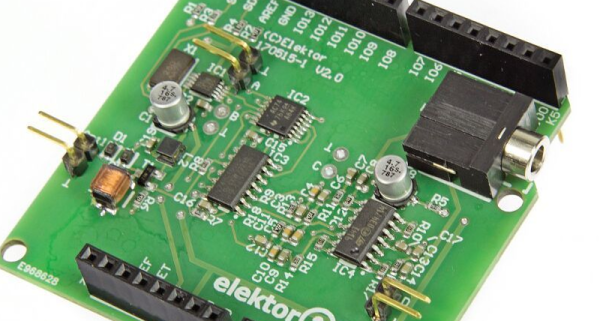
Microcontrollers tend to consume other kinds of electronics. A project you might once have done with a 555 now probably has a cheap microcontroller in it. Music synthesizers? RC controllers? Most likely, all microcontroller-based now. We always thought RF electronics would be immune to that, but the last decade or two has proven us wrong. Software-defined radio or SDR means you get the RF signal to digital as soon as possible and do everything else in software. If you want an introduction to SDR, Elektor now has an inexpensive RF shield for the Arduino. The Si5351-based board uses that oscillator IC to shift RF signals down to audio frequencies and then makes it available to the PC to do more processing.

The board is available alone or as part of a kit that includes a book. There’s also a series of Elektor articles about it. There’s also a review video from Elektor about the board in the video, below.

Continue reading “RF Shield Turns Arduino (And PC) Into Shortwave Radio” →

It Ain’t Over ‘Til The Paperwork Is Done: Test Driving TiddlyWiki

Working on projects is fun. Documenting them is often not so much. However, if you want anyone to duplicate your work — or even just want to remember what you were doing a few years ago when something needs upgrading or repairing.

There’s a ton of ways to keep track of the details of your projects. We love seeing how things come together and of course we’re happy to suggest documenting on Hackaday.io. But sometimes, you just want to keep your own notes to yourself. There’s always a notebook, of course, but that seems kind of old fashioned. A lot of projects are on Wikis but you hate to stand up a web server and a Wiki instance just to keep notes. But what if you could have a local Wiki with minimal setup?

I recently came across TiddlyWiki and decided to take it for a spin. Join me after to break to see what it’s all about.

Continue reading “It Ain’t Over ‘Til The Paperwork Is Done: Test Driving TiddlyWiki” →