Tech In Plain Sight: Hearing Aids

You might think you don’t need a hearing aid, and you might be right. But in general, hearing loss eventually comes to all of us. In fact, you progressively lose hearing every year, which is why kids can have high-pitched ringtones their parents can’t hear.

You’d think hearing aids would be pretty simple, right? After all, we know how to pick up sounds, amplify them, and play them back. But there’s a lot more to it. Hearing aids need to be small, comfortable, have great battery life, and cram a microphone and speaker into a small area. That also can lead to problems with feedback, which can be very uncomfortable for the user. In addition, they need to handle very soft and loud sounds and accommodate devices like telephones.

Although early hearing aids just made sound louder and, possibly, blocked unwanted sound, modern devices will try to increase volume only in certain bands where the user has hearing loss. They may also employ sophisticated methods to block or reduce noise. Continue reading “Tech In Plain Sight: Hearing Aids”

RTL-SDR With Only A Browser

Surely by now you’ve at least heard of RTL-SDR — a software project that let’s cheap TV tuner dongles work as a software-defined radios. A number of projects and tools have spun off the original effort, but in his latest video, [Tech Minds] shows off a particularly unique take. It’s a Web browser-based radio application that uses WebUSB, so it doesn’t require the installation of any application software. You can see the program operating in the video below.

There are a few things you should know. First, you need the correct USB drivers for your RTL-SDR. Second, your browser must support WebUSB, of course. Practically, that means you need a Chromium-type browser. You may have to configure your system to allow raw access to the USB port, too.

Watching the video, you can see that it works quite well. According to the comments, it will work with a phone, too, which is an interesting idea. The actual Web application is available as open source. It isn’t going to compete with a full-fledged SDR program, but it looked surprisingly complete.

These devices have grown from a curiosity to a major part of radio hacking over the years. Firefox users can’t use WebUSB — well, not directly, anyway.

Continue reading “RTL-SDR With Only A Browser”

Booting A Desktop PDP-11

Ever heard of VENIX? There were lots of variants of Unix back in the day, and VENIX was one for the DEC Professional 380, which was — sort of — a PDP 11. The 1982 machine normally ran the unfortunately (but perhaps aptly) named P/OS, but you could get VENIX, too. [OldVCR] wanted to put one of these back online and decided the ST-506 hard drive was too risky. A solid-state drive upgrade and doubling the RAM to a whole megabyte was the plan.

It might seem funny to think of a desktop workstation that was essentially a PDP-11 minicomputer, but in the rush to corner the personal computer market, many vendors did the same thing: shrinking their legacy CPUs. DEC had a spotty history with small computers. [Ken Olsen] didn’t think anyone would ever want a personal computer, and the salespeople feared that cheap computers would eat into traditional sales. The Professional 350 was born out of DEC’s efforts to catch up, as [OldVCR] explains. He grabbed this one from a storage unit about to be emptied for scrap.

The post is very long, but you get a lot of history and a great look inside this vintage machine. Of course, the PDP-11 couldn’t actually handle more than 64K without tricks and you’ll learn more about that towards the end of the post, too.

Just as a preview, the story has a happy ending, including a surprising expression of gratitude from the aging computer. DEC didn’t enjoy much success in the small computer arena, eventually being bought by Compaq, which, in turn, was bought by Dell HP. During their heyday, this would have been unthinkable.

The PDP/11 did have some success because it was put on a chip that ended up in several lower-end machines, like the Heathkit H11. Ever wonder how people programmed the PDP computers with switches and lights?

Piezo Sensor Reviewed

If you do FDM 3D printing, you know one of the biggest problems is sensing the bed. Nearly all printers have some kind of bed probing now, and it makes printing much easier, but there are many different schemes for figuring out where the bed is relative to the head. [ModBot] had a Voron with a clicky probe but wanted to reclaim the space it used for other purposes. In the video, also linked below, he reviews the E3D PZ probe which is a piezoelectric washer, and the associated electronics to sense your nozzle crashing into your print bed.

There are many options, and it seems like each has its pros and cons. We do like solutions that actually figure out where the tip is so you don’t have to mess with offsets as you do with probes that measure from a probe tip instead of the print head.

Continue reading “Piezo Sensor Reviewed”

Card Radios Remembered

We know how [Techmoan] feels. In the 1980s we had a bewildering array of oddball gadgets and exciting new tech. But as kids we didn’t have money to buy a lot of what we saw. But he had a £5 note burning a hole in his pocket from Christmas and found a Casio RD-10 “card radio” on sale and grabbed it. He’s long-ago lost that one, but he was able to find a new old stock one and shows us the little gadget in the video below.

The card-thin (1.9 mm) FM radio had many odd features, especially for the 1980s. For one thing, it took a coin cell, which was exotic in those days. The headphones had a special flat connector that reminded us of an automotive fuse. Even the idea of an earbud was odd at that time.

Continue reading “Card Radios Remembered”

Solar Power, Logically

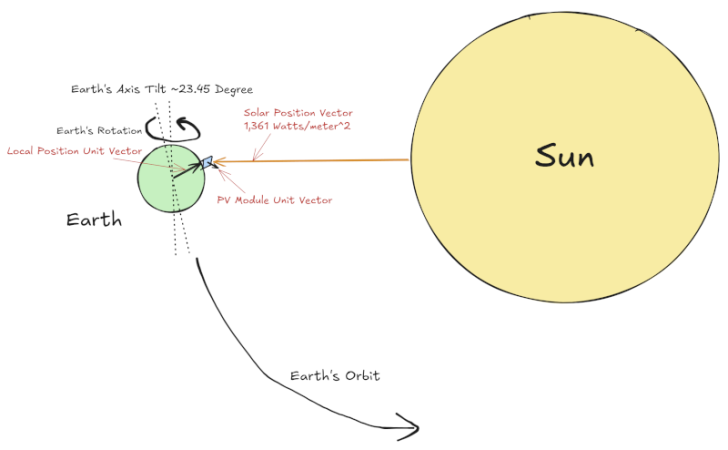
We’ve all seen the ads. Some offer “free” solar panels. Others promise nearly free energy if you just purchase a solar — well, solar system doesn’t sound right — maybe… solar energy setup. Many of these plans are dubious at best. You pay for someone to mount solar panels on your house and then pay them for the electricity they generate at — presumably — a lower cost than your usual source of electricity. But what about just doing your own set up? Is it worth it? We can’t answer that, but [Brian Potter] can help you answer it for yourself.

In a recent post, he talks about the rise of solar power and how it is becoming a large part of the power generation landscape. Interestingly, he presents graphs of things like the cost per watt of solar panels adjusted for 2023 dollars. In 1975, a watt cost over $100. These days it is about $0.30. So the price isn’t what slows solar adoption.

Continue reading “Solar Power, Logically”

Linux Fu: A Warp Speed Prompt

If you spend a lot of time at the command line, you probably have either a very basic prompt or a complex, information-dense prompt. If you are in the former camp, or you just want to improve your shell prompt, have a look at Starship. It works on the most common shells on most operating systems, so you can use it everywhere you go, within reason. It has the advantage of being fast and you can also customize it all that you want.

What Does It Look Like?

It is hard to explain exactly what the Starship prompt looks like. First, you can customize it almost infinitely, so there’s that. Second, it adapts depending on where you are. So, for example, in a git-controlled directory, you get info about the git status unless you’ve turned that off. If you are in an ssh session, you’ll see different info than if you are logged in locally.

However, here’s a little animation from their site that will give you an idea of what you might expect: Continue reading “Linux Fu: A Warp Speed Prompt”