Intel Rolls Out 49 Qubits

With a backdrop of security and stock trading news swirling, Intel’s [Brian Krzanich] opened the 2018 Consumer Electronics Show with a keynote where he looked to future innovations. One of the bombshells: Tangle Lake; Intel’s 49-qubit superconducting quantum test chip. You can catch all of [Krzanch’s] keynote in replay and there is a detailed press release covering the details.

This puts Intel on the playing field with IBM who claims a 50-qubit device and Google, who planned to complete a 49-qubit device. Their previous device only handled 17 qubits. The term qubit refers to “quantum bits” and the number of qubits is significant because experts think at around 49 or 50 qubits, quantum computers won’t be practical to simulate with conventional computers. At least until someone comes up with better algorithms. Keep in mind that — in theory — a quantum computer with 49 qubits can process about 500 trillion states at one time. To put that in some apple and orange perspective, your brain has fewer than 100 billion neurons.

Of course, the number of qubits isn’t the entire story. Error rates can make a larger number of qubits perform like fewer. Quantum computing is more statistical than conventional programming, so it is hard to draw parallels.

We’ve covered what quantum computing might mean for the future. If you want to experiment on a quantum computer yourself, IBM will let you play on a simulator and on real hardware. If nothing else, you might find the beginner’s guide informative.

Image credit: [Walden Kirsch]/Intel Corporation

Robotic Drive Train Is Nearly All 3D Printed

There are lots of ways to move a robot ranging from wheels, treads, legs, and even propellers through air or water. Once you decide on locomotion, you also have to decide on the configuration. One possible way to use wheels is with a swerve drive — a drive with independent motors and steering on each wheel. Prolific designer [LoboCNC] has a new version of his swerve drive on Thingiverse. The interesting thing is that it’s nearly all 3D printed.

You do need a few metal parts, a belt, two motors, and — no kidding — airsoft BBs, used as bearings. There are 3 parts you have to fabricate, which could take some work on a lathe, so it isn’t completely 3D printed.

[LoboCNC] points out that the assembly is lightweight and is not made for heavy robots. Apparently, though, his idea of lightweight is no more than 20 pounds per wheel, so that’s still pretty large in our book. The two motors allow for one motor to provide drive rotation while the other one — which includes an encoder — to steer. Of course, the software has to account for the effect of steering each wheel separately, but that’s another problem.

This robotic drivetrain is just thing for a car-like robot. If you are a little lonesome you could always print out ASPIR, instead. Or if you want an exotic 3D printed way to move things, you might get some inspiration from Zizzy. If you want a swerve drive that doesn’t require any machining or 3D printing, you might enjoy the video from another FIRST team, below.

Continue reading “Robotic Drive Train Is Nearly All 3D Printed”

3D Printing Wearables With A Net

If you want to build wearables, you need to know how to sew, right? Maybe not. While we’re sure it would come in handy, [Drato] (also known as [RobotMama]) shows how she prints designs directly on a net-like fabric. You can see a video of the process below.

The video after the break shows an Ultimaker, but there’s really nothing particularly special about the printer. The trick is to print a few layers, pause, and then insert the fabric under the printer before resuming the print.

[Drato] holds the fabric down after inserting it, and mentions you can use glue to hold it down, too. We wondered if some bulldog or alligator clips might work. The only thing we worried about is if the fabric were made of some synthetic, it might not take hot plastic without melting.

[Drato] mentions she uses Organza, which is a sheer fabric often found on wedding gowns. However, she doesn’t mention if she is using the polyester, silk, or nylon type of the fabric. A little research shows that polyester and nylon fabrics melt at about 295 C. Silk was harder to track down, but since you can iron it on a medium setting, that might work, too. Of course, the temperature where it melts and the temperature where it just deforms beyond use might be different, so some experimentation is probably wise.

What really piqued our interest was the application to creating wearables without sewing. We’ll be curious what other applications you could find for printing directly on a fabric substrate.

Continue reading “3D Printing Wearables With A Net”

Teaching Alexa To 3D Print

Sometimes a gadget like Alexa or Google Home is a solution looking for a problem. Then the problem you’ve been looking for hits you square in the face. I’ve confessed before that I have an oscilloscope problem. I also have a microcontroller development board habit. It appears now I have too many 3D printers. I recently finished building my latest one, an Anet A8 I picked up on Black Friday. While calibrating it, I found myself juggling a screwdriver, a pair of pliers, and trying to operate the thing all at one time. I realized I had to come up with a better way.

I don’t know if it qualifies as an addiction yet, but I also have an Alexa in every room (although I call it “Computer” because I’m a Star Trek fan) and a Google Home device almost everywhere. Why can’t I get one of these assistants to operate my printer for me? What are assistants for, after all, other than telling Dad jokes?

You’d think adding voice control to a 3D printer would a bit difficult. With the right tools, it is actually pretty easy. Luckily those tools aren’t anything special… if you want a set up like mine, where Alexa controls your 3D printer, read on.

Continue reading “Teaching Alexa To 3D Print”

TRS-80 Model 100 Goes Cellular

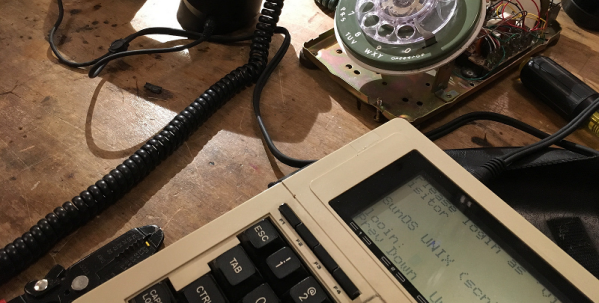
There are a few old products that have rabid fan bases, and the TRS-80 Model 100 is one of those. Depending on your point of view it’s either a small laptop or a large organizer, but in 1983 it was the ultimate computer on the go. The $1100 version had a whopping 8K of memory and the LCD screen showed 8 lines of 40 characters in glorious monochrome. One cool feature was the built-in 300 baud phone modem, which [Trammell Hudson] wanted to try, but he doesn’t have a landline. He tried a VOiP phone, but it wouldn’t wedge into the acoustic couplers well enough. Then he decided to go cellular.

He had already hooked up an old ITT 500 series dial phone to an Adafruit Fona ceullar board. He even has Teensy software to decode the dial, drive the dial tone and otherwise make the phone work. This time he hooked a handset up through a headset jack.

Continue reading “TRS-80 Model 100 Goes Cellular”

Hack Your Own Computer Science Degree

We ran across something interesting on GitHub of all places. The “Open Source Society University” has a list of resources to use if you want to teach yourself computer science for free. We found it interesting because there are so many resources available it can be hard to pick and choose. Of course, you can always pick a track from one school, but it was interesting to see what [Eric Douglas] and contributors thought would be a good foundation.

If you dig down, there are really a few potential benefits from going to college. One is you might learn something — although we’ve found that isn’t always a given, surprisingly. The second is you can get a piece of paper to frame that impresses most people, especially those that want to hire you but can’t determine if you know what you are talking about or not. Lastly, if you go to the right school you can meet people that might be useful to know in the future for different reasons.

The Internet has really changed all of those things, you can network pretty easily these days without a class ring, and there are lots of ways to earn accredited diplomas online. If you are interested in what we think is the most important part — the education — there are many options for that too.

Continue reading “Hack Your Own Computer Science Degree”

The Grooviest Random Number Generator Ever

Cloudflare is one of those Internet companies you use all the time, but don’t usually know it. Big websites you visit use Cloudflare to shore up their defenses against denial of service attacks. The company needed some truly random numbers for its security solutions, so it turned to some groovy old tech: lava lamps. In their office is a wall of 100 lava lamps monitored by cameras. The reaction of the lamps is unpredictable, and this allows them to generate really random numbers. [Joshua], a Cloudflare employee, talks about the technical details of the system in a recent blog post.

You might think this is a new and novel idea, but it turns out the LavaRnd (or maybe it is LavaRand — there’s some dispute if you read the comments below) system has been around for a while. In fact, we covered it way back in 2005. Silicon Graphics patented the system in 1996.

Continue reading “The Grooviest Random Number Generator Ever”