Cheap Helping Hands: Just Add Time

We think of helping hands as those little alligator clips on a metal stand. They are cheap and fall over, so we tend to buy them and don’t use them. However, if you are willing to put $35 or $40 into it, you can get the newer kind that have–well–tentacles–on a heavy base.  [Archie_slap] didn’t want that kind of investment, so he made his own for about $10. We think that’s Australian dollars, so that’s even less in the United States.

What’s better is he documented every step in meticulous detail and with great pictures. You probably won’t directly duplicate his project because you will probably pick up a slightly different base, but that’s not hard to figure out. The arms are actually coolant hose, [Archie_slap] picked up almost everything but the base plate on eBay.

It’s obvious [Archie] is a frugal guy, based on his drill press. It gets the job done, though. The build is attractive and looks like a much more expensive commercial product. Some of us around the Hackaday lab are old enough to wish there was a magnifying glass attached, but maybe that’s version two.

We’ve looked at a lot of different helpers recently. We couldn’t help but think about a somewhat similar Gorillapod holder we covered last year.

Templates Speed Up Arduino I/O

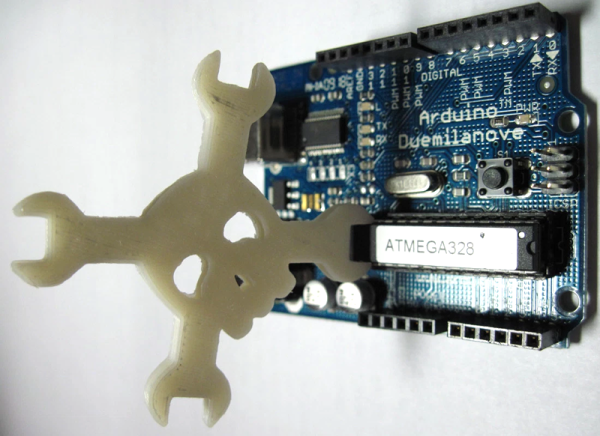
It is easy to forget, but the Arduino does use C++. Typically, the C++ part is in the libraries and the framework and most people just tend to code their main programs using a C-style just using the library objects like C-language extensions. [Fredllll] recently created a template library to speed up Arduino I/O and he shared it on GitHub.

If you’ve ever done anything serious with the Arduino, you probably know that while digitalWrite is handy, it does a lot of work behind the scenes to make sure the pin is setup and this adds overhead to every call. [Fredllll’s] template versions can switch a pin’s state in two cycles. You can cut that in half if you don’t mind bothering the state of other pins on the same port.

Continue reading “Templates Speed Up Arduino I/O”

History Of Git

Git is one of those tools that is so simple to use, that you often don’t learn a lot of nuance to it. You wind up cloning a repository from the Internet and that’s about it. If you make changes, maybe you track them and if you are really polite you might create a pull request to give back to the project. But there’s a lot more you can do. For example, did you know that Git can track collaborative Word documents? Or manage your startup files across multiple Linux boxes?

Git belongs to a family of software products that do revision (or version) control. The idea is that you can develop software (for example) and keep track of each revision. Good systems have provisions for allowing multiple people to work on a project at one time. There is also usually some way to split a project into different parts. For example, you might split off to develop a version of the product for a different market or to try an experimental feature without breaking the normal development. In some cases, you’ll eventually bring that split back into the main line.

Although in the next installment, I’ll give you some odd uses for Git you might find useful, this post is mostly the story of how Git came to be. Open source development is known for flame wars and there’s at least a few in this tale. And in true hacker fashion, the hero of the story decides he doesn’t like the tools he’s using so… well, what would you do?

Continue reading “History Of Git”

Monoprice Select Mini Gets Smooth

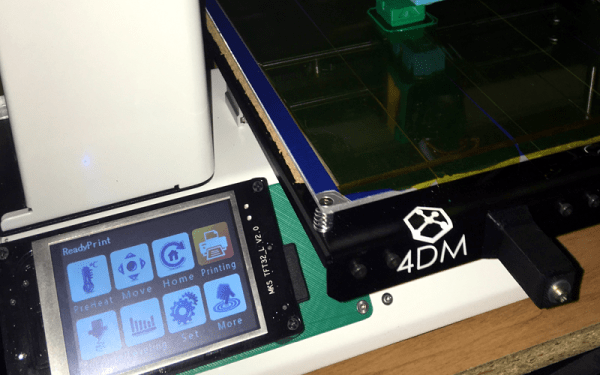
We’ve had a love affair with the Monoprice Select Mini since it came out. The cheap printer has its flaws, though. One of them is that the controller is a bit opaque. On the one hand, it is impressive that it is a 32-bit board with an LCD. On the other hand, we have no way to modify it easily other than loading the ready-built binaries. Want to add bed leveling? Multiple fans? A second extruder and mixing head? Good luck, since the board doesn’t support any of those things. [mfink70] decided the controller had to go, so he upgraded his Mini with a Smoothie board.

On the plus side, the Smoothie board is also a 32-bit board with plenty of power and expansion capability. On the downside, it costs about half as much as the printer does. Just replacing the board was only part of the battle. [mfink70] had to worry about the steppers, the end stops, and a few other odds and ends.

Continue reading “Monoprice Select Mini Gets Smooth”

Learn Advanced PCB Design For $200–Worth It?

[Helentronica] has been using Altium Designer to lay out PC boards since he was a student. Now as a freelancer, he felt like he didn’t quite know all that he wanted to know. Keep in mind he’d done multilayer boards with BGAs and LVDS routing, so he was no neophyte. He decided to spend about $200 on an advanced course from Fedevel Academy. In this day where everything is free on the Internet, is it worth paying $200 to watch some videos?

[Helentronica] probably weighed the same question. However, he was interested in the course project which is an open-source computer module with an i.MX6 processor, 1 GB of DDR3 SDRAM and lots of expansion options. In fact, the ad copy that sold him was:

You will be practicing on a real high-speed board with 1.2GHz CPU and DDR3, PCIE, SATA, HDMI, LVDS, 1Gb Ethernet and more

He completed the course. Was it worth it? We won’t spoil the story, but you should check out his post and find out. Even if you don’t want to drop $200 or you don’t use Altium, you will probably pick up some tips on PC board layout.

Continue reading “Learn Advanced PCB Design For $200–Worth It?”

Reverse Engineering Space Invaders Sound Chip

Around here, a new blog post from [Ken Shirriff] is almost as exciting as a new Star Trek movie. This time, [Ken] tears apart a 76477 sound effects chip. This chip was state-of-the-art in 1978 and used in Space Invaders, along with plenty of other pinball machines and games.

[Ken] started out with a die photo from [Sean Riddle] and mapped its functions. Unlike a modern sound chip, this one created sounds based on networks of attached resistors and capacitors. Even if you aren’t interested in the chip, per se, [Ken] explains how the die implements active and passive devices, along with some key analog design principles like current mirrors (although we are pretty sure he got his right and his left mixed up, or maybe it was a very subtle mirror joke).

Before electronics magazines were full of computer projects, they were full of music synthesis projects and the 76477 is like a crude synthesizer on a chip. It has voltage controlled oscillators (VCOs),  and generates envelopes with specific attack and decay times to create the sounds of interest.

This reminded us a little of the sounds from the more advanced MOS6581. [Ken] has looked inside a lot of ICs, including at the 2016 Hackaday SuperConference.

Learn By Fixing: Another Verilog CPU

Because I often work with students, I’m always on the look-out for a simple CPU, preferably in Verilog, in the Goldilocks zone. That is, not too easy and not too hard. I had high hopes for this 16-bit RISC processor presented by [fpga4student], but without some extra work, it probably isn’t usable for its intended purpose.

The CPU itself is pretty simple and fits on a fairly long web page. However, the details about it are a bit sparse. This isn’t always a bad thing. You can offer students too much help. Then again, you can also offer too little. However, what was worse is one of the modules needed to get it to work was missing! You might argue it was an exercise left to the reader, but it probably should have been pointed out that way.

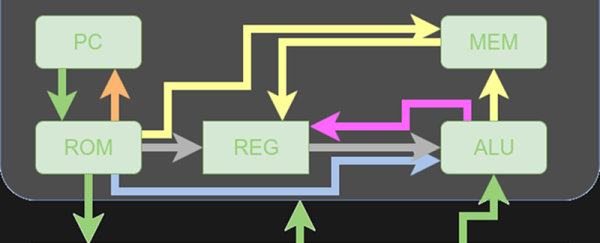
At first, I was ready to delete the bookmark and move on. Then I decided that the process of fixing this design and doing a little analysis on it might actually be more instructive than just studying a fully working design. So I decided to share my fix with you and look inside the architecture a bit more. On top of that, I’ll show you how to get the thing to run in an online simulator so you can experiment with no software installation. Of course, if you are comfortable with a Verilog toolchain (like the ones from Xilinx or Altera, or even free ones like Icarus or CVer) you should have no problem making that work, either. This time I’ll focus on how the CPU works and next time I’ll show you how to simulate it with some free tools. Continue reading “Learn By Fixing: Another Verilog CPU”