Using LTSpice To Measure Total Harmonic Distortion

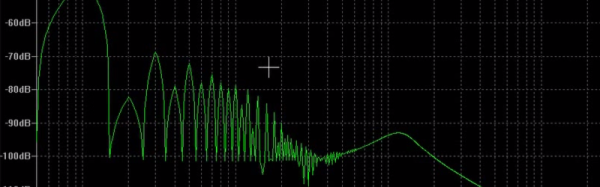
Audiophiles spend a lot of time and effort worrying about audio specs like Total Harmonic Distortion (THD). Makes sense, because THD affects the quality of audio reproduction. However, THD can also affect interference from radio signals and even losses in power transfer systems. A simplified definition is the THD is the ratio of the sum of the power of all harmonic frequencies to the power of the fundamental frequency.

If a circuit produced a perfect sine wave, there would be no harmonics. There are many ways to measure THD in practice, but [Michael Jackson] has an interesting video showing how he easily visualizes THD using LTSpice. Assuming you already have the system in question in LTSpice (or you could use another simulation tool, if you prefer) it is fairly straightforward.

Continue reading “Using LTSpice To Measure Total Harmonic Distortion”
Hams Talk Digital

Morse code qualifies as a digital mode, although organic brains are somewhat better at copying it than electronic ones. Ham radio operators that did “phone” (ham-talk for voice) started out with AM modulation. Sometime after World War II, there was widespread adoption of single side band or SSB. SSB takes up less bandwidth and is more reliable than AM modulation. On the digital side, hams turned to different and more sophisticated digital transmission types with computers pushing bandwidth down and reliability up. However, a recent trend has been to encode voice over ham radio–sort of VoIP with radio instead of Ethernet–using an open source program called freedv.

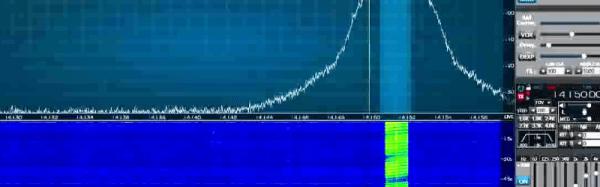
[AA6E] made a very informative video where he carries on a QSO (a conversation) with a distant station using freedv. What makes it interesting, is towards the end when the two stations switch to regular SSB. The difference is dramatic and really points out how even with less bandwidth (roughly 3 kHz for SSB vs 1.25 kHz), the digital mode is superior. The freedv software (available for Windows or Linux) compresses audio to 700-1600 bits per second and spreads it over 16 QPSK signals.

Continue reading “Hams Talk Digital”

Crystal Radio: It’s A Match!

A crystal radio is often a kid’s first introduction to building something electronic. [Billy Cheung] is a crystal radio builder who wants to “make crystal radios as easy to use as regular radios.” He’s built many sets, but his latest is one that not only fits in a matchbox, but uses the matchbox as a variable tuning inductor.

There’s no oatmeal box in this design and just a few components. The matchbox contains some ferrite rods and two different windings. By moving the inner part of the matchbox, you can tune different stations. Although the design calls for two fixed capacitors [Billy] found he had enough self resonance (presumably from stray capacitance) that omitting them didn’t hurt his reception of strong signals.

Continue reading “Crystal Radio: It’s A Match!”

How To Make A Hugo (Base)

A lot of hackers like science fiction. If you aren’t one of them, you might not know that the Hugo is a prestigious science fiction award handed out at the World Science Fiction Convention every year. The statue looks like a rocket ship, but every year the base the rocket ship rests on is different. Kinetic sculptor [gfish] realized the convention would be in Spokane (his hometown and near his current residence) and decided to enter the competition to create the bases. He won, so the 2015 Hugos all have [gfish’s] bases on them and it’s pretty neat that he’s shared the process he used to make them.

Continue reading “How To Make A Hugo (Base)”

Orange Is The New ($15) Pi

When the Raspberry Pi came on the scene it was hard to imagine that you could get a fairly complete Linux system for such a low price. The Pi has gotten bigger, of course, but there are still a few things you miss when you try to put one into a project. Wifi, comes to mind, for example. The first thing you usually do is plug a Wifi dongle in, consuming one of the two USB ports.

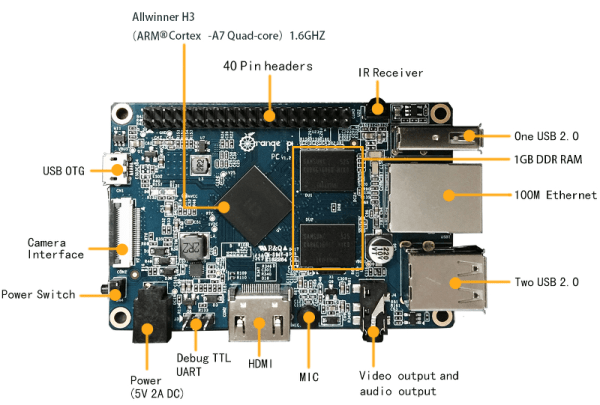
The Orange Pi is a direct competitor and has a few variants. Originally, the board cost about $30 but sports WiFi, a 1.6 GHz processor, 8 GB of flash, and a SATA interface. There’s now a reduced version of the board for about $15 that deletes the flash and SATA along with the WiFi and one of the original’s 4 USB ports. Still, the Raspberry Pi doesn’t have built-in flash. And the $15 Orange Pi PC has the things you’d expect on a Pi (HDMI and Ethernet) along with other extras like an IR receiver and an on-board microphone. Not bad for $15 considering it has a quad-core processor, a GPU and 1GB of RAM. Continue reading “Orange Is The New ($15) Pi”

Better TV Via Hacking

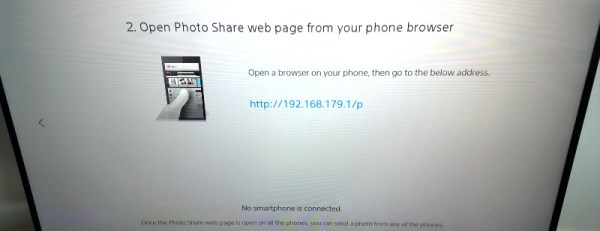
Smart TVs are just dumb TVs with a computer and a network connection, right? In a variation of rule 34, if it has a computer in it, someone will hack it. When [smarttvhacker] bought a Sony 48 inch smart TV, he noticed all the software licenses listed in the manual and realized that was a big leg up into hacking the TV.

We don’t have a comparable Sony model, but [smarttvhacker’s] post is a veritable travel log of his journey from TV viewer to TV ruler. By analyzing everything from network port scans to a dump of a firmware upgrade, he wound up being able to install a telnet server.

Continue reading “Better TV Via Hacking”

Learn 3D Modeling In Your Browser

If you have a 3D printer, it is a good bet you’ve at least seen or heard of Tinkercad. There’s pros and cons to doing your design in a Web browser, but Tinkercad is very easy to use and great for making simple objects. However, there are other 3D object designers you can use in your browser, too. Tinkercad is just the one that everyone seems to know about.

I won’t talk much about Tinkercad, but if you haven’t tried it, it is well worth a look. It has a simple system of drawing things and holes. When you merge holes with things you can make lots of shapes. The alignment tools are good, and since Autodesk acquired them (part of its 123d app suite), it isn’t likely they will go under any time soon (which, as you may remember, almost happened).

If you are designing some great new secret invention you may shy away from cloud-based design programs. But if you are printing out key chains with your coworker’s cat’s name on it, do you really care? Most of these cloud-based programs will work from any computer so you can quickly do a design in a coffee shop and then go home and print it.

Continue reading “Learn 3D Modeling In Your Browser”