This week Jonathan and Ben chat with Jason Shepherd about Ocre and Atym.io! That’s the lightweight WebAssembly VM that lets you run the same containers on Linux and a host of embedded platforms, on top of the Zephyr embedded OS. What was the spark that led to this project’s creation, what does Atym.io bring to the equation, and what are people actually doing with it? Watch to find out!
In the global game of nuclear brinksmanship, secrets are the coin of the realm. This was especially true during the Cold War, when each side fielded armies of spies to ferret out what the other guy was up to, what their capabilities were, and how they planned to put them into action should the time come. Vast amounts of blood and treasure were expended, and as distasteful as the whole thing may be, at least it kept armageddon at bay.
But secrets sometimes work at cross-purposes to one’s goals, especially when one of those goals is deterrence. The whole idea behind mutually assured destruction, or MAD, was the certain knowledge that swift retaliation would follow any attempt at a nuclear first strike. That meant each side had to have confidence in the deadliness of the other’s capabilities, not only in terms of their warheads and their delivery platforms, but also in the systems that controlled and directed their use. One tiny gap in the systems used to transmit launch orders could spell the difference between atomic annihilation and at least the semblance of peace.
During the height of the Cold War, the aptly named Survivable Low-Frequency Communication System was a key part of the United States’ nuclear deterrence. Along with GWEN, HFGCS, and ERCS, SLFCS was part of the alphabet soup of radio systems designed to make sure the bombs got dropped, one way or another.
It is well known that pictographic languages that use Hanzi, like Mandarin, are difficult to work with for computer input and output devices. After all, each character is a tiny picture that represents an entire word, not just a sound. But did you ever wonder how China used telegraphy? We’ll admit, we had not thought about that until we ran into [Julesy]’s video on the subject that you can watch below.
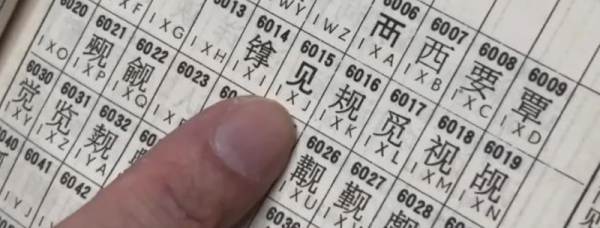
There are about 50,000 symbols, so having a bunch of dots and dashes wasn’t really practical. Even if you designed it, who could learn it? Turns out, like most languages, you only need about 10,000 words to communicate. A telegraph company in Denmark hired an astronomer who knew some Chinese and tasked him with developing the code. In a straightforward way, he decided to encode each word from a dictionary of up to 10,000 with a unique four-digit number.
There are many applications out there that use more than one window, with every modern-day platform and GUI toolkit offering the means for said application to position each of its windows exactly where it wants, and to restore these exactly in the configuration and location where the user saved it for that particular session. All toolkits but one, that is, for the Wayland project keeps shooting down proposals. Most recently merge request #264 for the ext-zones protocol by [Matthias Klumpp] as it descended into a 600+ comments spree.
This follows on an attempt two years prior with MR#247, which was rejected despite laying out sound reasons why the session protocol of Wayland does not cover many situations. In the breakdown video of the new ext-zones protocol discussion by [Brodie Robertson] the sheer absurdity of this whole situation becomes apparent, especially since KDE and others are already working around the Wayland project with their own extensions such as via KWin, which is being used commercially in e.g. the automotive world.
In a January 2024 blog post [Matthias] lays out many of his reasonings and views regarding the topic, with a focus on Linux desktop application usage from a scientific application perspective. When porting a Windows-, X11- or MacOS application to Wayland runs into compatibility issues that may necessitate a complete rewrite or dropping of features, the developer is more likely to stick to X11, to not port to Linux at all, or to use what eventually will amount to Wayland forks that patch around these missing API features.
Meanwhile X11 is definitely getting very long in the tooth, yet without it being a clean drop-in replacement it leaves many developers and end-users less than impressed. Perhaps the Wayland project should focus more on the needs of developers and end-users, and less about what it deems to be the One True Way?
This is very much a das blinkenlights kind of project. The goal is to get a 7-segment display to count from 0 to 9, and that’s it. [Gerry] has a 74LS193 Up/Down Binary Counter, a 74LS42 BCD to Decimal Decoder, and some 74LS00 NAND gates, but he “doesn’t have” an 74LS48 to drive the 7-segment display so he emulates one with an old Altera CPLD model EPM7064SLC44 which dates back to the late nineties. A CPLD is a Complex Programmable Logic Device which is a kind of precursor to FPGA technology.
Back in the innocent days of Windows 98 SE, I nearly switched to Linux on account of how satisfied I was with my Windows experience. This started with the Year of the Linux Desktop in 1999 that started with me purchasing a boxed copy of SuSE Linux and ended with me switching to Windows 2000. After this I continued tinkering with non-Windows OSes including QNX, BeOS, various BSDs, as well as Linux distributions that promised a ‘Windows-like’ desktop experience, such as Lindows.
Now that Windows 2000’s proud legacy has seen itself reduced to a rusting wreck resting on cinderblocks on Microsoft’s dying front lawn, the quiet discomfort that many Windows users have felt since Windows 7 was forcefully End-Of-Life-d has only increased. With it comes the uncomfortable notion that Windows as a viable desktop OS may be nearing its demise. Yet where to from here?
Although the recommendations from the peanut gallery seem to coalesce around Linux or Apple’s MacOS (formerly OS X), there are a few dissenting voices extolling the virtues of FreeBSD over both. There are definitely compelling reasons to pick FreeBSD over Linux, in addition to it being effectively MacOS’s cousin. Best of all is not having to deal with the Chaos Vortex that spawns whenever you dare to utter the question of ‘which Linux distro?’. Within the world of FreeBSD there is just FreeBSD, which makes for a remarkably coherent experience.
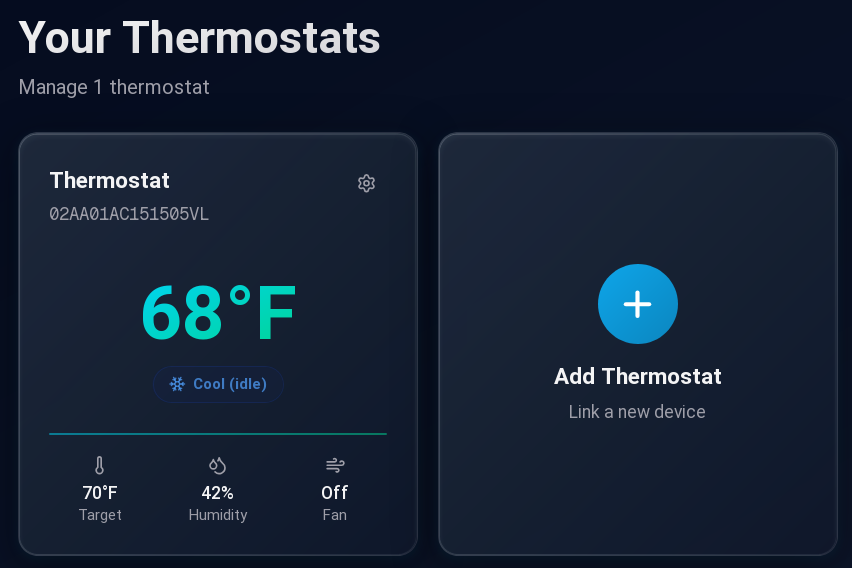
If you have a Nest thermostat of the first or second generation, you probably noticed it recently became dumber. Google decided to pull the plug on the servers that operate these devices, turning them into — well — ordinary thermostats. Lucky for us [codykociemba] has been keeping up with various exploits for hacking the thermostat, and he started the NoLongerEvil-Thermostat project.
If you want to smarten up your thermostat again, you’ll need a Linux computer or, with some extra work, a Mac. The thermostat has a DFU-enabled OMAP loader. To access it, you have to plug it into USB and then reboot it. There is a narrow window for the loader to grab it, so you have to be running the software before you reboot or you’ll miss it.
You can control your thermostat again!
After that, the flash is relatively fast, but the Nest will look dead for a brief time. Then the No Longer Evil logo will show, and you are in business. We wish the hack simply replaced the Google software with a local website, but it doesn’t. It redirects all the network traffic to a custom URL. Then you can control your thermostat from the nolongerevil.com website. So we don’t know what will happen if they decide to stop hosting the remote server that powers this. You can also run the code locally if you’ve got a server up.
If you get another year out of your trusty thermostat, that’s a year you wouldn’t have had otherwise. We do worry a bit about putting an odd device on your network. In theory, the project is open source, but all the important bits are in a binary U-Boot image file, so it would take some work to validate it. To get you started, the command to dump the content is probably: dumpimage -T kernel -p 0 -o kernel uImage. Or, you could watch it with Wireshark for a bit.
We were happy to get some more use out of our Nest.



![[Gerry] holding up a DIP IC](https://hackaday.com/wp-content/uploads/2025/11/Behind-The-Code-with-Gerry-Altera-CPLD-banner.jpg?w=600&h=450)