Next Week’s Bay Area Meetups

Next week we’ll be at a few awesome hardware meetups around the Bay Area, and we want you to head out and join us.

The first meetup will be the Silicon Valley Hardware Meetup at the Evil Mad Scientist shop in Sunnyvale. It’s going down Wednesday, December 6th, from 6:30 until 9:30. At least some of the Hackaday/Tindie/Supplyframe crew will be there, and the night will be filled with lightning talks, demos, and the cool hardware people you know and love.

Speakers for this meetup will include [Mitch Altman], hacker extraordinaire and owner of far, far too many TV remotes. He’ll be talking about hardware successes and failures in his own businesses. Also headlining the event will be [Clarissa Redwine] from Kickstarter. She’ll be talking about crowdfunding hardware, and the fact that making a thousand of something is a million times harder than making one of something.

The day after, on December 7th, we’re also going to be opening the doors at the San Francisco Supplyframe office to host the Hardware Developers Didactic Galactic. These Didactics are fun and popular, and you don’t need to go to the South Bay. Food and drink will be served, and there’s a sweet Rick and Morty mural in the alley across the street.

On deck for this month’s Didactic is [Tiffany Tseng], lead UX designer at Autodesk. Her work involves creating and implementing the design decisions that go into Eagle CAD. If you’re wondering why the icons changed a few years ago, she is not the person to talk to; that happened before the Autodesk mothership bought Eagle. If you’re wondering how the awesome push and shove routing actually works, [Tiffany] is the person to talk to.

Also at the Didactic will be [Asaad Kaadan]. He’s a robotics engineer working on cinematic tools for his day job and is currently exploring a very, very cool modular electronics project called Hexabitz. He’ll be talking about Hexabitz and designing for modular electronics.

Refinishing A Vintage KitchenAid Mixer

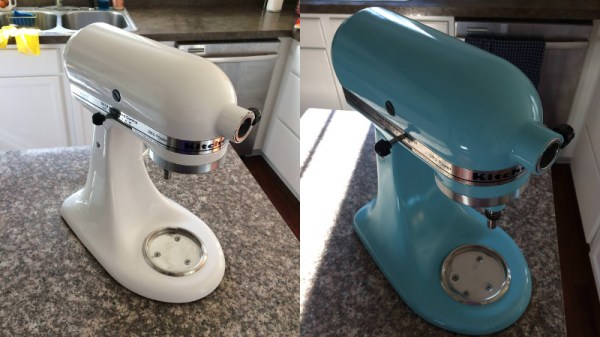
If you know anyone who is serious about baking, there’s a good chance you’ve seen one of these classic KitchenAid mixers. Built to last, they are often handed down generation to generation (or at least, when a newer model comes out), which is how [Kaitlin Flannery] received hers. While it didn’t look too bad considering its long life and the fact it’s been through a motor replacement already, she decided to spruce it up a bit by stripping it down and repainting the whole machine.

Sanding between coats of paint.

These KitchenAid mixers are solidly built and look highly serviceable, it’s refreshing to see a teardown that doesn’t involve any finicky plastic clips or glue. A standard philips screwdriver gets you inside the case, and a couple more screws allow the trim pieces to be removed.

Most of the work [Kaitlin] does is not completely unlike what you might have to do if you wanted to respray the fender of your car. You take off as much extra hardware as your patience allows, put painters tape over everything you want to keep over-spray off of, and then go to town.

To get the smooth metallic finish that you’d expect on a kitchen appliance, [Kaitlin] sands with 220 paper between the coats of hardware store Rust-Oleum. Generally we’d advise switching over to wet sanding at a higher grit once a few coats of paint have been laid down, but we can’t argue with the final results [Kailtin] got. The last coat is followed up with a clear enamel, which will help protect the finish from scratches; very important for a kitchen appliance.

[Kaitlin] does mention that she mistakenly taped off a bit more than she should have, and there’s still some of the original color visible on the rear of the machine. But beyond that, the finish looks fantastic, and with the new motor installed it looks like this machine is going to stick around long enough to get handed down a second time at least.

Hackaday has regrettably made few inroads into the kitchen as of late, one might get the impression that there isn’t a whole lot of overlap between the workbench and the counter-top. If you’ve got something you’ve made or remade sitting in your kitchen as you read this, by all means let us know.

Life On Contract: How Much Do I Charge?

If you’re comfortable with the technical side of becoming a consultant or contractor but are unsure what to charge for your services, you’re not alone. “How much do I charge?” is a tough question, made even tougher by the fact that discussing money can be awkward, and at times virtually taboo.

As a result it’s not uncommon for the issue to get put off because it’s outside one’s comfort zone. Technical people in particular tend to suffer from an “if you build it, they will come” mentality; we get the technical side of things all figured out and just sort of assume that the rest — customers, money, and so forth — will fall into place afterward. If you’re lucky, it will! But it’s better to do some planning.

The short and simple answer of how much to charge is a mix of “it depends” and “whatever the market bears” but of course, that’s incredibly unhelpful all by itself. It’s time to make the whole process of getting started a bit less opaque.

A stubborn determination to solve my own problems has given me plenty of opportunity to make mistakes and commit inefficiencies over the years; I’ve ended up with a process that works for me, but I also happen to think it is fairly generally applicable. Hopefully, sharing the lessons I’ve learned will help make your own process of figuring out what to charge easier, or at least make the inevitable blunders less costly.

Continue reading “Life On Contract: How Much Do I Charge?”

Classic Furby Plus Alexa Equals… Furlexa

[Zach Levine] wrote in to share a project just completed: a classic Furby packing a Raspberry Pi running Alexa: he calls it Furlexa.

The original Furby product wowed consumers of the 90s. In addition to animatronic movements, it also packed simulated voice learning technology that seemed to allow the Furby to learn to speak. It wasn’t like anything else on the market, and even got the toy banned from NSA’s facilities in case it could spy on them. Elegantly, the robot uses only one motor to move all of its parts, using a variety of plastic gears, levers, and cams to control all of the robot’s body parts and to make it dance.

Over the past twenty years the Furby has earned the reputation as one of the most hackable toys ever — despite its mystery microcontroller, which was sealed in plastic to keep the manufacturer’s IP secret. [Zach] replaced the control board with a Pi Zero. He also replaced the crappy mic and pizeo speaker that came with toy with a Pimoroni Speaker pHat and a better mic.

While classic Furbys have a reputation for hackability, the new ones aren’t immune: this Infiltrating Furby is based on a recent model of the toy. Continue reading “Classic Furby Plus Alexa Equals… Furlexa”

Rubies Are A 3D Printer’s Best Friend

Watching a 3D printer work always reminds us of watching a baker decorate a cake. Gooey icing squeezes out of a nozzle and makes interesting shapes and designs. While hot plastic doesn’t taste as good as icing, it does flow easily through the printer’s nozzle. Well… normal plastic, anyway. These days, advanced 3D printers are using filament with wood, metal, carbon fiber, and other additives. These can provide impressive results, but the bits of hard material in them tend to wear down metallic nozzles. If this is your problem and you are tired of replacing nozzles, you should check out the Olsson Ruby Nozzle.

Ruby, in this case, isn’t just a name. The nozzle has a small bit of ruby with a 0.4mm hole in the center — or they have a few other sizes. We suppose diamond would even be better, but ruby is so much more affordable. We haven’t tried these ourselves, but [3D Printing Nerd] has an interesting video review you can see below.

Continue reading “Rubies Are A 3D Printer’s Best Friend”

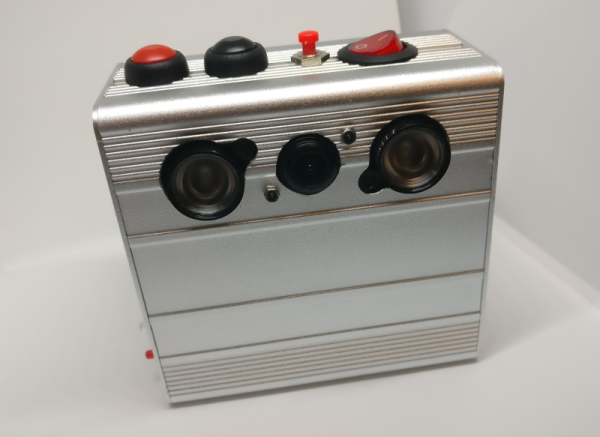
Rage Against The Dying Of The Light With A Raspi Night Vision Camera

One of the most interesting things about hacking is the difference between the vision we have at the beginning and the reality of we’ve built at the end. What began as a simple plan to build a night vision VR headset turned into a five-month adventure for [facelessloser] that culminated in this great-looking camera. He thought it would be easy, but almost every aspect presented some kind of challenge. The important thing is that he kept at it.

One of the major issues [facelessloser] encountered was power. He found that the Pi (Zero W), the screen, and the IR LEDs draw between 1.5 and 2A altogether. He was able to solve this one by using the charging board from a 2A power bank paired with a 1200mAh Li-Po built for the high draw required by vaping. If not for space issues, he might have used a 18650 or two.

Another challenge he faced was storing the video and images. He’d considered setting up the Pi as an access point to view them from a phone browser, but ultimately extended a USB port with an OTG cable to use flash drives. With a bit of Python he can watch for the drive to mount and then write to it. If the flash drive suddenly disappears, the Pi starts saving to the SD card.

There are two videos after the break, a walk through and a night vision demo. You’ll see a bit of a lag happening in the demo video—that’s because [facelessloser] is running the feed through PyGame first. No matter what nightlife you want to peep, it might be nice to add automated zoom with a rangefinder or get a closer look with some PiNoculars.

Continue reading “Rage Against The Dying Of The Light With A Raspi Night Vision Camera”

Zigbee-Based Wireless Arduinos, Demystified

Hackday regular [Akiba] is working on a series of video tutorials guiding newbies into the world of the 802.15.4 wireless protocol stack — also known as ZigBee. So far, his tutorials include a “getting started with chibiArduino”, his own Arduino-based wireless library, as well as a more basic tutorial on how radio works.

[Akiba] already made a name for himself though a large number of wireless projects, including his Saboten sensor boards, which are ruggedized for long-term environmental monitoring. The Saboten boards use the same wireless stack as his Arduino-compatible wireless development boards, his Freakduino products. The latest version features an ATmega 1284P with 8x the RAM and 4x the flash of the older, 328P-based Freakduinos. It comes in both 900 MHz and 2.4 GHz and there’s also a special 900 Mhz “Long Range” variant. The boards include some great power-saving features, including switchable status LEDs and on-board battery regulation circuity allowing one to run a full year on two AA cells while in sleep mode. They also have a USB stick configuration that is great for Raspberry Pi projects and for running straight from the PC.

For more [Akiba] goodness, check out our colleague [Sophi]’s SuperCon interview with him as well as our coverage of his Puerto Rico lantern project.