12 Gauge Shotgun Bow: Real Or Fake?

It’s time once again for everyone’s favorite comments section game: Real or Fake? This week we’re looking into this 12 gauge shotgun bow. Why use arrows when you can fire shells? This gentleman has apparently removed the stock of a 12 gauge shotgun and positioned the barrel as if it were an arrow. When he releases the bowstring the gun fires.

Take a look a the quick clip after the break and let us know what you think. We’ve fired a 12 gauge and the kick is surprising. Although the sound matches in this video, we think he’s got arms of steel if he can control the weapon that well with one outstretched arm. But then again, perhaps our arms are just too wimpy from all that intricate surface mount soldering we do.

If you’ve missed out on this game in the past be sure to look back on the last couple features.

Continue reading “12 Gauge Shotgun Bow: Real Or Fake?”

Redbull’s New Creation Contest Comes To Your Workshop

We get bombarded with press releases daily. Our inbox overflows with brand new iPhone cases and cheap LED manufacturers in china. We generally have no interest in sharing obvious product advertisement with you. However, some people understand what we’re interested in. Redbull gets it. They’re embracing hackers and running contests that promote DIY/hacking. Last year, we saw some cool results from their contest.

So, we’re happy to announce that this year, they are doing it again! Only this time, the contest will come to the location of the entrants! If you qualify to be one of the final teams involved, they’ll set up to stream live from your home workshop/hackerspace for the contest. You might be thinking, “aren’t you just advertising for red bull?”, we feel that as long as they’re promoting hacking, they’re advertising for us!

You can catch the details after the break.

Continue reading “Redbull’s New Creation Contest Comes To Your Workshop”

Adding Wireless To The Raspberry Pi

For those of us who haven’t received their Raspberry Pis yet, it may come as a bit of a shock to realize the RasPi doesn’t have an on board WiFi adapter. While the Model B RasPi has an RJ45 Ethernet plug, but the Model A must rely on USB-bound networking dongles. [Mike] over at Mitch Tech put up a great guide to using a Realtek WiFi dongle with his Raspberry Pi.

Stock, the standard Debian install recommended by the folks at Raspberry Pi has the drivers for the Realtek WiFi adapter, but no firmware. [Mike] goes over how to get the firmware for this series of WiFi adapters to keep the kernel from complaining. Interestingly, [Mike]’s instructions also work for a slew of Realtek-based wireless dongles, so the installation instructions should work for a bunch of adapters available from DealExtreme or eBay.

[Mike] also has a guide for installing Quake 3 on a RasPi. Combine these two builds and you’ve got the perfect setup for a Raspberry Pi LAN party. Anyone want to host?

Putting An Atari POKEY In Your Pocket

The Atari POKEY served as the main I/O chip on the venerable Atari 400/800 and XL/XE 8-bit computers. While a chip designed to get voltages from game paddles and scanning a matrix of keyboard switches wouldn’t normally be remembered 30 years later, the POKEY had another function: generating very, very distinctive music and sound effects for those old Atari games. [Markus Gritsch] wanted a portable version of the POKEY, so he emulated one on a modern microcontroller. Now he’s able to take those old Atari chiptunes where ever he goes.

The build uses the Another Slight Atari Player by emulating a 6502 and POKEY chip inside [Markus]’ PIC32MX-based microcontroller. There’s not much physical hardware [Markus] had to deal with – the board is built on a QFP proto board [Markus] picked up with a few buttons and a jack added for some simple I/O.

This isn’t [Markus]’s first attempt at portabalizing chiptunes – last year, we saw a truly awesome portable SID player that used the same PIC32 microcontroller and an emulated 6502. Between the Atari SAP Music Archive and the High Voltage SID Collection, [Markus] has more than enough chiptunes for days of listening pleasure.

Nook Touch Becomes A Desktop Computer

It looks like [Renate] has been pounding out hack after hack on her Nook touch. It stands on its own now thanks to a tripod bracket hack which is the most recent work she’s done. But there are bunch of other modifications, all of which are linked after the break.

We believe that this is meant for displaying lyrics as she sings and plays along. To that end there’s a foot pedal attachment that lets her control the device. It connects to the Nook via a USB hub that allows her to interface multiple devices at once. This in itself is also a hack, as host mode isn’t an out-of-the-box feature for the device. In order to avoid having to disconnect everything in order to top off the battery, she also manged to get the thing to charge from the USB hub. In fact, with all this in one package she’s basically got herself a desktop computer.

Continue reading “Nook Touch Becomes A Desktop Computer”

Penny Auction Hacking; Put On Your Statistician’s Hat

Penny auctions are where you must pay a fee each time you bid. Certainly this alters the behavior of the bidders, but there doesn’t seem to be a lot of info about exactly how. In preparation for an analytics degree, [Jay] decided to study penny auctions and see if he can win a contest based on his findings. Now he’s not necessarily looking to make a living by gaming the auction system. But we were interested to see how he went about getting information, and what he has to say about the results.

Since there really isn’t a large body of data available, he scraped it himself. You’ll want to page through his posts on the topic, but basically he’s using Python on a fast machine. This is made quite a bit easier through the use of Selenium RC, but it also means he’s got a lot of instances of Firefox running to track multiple auctions. Scraped data is stored in CSV files, and posted to his front page daily.

From what he’s captured so far [Jay] suggests that time of day, type of auction, and several other factors dictate when you should bid to attain the best deals.

Embedded Linux Meets Arduino With The Rascal Micro

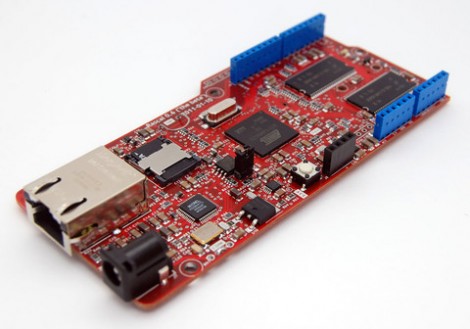
Behold the Rascal Micro. It’s running embedded Linux and has a dual-row of pin headers which probably seem pretty familiar. The idea here is to bring Arduino hardware (ie: shields) to a party with a powerful web server.

The image above is the beta version of the hardware. What’s being shown off in a recent Engadget demo is a version that slides two USB ports in between the barrel jack and the NIC. This makes it easy to jump over to wireless with the use of a USB dongle, or you can figure out what other peripherals you want to include in your project.

The novelty here is that the web server included a built-in editor. So not only can it serve you a webpage to control hardware or display sensor status, but it will let you edit the interface without needing to reflash anything.

The price rings in somewhere around $100-150, and like the popular Raspberry Pi board, you can’t get your hands on it right now.