Facial Recognition Software Can Tell When You’re Frustrated With Xbox Live

Most of us have been faced with the anguish of being shot in the head repeatedly by 12-year-olds. There are also the times when we’re overjoyed by defeating the Mother Brain and making it out of the caverns of Zebes. If we wanted to scientifically quantify how happy, sad, or angry we are while playing video games, we wouldn’t know what to do. [Dale] came up with a very interesting way to gauge someone’s state of mind while either playing Xbox, or watching TV.

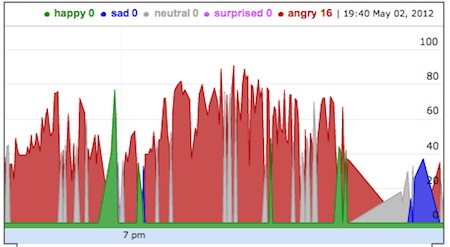
To get a measure of how happy or sad he is, [Dale] put a webcam underneath his TV and pointed it towards his couch. Every 15 seconds or so, the webcam snaps a picture and sends if off to the face.com API. After face.com sends a blob of JSON containing information about all the faces detected in the photo, a short Python script plots it on a graph.

[Dale] admits he’s not entirely scientific with this project; the low resolution of the webcam, coupled with images being captured every 15 seconds means he runs into the limitations of his hardware very quickly. Also, there’s the confound of [Dale] paying attention to something else in the room – like his kids – rather than the TV. Still, it’s an interesting use of hardware and software that would be loved by a market researcher or QA designer.

Giving An Old Atari Computer A Much Needed Upgrade

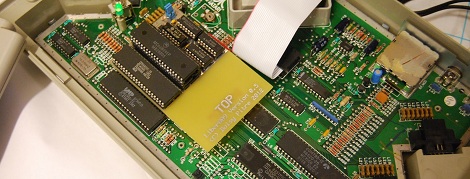
As a kid, [Boisy] cut his teeth on the TRS-80 Color Computer. It was a wonderful machine for its day, featuring a relatively powerful Motorola 6809 CPU. Although his CoCo was theoretically more powerful than its Commodore and Apple contemporaries, the graphics and sound capabilities of [Boisy]’s first love paled in comparison to his friends 6502-based machines. A little jealously and thirty years go a long way, because now [Boisy] is adding a 6809 microprocessor to the 6502-based machines Atari put out.

[Boisy]’s goal for his Liber809 project was simple: Put a 6809 CPU in an Atari XEGS and get NitrOS-9, the Unix-like OS for the TRS-80 CoCo running on his Frankenputer. After a few months of work, [Boisy] completed his goal and more so: the Liber809 also works on the Atari 1200XL.

To put [Boisy]’s work in perspective, it’s like he took a Macintosh from 1993 and made it run on an Intel 486. While that’s not a terribly accurate analogy, we hope our readers will understand the fortitude needed to make a computer run on a completely different processor.

After the break, you can check out a neat demo app written by [SLOR] from the AtariAge forums showcasing a 6809 running in a machine designed for a 6502. Awesome work for all involved

Continue reading “Giving An Old Atari Computer A Much Needed Upgrade” →

Board Games Over IP Means Telepresence Chess

Correspondence chess, or playing a game of chess via email or snail mail, is well-known in the chess community. [FunGowRightNow] thought he could bring correspondence chess into the 21st century, so he built two robotic chess boards that communicate over the Internet. The end result makes for an awesome senior project for school.

Instead of a simple monitor displaying the other player’s moves (and having to manually move both black and white pieces), the positions of all the pieces are controlled via a laptop an Arduino underneath each board. An electromagnet mounted on an xy frame moves one piece at a time. To detect the positions of the pieces, an 8×8 grid of reed switches open and close with magnets put in the base of each piece. The end result is a nearly seamless chess game that can be played by two people separated by hundreds of miles.

Right now, all we have are a few videos and the descriptions of the inner machinations of the chessbots. [FunGow] promised the Internet design specs after he turns this in as his senior project on April 10th. Until then, you can enjoy a few of the videos he’s posted after the break.

via reddit

Continue reading “Board Games Over IP Means Telepresence Chess” →

Auto-locking Pet Door Ensures That Your Outdoor Kitty Obeys Its Curfew

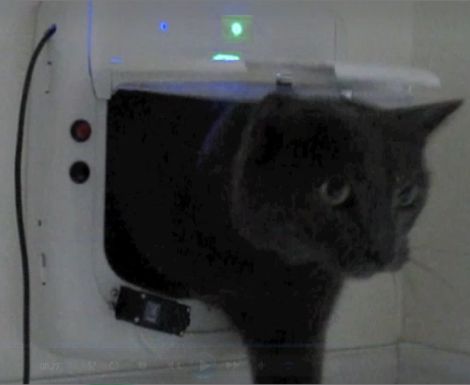
auto-locking-pet-door

If you’ve got a pet that roams freely in and out of your house, you may find yourself wanting to more closely regulate how they come and go. [tareker] was looking to keep his cat indoors at night when dangerous animals might be lurking in the neighborhood, but he didn’t want it to become a hassle.

He already had locking pet door on hand, which he hacked to regulate the egress and ingress of his cat automatically. He installed a pair of reed switches to determine if the door had been opened outwards (cat leaving) or inwards (cat returning), keeping track of the state using an Arduino Nano. A servo motor attached to the door’s frame locks the door whenever it detects the cat is safely inside after nightfall.

While he also added an RGB LED to reflect the status of the door, he’s considering connecting it to the Internet so that he can control and check the door from wherever he might be at the moment.

Closing In On Nixie Cuff Links

It’s not Nixie cuff links yet, but we’re seeing a lot of potential for a few very classy accoutrements with [thouton]’s Nixie tube necklace.

The build was inspired by this much clunkier necklace that found its way onto the MAKE blog. Unlike the previous necklace, [thouton] used a much smaller Mullard ZM1021 indicator bulb. Instead of the normal 0-9 digits in a Nixie, this tube displays only A V Ω + - % and ~, betraying its pedigree as part of the display from an ancient multimeter.

To power the bulb, [thouton] is using a single AA battery and a boost converter salvaged from a camera flash unit. All the circuitry is on a little piece of perfboard encased in a handsome aluminum tube. Power is delivered through two terminals with a bit of audio cable standing in as the chain of the necklace. We suppose this could be re-engineered to use a coin cell battery; although a coin cell doesn’t offer as many amp hours as a AA cell, [thouton] is confident the AA will last for a few days. A coin cell would be more than enough for a night on the town, though.

Rabiscoscopio – Oscilloscope Drawing Made Easy

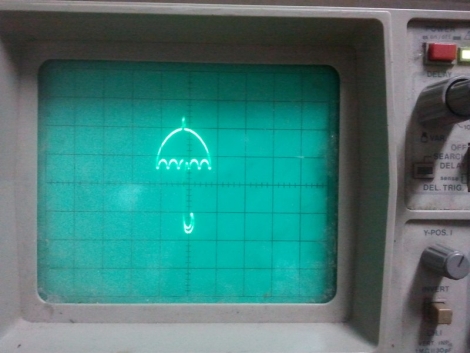
Rabiscoscopio

If you own an oscilloscope, sooner or later the urge to see something other than signals on the screen will strike. Some people ignore the urge and go about their normal business while others give in, spending hours carefully crafting images, games, and more. The process is time consuming and tricky as our own [Kevin Dady] discovered, but rewards come in the form of geek cred and are hard to pass up.

[Alex] wanted to draw on his oscilloscope, but decided that he would try something other than the microcontroller-based solutions we have seen in the past. He figured the easiest and most accessible way to draw on the scope was with sound, so he whipped up a small application he calls Rabiscoscopio to do most of the work for him.

He starts off by drawing an image using a single line, saving it as an SVG file. This image is converted into an audio file by Rabiscoscopio, which can then be fed directly into his oscilloscope from his PC. That’s all there is to it – it really doesn’t get much easier.

While you could claim that [Alex] is cheating his way through the oscilloscope drawing process, we think his application rocks – after all, hacking is about making your technology work for you rather than the other way around.

Give Rabiscoscopio a try and post the results here or in our Flickr stream – we’d love to see what you guys come up with.

In the meantime, check out the video below to see [Alex’s] attempt at replicating the Garoa Hackerspace logo on his scope.

Continue reading “Rabiscoscopio – Oscilloscope Drawing Made Easy” →

Recorder Controlled Snake Game Played On A Nokia 6110

Dig out an old cell phone, hit the dollar store for some plastic recorders, and build this sound controlled snake game for your next party. The project will be a snap for those comfortable working with microcontrollers, and a great learning experience if you’re looking to try your first Arduino project.

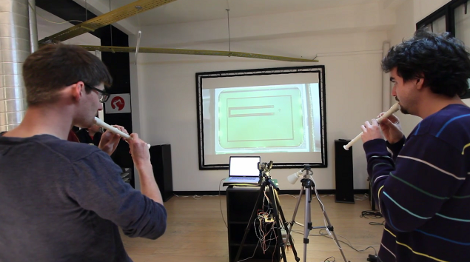
[László] and his friend call the project the Snake Charmer. As shown in the clip after the jump it uses music notes to direct the path of the solid line in the classic cellphone game of snake. But this isn’t just some PC-based rip-off. They’re playing on the actual cellphone. A camera points at the screen to project it for the enjoyment of spectators. The control scheme uses relays soldered to the pads of the four directional buttons. The pitches are being detected by a Max/MSP program, with the corresponding commands pushed to the Arduino via USB. Yep, it’s overkill but the point was to get this up and running quickly and with a minimum of work. We’d say they succeeded.

Actually, now that we think of it, this isn’t a two player game. Perhaps the recorder control concept needs to be applied to a more modern version of the game.

Continue reading “Recorder Controlled Snake Game Played On A Nokia 6110” →