Peltier Powered Sous-vide Rig Gets It Right Every Time

diy_sous_vide_refrigerator_cooker

It seems that sous-vide cooking is becoming increasingly popular lately. [Meseta] caught the sous-vide bug and wanted to try his hand at it, though he did not have enough money for a premade sous-vide cooker. After seeing a good handful of lackluster DIY sous-vide rigs online, he decided that he would design and build a sous-vide cooker of his own.

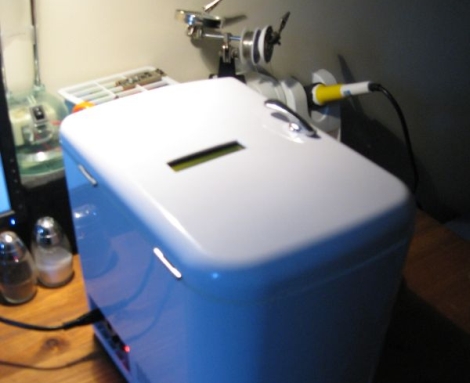
He already had a Forebrain microcontroller at his disposal to use as a PID controller, but what he really needed was a cooking vessel. Rather than use an old crock pot or similar device, he purchased a small personal refrigerator that could be used for cooling or heating. The unit ran off a Peltier cooler that could be switched between modes, making it quite easy for him to control.

In his blog, he discusses the modification from beginning to end, and even shows off the results of his cooking endeavors. He hasn’t posted code as of yet, but he says that he is more than happy to share it with anyone who might be interested in building their own sous-vide cooker.
How To Add Modular Tools To Your Soldering Platform

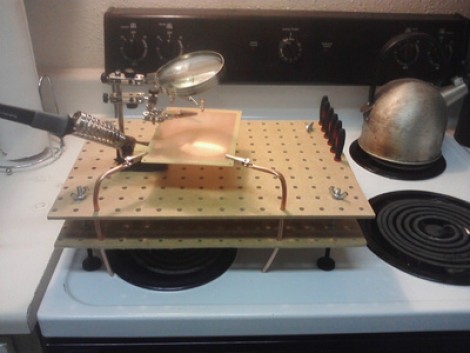
[Patenomics] has had some trouble finding a suitable place to work on projects in his tiny apartment. Lately he’s taken to using the stove top as a soldering platform and was looking for ways to protect the stove while adding functionality. He built this soldering platform from a couple chunks of pegboard and some hardware store parts. He’s in for under $15 and has a really functional platform that may be worth adding to your solder station.

The two pegboard pieces are held in place by threaded rod and some nuts. This hardware also lends itself to adjustable feet so that you can make the platform level and stable. The holes in the top and bottom sheets line up to receive and securely position some additional tools. Here you can see that bendable copper pipe keeps some alligator clips right where they’re needed, but future plans include adding lights, clamps, and lasers.

This makes a nice work platform to go along with your other portable electronic bench tools. But if you’ve really got the itch, you’ll eventually outgrow all of this and then it might be time to find yourself a hackerspace to join.

Come See What’s Cooking In The Arduino Kitchen

arduino_labs

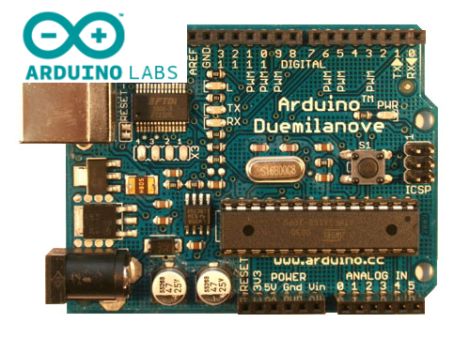
The crew that brought you the Arduino is always hard at work trying to bring the community closer together and to foster collaborative development. They recently rolled out a new feature on their site that is sure to be of interest to Arduino veterans and neophytes alike.

Arduino Labs is a platform which the team plans on using as an incubator of sorts, for projects that are underway, but not fully baked. Currently, they have highlighted two in-progress initiatives, including the Arduino Mega ADK, as well as a GSM/GPRS shield that the team has been developing in collaboration with Telefonica I+D.

As of right now, the site looks to be a one-way information outlet for the Arduino team to the community, but they stress that their aim is to create a more open development process within the Arduino project. While there is no official statement on the matter, we hope that the site will eventually allow members of the community to offer both their feedback and lend manpower to forthcoming projects.

[via Adafruit blog]

A 3D Printed Aerial Drone

Drones come in many shapes and sizes, but now they can also be 3d printed! To make these drones, the [Decode] group used a selective laser sintering process which is pretty interesting in itself. Once the printing process is done, these little planes are built with only five structural and aerodynamic components. Because of their simplicity, these drones can reportedly be assembled and ready to fly with no tools in only ten minutes!

This design was done by the [Engineering and Physical Sciences Research Council] at the University of Southampton in the UK by a group of students. Besides this particular plane, they concentrate their efforts on building autonomous drones under 20 Kilograms. Using a 3D sintering process with this design allowed them to make this plane how they wanted, regardless of the ease of machining the parts.

This group has several videos of their planes on their website to download, but check after the break for an embedded video of the [Newscientist] piece about their project. Continue reading “A 3D Printed Aerial Drone”

Model Rocketry From The Rocket’s Point Of View

model_rocketry_video

When someone writes in and says, “Hey, I strapped a camera to a rocket and took videos of it launching!” it’s really hard for us to not get suckered in. Try as we might, we just couldn’t resist taking a look at the videos [Vlad] recorded of his model rocketry “exploration”.

Inspired by our 4th of July post featuring POV videos of bottle rocket launches, he bought himself an 808 keychain camera and decided to try his hand at some high flying video. He strapped the camera to his 46” Estes rocket with a few pieces of scotch tape in an effort to keep weight down, and set off to his launch pad.

He used a Estes C6-5 engine for each launch, which he estimates took the rocket up to a height of 300 feet rather than the typical 500 feet, due to the added weight. While not particularly useful, the video is still awfully fun to watch, and perhaps it will inspire others to mount cameras on even larger, more powerful rockets.

We can only hope.

Continue reading to check out the videos [Vlad] shot, but be warned, the descent is vertigo-inducing.

Continue reading “Model Rocketry From The Rocket’s Point Of View”

Classic Game Cabinet Becomes A Drivable Car

[Garnet Hertz], a professor and “artist in residence” at UC Irvine, built a drivable Outrun arcade cabinet for an experiment in augmented reality.

The old fiberglass and wood cabinet was hacked up and the motors, wheels, and drive train from an electric golf cart were stuffed inside. The original steering wheel and pedals were used for the controls. Although the top speed of the in-game car is about 180 mph, that was brought down to a reasonable 13 miles per hour.

Continue reading “Classic Game Cabinet Becomes A Drivable Car”

Visualizing PCB Revisions Using A Gerber Viewer

gerber_schematic_highlighting

We all know that Eagle has its share of shortcomings. Instructables user [westfw] was particularly annoyed by the fact that while Eagle keeps copies of up to 10 revisions of your board, it cannot open those files without resorting to manually renaming each one. Even more frustrating to him is the fact that you can’t use Eagle to view two files simultaneously in order to compare layouts. This made hunting down changes quite tedious, so he started looking for a better way to do things.

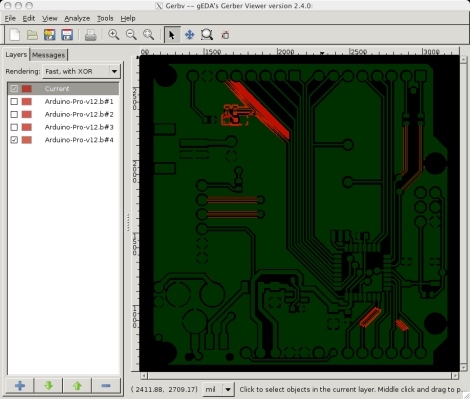
While using his favorite open-source gerber viewer gerbv, he noticed that the application let him load multiple copies of the same layer, XORing the PCBs’ colors together. Realizing that with some clever color selection, he could use gerbv to automatically highlight layout differences, he set off to automate the process.

The resulting script works on any flavor of *nix, and should play nice in Windows under cygwin as well. The script reads through Eagle backup files, renaming them and tweaking the colors so that when XORed, they show up as bright red areas in gerbv. It’s a simple yet handy tool to have on hand if you happen to do a lot of PCB design.